Results for

Extremely--I have real work to do
27%
Maybe talk about something else?
27%
Neutral
20%
Not very much
20%
Let's talk about nothing else
7%
15 votes

I contributed a guet post for @Mike Croucher - AI Agent Demystified – Building a Minimalist Agent in MATLAB
Basically, my use case is an coding agent built with MATLAB to code MALTAB, but you can actually roll your own agnet with MATLAB AI Agent SDK for more realistic use cases. Hopefully my post gives you a starting point for a fun exploration!

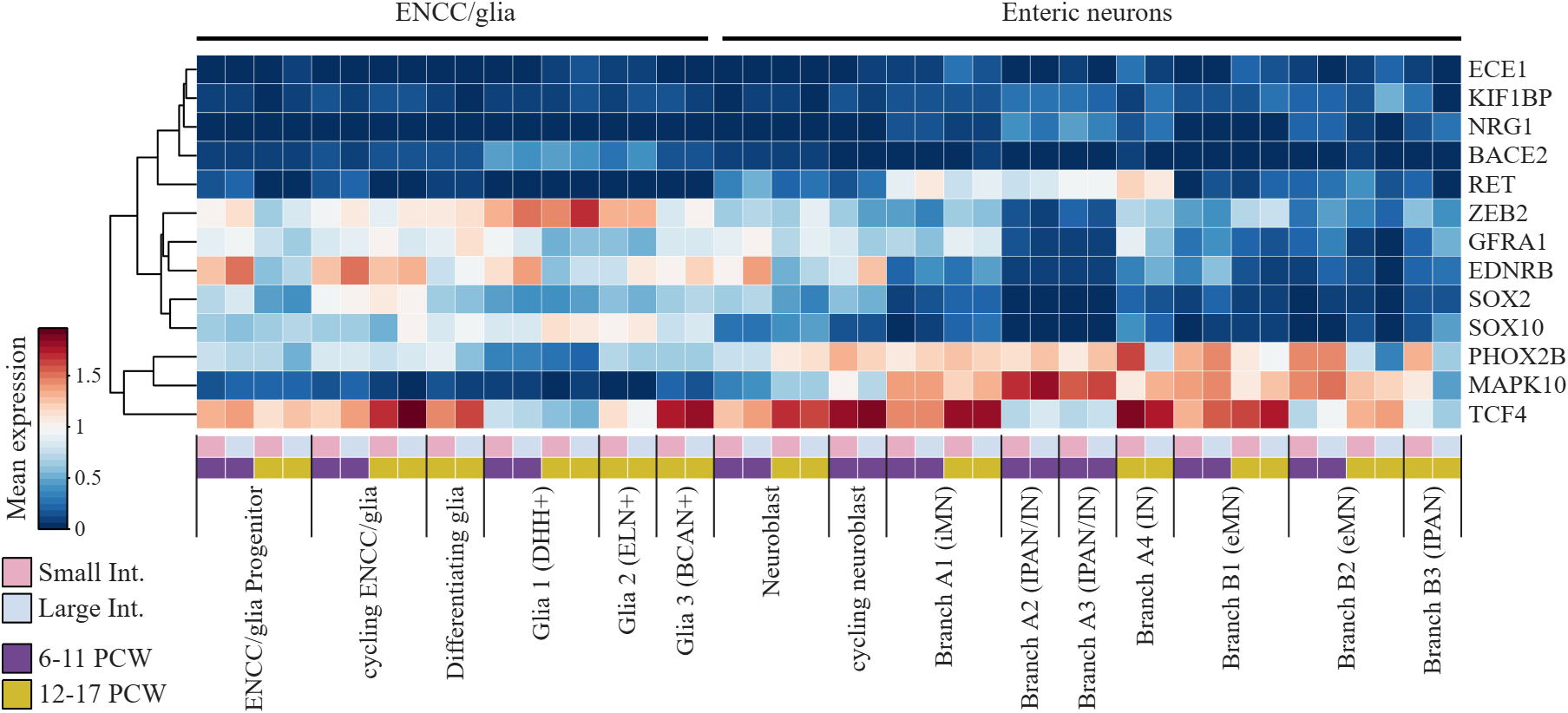
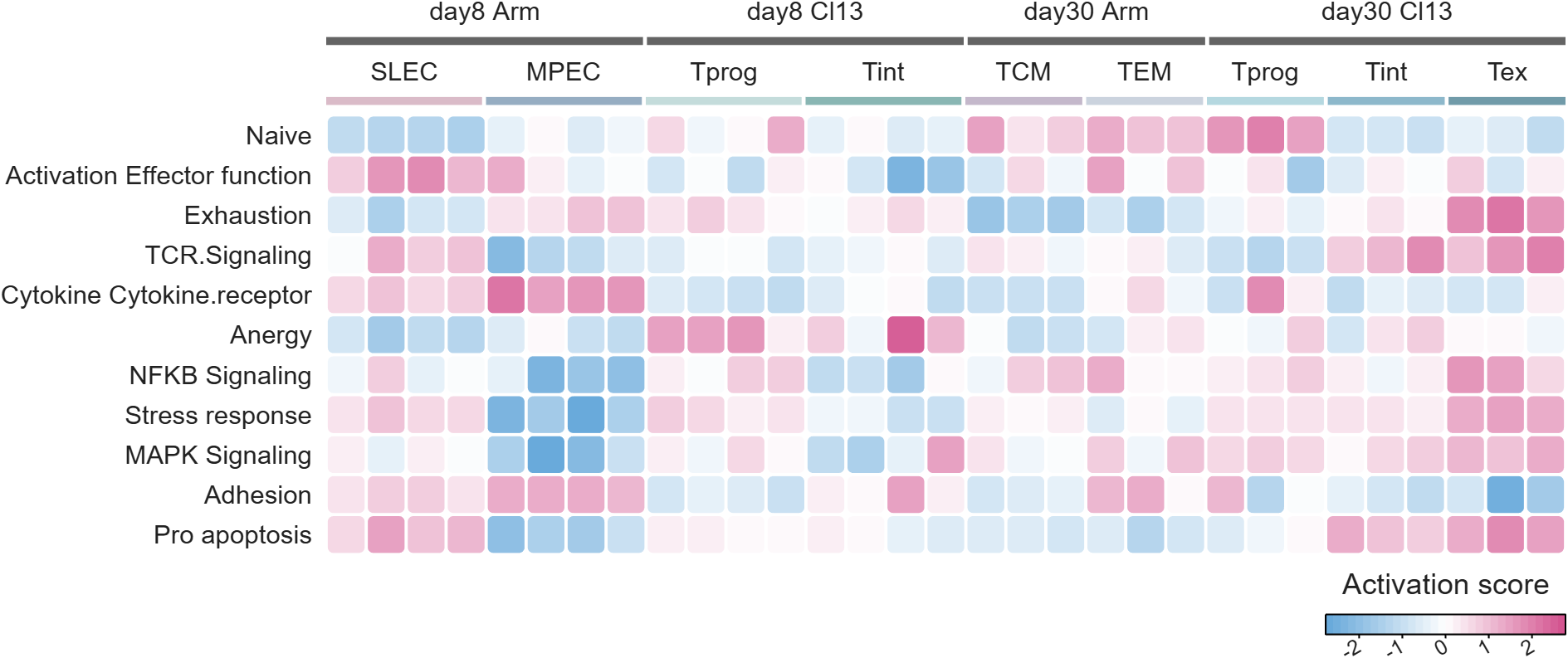
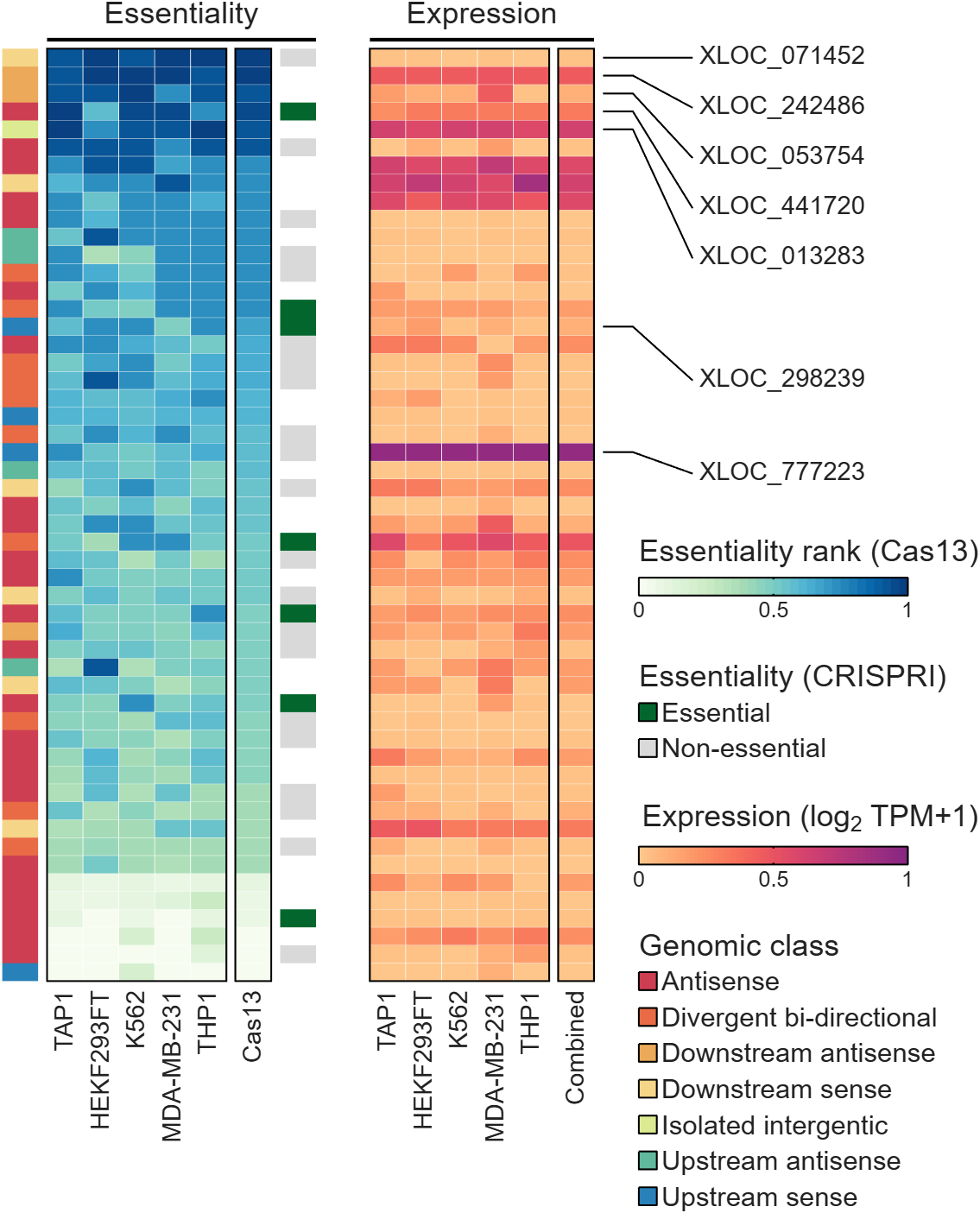
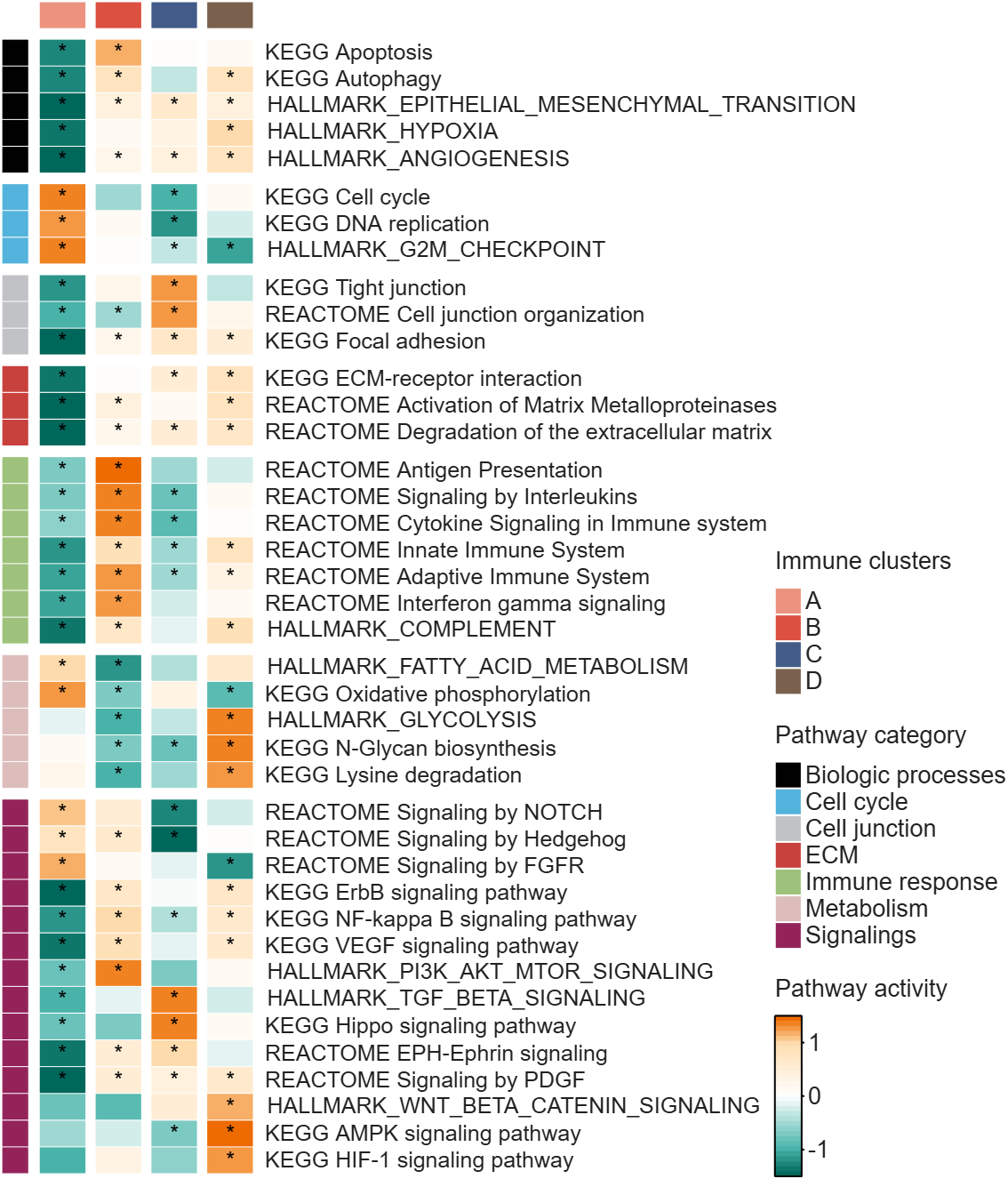
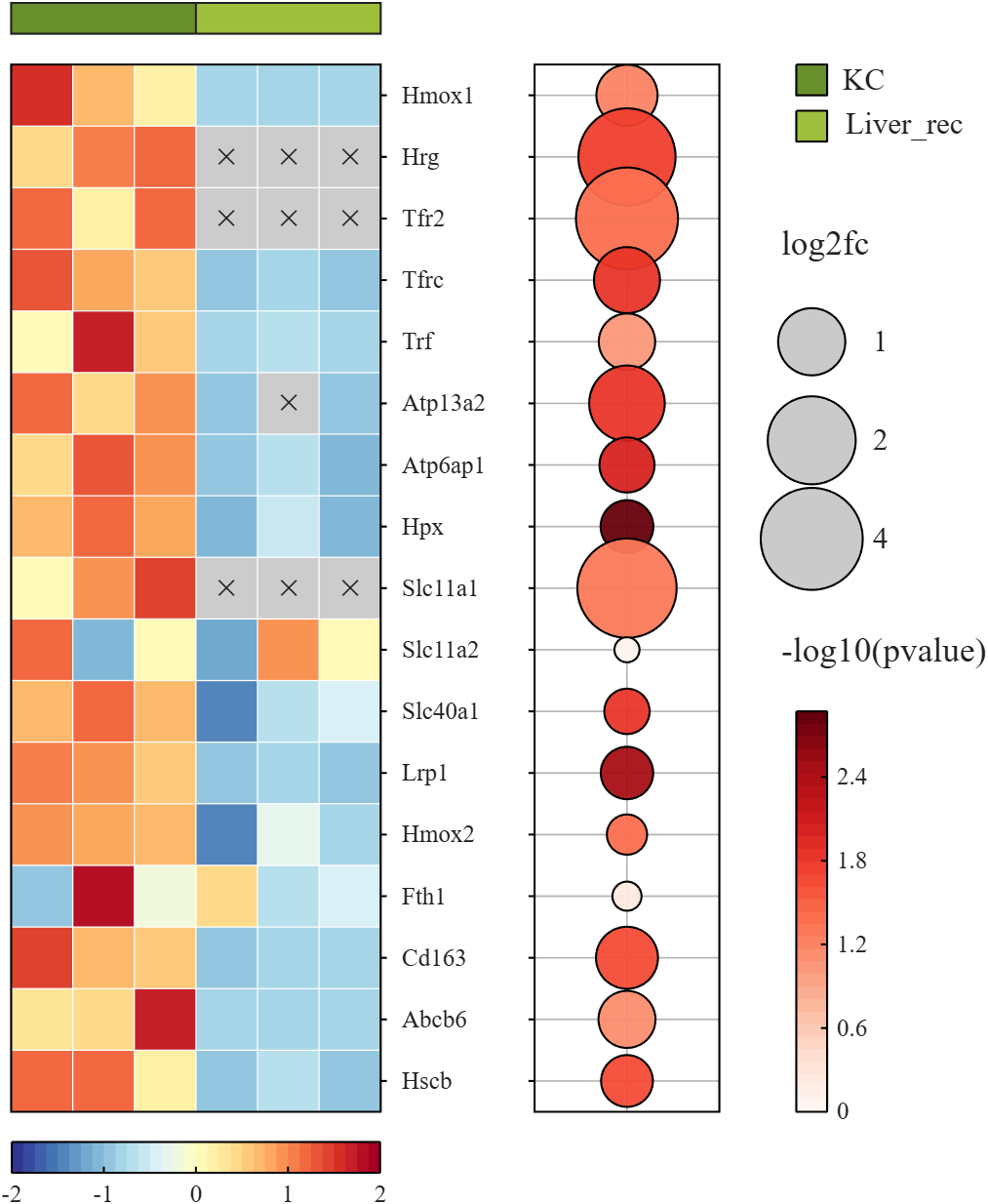
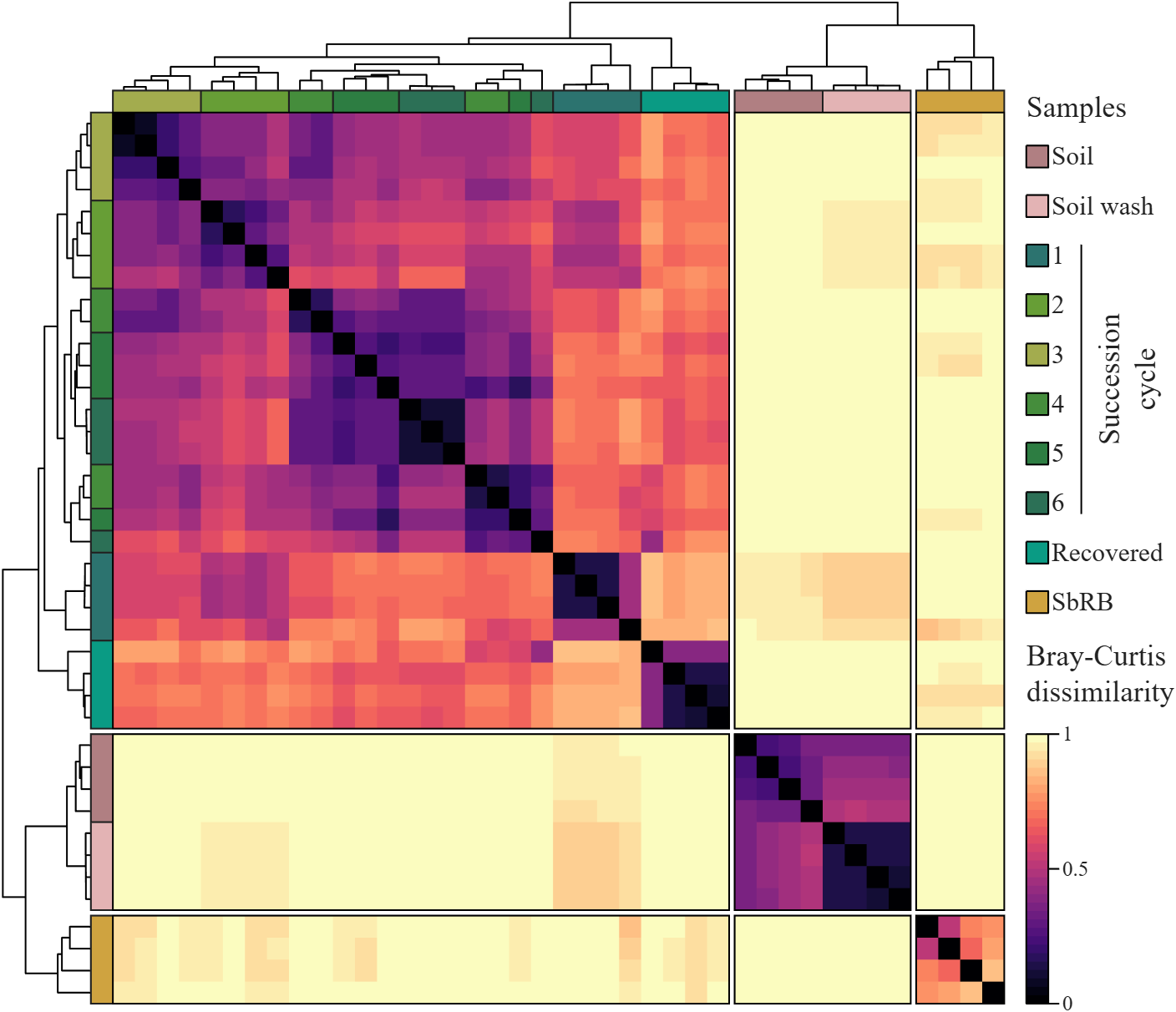
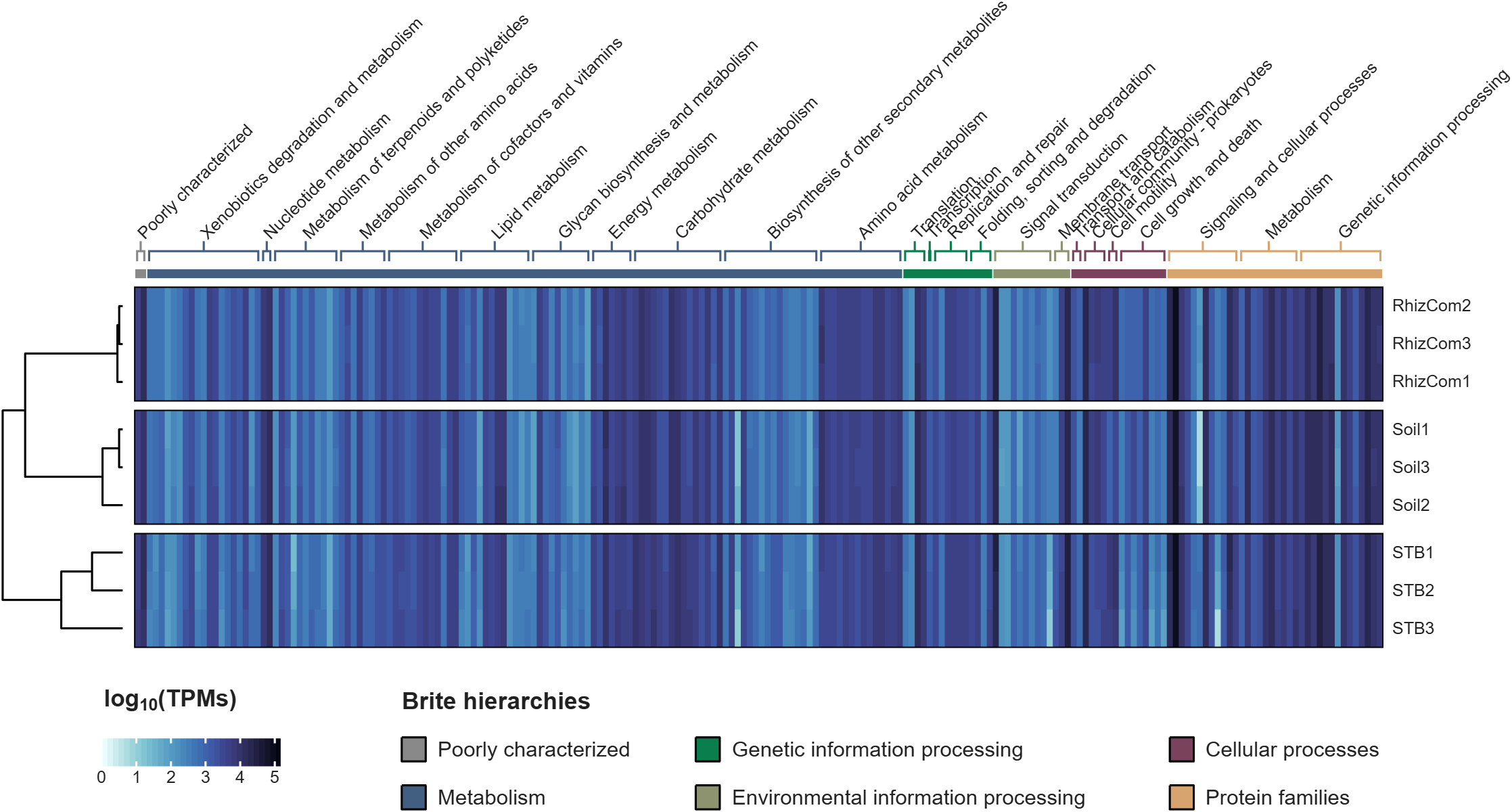
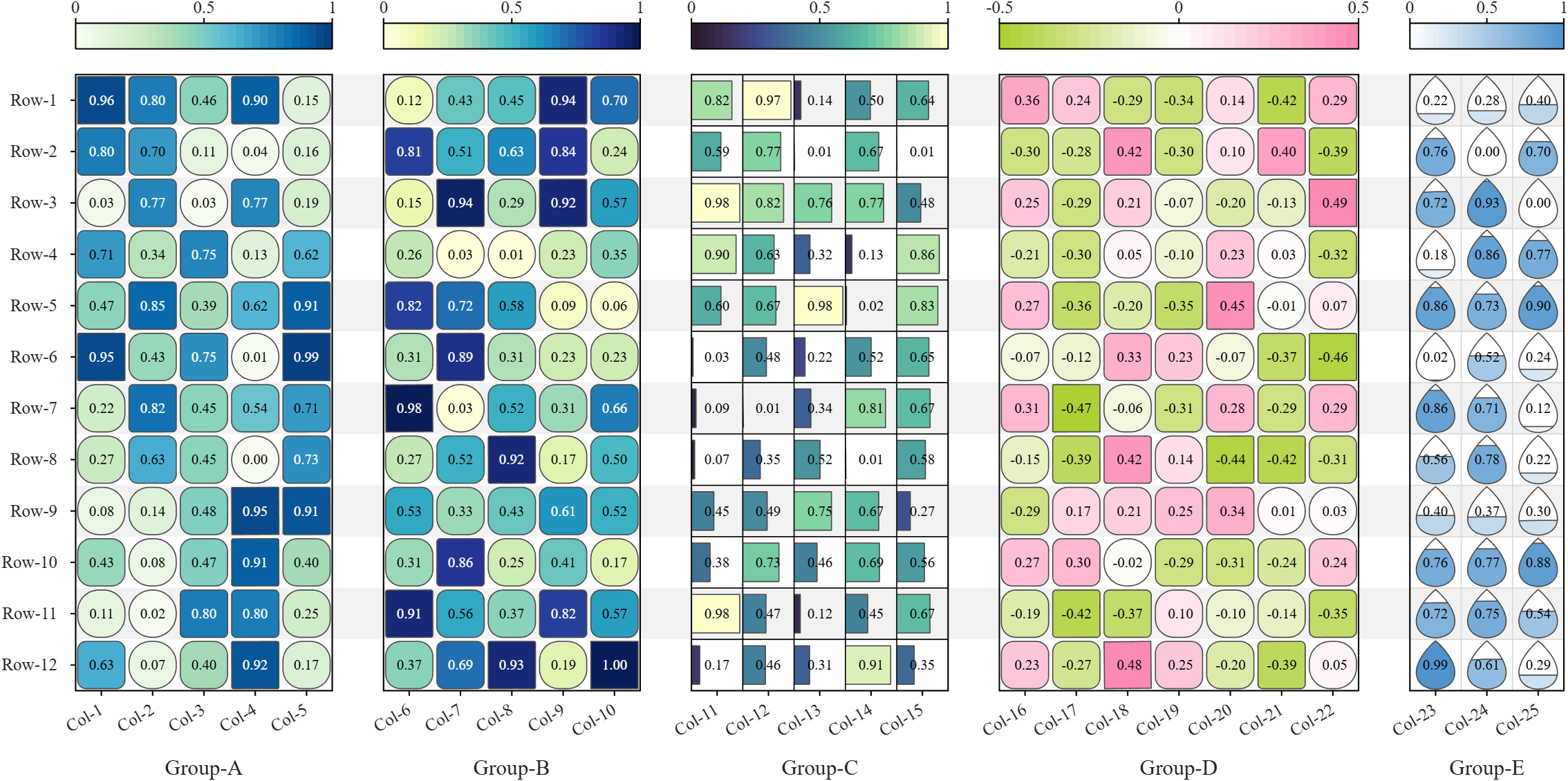
All these examples are plotted using SHeatmap. For details, please refer to the relevant examples in the demo_SColorbar folder included in the toolbox.

Claudifying MATLAB
Duncan Carlsmith
Department of Physics, University of Wisconsin-Madison

Introduction
AI mobile and desktop apps are convenient interfaces for exploration. For programmatic work not subject to variations in AI response, an AI can generate standalone code and web workflows. (See e.g. Web Automation with Claude, MATLAB, Chromium, and Playwright.) Intermediate is your own code that can batch process input data with AI via API.
Large Language Models (LLMs) with MATLAB permits a script to connect to OpenAI Chat Completions and Images, Azure OpenAI, Ollama, and other services that accept the OpenAI format. This submission introduces an educational Live Script Claude API from MATLAB for Coursework that illustrates how to access Anthropic models via API with MATLAB, using example tasks relevant to physics education, and might be adapted for other AI vendor APIs or emulated for other applications. This submission is essentially the Live Script introduction.
The script lists the available Claude models, sends text, images, and PDFs to a chosen model, holds a multi-turn conversation, extracts structured data from a document, lets Claude call MATLAB functions, and grades a set of short answers against a rubric. The examples show how an instructor or a student might use an AI model as a programmable assistant, for feedback on a figure, a check of a lab report, or a first pass at grading.
The Messages API is a web service at https://api.anthropic.com/v1/messages. A program sends it a request in JSON, the text format used for structured data on the web, and receives Claude's reply in JSON. A request names a model, sets a limit on the length of the reply, and carries a list of messages. An optional system prompt holds standing instructions that apply to every turn. The service keeps no memory between requests, so each request carries the whole conversation so far. MATLAB builds each request as a struct and jsonencode converts it to JSON.
Lengths and prices are counted in tokens. A token is a fragment of text, on average about four characters of English. Each response reports how many input and output tokens it used.
Helper functions in this folder handle the web requests and the bookkeeping. claudeRequest sends one request and reports the server's error message on failure. claudeListModels returns the models available to the key. claudeConversation and askClaude hold a multi-turn conversation and add up tokens and cost. claudeImageBlock and claudePdfBlock package a file for a message, claudeText extracts the reply text, and claudeCost converts token counts to dollars.
The example inputs sit in the inputs folder, which the Python version shares, and are fictional. example_flawed_figure.png is a plot with deliberate defects. example_lab_report.pdf is a student lab report with three planted errors, and example_lab_report_page1.png is an image of its page for display. student_answers.csv holds five short answers of varying quality. Output files go to the matlab_outputs folder and carry a timestamp in the name, so no run overwrites an earlier one, and the MATLAB and Python outputs stay apart.
"Try this" blocks mark the settings to change. The references list the API documentation. The appendix on privacy and security describes where requests go, how long the vendor keeps them, and precautions for student work and for the API key. A parallel Python version of the script and helper functions is in the Python folder. These functions could be called from MATLAB or invoked from a terminal.
Acknowledgments and disclaimer
The author has no financial interest in any company or product named here. Nothing in this post is endorsed by, sponsored by, or an official position of the University of Wisconsin-Madison.

Hi everyone
Some of my colleauges at MathWorks are conducting a survey on how people use science and engineering file formats such as NetCDF, HDF5, Zarr and so on.
It will only take a few minutes to fill out and is completely anonymous unless you want to be contacted. Your thoughts, details of usage in your domain or industry, and current friction points will help us improve MATLAB to better support the kind of work you do in the future!
If there's anything not covered by the survey that you'd like to mention, feel free to reply to this thread.
Cheers,
Mike
Running Octave and other applications in a ChatGPT container
Duncan Carlsmith
Department of Physics, University of Wisconsin-Madison
Introduction
An AI assistant that can run code can write a script, run it, read the results, and fix errors before reporting back.
Prototyping MATLAB code in a Claude container with Octave describes one way I can supply Claude basic autonomous MATLAB executability by installing Octave in the Claude container instead of using an MCP connection or an HTTPS command server to hand the assistant my own Mac, with its MATLAB, the toolboxes, and the real files. This Octave hack is useful if, for example, I am on my phone while my laptop is offline or otherwise occupied.
ChatGPT runs code in a Linux container with Python, Node, and a shell. GNU Octave is not present and is not straightforwardly installed by the chat itself - an apt-get install octave fails because the container reaches selected package proxies and not the Debian repositories. This post describes a solution provided by Claude for ChatGPT, a solution provided that applies to other packages as well.
The trick is to prepare externally and upload an Octave (or whatever) package and simply drop it into the ChatGPT chat as needed with an installation instruction prompt. Once the chat accomplishes the installation, that chat is good to go. A 197 MB file uploaded to the conversation installs Octave 10.3.0 in about ten seconds. The install needs no root access, no apt, and no network connection from the container. I can then hand ChatGPT an .m file, read the numbers it prints, and retrieve the figure. The same method carries other programs built by conda-forge for Linux x86_64. The ExifTool bundle is 37 MB. The Pandoc bundle is 40 MB.
Be aware that in a ChatGPT Project environment, the uploaded package is available to all project chats but must be installed in each chat’s container that needs it, and can sometimes need a reinstall if you leave a chat in which it is installed. That installation action might be automated via persistent context -I’ve not tried that. Neither have I tried this trick with other AIs.
The rest of this submission is Claude-generated goop describing exactly how to implement this and the tests performed. It is not intended for normal sentient being consumption. Just hand it to your AI.
Background
The Claude container I used to prepare this post runs Ubuntu 24.04 with glibc 2.39, as root, with HTTPS access to an allowed set of hosts. apt-get update reaches the Ubuntu archives, pip reaches PyPI, and apt-get install octave would install Octave 8.4.0 from the distribution. That container also carries ffmpeg and ImageMagick and no Octave.
The ChatGPT container I tested runs Debian 13 with glibc 2.41, unprivileged, with a packages-only network policy. Its pip reaches an internal proxy and apt reaches nothing. Published reconnaissance reports the same policy (Willison, January 2026, container environment notes, sandbox exploration).
So the bundle is a requirement on ChatGPT and an upgrade on Claude. Ubuntu supplies Octave 8.4, the version the companion post worked around. The bundle supplies 10.3.0 on either, because it does not depend on what the distribution packages.
Those reports, and my own measurements, describe particular images in September 2026. The images change. The bundle therefore targets an application binary interface rather than a named vendor image. Conda-forge packages for linux-64 declare a minimum glibc version and an instruction-set baseline, and a Linux host new enough to meet both runs the same binaries. After the design was fixed, ldd --version in the ChatGPT container reported Debian GLIBC 2.41, above the glibc 2.28 floor the bundle assumes.
The method
Micromamba, a single statically linked executable, installs an explicit list of conda packages from local archive files. The bundle contains those files, a Linux micromamba binary and a short installer.
- On your own machine, solve the dependency graph for Linux x86_64 without installing it.
- Download the package archives returned by the solve.
- Put the archives, micromamba and the installer in one tar file.
- Upload the tar, extract it in the container and install under /mnt/data.
Step 4 needs no network, no root access and no system package manager. Everything is written below one directory the container already permits.
Building the Octave bundle
DROP='(qt-|qt6|pyqt-|qscintilla2|libllvm|libclang|ghostscript|mesa)' \
sh build_bundle.sh octave octave
The complete solve contains 181 packages, 460 MB of archives, and installs to 1.8 GB, much of it supporting a graphical interface the container cannot display. Dropping Qt, PyQt, QScintilla, LLVM, Clang, Mesa and Ghostscript leaves 171 packages, a 197 MB tar file and a 773 MB installed tree. Appendix A passes that exclusion list through DROP.
There is a limit to the pruning. octave-cli links libOpenGL.so.0, so libglvnd must remain even though no window is drawn.
Solving on macOS for a Linux target
My first solve on an Apple silicon Mac returned Octave 7.1.0, Python 3.9, Qt 5.12 and a 323 MB tar. The same solve run on Linux returned Octave 10.3.0, Python 3.14 and a 197 MB tar.
The difference comes from conda virtual packages, one of which is __glibc. A Mac has no glibc, so builds requiring __glibc >=2.17 appear unsatisfiable, and the solver walks backward to builds from 2022 and earlier, before that declaration was used. Setting CONDA_OVERRIDE_GLIBC=2.12 on a Linux machine reproduced the Mac result package for package.
Three settings remove the host from the decision.
export CONDA_OVERRIDE_GLIBC=2.28 # describe the target, not this Mac
export CONDA_OVERRIDE_ARCHSPEC=x86_64 # portable baseline, not the host CPU
# on the micromamba command line:
--no-rc --no-env --override-channels # ignore local conda configuration
CONDA_OVERRIDE_ARCHSPEC matters on a fast host. A solve on a machine with AVX-512 selected a metapackage pinned to x86_64_v4, which would fail in a container whose processor lacks those instructions.
Appendix A also rejects a solved Octave version below 10, which catches the silent fallback before hundreds of megabytes are downloaded.
An earlier bug in the build script was less obvious. Its URL filter matched only the linux-64 subdirectory and silently dropped 15 noarch packages. Octave still ran, and figure text fell back to whatever fonts the container had, because the DejaVu fonts are noarch.
Verification
Appendix C contains 13 checks. Each compares an Octave result with a value obtained independently. A truncated package set or a broken BLAS can start normally and return a plausible wrong answer.
The checks cover dense and sparse linear algebra, an ODE, quadrature, an FFT, root finding, minimization, MAT-file and text I/O, basic data structures and a PNG figure. The eigenvalues of the 3 by 3 second-difference matrix are compared with 2 - 2cos(k pi/4), and the ode45 value at t = 5 with the closed-form solution of y' = -2y + sin(t).
All 13 pass in the ChatGPT container. The 400 by 400 dense solve gives a residual of 1.3e-15 in 17 ms. The BLAS is real.

Figure 1. Output of the self-test under Octave 10.3.0 in a ChatGPT container. Blue solid curve, sin(x). Red dashed curve, sin(x)exp(-x/6). Black circles, the ode45 solution of y' = -2y + sin(t), sampled every 25th step.
What is missing
Octave itself does not provide MATLAB's table or string class. Octave Forge packages are unavailable because pkg install tries to download them.
The Qt graphics toolkit needs a display, so the self-test uses gnuplot and print -dpngcairo to write a PNG. Pruning Ghostscript removes EPS and PDF output and the plain -dpng device, and putting it back costs about 60 MB.
Three warnings accompany every figure. GraphicsMagick reports its 8-bit limit, Ghostscript is absent, and fontconfig prints an initialization notice. None changed the PNG output in these tests.
What persisted in the tests
I measured three behaviors in one ChatGPT project in September 2026.
Within one conversation, the container persisted across turns. An Octave install made at the start remained usable for the rest of that chat.
After several hours away, the installed directory was gone and the files uploaded or produced in the conversation had returned, with fresh timestamps. Reinstallation took one instruction and about ten seconds, with no new upload.
$ ls -la /mnt/data/
-rw-r--r-- 1 root oai_shared 206766592 Sep 13 14:40 octave-bundle-linux64.tar
-rw-r--r-- 1 root oai_shared 34124 Sep 13 14:52 octave_selftest.png
A new conversation in the same project started with an empty /mnt/data. Project files were available to ChatGPT for retrieval and did not appear in that conversation's container filesystem, so files belonged to the conversation rather than to the project.
I therefore keep one conversation as the Octave conversation and return to it whenever an .m file needs a trial run.
Other programs
ExifTool resolves to six packages and a 37 MB upload including micromamba. Pandoc resolves to one 23 MB package and a 40 MB bundle. Both use the same two scripts.
sh build_bundle.sh exiftool exiftool
sh build_bundle.sh pandoc pandoc
The Pandoc bundle converted the Markdown source of this post to RTF.
Try pip first. The Python package proxy worked here, and a bundle is unnecessary when pip supplies the program. The bundle earns its keep for compiled programs with shared-library dependencies, where apt would ordinarily be the answer.
The method does not solve a large-data problem. At the time of these tests, an upload was limited to 512 MB, so a program needing gigabytes of auxiliary data, such as the index files of a blind astrometric solver, does not fit merely because its executable does.
Security
The installer runs package scripts supplied by conda-forge, the same trust decision as creating an ordinary conda environment. The container is disposable and had no general outbound network access in these tests, which limits what a malicious package could reach. It does not make an untrusted package safe.
Wrap up
One upload and about ten seconds of installation gave a ChatGPT conversation a working Octave, and the same pair of scripts carried ExifTool and Pandoc. Octave is still not MATLAB. Parser differences, unsupported classes and toolbox calls remain, so the finished program needs a run in MATLAB.
For anyone already running a command server on a personal machine, a custom GPT action can call an HTTPS endpoint that runs MATLAB itself, on hardware that remembers yesterday's installation. The uploaded bundle is for the case in between, with no MATLAB connection, no root access and no useful apt, but a serviceable Linux container once the right files arrive.
Acknowledgments and disclaimer
The methods and measurements were assembled and tested by the author. A first draft of this post was prepared with Claude and revised with ChatGPT and further revised by the author.
The author has no financial interest in any company or product named here. Nothing in this post is endorsed by, sponsored by, or an official position of the University of Wisconsin-Madison. The affiliation is given for identification only.
Appendix A. build_bundle.sh
#!/bin/sh
# Build a self-contained, network-free bundle of any conda-forge package for
# a Linux x86_64 container. Runs on macOS or Linux. Nothing is installed on
# the host. Requires curl, tar and python3.
#
# Usage: sh build_bundle.sh <name> <package> [package ...]
# e.g. sh build_bundle.sh docs pandoc graphviz
# Output: <name>-bundle-linux64.tar in the current directory.
#
# Env: DROP extended regex of package names to exclude, for example
# DROP='(qt-|qt6|pyqt-|qscintilla2|libllvm|libclang|ghostscript|mesa)'
# GLIBC glibc version the target container provides. Default 2.28.
set -e
[ $# -ge 2 ] || { echo "usage: sh build_bundle.sh <name> <package> [package ...]"; exit 1; }
SCRIPTDIR=$(cd "$(dirname "$0")" && pwd)
NAME=$1; shift
PKGS=$*
WORK="$PWD/${NAME}-bundle-build"
mkdir -p "$WORK"
DROP=${DROP:-'(^$)'}
GLIBC=${GLIBC:-2.28}
# Describe the TARGET container, not this host. Without these a macOS solve
# falls back to pre-2022 builds, and a fast host selects AVX-512 packages.
export CONDA_OVERRIDE_GLIBC=$GLIBC
export CONDA_OVERRIDE_ARCHSPEC=x86_64
ISO='--no-rc --no-env --override-channels' # ignore ~/.condarc and CONDA_* vars
cd "$WORK"
case "$(uname -s)/$(uname -m)" in
Darwin/arm64) HOSTPLAT=osx-arm64 ;;
Darwin/x86_64) HOSTPLAT=osx-64 ;;
Linux/aarch64) HOSTPLAT=linux-aarch64 ;;
*) HOSTPLAT=linux-64 ;;
esac
echo "Host $HOSTPLAT, target linux-64 glibc $GLIBC, packages: $PKGS"
mkdir -p hostbin bundle/pkgs
curl -sSL "https://micro.mamba.pm/api/micromamba/$HOSTPLAT/latest" \
| tar -xj -C hostbin --strip-components=1 bin/micromamba
chmod +x hostbin/micromamba
curl -sSL https://micro.mamba.pm/api/micromamba/linux-64/latest \
| tar -xjO bin/micromamba > bundle/micromamba
chmod +x bundle/micromamba
echo "Solving ..."
export MAMBA_ROOT_PREFIX="$WORK/solveroot"
./hostbin/micromamba create -n solve $ISO --platform linux-64 -c conda-forge \
$PKGS -y --dry-run --json > solve.json
python3 - "$DROP" <<'PY' > urls.txt
import json, re, sys
drop = re.compile('/' + sys.argv[1])
links = json.load(open('solve.json'))['actions']['LINK']
# A host with no glibc override can silently select an old Octave.
octave = next((p for p in links if p['name'] == 'octave'), None)
if octave and int(octave['version'].split('.')[0]) < 10:
raise SystemExit('refusing solved Octave version ' + octave['version'])
out = open('bundle/explicit.txt', 'w')
out.write("# offline install list, linux-64\n# platform: linux-64\n@EXPLICIT\n")
kept = 0
for p in links:
url = p.get('url') or "%s/%s/%s-%s-%s.conda" % (
p['channel'], p['platform'], p['name'], p['version'], p['build_string'])
if drop.search(url):
continue
md5 = p.get('md5')
out.write('@PKGS@/' + url.rsplit('/', 1)[1] + ('#' + md5 if md5 else '') + '\n')
print(url)
kept += 1
out.close()
print("kept %d of %d packages" % (kept, len(links)), file=sys.stderr)
PY
echo "Downloading $(wc -l < urls.txt) packages ..."
xargs -n1 -P8 curl -sS -L -O --output-dir bundle/pkgs < urls.txt
cp "$SCRIPTDIR/install_bundle.sh" bundle/
COPYFILE_DISABLE=1 tar -cf "../${NAME}-bundle-linux64.tar" -C bundle .
cd ..
du -h "${NAME}-bundle-linux64.tar"
cat <<EOF
Bundle: $PWD/${NAME}-bundle-linux64.tar
Upload it, then extract and run install_bundle.sh in the container.
EOF
Appendix B. install_bundle.sh
#!/bin/sh
# Install a bundle built by build_bundle.sh into a prefix inside a container.
# No network. No root. No apt.
# Usage: sh install_bundle.sh [prefix] default: <bundle dir>/prefix
set -e
HERE=$(cd "$(dirname "$0")" && pwd)
PREFIX=${1:-$HERE/prefix}
chmod +x "$HERE/micromamba"
sed "s|@PKGS@|file://$HERE/pkgs|" "$HERE/explicit.txt" > "$HERE/explicit_resolved.txt"
MAMBA_ROOT_PREFIX="$HERE/mroot" "$HERE/micromamba" create -p "$PREFIX" --offline -y \
--file "$HERE/explicit_resolved.txt" >/dev/null
# One launcher that sets the environment and runs any binary from the prefix.
cat > "$HERE/run" <<EOF
#!/bin/sh
export PATH="$PREFIX/bin:\$PATH"
export LD_LIBRARY_PATH="$PREFIX/lib:\${LD_LIBRARY_PATH:-}"
[ -d "$PREFIX/share/octave" ] && export OCTAVE_HOME="$PREFIX"
[ -f "$PREFIX/etc/fonts/fonts.conf" ] && export FONTCONFIG_FILE="$PREFIX/etc/fonts/fonts.conf"
[ -d "$PREFIX/share/gnuplot" ] && export GNUPLOT_DRIVER_DIR="$PREFIX/libexec/gnuplot"
exec "\$@"
EOF
chmod +x "$HERE/run"
echo "Installed to $PREFIX"
echo "Executables:"
ls "$PREFIX/bin" | head -20
echo "Run with: $HERE/run <command> [args]"
Appendix C. octave_selftest.m
% octave_selftest.m
% Self-check for the Octave bundle installed in a ChatGPT container.
% Each test compares against a value known independently of Octave.
% Run: /mnt/data/oct/run octave-cli -q octave_selftest.m
% Writes octave_selftest.png next to the working directory.
npass = 0;
function r = chk(name, got, want, tol)
ok = all(abs(got(:) - want(:)) <= tol);
printf('%-28s %s got %-14.8g want %-14.8g\n', name, ...
merge(ok, 'PASS', 'FAIL'), got(1), want(1));
r = ok;
end
printf('Octave %s on %s\n\n', version(), computer());
% 1. Dense linear algebra. magic(4) is singular, rank 3.
A = magic(4);
npass += chk('rank(magic(4))', rank(A), 3, 0);
% 2. Eigenvalues of the 3x3 second-difference matrix, 2 - 2cos(k pi/4).
T = full(gallery('tridiag', 3, -1, 2, -1));
want = sort(2 - 2*cos((1:3)*pi/4));
npass += chk('eig(tridiag) vs closed form', sort(eig(T))', want, 1e-12);
% 3. Solve a 400x400 system, check the residual and time it.
n = 400; rand('seed', 42);
M = rand(n) + n*eye(n); b = ones(n,1);
t0 = tic; x = M\b; dt = toc(t0);
npass += chk('400x400 solve residual', norm(M*x - b, inf), 0, 1e-10);
printf('%-28s %.3f s\n', 'solve wall time', dt);
% 4. ode45 against y(t) = (2 sin t - cos t)/5 + (6/5)exp(-2t),
% the solution of y' = -2y + sin(t), y(0) = 1.
f = @(t,y) -2*y + sin(t);
opt = odeset('RelTol', 1e-9, 'AbsTol', 1e-11);
[T5, Y5] = ode45(f, [0 5], 1, opt);
ya = @(t) (2*sin(t) - cos(t))/5 + 1.2*exp(-2*t);
npass += chk('ode45 vs analytic at t=5', Y5(end), ya(5), 1e-8);
% 5. Quadrature: integral of exp(-x^2) on [0,Inf) is sqrt(pi)/2.
npass += chk('quadgk vs sqrt(pi)/2', quadgk(@(x) exp(-x.^2), 0, Inf), sqrt(pi)/2, 1e-10);
% 6. FFT of a pure tone: peak bin amplitude n/2 for unit sine.
n = 1024; k = 17; s = sin(2*pi*k*(0:n-1)/n);
S = abs(fft(s));
npass += chk('fft peak bin', S(k+1), n/2, 1e-8);
% 7. Root finding and unconstrained minimization.
npass += chk('fzero cos(x)=x', fzero(@(x) cos(x)-x, [0 1]), 0.73908513321516, 1e-10);
npass += chk('fminsearch Rosenbrock', ...
fminsearch(@(v) 100*(v(2)-v(1)^2)^2 + (1-v(1))^2, [-1.2 1], ...
optimset('TolX',1e-8,'TolFun',1e-10)), [1 1], 1e-3);
% 8. Sparse matrices.
Sp = sparse(1:5, 1:5, 2:6);
npass += chk('sparse trace', full(sum(diag(Sp))), 20, 0);
% 9. MAT file round trip in v7 format, which MATLAB also reads.
Mg = magic(5); save('-v7', 'selftest.mat', 'Mg'); clear Mg
load('selftest.mat');
npass += chk('save/load -v7', sum(Mg(:)), 325, 0);
% 10. Text file I/O.
fid = fopen('selftest.txt', 'w'); fprintf(fid, '%d\n', 1:100); fclose(fid);
v = dlmread('selftest.txt');
npass += chk('fprintf/dlmread', sum(v), 5050, 0);
% 11. Strings, cells, structs, regexp.
c = cellfun(@(s) upper(s), {'ab','cd'}, 'UniformOutput', false);
st = struct('a', {1,2,3});
tok = regexp('Octave 10.3.0', '(\d+)\.(\d+)\.(\d+)', 'tokens');
ok = isequal(c, {'AB','CD'}) && numel(st) == 3 && str2double(tok{1}{1}) == 10;
printf('%-28s %s\n', 'cell/struct/regexp', merge(ok, 'PASS', 'FAIL'));
npass += ok;
% 12. Figure to PNG through the gnuplot toolkit.
warning('off', 'Octave:gnuplot-graphics');
graphics_toolkit('gnuplot');
fh = figure('visible', 'off');
set(fh, 'position', [0 0 900 400]);
x = linspace(0, 4*pi, 400);
plot(x, sin(x), 'b-', 'linewidth', 1.2); hold on
plot(x, sin(x).*exp(-x/6), 'r--', 'linewidth', 1.5);
kk = 1:25:numel(T5);
plot(T5(kk), Y5(kk), 'ko', 'markersize', 5, 'markerfacecolor', 'none');
legend('sin(x)', 'sin(x) exp(-x/6)', 'ode45 solution y(t)', ...
'location', 'northeastoutside');
xlabel('x'); ylabel('amplitude');
title('sin(x), damped sin(x), and ode45 solution of y prime = -2y + sin(t)');
ylim([-1.3 1.3]); grid on
print(fh, 'octave_selftest.png', '-dpngcairo', '-r120');
d = dir('octave_selftest.png');
ok = ~isempty(d) && d.bytes > 5000;
printf('%-28s %s %d bytes\n', 'figure to PNG', merge(ok, 'PASS', 'FAIL'), ...
merge(isempty(d), 0, d.bytes));
npass += ok;
ntot = 13;
printf('\n%d of %d checks passed\n', npass, ntot);
if npass < ntot
printf('FAILURES PRESENT\n');
end
printf('Forge packages installed: %d (expected 0, pkg install needs network)\n', ...
numel(pkg('list')));
Appendix D. Commands to give ChatGPT
Upload the tar and the .m file to one conversation. A literal prompt is less likely to produce a substitute method or imagined output.
Run these shell commands in order and show me all output. Do not substitute Python for any step.
mkdir -p /mnt/data/oct
tar -xf /mnt/data/octave-bundle-linux64.tar -C /mnt/data/oct
sh /mnt/data/oct/install_bundle.sh
/mnt/data/oct/run octave-cli -q /mnt/data/yourscript.m
If a command fails, stop and show the command and its complete error output. Return any PNG files created by the script.
ExifTool and Pandoc follow the same pattern.
/mnt/data/exiftool/run exiftool -s -ImageWidth -ImageHeight image.png
/mnt/data/pandoc/run pandoc -s -f markdown -t rtf -o post.rtf post.md
If the upload is not visible at the expected path, ask for ls -la /mnt/data first. Attach the tar to the conversation in which it will run. If the extract directory is mounted without execute permission, copy the tree to a writable executable directory and install there.

TokaLab is an open-access virtual tokamak platform built in MATLAB for nuclear fusion modeling, diagnostics, inverse problems, and computational experimentation.
- App installer for MATLAB Online — run TokaLab directly in your browser.
- Two new tutorials covering the core modules, SimPla and SynDiag, in detail.
- Two new modules: TokaPlot for advanced plotting, and SynRad for radiation generation.
- Real tokamak geometries, supporting more realistic tokamak modeling.

You can use MATLAB's rat() function to obtain a rational approximation of a decimal value. For example, rat(0.625) gives a representation equivalent to 5/8. If you simply want to verify decimal/fraction conversions without running MATLAB, a browser-based decimal-to-fraction calculator can also be useful.
Vibe Coding with a Remote Desktop
Duncan Carlsmith, Department of Physics, University of Wisconsin-Madison
Introduction
A phone is all you need to develop coding projects with an agentic AI like Claude. With the Claude App voice input or a voice-to-text app, you don’t even have to type text on your phone. You can leave your laptop at home, take a stroll, respond to a Claude notification en route, and pretend you are not working at the coffee shop.
But there are advantages to having a phone-based remote desktop, and free or nearly free options are available. This post describes experience with two full remote desktop applications and one AI-built quick file-browser-viewer that serves most use cases. Boring technical descriptions follow, but don’t be overwhelmed by them. Claude can bootstrap the installation and setup of everything described here. Just ask and maybe point it to this submission.
Background information
How to set up and use AI Desktop Apps with MATLAB and MCP servers covers the MCP setup. A universal agentic AI for your laptop and beyond describes what a desktop AI does with it. Web automation with Claude, MATLAB, Chromium, and Playwright describes a browser assistant on the same footing. Giving All Your Claudes the Keys to Everything puts an HTTP command server on the Mac behind an ngrok tunnel, so any AI chat interface runs MATLAB, shell commands and AppleScript there. The code is on File Exchange.
With my setup, the Claude app on the phone carries the same conversations and Cowork sessions as the app on the Mac, with the same shell, the same MCP connections, and the same ngrok tunnel. A chat started at the desk continues on the phone where it stopped seamlessly. One conversation can dispatch subagents and run a long computation while a second conversation works on something else.
I am terrible at using the tiny keyboard on my wee iPhone. I now dictate most prompts into the Claude app and use Wispr Flow for dictation into other apps on the phone. I generally ask Claude to back up and version products on my laptop for safekeeping and easy access rather than use GitHub. For example, I might have the AI develop a MATLAB code and test it using GNU Octave in its container to avoid a lot of costly back-and-forth transfers, and then transfer a working product to my Mac as a Live Script that I can render and run with the MATLAB Live Editor. I could ask the AI to run MATLAB and to save a PDF of the Live Script and ship that to me, but it is easier to just run it with real-time feedback. With a remote desktop on my phone, I can have that feedback without carrying the laptop with me.
Remote Desktops
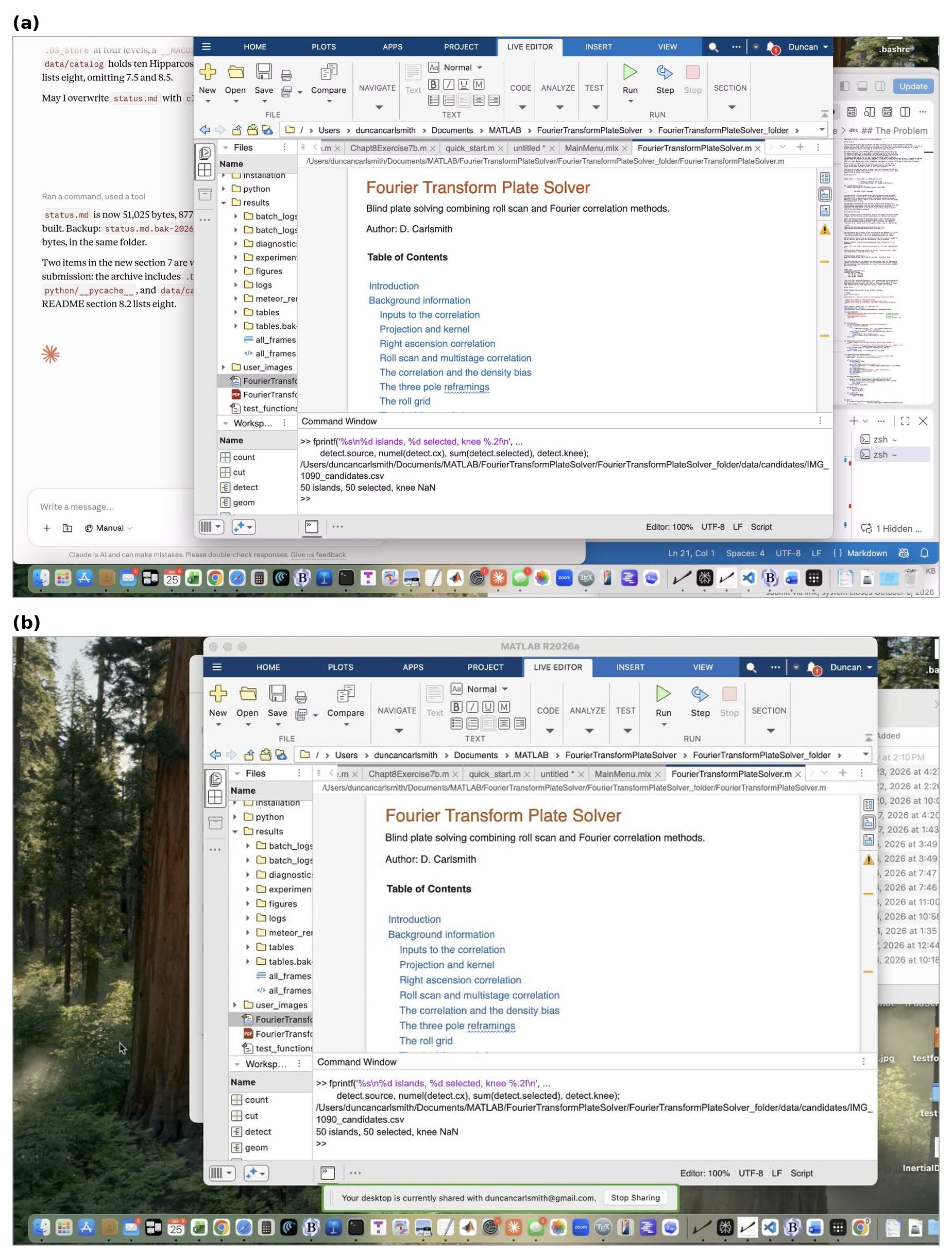
Figure 1. A Mac desktop displayed on an iPhone. (a) Screens, a VNC client, over Tailscale. (b) Chrome Remote Desktop in mobile Safari. MATLAB R2026a is open in the Live Editor in both.
Figure 1 shows iPhone screenshots (partly cropped for privacy) of two remote desktop applications, Screens and Chrome Remote Desktop, serving my MacBook Pro. The full desktop is provided in miniature. Each iPhone app has mechanisms for navigation and operation of macOS and its applications. A drag in Screens moves the whole desktop. Scrolling inside a MATLAB window uses the controls along the bottom of the Screens interface. Chrome Remote Desktop supplies a cursor to drag and click. These suffice for most simple operations. In particular, a Live Script renders in the Live Editor, with figures, equations, and formatted text in place. Tapping Run runs it. One can, of course, direct the AI to launch the laptop application you want beforehand. It is reassuring to see in real time that my laptop has not been hijacked by some wayward mechanism, and to watch a file transfer complete.
Chrome Remote Desktop is free. RealVNC Viewer is free and reaches the same port, but I’ve not tried it. The App Store lists other clients which, like Screens, may require a subscription.
The File Server
New here is an AI-built quick file-browser-viewer. It serves any designated folder over HTTP, and the folder appears in Safari. No file is copied, converted, or sent through the chat. That saves some token charges and headaches. Briefly described:
iPhone Safari -> http://100.x.y.z:8080/some/file.html
|
| WireGuard, encrypted end to end
| direct peer-to-peer, or relayed if NAT blocks it
v
Mac, tailnet address 100.x.y.z
python3 serve_folder.py ~/Documents/courses --port 8080
|
v
the actual folder, unchanged
Safari displays the folder, including subfolders, as easy-to-read clickable links; iPhone handles the display of common file types. HTML renders with its JavaScript, so interactive HTML5 appears instantly and is interactive. PDF, JPEG, PNG, and SVG all display. Markdown, plain text, and JSON display as text. MP3, WAV, and MP4 play in the page, and the back arrow returns to the listing. CSV, ZIP, and .m files download to the Files app, to iCloud Drive or to On My iPhone according to the setting in Settings, Safari, Downloads. A .m file opened from the Files app launches the MATLAB Mobile app, which runs it in the cloud. Cool!
Figure 2a shows what this looks like on iPhone, and Figure 2b shows an educational product I am developing to teach students physics and effective use of AI simultaneously. Figure 3 shows a pair of iPhone views of an HTML5 application at two display sizes, both fully interactive on a phone.
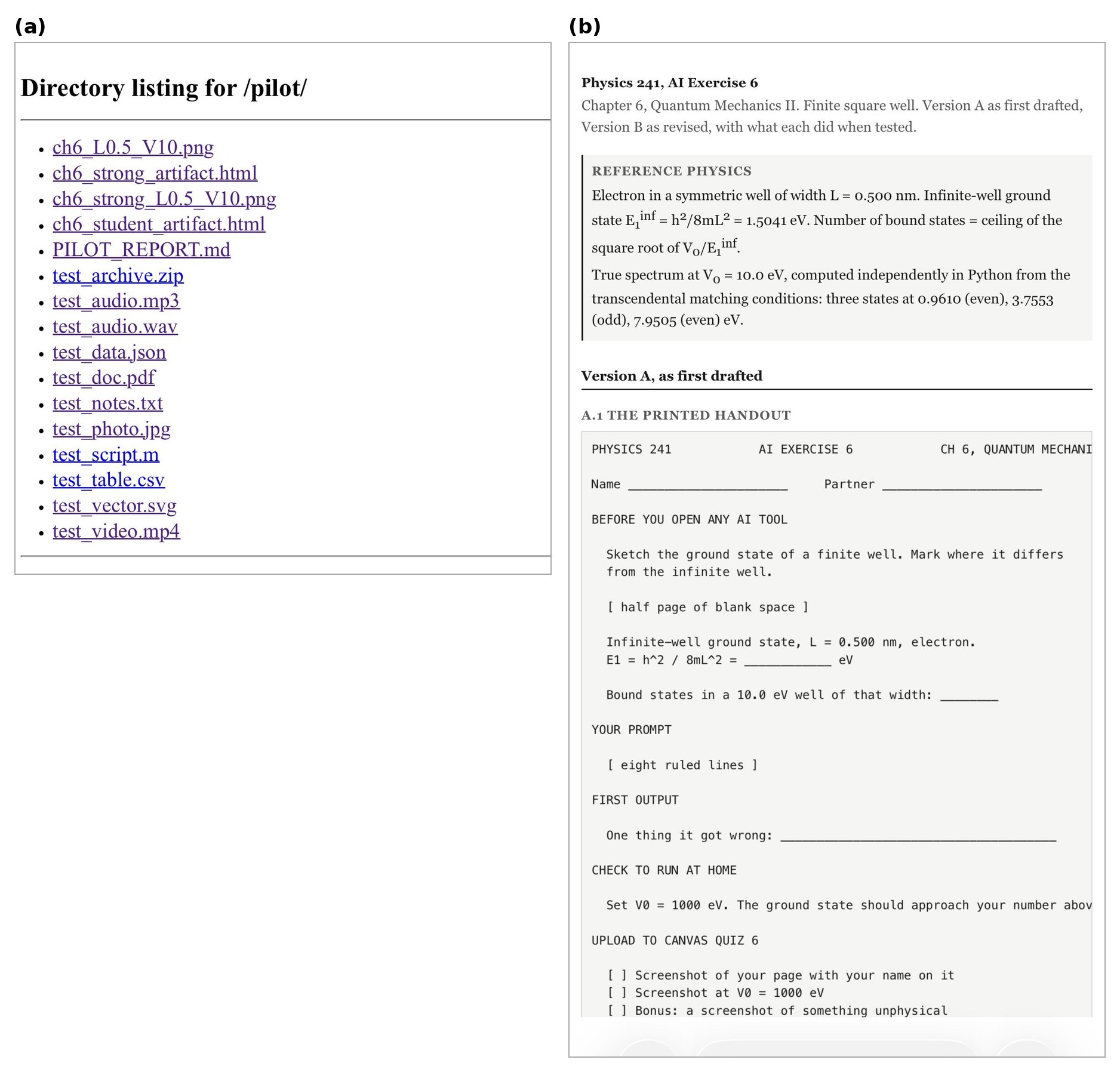
Figure 2. A served folder in Safari. (a) The listing for a subdirectory holding test files of various types. (b) An HTML file from that folder.
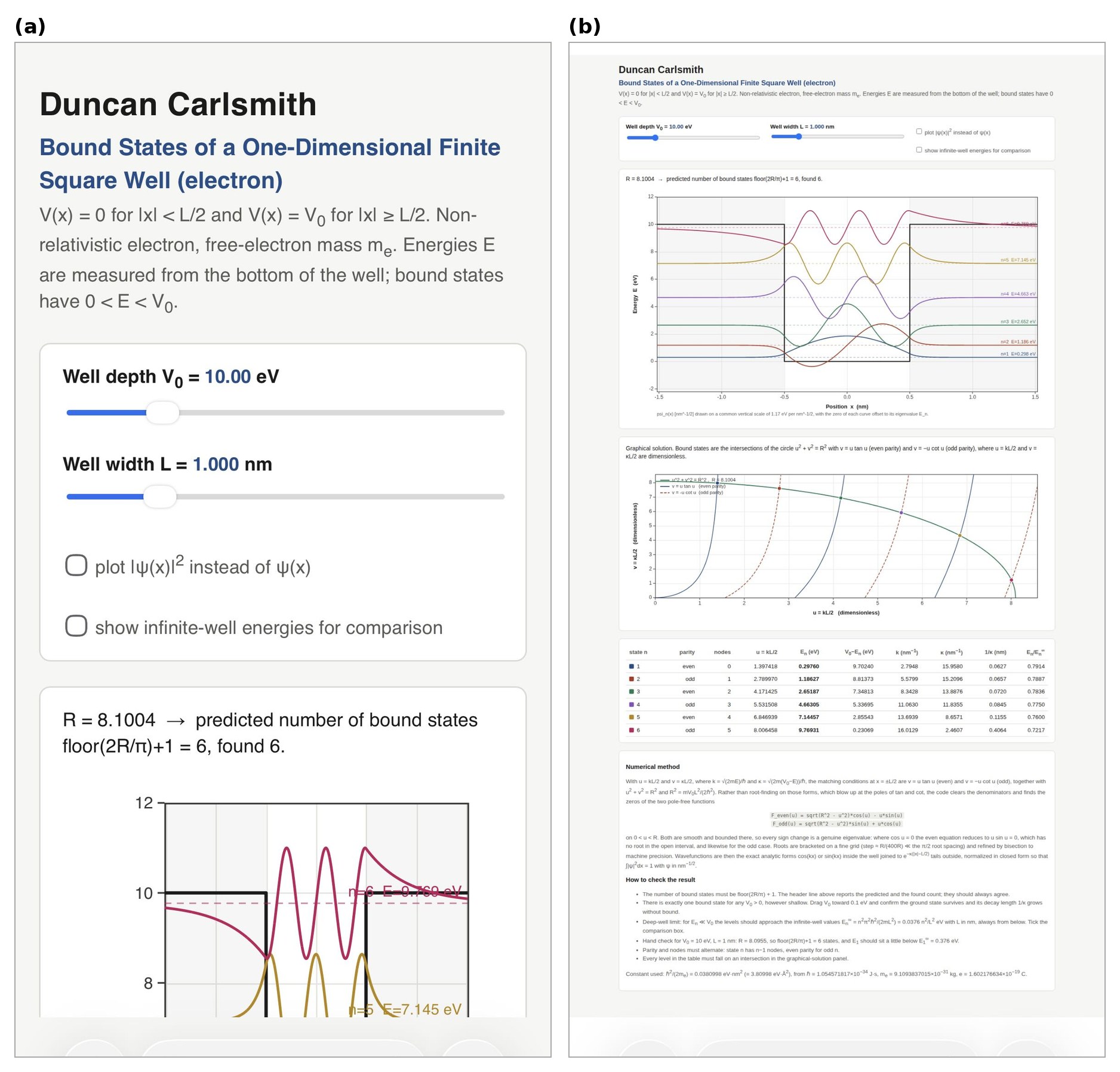
Figure 3. One HTML page in iPhone Safari at two display sizes. The sliders, checkboxes, plots, and table are the page's own controls and respond to touch in both.
Security
A server bound to the tailnet address answers tailnet devices and nothing else. Add a password when the folder holds anything you want protected, and check for dotfiles before serving a directory. Chrome Remote Desktop authenticates with a Google account, so enable two-factor authentication on it. Lock the phone, of course, when using any tool providing access to your stuff from anywhere.
Wrap up
Now back to work, coffee in hand, studying results of an interactive numerical quantum mechanics application built by a mock student (a Haiku-class subagent given one message, no code execution, no browser, no iteration, no references) to investigate the energy levels of a particle bound in a finite potential well, supervised by an instructor agent attempting to assess the subagent’s work. The mock student’s mock assignment submission page reports wrong energy levels which sit at the poles of the transcendental equations, not roots. Moreover, the mock student’s wavefunction parity sequence is wrong. A real student’s job will be to figure this out if and when this happens. My job is to somehow facilitate and assess that. There will be no test about that. The message is I am hoping to replace myself with AI. ;) Yes, it’s a crazy world we now live in. Oh no, my phone just went into power-saving mode, trying to tell me something! I think my coffee needs a refill.
Acknowledgments and disclaimer
The methods were assembled and tested by the author. This submission and the supplied code and installation descriptions were created with Claude's assistance.
The author has no financial interest in any company named here, and no product named here was supplied on special terms. Nothing in this post is endorsed by, sponsored by, or an official position of the University of Wisconsin-Madison, and the author's affiliation is given for identification only.
Product names are the property of their respective owners and are used for identification only. MATLAB, MATLAB Mobile and Live Editor are trademarks of The MathWorks, Inc. Claude and Cowork are trademarks of Anthropic PBC. Wispr Flow is a product of Wispr AI. Google, Google Chrome, Chrome Remote Desktop, Chromium and Android are trademarks of Google LLC. Apple, Mac, macOS, MacBook Pro, iPhone, iOS, iCloud Drive, Safari, Files, App Store and Keychain are trademarks of Apple Inc. Tailscale is a trademark of Tailscale Inc. WireGuard is a registered trademark of Jason A. Donenfeld. VNC and RealVNC are trademarks of RealVNC Ltd. Screens is a product of Edovia Inc. Jump Desktop is a product of Phase Five Systems. Python is a trademark of the Python Software Foundation. Microsoft, Windows and Playwright are trademarks of Microsoft Corporation. Linux is a registered trademark of Linus Torvalds. GitHub is a trademark of GitHub, Inc. ngrok is a trademark of ngrok, Inc. Octave is a trademark of the Free Software Foundation.
- - - - -
Appendix A. Tailscale
Required for Appendix B and Appendix D, not for Appendix C. Free for personal use up to 100 devices. Sign in with Google, Microsoft, GitHub or Apple, and use the same account on every device so they join one tailnet.
Tailscale builds a private network across your devices using WireGuard. Each device gets an address in the 100.64.0.0/10 range that belongs to the tailnet rather than to any physical network. The address follows the device across home wifi, cellular, hotel and campus, and does not change, so a bookmark keeps working.
On macOS, install and sign in, then confirm:
/Applications/Tailscale.app/Contents/MacOS/Tailscale status
/Applications/Tailscale.app/Contents/MacOS/Tailscale ip -4
Use that bundled path. A Homebrew CLI installed alongside the Mac App Store build fails with a socket error, because it looks for /var/run/tailscaled.socket, which the sandboxed App Store build does not create.
On iOS, install from the App Store, sign in with the same account, and toggle the VPN on. iOS asks to add a VPN configuration.
tailscale status lists every device. tailscale ping shows the route in use:
$ tailscale ping iphone-13-pro
pong from iphone-13-pro (100.67.204.58) via 10.0.1.9:41641 in 101ms
That reply came over the LAN with both devices at home. On cellular, Tailscale tries direct peer-to-peer through NAT hole punching and falls back to a relay. tailscale netcheck predicts which:
* UDP: true
* MappingVariesByDestIP: false
* Nearest DERP: Chicago
- ord: 37.3ms (Chicago)
- tor: 48.8ms (Toronto)
- iad: 66.4ms (Ashburn)
UDP: true with MappingVariesByDestIP: false means hole punching usually succeeds. When it fails, the relay carries WireGuard packets it cannot read.
Appendix B. Screen Sharing Over the Tailnet
macOS ships a VNC server. System Settings, General, Sharing, turn on Screen Sharing. The account name shown there and your login password are the credentials. Confirm the listener:
lsof -nP -iTCP:5900 -sTCP:LISTEN
Connect from any VNC client that reaches port 5900 at the address tailscale ip -4 reports. Screens, RealVNC Viewer and Jump Desktop all work, and the App Store lists others. Tailscale must be connected on the phone first.
Some clients speak only the legacy VNC handshake and reject a macOS account password. For those, open the information button beside Screen Sharing, then Computer Settings, and tick "VNC viewers may control screen with password". That password is limited to eight characters.
Display sleep and system sleep are separate settings:
$ pmset -g custom
AC Power:
displaysleep 60
sleep 0
Battery Power:
displaysleep 20
sleep 1
displaysleep blanks the panel and sleep suspends the machine. On AC power with sleep 0 the Mac stays reachable with the screen dark. On battery it sleeps after a minute idle. Stay plugged in, or hold system sleep off:
caffeinate -i &
Enable Wake for network access in System Settings, Battery, Options. Closing the lid sleeps a laptop regardless of caffeinate or pmset sleep 0, unless it is in clamshell mode with power and an external display. Lid open with the screen dark works.
Appendix C. Chrome Remote Desktop
The host on the Mac makes an outbound connection to Google's infrastructure and the phone reaches it through the same infrastructure. No VPN is involved.
On the Mac, in Chrome, go to remotedesktop.google.com/access and choose Set up Remote Access. Chrome downloads a package that installs the host at /Library/PrivilegedHelperTools/ChromeRemoteDesktopHost.app. Installing it requires an administrator password.
The installer requests Screen Recording and Accessibility for Chrome Remote Desktop Host. Both appear in System Settings, Privacy and Security, and both must be on. The Accessibility entry in that list is the permission to control the computer, not the System Settings, Accessibility pane of assistive features. The two permissions separate the view from the input. With Accessibility off the remote screen still draws and clicking a link does nothing. Restoring the permission restores the click.
Name the machine and set a PIN of at least six digits. The PIN is neither the Google password nor the macOS password. Confirm the host:
ps -Ao comm | grep remoting_me2me_host
Connect from the Chrome Remote Desktop app or from mobile Safari at remotedesktop.google.com. Sign in with the same Google account, tap the machine name, enter the PIN. The pmset and caffeinate notes in Appendix B apply here too.
Appendix D. The Tailnet File Server
serve_folder.py is listed in Appendix E. Python standard library only, no pip, no Node, no Docker.
tailscale_ip() supplies the default bind address. Binding to the tailnet address rather than 0.0.0.0 keeps the folder off the physical network the Mac is on.
send_head() refuses paths whose real location escapes the served root. SimpleHTTPRequestHandler blocks ../ traversal but follows symbolic links out of the tree. My skills folder holds six symlinks into ~/Developer, so serving ~/Documents without this check also serves part of ~/Developer.
hmac.compare_digest compares the credential in constant time, so a wrong first character and a wrong last character take equally long.
Run it on a folder of your own writing:
python3 serve_folder.py ~/Documents/courses/241-F26/AIExercises
serving /Users/duncancarlsmith/Documents/courses/241-F26/AIExercises
http://100.103.217.59:8080
auth OFF
Run it with a password on anything else. Store the password in the Keychain, so it is absent from the command line, the shell history and the script:
security add-generic-password -a "$USER" -s tailnet-files -w 'yourpassword' -U
python3 serve_folder.py ~/Documents --user duncan --keychain tailnet-files
On Linux or Windows, use the environment variable form:
export FILESRV_PW='yourpassword'
python3 serve_folder.py ~/Documents --user duncan --password-env FILESRV_PW
Background it and stop it:
nohup python3 serve_folder.py ~/Documents/courses > ~/Library/Logs/filesrv.log 2>&1 &
pkill -f serve_folder.py
On the phone, open http://100.x.y.z:8080 in Safari and bookmark it or add it to the Home Screen. With auth on, Safari asks once, offers to save the credential to Keychain, and stops asking. Basic Auth has no logout, so clearing website data for that host is how you forget it. Chrome on Android and any browser on a laptop behave the same.
Measured from an M1 MacBook Pro on residential internet in August 2026, a direct peer-to-peer ping with both devices on home wifi was 101 ms, and the nearest relay was Chicago at 37.3 ms. A request with no credentials against a server with auth on returns 401 with the Basic challenge, a wrong password returns 401, and the right password returns 200. A symlink pointing outside the root returns 404, as does /../.ssh/. Serving all of ~/Documents listed 235 entries without macOS TCC intervening, and a request with the Mac's display asleep returned 200.
tailscale serve publishes a directory over HTTPS with a certificate and a MagicDNS name, and it is the better tool where it runs. On this Mac it does not:
$ /Applications/Tailscale.app/Contents/MacOS/Tailscale serve --bg ~/Documents
The Tailscale GUI failed to start: The operation couldn't be completed.
(Tailscale.CLIError error 3.)
The installed app is the Mac App Store build. /Applications/Tailscale.app/Contents/_MASReceipt/receipt exists and the bundle identifier is io.tailscale.ipn.macos. That build runs inside a sandboxed network extension and cannot serve filesystem paths. The standalone build from tailscale.com/download fixes both this and the Homebrew CLI socket error.
Appendix E. serve_folder.py
#!/usr/bin/env python3
"""
serve_folder.py -- publish a folder to your Tailscale tailnet over HTTP.
python3 serve_folder.py ~/Documents/courses
python3 serve_folder.py ~/Documents --keychain tailnet-files
python3 serve_folder.py ~/Documents --port 8081 --password-env FILESRV_PW
Binds only to the Tailscale address, so the folder is reachable from your own
tailnet devices and from nothing else on whatever network you are on.
Optional HTTP Basic Auth. Symlinks that point outside the served root are
refused.
"""
import argparse, base64, hmac, os, subprocess, sys
from functools import partial
from http.server import SimpleHTTPRequestHandler, ThreadingHTTPServer
TAILSCALE_CANDIDATES = [
"/Applications/Tailscale.app/Contents/MacOS/Tailscale", # macOS app bundle
"/usr/local/bin/tailscale", # macOS standalone
"/opt/homebrew/bin/tailscale", # Homebrew
"tailscale", # Linux, Windows, PATH
]
def tailscale_ip():
"""First IPv4 address Tailscale reports for this machine."""
for exe in TAILSCALE_CANDIDATES:
try:
r = subprocess.run([exe, "ip", "-4"], capture_output=True,
text=True, timeout=10)
except (FileNotFoundError, subprocess.TimeoutExpired, OSError):
continue
if r.returncode == 0 and r.stdout.strip():
return r.stdout.strip().splitlines()[0].strip()
return None
def keychain_password(service):
"""Read a password from the macOS Keychain. Returns None elsewhere."""
try:
r = subprocess.run(["security", "find-generic-password", "-s", service, "-w"],
capture_output=True, text=True, timeout=10)
except (FileNotFoundError, subprocess.TimeoutExpired, OSError):
return None
return r.stdout.strip() if r.returncode == 0 else None
class Handler(SimpleHTTPRequestHandler):
token = None # base64 of "user:password", or None to disable auth
root = None # realpath of the served directory
def authorized(self):
if self.token is None:
return True
sent = self.headers.get("Authorization", "")
if sent.startswith("Basic ") and hmac.compare_digest(sent[6:], self.token):
return True
self.send_response(401)
self.send_header("WWW-Authenticate", 'Basic realm="files"')
self.send_header("Content-Length", "0")
self.end_headers()
return False
def send_head(self):
# Refuse anything whose real location escapes the served root.
target = os.path.realpath(super().translate_path(self.path))
if target != self.root and not target.startswith(self.root + os.sep):
self.send_error(404, "Not found")
return None
return super().send_head()
def do_GET(self):
if self.authorized():
super().do_GET()
def do_HEAD(self):
if self.authorized():
super().do_HEAD()
def main():
ap = argparse.ArgumentParser(description=__doc__,
formatter_class=argparse.RawDescriptionHelpFormatter)
ap.add_argument("folder")
ap.add_argument("--port", type=int, default=8080)
ap.add_argument("--user", default="me")
ap.add_argument("--keychain", metavar="SERVICE",
help="read the password from this macOS Keychain item")
ap.add_argument("--password-env", metavar="VAR",
help="read the password from this environment variable")
ap.add_argument("--bind", help="override the address to bind (default: Tailscale IP)")
args = ap.parse_args()
root = os.path.realpath(os.path.expanduser(args.folder))
if not os.path.isdir(root):
sys.exit(f"not a directory: {root}")
addr = args.bind or tailscale_ip()
if not addr:
sys.exit("No Tailscale IPv4 address. Is Tailscale connected?")
password = None
if args.keychain:
password = keychain_password(args.keychain)
if password is None:
sys.exit(f"no Keychain item named {args.keychain!r}")
elif args.password_env:
password = os.environ.get(args.password_env)
if not password:
sys.exit(f"environment variable {args.password_env} is empty")
Handler.root = root
if password:
Handler.token = base64.b64encode(
f"{args.user}:{password}".encode()).decode()
httpd = ThreadingHTTPServer((addr, args.port),
partial(Handler, directory=root))
print(f"serving {root}")
print(f" http://{addr}:{args.port}")
print(f" auth {'on, user ' + args.user if password else 'OFF'}")
try:
httpd.serve_forever()
except KeyboardInterrupt:
print("\nstopped")
if __name__ == "__main__":
main()

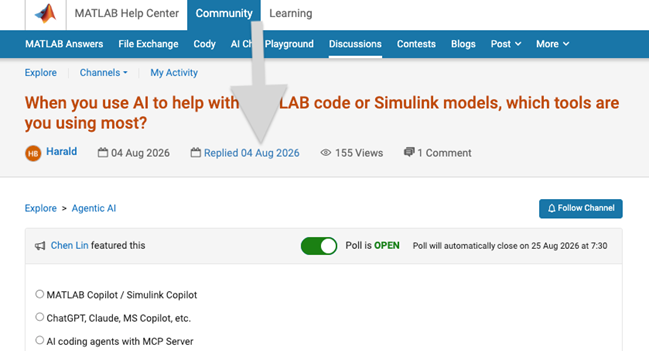
We heard your feedback that it can be difficult to find the latest comment or reply in long threads. To make this easier, you can now jump directly to the latest activity by clicking the latest activity date link at the top of the leaf page. See the screenshot below for an example. This is similar to the experience of MATLAB Answers today.
Thanks again for sharing your feedback and helping us improve the experience.
Physics and astronomy with AI on your phone
by Duncan Carlsmith
The other morning I was having a cup of coffee and had a thought, then another, and shortly I had performed scientific audio analysis of a phone voice memo and then scientific night-sky image plate solving with phone images, both analyses presenting figures and detailed descriptive text. All on my phone, with Claude, before I finished my coffee. Any student might be able to do this.
By way of background, I have been for some years laboriously developing educational MATLAB Live Scripts for undergraduate students of physics, astronomy, and engineering. (See MATLAB File Exchange.) Several entail scientific analysis of mobile phone audio recordings. One performs FEA of Buddha bowls, wine glasses, and other common objects one can scan with one’s phone. Others study mobile phone videos and night-sky images. SInce late 2025, I have been using agentic AI and, with AI assistance, I recently developed and published a mobile phone image plate solver that identifies stars and calibrates the phone camera. AI is great for speeding up research and development of such products. But my “over coffee” experience reminded me AI is also good at one-off applications. However, for student use, there is a caveat: at some level, the AI knew me and what I know and wasn’t working entirely in a vacuum. How much so is difficult for me to reconstruct. Claude waffles when asked and is really unable to say. The only hard record is the tools it called and responses it generated.
So my first coffee thought this weekend was to start a fresh chat with using Claude iOS app (using Opus 5) and to copy-paste into that chat an iPhone voice memo of a singing Buddha bowl, an audio recording that I had made at home some years ago, and then to ask simply for a Fourier analysis. The figures generated (Figure 1) and analysis (Appendix) were eye-popping.
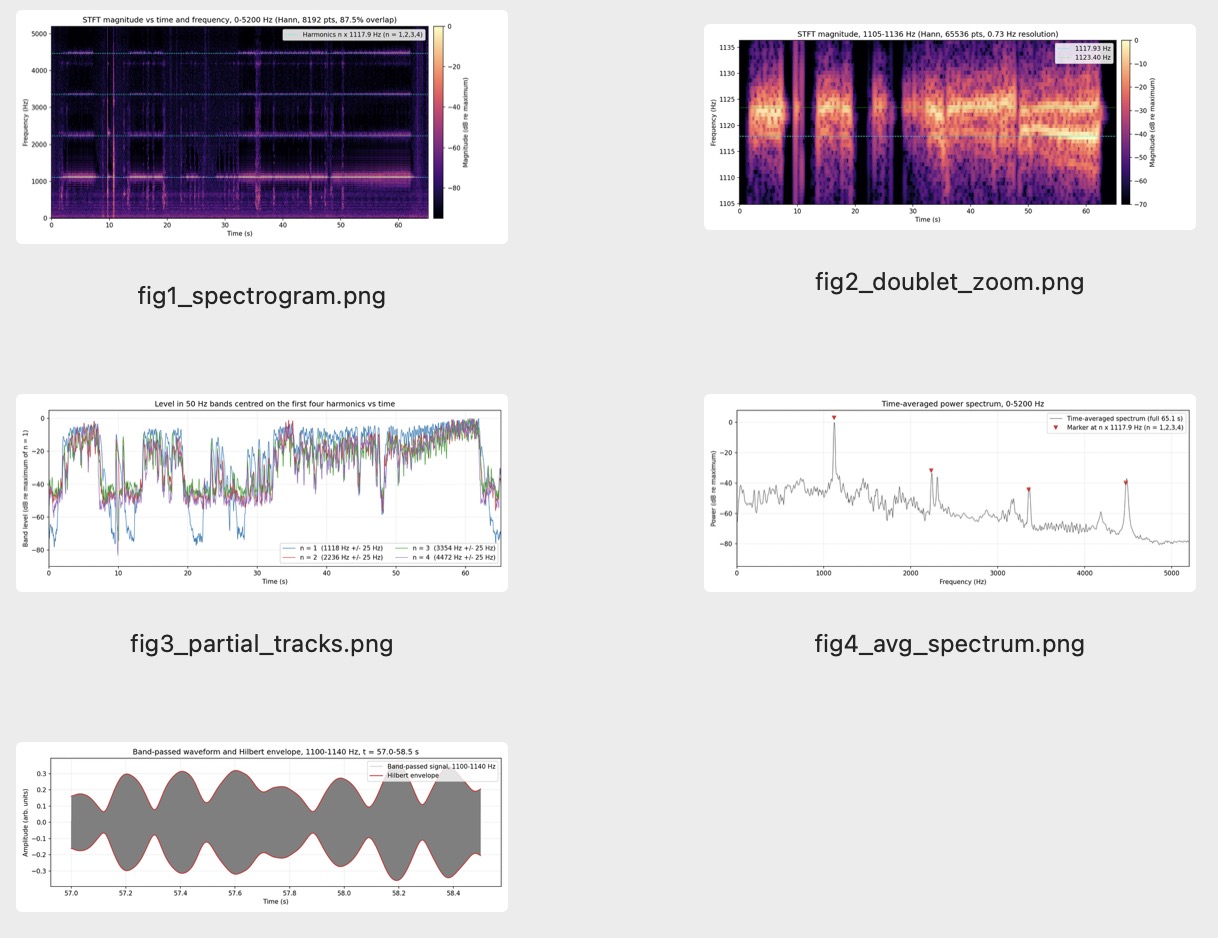
Figure 1: AI analysis of a Buddha bowl caused to sing
Notice in the power spectrum evidence for line splitting due to deviations of the bowl from circular symmetry that result in a characteristic audible audio beat phenomenon. In its text response (see below), Claude called this out and much else without prompting. All the work happened in the chat’s container with web access. My Buddha bowl and other audio studies pre-dated AI, so as far as I know, Claude was in this sense starting from scratch. If so, this kind of audio analysis is available to a student new to physics and new to audio analysis.
So then I copied a night-sky image from iOS Photos and simply asked Claude to identify the stars in the image. After about 14 minutes without further ado, I had a solved image and detailed description. I then asked Claude to re-use its harness to solve another image and, in 6 minutes, I received similar results (Figure 2). Once it builds an application in its container, it can re-use it. If you like, you may be able save the harness as reproducible code, but for a one-off exploration, that’s unnecessary.
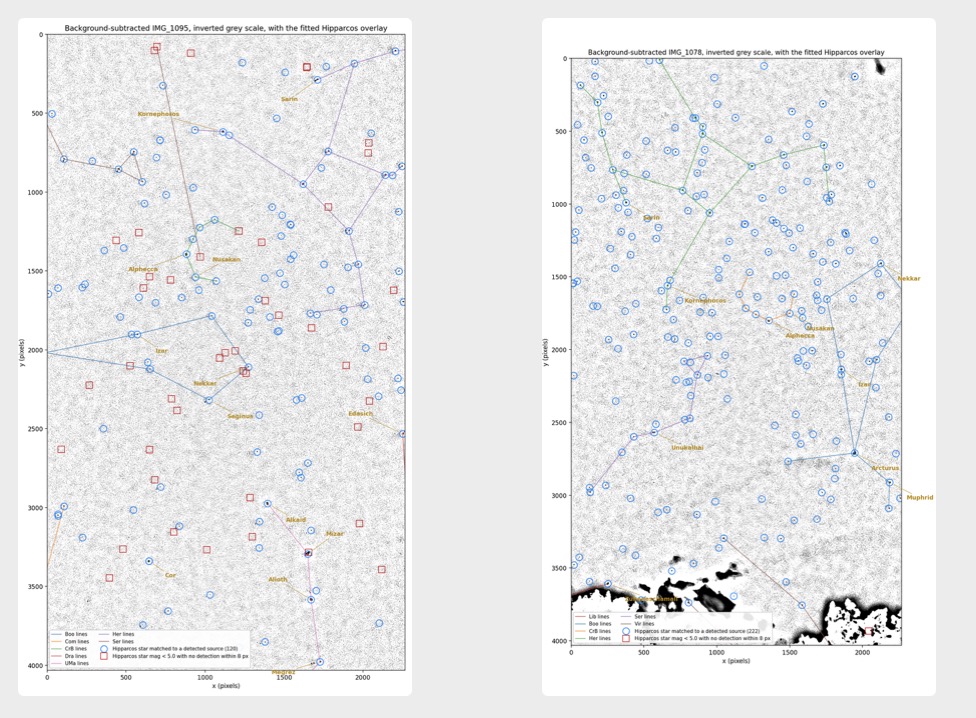
Figure 2: AI mobile-phone night-sky image plate solving with a simple prompt. The fitted solutions are shown back-projected on background-subtracted grayscale images.
In the image analysis case, Claude was not working from scratch. I had used Claude in a prior chat to develop a novel rather involved plate solver package (Celestial Plate Solver), a mixture of MATLAB and Python, so this new chat was likely familiar with my plate solving algorithms and resources. But I discovered Claude had used a different approach to the problem in our new coffee chat. I was immediately excited to explore this new approach and that led to my most recent FEX submission Mobile Phone Plate Solver.
The prompts and text responses chat are appended below.
If you have an idle moment, try these two phone-data analysis tasks yourself with your AI agent and let me know how it goes in a response. Record a voice memo or take a night-sky photo, open your agentic AI app, attach the memo or photo, and provide my prompt. Then try variants, and video analysis, and… Have fun!
Acknowledgments and disclosure
The results presented here were prepared by Anthropic Claude. The author wrote the essay and declares he has no financial interest in Anthropic or MathWorks.
————————————————————————————————————
Appendix: AI chat leading to audio and image analysis results
Prompt: Fourier analyse this recoding of a singing bhudda bowl and plot the frequency distribution over time.
Response:
Recording: 65.13 s, mono, 48 kHz AAC, peak 0.76 full scale, no clipping.
Measured values (Hann-windowed FFT, 0.25 Hz effective resolution on t = 54-62 s):
- Fundamental doublet: 1117.93 and 1123.40 Hz, split 5.47 Hz. Amplitude-modulation rate measured independently from the Hilbert envelope of the 1100-1140 Hz band: 5.22 Hz.
- Upper partials at 2236, 3354, 4472 Hz, i.e. n x 1117.9 within 0.2 percent, each appearing as a cluster consistent with n-fold combinations of the two doublet members.
- 99.6 percent of the total energy lies in 900-1400 Hz.
- Weak features near 3170 and 4180 Hz sit 55-65 dB down and are not resolved into stable lines.
- Envelope shows six excitation episodes separated by near-silence (roughly 1-8, 13-20, 22-28, 32-48, 49-62 s), with broadband vertical streaks at onsets.
The near-exact integer ratios distinguish these upper partials from the inharmonic mode series of a struck bowl; a periodic stick-slip drive would produce this pattern, but I have not tested that against an alternative such as recording-chain nonlinearity.
Tell me if you want the numbers exported, a MATLAB version of the analysis, or a decay-rate (Q) fit on the tail after the last episode.
Fig1 spectrogram
Image · PNG
Fig2 doublet zoom
Image · PNG
Fig3 partial tracks
Image · PNG
Fig4 avg spectrum
Image · PNG
Fig5 beats
Image · PNG
Prompt: Describe the results.
Response:
Fig 1, broadband spectrogram (0-5200 Hz). Four horizontal bright lines at 1118, 2236, 3354, and 4472 Hz persist through the whole recording, brightest at the bottom and falling roughly 35, 45, 40 dB below it. Between them the plane is dark. Six bright blocks separated by dark gaps mark the excitation episodes; the gaps are the noise floor. Narrow vertical streaks spanning all frequencies occur at roughly 9.5, 10.5, 19.5, 35.5, 48, and 50 s — impulsive events (contact, table knock, or mallet reseating) whose energy is broadband rather than tonal. Below 900 Hz there is a diffuse haze with no stable line.
Fig 2, zoom to 1105-1136 Hz. The single bright line of Fig 1 resolves into two. Both are present in every episode and neither drifts detectably in frequency over 65 s. Their relative brightness changes between episodes: around t = 4-7 s the upper member near 1123 Hz dominates; from t = 49 s on the lower member near 1118 Hz is the stronger. The horizontal striping visible inside each block is the modulation sideband structure, not separate modes.
Fig 3, band levels vs time. All four harmonic bands rise and fall together, tracking within a few dB across 60 dB of dynamic range. During the gaps they collapse to a common floor near -45 dB, which is the noise floor rather than a real signal. The n = 1 trace dips below the others in the gaps because the noise floor in its 50 Hz band happens to be lower. The strongest passage is t = 55-62 s, ending in an abrupt 40 dB drop at 62 s when the excitation stops.
Fig 4, time-averaged spectrum. One dominant peak at 1118 Hz, then peaks at each integer multiple decreasing in height, sitting on a broadband background that falls from about -40 dB at low frequency to -80 dB above 4.6 kHz. Two shallow bumps at roughly 3170 and 4180 Hz rise about 10 dB above the local background but do not resolve into stable narrow lines in the high-resolution windows.
Fig 5, band-passed waveform and envelope. The 1100-1140 Hz signal is a carrier near 1120 Hz with its amplitude modulated at about 5.2 Hz, giving envelope minima roughly every 0.19 s. The modulation is deep but not to zero — the envelope minima sit near 0.07-0.12 in units where the maxima reach 0.30-0.36 — so the two components differ in amplitude rather than being equal and cancelling.
Physically, the doublet is the signature of a broken degeneracy: a perfectly axisymmetric shell has a degenerate pair of (2,0)-type bending modes, and any departure from axisymmetry in wall thickness or rim shape splits them by an amount set by the asymmetry. Here that split is 5.47 Hz on 1118 Hz, about 0.5 percent. The audible beat is the interference of the pair, and the beat rate measured from the envelope agrees with the frequency difference to within the resolution of the envelope estimate. The changing balance between the two members across episodes is consistent with different drive positions around the rim exciting the two orthogonal mode shapes in different proportion, though I have not tested that.
Prompt: Identify the stars in this image.
Response:
Solved. iPhone 13 Pro, 1 s at ISO 10000, 2026-06-11 23:19:33.6 CDT from 43.0559 N, 89.4353 W. Field is centred near the zenith at az 235.8, alt 80.3, spanning about 41 x 67 degrees.
Method: 206 sources extracted, then a 2-point RANSAC against Hipparcos in the topocentric alt-az frame, refined with focal length, principal point, and two radial distortion terms. Result: 120 catalogue stars matched with median residual 1.0 px, plate scale 68.4 arcsec/px, f = 3014.9 px, k1 = 0.062, k2 = -0.065. Faintest match V = 6.4. The compass tag in EXIF (102 deg magnetic) does not agree with the solved pointing, which is expected with the phone aimed nearly straight up.
Brightest stars in the frame:
HIP Name Con V x, y (px)
62956 Alioth UMa 1.76 1670, 3584
67301 Alkaid UMa 1.85 1395, 2974
76267 Alphecca CrB 2.22 882, 1393
65378 Mizar UMa 2.23 1650, 3294
72105 Izar Boo 2.35 570, 1901
80816 Kornephoros Her 2.78 1112, 617
81693 zeta Her Her 2.81 1620, 949
63125 Cor Caroli CVn 2.89 645, 3340
71075 Seginus Boo 3.04 1025, 2318
84379 Sarin Her 3.12 1711, 288
75458 Edasich Dra 3.29 2253, 2533
59774 Megrez UMa 3.32 1727, 3977
Constellation census of the 120 matches: Hercules 35, Bootes 26, Corona Borealis 20, Canes Venatici 13, Serpens Caput 11, Ursa Major 7, Draco 4, Coma Berenices 4.
The Big Dipper handle runs along the bottom edge (Megrez, Alioth, Mizar, Alkaid), the Bootes kite and the Corona Borealis semicircle sit in the middle, and the Hercules Keystone occupies the upper right. Arcturus falls 16 px outside the left edge at y = 2019, so it is just off-frame. No planets or the Moon were above the horizon in this direction; all eight were below it.
Prompt: What resources did you use to figure out how to do this work?
Response:
Downloads (all via curl with certificate verification disabled, since the container's proxy presents a self-signed chain that broke urllib):
Hipparcos main catalogue, hip_main.dat from CDS/VizieR I/239, 53 MB. This is the astrometry and photometry source for everything — 118,218 entries, cut to 15,404 at V < 7.
IAU-CSN.txt, the IAU Working Group on Star Names catalogue, from Eric Mamajek's page at Rochester. Gives proper names keyed to HIP numbers.
constellationship.fab from the Stellarium repository, tag v0.21.3, western sky culture. Stick-figure line segments expressed as HIP number pairs, which is why the overlay lines land on the right stars with no extra cross-matching.
de421.bsp from JPL — this one failed. The URL returned a 114-byte stub beginning "UPSTREAM", so I dropped the planetary ephemeris and used astropy's built-in ERFA series instead, which is far more than adequate at 68 arcsec/px.
Python packages: skyfield 1.55 (used only for its Hipparcos fixed-width parser), astropy 8.0.1 (SkyCoord, AltAz with IERS auto-download disabled, get_constellation, get_body), scipy (ndimage for source labelling, cKDTree for nearest-neighbour matching, least_squares for the fit), numpy, and PIL for EXIF and pixel access. exiftool is not installed in this container, so the EXIF came from PIL's getexif plus the GPS and Exif sub-IFDs.
Methods came from my own knowledge rather than from any document I fetched: gnomonic projection, the Kabsch SVD construction of a rotation from paired unit vectors, two-point RANSAC keyed on angular separation between bright pairs, the Brown-Conrady radial distortion form, and Levenberg-Marquardt for the refinement.
I did not use astrometry.net, any index files, your CelestialPlateSolver code, or a web search. The only prior input was the EXIF time and site coordinates, which fixed the alt-az frame; the identification itself came from pattern matching and would stand even if the timestamp were wrong.
Prompt: You should have all the tools in your container. Solve this image with the same methods. I want to know how long this step takes and compare to the time to solve the previous image when you started from scratch.
Solved. IMG_1078: 2026-06-07 01:35:53 CDT, ISO 5000, same site. Field centre az 238.56, alt 56.30, looking southwest at Bootes with Hercules toward the upper left. 222 of 404 in-frame Hipparcos stars matched, median residual 1.08 px, scale 68.22 arcsec/px, FOV 41.1 x 67.4 deg, f = 3023.7 px, k1 = 0.0488, k2 = -0.0420 — consistent with the values from IMG_1095 (68.28 arcsec/px, k1 = 0.0616), as expected for the same lens.
Brightest stars: Arcturus (V -0.05, at 1945, 2710), Alphecca 2.22, Izar 2.35, Zubeneschamali 2.61, Unukalhai 2.63, Muphrid 2.68, Kornephoros 2.78, zeta Her 2.81, Sarin 3.12. Constellation census: Her 93, Boo 47, CrB 31, Ser 29, Vir 11, Lib 9, Dra 2. Trees fill the bottom corners and a lit cloud sits at bottom centre; those regions produced detections but no false matches.
Timing.
IMG_1095, from scratch IMG_1078, reusing the pipeline
Elapsed from upload to final figure about 14 min (14:14 to 14:28 by file mtimes) about 6 min
Scripted compute only 123.3 s (measured by re-running the same pipeline on it just now) 129.6 s
The compute is essentially identical, 123 vs 130 s, and the small difference is just source count: IMG_1078 yielded 699 detections against 206, so the RANSAC pair loop had more work. That loop dominates completely — 106 s and 109 s of the two totals, 86 percent. Everything else is trivial: EXIF 0.1 s, extraction 2.2 s, catalogue transform 1-4 s, the distortion refinement 0.01 s, and 14 s in get_constellation, which is a slow per-star Python loop.
So the real saving was not compute but the exploratory overhead: the first pass spent roughly 11 of its 14 minutes on catalogue downloads, the failed ephemeris fetch and workaround, discovering the constellation-line file, and iterating on the figure. The second pass ran one script.
One correction worth noting, found while checking the new solve. Deneb came out at pixel (850, 319), apparently inside the frame, but it is 65.5 deg from the field centre against a 37.4 deg half-diagonal — the radial distortion polynomial is non-monotonic beyond r ≈ 0.85 and folds far-off-axis stars back into the frame. I added a guard on undistorted radius. It removed 2 spurious matches from IMG_1078 (224 to 222) and 203 phantom in-frame entries; IMG_1095's 120 matches were unaffected, though its in-frame count drops from 620 to 417.
Prompt: Create in my new ClaudePlateSolver folder a package with this pipeline and the requisite files and a folder of scripts for installation of dependencies and a Readme.md explanation of how the user can use this package to solve their own image. Do you have any questions? Do not overwrite any file in my system or launch MATLAB without my approval.
…

Very Favorable
21%
Favorable
22%
Neutral
20%
Unfavorable
17%
Very Unfavorable
20%
886 votes

MATLAB Copilot / Simulink Copilot
21%
ChatGPT, Claude, MS Copilot, etc.
41%
AI coding agents with MCP Server
7%
AI coding agents without MCP Server
1%
I am using different tooling
3%
I am not using any AI tooling
28%
437 votes

💡About
First, I would like to thank everyone who has downloaded my eds-classification repository so far. This post is meant for those who are currently using the repository or may be interested in using the repository in their research.
To keep things short, I have released v2.0 of the eds-classification series on GitHub and the File Exchange. The update comes with significant changes to the repository structure and functions, and so it is worth noting that the update will likely be incompatible with any scripts written using prior releases.
The update provides several key new features that are meant to improve usability and producton. If you are interested in seeing how eds-classification may help you with your mineralogy research, please check out the release notes for v2 and consider giving the repository a try.
Respectfully,
Austin
📝Release Notes
The full release notes for v2 are available here: https://github.com/weber1158/eds-classification/releases/tag/v2.0
⬇️Download Now

Hello everyone,
Today, we have a wide range of models available for problem-solving, education, and agentic coding. Picking a model for a task itself is a skill worth learning and exploring. We have a bouquet of closed models from Anthropic, OpenAI, Grok (Cursor), Mistral, and Gemini, as well as open-source models like Kimi and Gemma.
I am wondering whether, as a MathWorks community, we can come up with some benchmarks tailored for MATLAB + AI models by choosing and compiling tasks like plotting (graphing), some matrix problems, signal processing tasks, control system problems and other engineering problems, and then test AI model with Matlab-MCP server and document performance.
Reaching a consensus would really help us choose a certain model for certain tasks. That way, we can save API tokens, be smart with our choices and as a community, we can learn and help by sharing our experiences. I would love to hear your thoughts and see what this conversation could lead to.
@Hans Scharler do you have any initial thoughts to share with us?

I often see the need of argument validation for which the arguments depend on each other.
function result = myFcn(points, attributes, queryIdx)
% INPUT
% points: [Nx3]
% attributes: [Nx1]
% queryIdx: [Mx1]
%
% OUTPUT
% result: [Mx1]
end
points and attributes depend in size, queryIdx and result as well. The current arguments/end block does not allow to formulate such constraints. The best you can do currently is
function result = myFcn(points, attributes, queryIdx)
arguments(Input)
points (:,3)
attributes (:,1)
queryIdx (:,1)
end
arguments(Output)
result (:,1)
end
assert(height(points) == height(attributes), "Argument validation failed")
...
assert(height(queryIdx) == height(result), "Argument validation failed")
end
Reading just the header without additional comments is unclear for a developer and prone to misunderstanding.
What do you think of the following language extension proposal?
function result = myFcn(points, attributes, queryIdx)
arguments(Input)
points (N,3)
attributes (N,1)
queryIdx (M,1)
end
arguments(Output)
result (M,1)
end
end
The intention is clear for the reader at first sight and gives you guarantees about input/output parameters (in contrast to simple comments). Validating the parameter "points" sets the (temporary) variable N, which can be reused in further argument validations. To be discussed if N and M are valid just within the arguments block or also in the whole function.
What is your opinion on such a language improvement?

What did you guys do? It's impossible to edit figures on the fly now. Even simple things like removing data series and then removing them from the legend have become impossible without meddling with code. It used to be you could do little touch ups and even copy series from one figure to the next in the most expeditious and simple way, that to me was a big plus of using Matlab over python. Now this is so backwards and unintuitive, what were you guys thinking?
AI writes all my code now
18%
Multiple times a day
24%
A few times a week
15%
A few times a month
7%
Only for suggestions
22%
It is not allowed for my work
14%
758 votes

I've left Matlab Answers in spring 2023. At this time the forum was full of interesting programming questions, e.g about optimizing code. A bunch of experienced Matlab users have discussed diefferent approachs and compared them. Some questions have concerned beginner problems and home work solutions, others belonged to professionally used tools for scientific work
Every week some new tools for dailiy use have been posted in the FileExchange.
Today, 3 years later, the traffic is much lower and questions concern the correct usage of Matlab commands usually. Submissions in the FileExchange are very specific and rarely useful for general programming jobs.
What has happend?

Hi everyone,
Simulations have a way of outgrowing the machine they run on (at least mine do). Bigger sweeps, longer regression suites, more data to pull in. At some point your workstation just isn't beefy enough!
I've just published a post on running larger MATLAB and Simulink simulations in the cloud (e.g. AWS): more compute when we need it, without changing how we work day to day.
The example is from automotive, but the same applies to aerospace, robotics, and beyond.
If you want to read more, here's the link: https://blogs.mathworks.com/engineering/2026/07/14/on-scaling-model-based-design-into-the-cloud/
How are others handling scaling for simulation? what's working for you?
Cheers,
George

