Paint store color swatch for Matlab
Eric LePage
on 6 Oct 2024
Latest activity Reply by Walter Roberson
on 11 Oct 2024
If I go to a paint store, I can get foldout color charts/swatches for every brand of paint. I can make a selection and it will tell me the exact proportions of each of base color to add to a can of white paint. There doesn't seem to be any equivalent in MATLAB. The common word "swatch" doesn't even exist in the documentation. (?) One thinks pcolor() would be the way to go about this, but pcolor documentation is the most abstruse in all of the documentation. Thanks 1e+06 !
10 Comments
Time Descending
Hiroshi, Great! Very useful subset. For that list survey suggested by Walter, I built my own swatch. I can sort it any which way. I attach a screen dump, sorted alphabetically. Shows there's a lot of redundancy. Incidentally, in adding the labels, I needed to decide of the fill background is light or dark to decide whether to make the label black or white. Color depth is not a good indication, because ff ff 0 is still very bright (yellow). It seems you have solved that problem. How did you do it?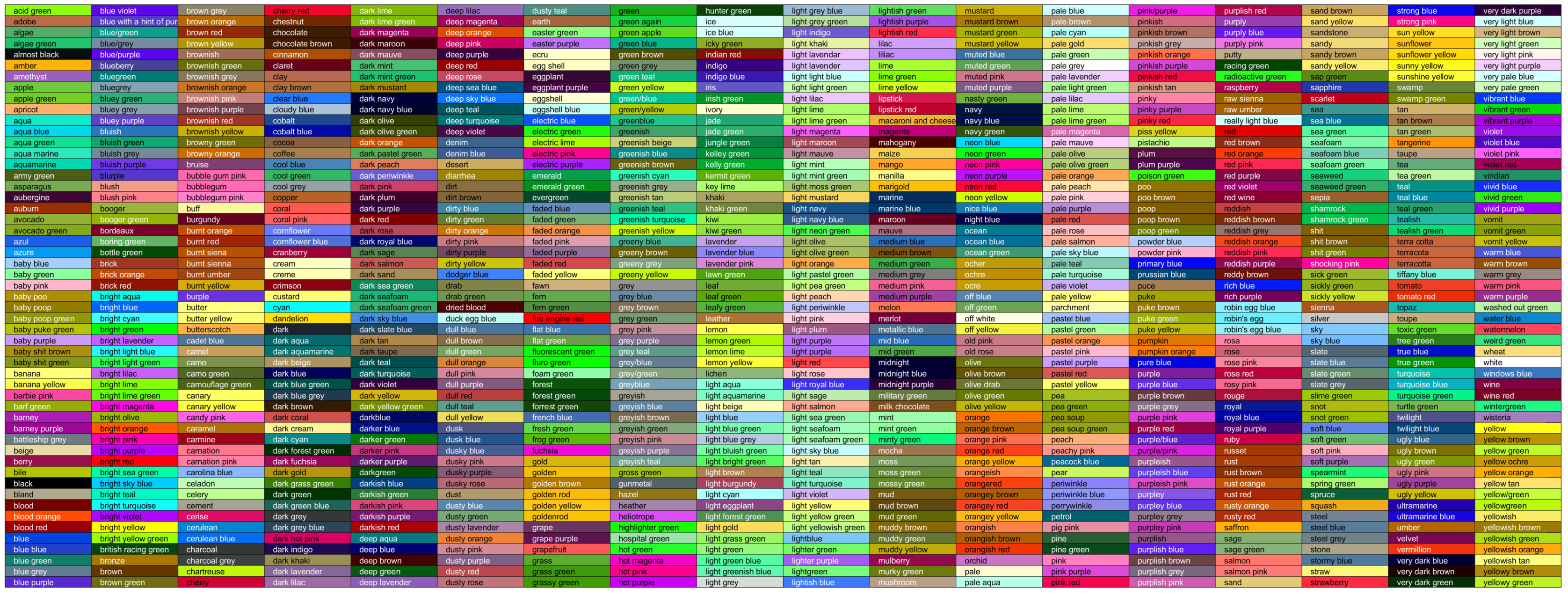

Hi, Eric-san,
Thank you for the interesting topic.
There was a mistake. The line fcol = 'b'; was supposed to be fcol = 'k';.
For choosing the label color, I initially tried inverting the RGB values, but the results were not satisfactory. Instead, I found it easier to read by inverting the color to either black or white based on whether the brightness (rounghly * [0.3 0.6 0.1]') of the background color was greater than 0.5.
As an alternative, there is a method to declare color names using structures.
I asked ChatGPT to declare 141 commonly used web colors.
function webColor = createWebColorStruct()
webColor.aliceblue = "#f0f8ff";
webColor.antiquewhite = "#faebd7";
webColor.aqua = "#00ffff";
webColor.aquamarine = "#7fffd4";
webColor.azure = "#f0ffff";
webColor.beige = "#f5f5dc";
webColor.bisque = "#ffe4c4";
webColor.black = "#000000";
webColor.blanchedalmond = "#ffebcd";
webColor.blue = "#0000ff";
webColor.blueviolet = "#8a2be2";
webColor.brown = "#a52a2a";
webColor.burlywood = "#deb887";
webColor.cadetblue = "#5f9ea0";
webColor.chartreuse = "#7fff00";
webColor.chocolate = "#d2691e";
webColor.coral = "#ff7f50";
webColor.cornflowerblue = "#6495ed";
webColor.cornsilk = "#fff8dc";
webColor.crimson = "#dc143c";
webColor.cyan = "#00ffff";
webColor.darkblue = "#00008b";
webColor.darkcyan = "#008b8b";
webColor.darkgoldenrod = "#b8860b";
webColor.darkgray = "#a9a9a9";
webColor.darkgreen = "#006400";
webColor.darkkhaki = "#bdb76b";
webColor.darkmagenta = "#8b008b";
webColor.darkolivegreen = "#556b2f";
webColor.darkorange = "#ff8c00";
webColor.darkorchid = "#9932cc";
webColor.darkred = "#8b0000";
webColor.darksalmon = "#e9967a";
webColor.darkseagreen = "#8fbc8f";
webColor.darkslateblue = "#483d8b";
webColor.darkslategray = "#2f4f4f";
webColor.darkturquoise = "#00ced1";
webColor.darkviolet = "#9400d3";
webColor.deeppink = "#ff1493";
webColor.deepskyblue = "#00bfff";
webColor.dimgray = "#696969";
webColor.dodgerblue = "#1e90ff";
webColor.firebrick = "#b22222";
webColor.floralwhite = "#fffaf0";
webColor.forestgreen = "#228b22";
webColor.fuchsia = "#ff00ff";
webColor.gainsboro = "#dcdcdc";
webColor.ghostwhite = "#f8f8ff";
webColor.gold = "#ffd700";
webColor.goldenrod = "#daa520";
webColor.gray = "#808080";
webColor.green = "#008000";
webColor.greenyellow = "#adff2f";
webColor.honeydew = "#f0fff0";
webColor.hotpink = "#ff69b4";
webColor.indianred = "#cd5c5c";
webColor.indigo = "#4b0082";
webColor.ivory = "#fffff0";
webColor.khaki = "#f0e68c";
webColor.lavender = "#e6e6fa";
webColor.lavenderblush = "#fff0f5";
webColor.lawngreen = "#7cfc00";
webColor.lemonchiffon = "#fffacd";
webColor.lightblue = "#add8e6";
webColor.lightcoral = "#f08080";
webColor.lightcyan = "#e0ffff";
webColor.lightgoldenrodyellow = "#fafad2";
webColor.lightgreen = "#90ee90";
webColor.lightgray = "#d3d3d3";
webColor.lightpink = "#ffb6c1";
webColor.lightsalmon = "#ffa07a";
webColor.lightseagreen = "#20b2aa";
webColor.lightskyblue = "#87cefa";
webColor.lightslategray = "#778899";
webColor.lightsteelblue = "#b0c4de";
webColor.lightyellow = "#ffffe0";
webColor.lime = "#00ff00";
webColor.limegreen = "#32cd32";
webColor.linen = "#faf0e6";
webColor.magenta = "#ff00ff";
webColor.maroon = "#800000";
webColor.mediumaquamarine = "#66cdaa";
webColor.mediumblue = "#0000cd";
webColor.mediumorchid = "#ba55d3";
webColor.mediumpurple = "#9370db";
webColor.mediumseagreen = "#3cb371";
webColor.mediumslateblue = "#7b68ee";
webColor.mediumspringgreen = "#00fa9a";
webColor.mediumturquoise = "#48d1cc";
webColor.mediumvioletred = "#c71585";
webColor.midnightblue = "#191970";
webColor.mintcream = "#f5fffa";
webColor.mistyrose = "#ffe4e1";
webColor.moccasin = "#ffe4b5";
webColor.navajowhite = "#ffdead";
webColor.navy = "#000080";
webColor.oldlace = "#fdf5e6";
webColor.olive = "#808000";
webColor.olivedrab = "#6b8e23";
webColor.orange = "#ffa500";
webColor.orangered = "#ff4500";
webColor.orchid = "#da70d6";
webColor.palegoldenrod = "#eee8aa";
webColor.palegreen = "#98fb98";
webColor.paleturquoise = "#afeeee";
webColor.palevioletred = "#db7093";
webColor.papayawhip = "#ffefd5";
webColor.peachpuff = "#ffdab9";
webColor.peru = "#cd853f";
webColor.pink = "#ffc0cb";
webColor.plum = "#dda0dd";
webColor.powderblue = "#b0e0e6";
webColor.purple = "#800080";
webColor.rebeccapurple = "#663399";
webColor.red = "#ff0000";
webColor.rosybrown = "#bc8f8f";
webColor.royalblue = "#4169e1";
webColor.saddlebrown = "#8b4513";
webColor.salmon = "#fa8072";
webColor.sandybrown = "#f4a460";
webColor.seagreen = "#2e8b57";
webColor.seashell = "#fff5ee";
webColor.sienna = "#a0522d";
webColor.silver = "#c0c0c0";
webColor.skyblue = "#87ceeb";
webColor.slateblue = "#6a5acd";
webColor.slategray = "#708090";
webColor.snow = "#fffafa";
webColor.springgreen = "#00ff7f";
webColor.steelblue = "#4682b4";
webColor.tan = "#d2b48c";
webColor.teal = "#008080";
webColor.thistle = "#d8bfd8";
webColor.tomato = "#ff6347";
webColor.turquoise = "#40e0d0";
webColor.violet = "#ee82ee";
webColor.wheat = "#f5deb3";
webColor.white = "#ffffff";
webColor.whitesmoke = "#f5f5f5";
webColor.yellow = "#ffff00";
webColor.yellowgreen = "#9acd32";
end
webcolor = createWebColorStruct();
axis square
axis off
col = webcolor.rebeccapurple;
rectangle('Position',[4 3 5 5], ...
'Curvature',[1 1],FaceColor = col);
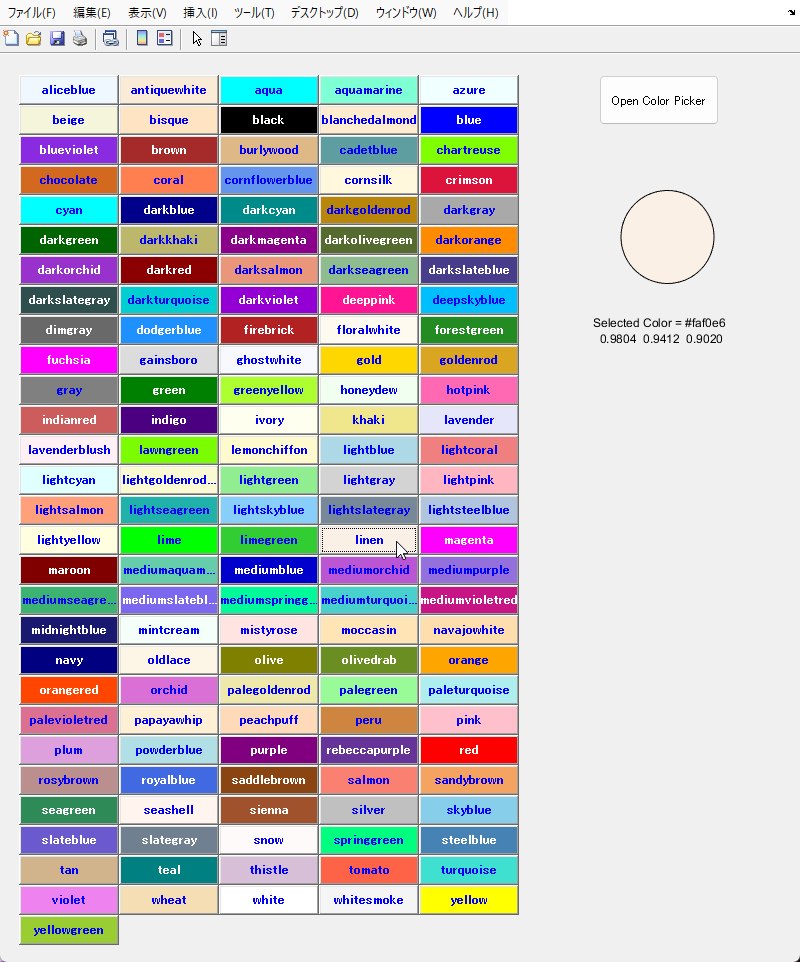
By doing this, you can select from the color name options in the Live Editor.
If you display them in buttons in the UI, you can also select a color by clicking on it.
function customColorPicker()
% Define custom colors
webcolor = createWebColorStruct();
colorNames = fieldnames(webcolor);
customColors = struct2cell(webcolor);
numColors = length(customColors);
dh = 30;
h = floor(dh * (numColors + 2) / 5);
% Create a figure
f = figure('Position', [100, 100, 800, h+50]);
% Draw circle
ax = uiaxes(f,'Position',[600 h-200 120 120]);
rect = rectangle(ax,'Position',[0.25 0.25 0.5 0.5], ...
'Curvature',[1 1],FaceColor="b");
axis(ax,"equal")
axis(ax,"off")
str1 = sprintf('Selected Color = %s',rgb2hex(rect.FaceColor)); % R2024a later
str2 = sprintf(' %.4f',rect.FaceColor);
text(600, h-200-130, {str1; str2}, "FontSize",100)
t = text(0.1, 0, {str1; str2}, "FontSize",12);
% Create buttons for each custom color
for i = 1:numColors
x = mod(i-1,5) * 100 + 20;
y = h - floor((i-1)/5) * dh;
if (hex2rgb(customColors{i}) * [0.3 0.6 0.1]') > 0.5
fcol = 'b';
else
fcol = 'w';
end
uicontrol('Style', 'pushbutton', ...
'BackgroundColor', customColors{i}, ...
'ForegroundColor', fcol, ...
'FontWeight','bold', ...
'String', colorNames{i}, ...
'Position', [x, y, 100, dh], ...
'Callback', @(src, event) selectColor(customColors{i}, rect, t));
end
% Create a ColorPicker button
uicontrol('Style', 'pushbutton', ...
'String', 'Open Color Picker', ...
'Position', [600, h-20, 120, 50], ...
'Callback', @(src, event) openColorPicker(rect, t));
end
function selectColor(color, rect, t)
rect.FaceColor = color;
% fprintf('Selected Color = %s\n',color);
% fprintf('%.4f ',validatecolor(color)); % R2020b later
% fprintf(newline)
str1 = sprintf('Selected Color = %s',color);
str2 = sprintf(' %.4f',validatecolor(color)); % R2020b later
t.String = {str1; str2};
end
function openColorPicker(rect, t)
color = uisetcolor();
if sum(color) ~= 0
disp(['Picked Color: ', num2str(color)]);
rect.FaceColor = color;
str1 = sprintf('Selected Color = %s',rgb2hex(color)); % R2024a later
str2 = sprintf(' %.4f',validatecolor(color)); % R2020b later
t.String = {str1; str2};
end
end
% Run the custom color picker
customColorPicker();
Ideally, it would be best if the official support included color names beyond just the primary colors.

Ideally, it would be best if the official support included color names beyond just the primary colors.
As Walter wrote previously, getting agreement on what those colors should be named beyond the eight "primary" colors (red, green, blue, cyan, magenta, yellow, black, and white) can be surprisingly difficult. See this XKCD blog post for a discussion of the analysis he did to generate the list of colors to which Walter linked. [Note that you have hotpink, pink, magenta, salmon, and fuchsia on your list all of which are noted in one section or another of that blog post. Are they all different or should they be lumped together as "pink"?]
In addition, the differences between colors with different names can be very subtle (and may be different depending on your monitor settings, the brighness of the location where you're looking at the colors, and even the differences between my eyes and yours.)
As examples, looking at your picture on my monitor I find it very difficult to tell what the difference is between "antiquewhite" and "bisque", "moccasin" and "navajowhite", "midnightblue" and "navy", "lemonchiffon" and "lightgoldenrod", and "lawngreen" and "chartreuse" (just to name a few close pairings.) I could believe that they are (slightly) different color codes, but if you made me guess which was which on a game show I'd be essentially flipping a coin to decide.
Defining "pink" as a particular RGB triplet or hex color code would be possible for us to include in the "official support". I don't think it would be that difficult for us to do. [I say this not having looked at the graphics code dealing with color, so I could be underestimating the difficulty.]
Deciding which RGB triplet or hex color code is "pink" (and figuring out how we'd address user feedback about "That's not pink, this other color is pink!") would be the tough (potentially nigh-impossible) part. Also figuring out how we'd handle misspellings (see the discussion on the blog post about "baige" and "fuscia"/"fucsia"/"fuschia"/"fuschia"/"fushia"/"fuchia"/"fuschia") likely would be the subject of a lot of discussion / argument.
The eight primary colors we have names for have pretty clear definitions: they are the eight colors at the corners of the [0, 1] cube (all their RGB components are either 0 or 1.) In-between those colors, there be dragons -- and often those dragons are called different things by different people.
What you are saying is absolutely correct.
However, the demands of many people are probably much simpler.
The default color palette in MATLAB uses intermediate colors.
We simply want to use those colors by their names, rather than by index numbers or color codes.
In fact, in HTML and JUCE etc., those color names can be used to specify colors as the CSS definition.
Incidentally, regarding the differences in color perception, I believe there is no need to worry too much.
Because, if the color that appears as RED to me appears as YELLOW to someone else, both of us would still define it as "RED," so no discrepancy would occur. (The actual difference in perception is likely smaller.)

In fact, in HTML and JUCE etc., those color names can be used to specify colors as the CSS definition.
But https://en.wikipedia.org/wiki/X11_color_names shows that there are standards arguments about some of the basic color names such as "light gray"
(I measured differences in color perception quite a long time ago, and even in the same person, there are differences between the left and right eyes, and it can also change depending on their physical condition on that day.)
Thanks crew. I have always wanted a swatch for MATLAB colors, so thanks Walter for the link to the 954 colors. Looks great on my 34" monitor. It took a day with all the fiddling. Of course I can sort the colours by primaries or secondaries. Too hard to generate codes, so I just did a screen dump.
Take a look at the uisetcolor function or (if you want to allow users of an app to select a color as part of that app's workflow) the uicolorpicker function.
See https://xkcd.com/color/rgb/ for a table of 954 distinct colors that people repeatedly named in a survey.
The survey got more than 1.5 million responses, so there were many more colors that were named but less reliably.
You will see in the later discussion that there are arguments in the standards organizations about which colors to associate with which names.
Now, the exact portions of each base color to mix together to produce particular tints are going to depend upon which manufacturer and which line -- for example to get any particular tint, the mix would be different between Irwin Williams glossy paints and Durelco flat paints.
It isn't that what you are discussing is not possible, but it would be a lot of work to put together and would only be valid for one line of one manufacturer (unless you did the work to expand it.)
Sign in to participate