Main Content

showAllocation

R2026b

Resource unit allocation

Description

showAllocation(cfg) shows the resource unit (RU) allocation in a WLAN transmission parameterized by format configuration cfg. You can get more information about an RU by clicking on it.

example

showAllocation(cfg,ax) specifies ax, the axes that the function uses to plot the allocation.

Examples

collapse all

Create a trigger-based UHR configuration object of RRUs. Specify an RU size of 26. Show the RU allocation of the configuration.

cfg = wlanUHRTBConfig(RUSize=26);
cfg.showAllocation
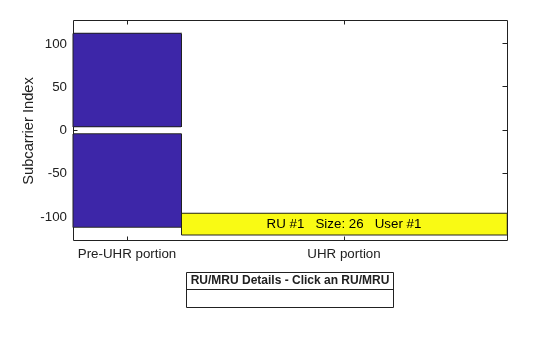
Figure RU/MRU Assignment and Occupied Subcarriers contains an axes object. The axes object with ylabel Subcarrier Index contains 5 objects of type patch, line, text. This object represents .

Now specify the DRU property as true and show the new allocation. The 26 tones are now distributed non-contiguously over the whole 20 MHz channel bandwidth.

cfg.DRU = true;
cfg.showAllocation
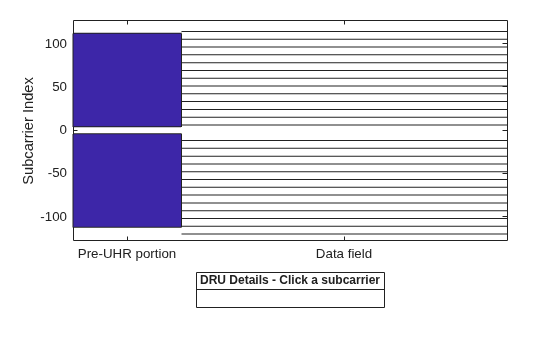
Figure RU/MRU Assignment and Occupied Subcarriers contains an axes object. The axes object with ylabel Subcarrier Index contains 29 objects of type patch, line. This object represents .

Create a configuration object for an HE MU transmission with a channel bandwidth of 40 MHz.

AllocationIndex = [100 98];
cfgHE = wlanHEMUConfig(AllocationIndex);

Show the RU allocation in the resultant transmission. This configuration object specifies seven users across four RUs.

showAllocation(cfgHE)
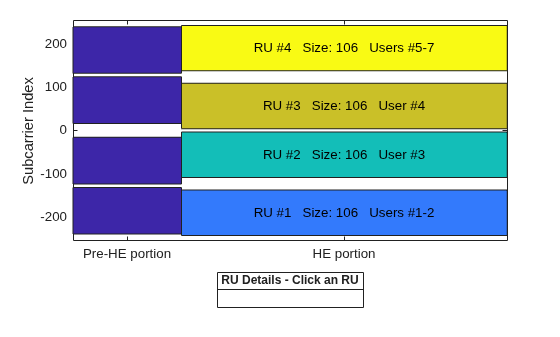
Figure RU Assignment and Occupied Subcarriers contains an axes object. The axes object with ylabel Subcarrier Index contains 13 objects of type patch, line, text. This object represents .

As shown in this figure, you can highlight and show the details of multiple RUs at once. To do this, use Ctrl+Click, or Command+Click on macOS systems.
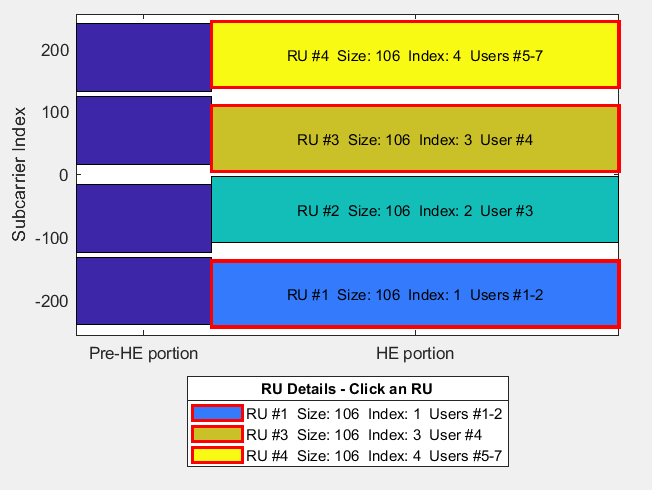
Multiple RUs selected at once

Input Arguments

collapse all

Plot axes, specified as an Axes object. For more information, see Axes Properties. If you do not specify this input, the showAllocation object function shows the RU allocation plotted on the default axes.

Version History

Introduced in R2019b

expand all