Operations for Stateflow Data
R2026bStateflow® charts in Simulink® models have an action language property that defines the operations that you can use in state and transition actions. The language properties are:
 MATLAB® as the action language.
 C as the action language.
Stateflow charts support standard programming operations like addition, comparison, and assignment. The specific operations available depend on the action language of your chart.
Both action languages support basic arithmetic (
+,-,*) and comparison (>,<,==)C action language supports additional operations like bitwise operators (
&,|)MATLAB action language uses functions for some operations that C does with operators.
All operations work with Stateflow data types including integers, floating-point numbers, and boolean values. For more information, see Differences Between MATLAB and C as Action Language Syntax.
Arithmetic Operations
Use arithmetic operations to perform calculations with sensor values, control signals, and system parameters.
| Operation | Precedence | Description | Example |
|---|---|---|---|
| 0 | Power | voltage_squared = voltage ^ 2 |
| 1 | Multiplication | power = voltage * current |
| 1 | Division | efficiency = output_power / input_power |
| 2 | Addition | total_force = applied_force + friction_force |
| 2 | Subtraction | error = setpoint - measured_value |
Comparison Operations
Use comparison operations to evaluate conditions and thresholds in control logic.
| Operation | Precedence | Description | Example |
|---|---|---|---|
| 4 | Greater than | if (temperature > max_temp) |
| 4 | Less than | if (pressure < min_pressure) |
| 4 | Greater than or equal to | if (speed >= target_speed) |
| 4 | Less than or equal to | if (voltage <= safety_limit) |
| 5 | Equal to | if (mode == CALIBRATION) |
| 5 | Not equal to (MATLAB) | if (status ~= READY) |
| 5 | Not equal to (C) | if (status != READY) |
Logical Operations
Use logical operations to combine multiple conditions.
| Operation | Precedence | MATLAB Action Language | C Action Language |
|---|---|---|---|
&& | 9 | Logical AND. | Logical AND. |
| 10 | Logical OR. | Logical OR. |
| 5 | Logical NOT | Logical NOT |
| 5 | Not supported | Logical NOT |
Assignment Operations
Assign values to variables using the = operator:
sensor_reading = adc_value;
control_output = pid_result;
For charts that use C as the action language, you can use these compound assignment operators.
| Operation | Equivalent | Example |
|---|---|---|
a += b |
|
|
|
|
|
|
|
|
|
|
|
Increment and Decrement
In charts that use C as the action language, you can use ++ or
–- to increment or decrement your data values. For example:
counter++; // Equivalent to counter = counter + 1
sample_index--; // Equivalent to sample_index = sample_index - 1
Type Conversion Operations
You can use MATLAB Type functions in any Stateflow chart.
pressure_int = int16(pressure_reading);
voltage_single = single(voltage_measurement);
Using the cast function
is different depending on your action language.
In charts that use MATLAB as the action language, use:
result = cast(sensor_value, "int32");
scaled_value = cast(raw_data, "like", reference_signal);
In charts that use C as the action language, use:
result = cast(sensor_value, int32);
scaled_value = cast(raw_data, type(reference_signal));
Type Cast Operations
To convert a value of one type to another type, use type cast operations. You can cast data to an explicit type or to the type of another variable.
Cast to Explicit Data Type
To cast a numeric expression to an explicit data type, use one of these type
conversion functions: double, single, int8, int16, int32, int64, uint8, uint16, uint32, uint64, and boolean. For example, this
statement casts the expression x+3 to a 16-bit unsigned integer and
assigns the value to the data
y:
y = uint16(x+3);
Alternatively, in charts that use MATLAB as the action language, you can use the cast function and specify "double",
"single", "int8", "int16",
"int32", "int64", "uint8",
"uint16", "uint32", "uint64",
or "logical" as an input argument. For example, this statement casts
the expression x+3 to a 16-bit unsigned integer and assigns the value
to
y:
y = cast(x+3,"uint16");To cast an expression to a fixed-point type, charts that use MATLAB as the action language support calling the fi (Fixed-Point Designer) function. For example, this statement casts the expression
x+3 as a signed fixed-point value with a word length of eight bits
and a fraction length of three bits:
y = fi(x+3,1,8,3);
In charts that use C as the action language, call the cast
function using a fixdt (Simulink) expression as an argument. For
example, this statement casts the expression x+3 as a signed
fixed-point value with a word length of eight bits and a fraction length of three
bits:
y = cast(x+3,fixdt(1,8,3));
Cast Type Based on Other Data
To make type casting easier, you can convert the type of a numeric expression to the same type as another Stateflow data.
In charts that use MATLAB as the action language, call the cast function with the keyword "like". For example, this
statement converts the value of x+3 to the same type as that of data
z and assigns the value to
y:
y = cast(x+3,"like",z);In charts that use C as the action language, the type operator returns the type of an existing Stateflow data. Use this return value in place of an explicit type in a
cast operation. For example, this statement converts the value of
x+3 to the same type as that of data z and assigns
the value to
y:
y = cast(x+3,type(z));
Binary Operations
This table summarizes the interpretation of all binary operations in Stateflow charts according to their order of precedence (0 = highest, 10 = lowest). Binary operations are left associative so that, in any expression, operators with the same precedence are evaluated from left to right. The order of evaluation for other operations is unspecified. For example, in this assignment
A = f() > g();
f() and g() is unspecified. For
more predictable results, it is good coding practice to split expressions that depend on the
order of evaluation into multiple statements.
Operation | Precedence | MATLAB as the Action Language | C as the Action Language |
|---|---|---|---|
6 | Logical AND. For bitwise AND, use the |
For more information, see Bitwise Operations and Enable C-bit operations. | |
7 | Not supported. For bitwise XOR, use the | Bitwise XOR (default). Enable this operation by selecting the Enable C-bit operations chart property. For more information, see Bitwise Operations and Enable C-bit operations. | |
8 | Logical OR. For bitwise OR, use the |
For more information, see Bitwise Operations and Enable C-bit operations. |
Bitwise Operations
This table summarizes the interpretation of all bitwise operations in Stateflow charts that use C as the action language.
Operation | Description |
|---|---|
a & b | Bitwise AND. |
a | b | Bitwise OR. |
a ^ b | Bitwise XOR. |
~a | Bitwise NOT. |
| Shift a to the right by b bits. |
| Shift a to the left by b bits. |
Except for the bit shift operations a >> b and a <<
b, you must enable all bitwise operations by selecting the Enable
C-bit operations chart property. For more information, see Enable C-bit operations.
Bitwise operations work on integers at the binary level. Noninteger operands are first cast to integers. Integer operands follow C promotion rules to determine the intermediate value of the result. This intermediate value is then cast to the type that you specify for the result of the operation.
Note
Bitwise operations are not supported in charts that use MATLAB as the action language. Instead, use the functions bitand, bitor, bitxor, bitnot, or bitshift.
Bitwise Operations and Integer Overflows
The implicit cast used to assign the intermediate value of a bitwise operation can result in an overflow. To preserve the rightmost bits of the result and avoid unexpected behavior, disable the chart property Saturate on Integer Overflows.
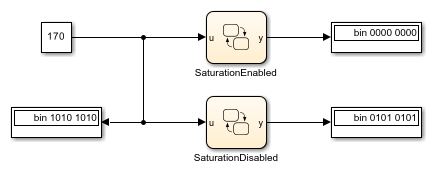
For example, both charts in this model compute the bitwise operation y = ~u. The charts compute the intermediate value for this operation by using the target integer size of 32 bits, so the 24 leftmost bits in this value are all ones. When the charts assign the intermediate value to y, the cast to uint8 causes an integer overflow. The output from each chart depends on how the chart handles integer overflows.
If Saturate on Integer Overflow is enabled, the chart saturates the result of the bitwise operation and outputs a value of zero.
If Saturate on Integer Overflow is disabled, the chart wraps the result of the bitwise operation and outputs its eight rightmost bits.
Pointer and Address Operations
This table summarizes the interpretation of pointer and address operations in Stateflow charts that use C as the action language.
Operation | Description |
|---|---|
| Address operation. Use with custom code and Stateflow variables. |
| Pointer operation. Use only with custom code variables. |
For example, the model sf_bus_demo contains a custom C function that
takes pointers as arguments. When the chart calls the custom code function, it uses the
& operation to pass the Stateflow data by address. For more information, see Integrate Custom Structures in Stateflow Charts.
Pointer and address operations are not supported in charts that use MATLAB as the action language. Pointers to structures should only be used in read-only mode and are only valid during the call in which they are passed.

