inverseKinematics
R2026bCreate inverse kinematic solver
Description
The inverseKinematics
System object™ creates an inverse kinematic (IK) solver to calculate joint
configurations for a desired end-effector pose based on a specified rigid body tree model.
Create a rigid body tree model for your robot using the rigidBodyTree class. This model defines all the joint constraints that the solver
enforces. If a solution is possible, the joint limits specified in the robot model are
obeyed.
The IK solver uses a gradient-descent-based optimization approach to find a joint configuration that is a local minimum of the weighted pose-error-squared objective function:
where:
w is the six-element weight vector. You can specify this using the
weightsargument to prioritize the relative importance between orientation and translation components.is a vector-valued function representing the six-element pose error between the desired end-effector pose Tdes and the forward kinematics computed end-effector pose.
FK is a forward kinematics function that calculates the pose at a joint configuration q for the end-effector link ee_link of the robot.
To specify more constraints besides the end-effector pose, including aiming constraints,
position bounds, or orientation targets, consider using generalizedInverseKinematics. This object allows you to compute multiconstraint IK
solutions.
For closed-form analytical IK solutions, see analyticalInverseKinematics.
To compute joint configurations for a desired end-effector pose:
Create the
inverseKinematicsobject and set its properties.Call the object with arguments, as if it were a function.
To learn more about how System objects work, see What Are System Objects?
Creation
Description
ik = inverseKinematicsRigidBodyTree property.
ik = inverseKinematics(PropertyName=Value)SolverAlgorithm="fminconsqp" uses
the fmincon SQP solver as the inverse kinematics solver.
Properties
Usage
Description
[
finds a joint configuration that achieves the specified end-effector pose. Specify an
initial guess for the configuration and your desired weights on the tolerances for the six
components of configSol,solInfo]
= ik(endeffector,pose,weights,initialguess)pose. Solution information related to execution of the
algorithm, solInfo, is returned with the joint configuration
solution, configSol.
Input Arguments
Output Arguments
Object Functions
To use an object function, specify the
System object as the first input argument. For
example, to release system resources of a System object named obj, use
this syntax:
release(obj)
Examples
Load a PUMA 560 manipulator from the Robotics System Toolbox™ loadrobot.
puma = loadrobot("puma560");Set the desired end-effector position and convert to an SE(3) homogeneous transformation matrix.
pos = [-0.5 0.5 0.75];
eePoseTF = trvec2tform(pos);
Create the IK solver and set weights such that the solver prioritizes reaching the desired xyz-position over the desired orientation. Use the home joint configuration as the initial guess for the solver.
ik = inverseKinematics("RigidBodyTree",puma);
weights = [0 0 0 1 1 1];
initialguess = homeConfiguration(puma);
Solve IK for the end effector of the robot model, link7.
[configSoln,solnInfo] = ik("link7",eePoseTF,weights,initialguess);Show the generated solution configuration, which now reaches the goal position.
show(puma,configSoln);
hold on
plotTransforms(pos,eul2quat([0 0 0]),FrameSize=0.3);
axis auto padded
title("End-Effector Target Position Achieved")
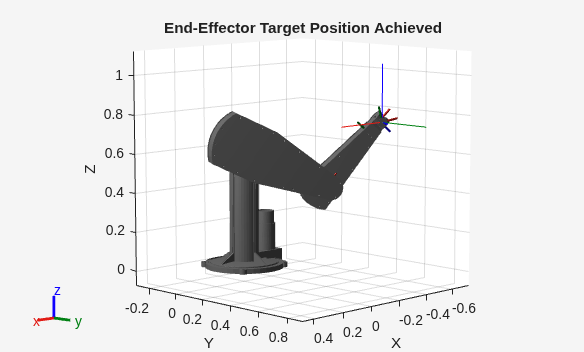
Note that for most IK problems, there are multiple configurations that can reach the desired pose target. Because the solver is optimization-based, the solver could approach a solution that does not actually reach the desired pose. If this occurs, the solver automatically restarts and uses a random configuration as the initial guess. This means that running the function more than once for the same pose target could yield different configurations that all reach the pose target. To avoid randomness, you can either set the random number generator seed or you can use an initial guess that is closer to the solution while also disabling AllowRandomRestart.
ik.SolverParameters.AllowRandomRestart = false
If you must find all possible solutions, use the analyticalInverseKinematics object.
Load a robot and create an inverse kinematics solver for it. Set the solver algorithm to the fmincon SQP algorithm.
robot = loadrobot("universalUR5",DataFormat="row");
ik = inverseKinematics(RigidBodyTree=robot,SolverAlgorithm="fminconsqp");
Set the last body of the robot as the end effector, set a target pose, set the weights, and set the initial guess configuration.
ee = robot.BodyNames{end};
poseTarget = se3([0 pi/2 -pi/2],"eul","ZYX",[0 0.7 0.3]);
weights = [1 1 1 0.8 0.8 0.8];
initGuessConfig = [pi/2 0 0 0 0 0];
Show the robot in the initial guess configuration, and plot the target pose.
show(robot,initGuessConfig);
axis([-0.5 0.5 -0.1 0.9 -0.1 0.8])
hold on
plotTransforms(poseTarget,FrameSize=0.2);
title("Initial Guess Configuration and Pose Target")
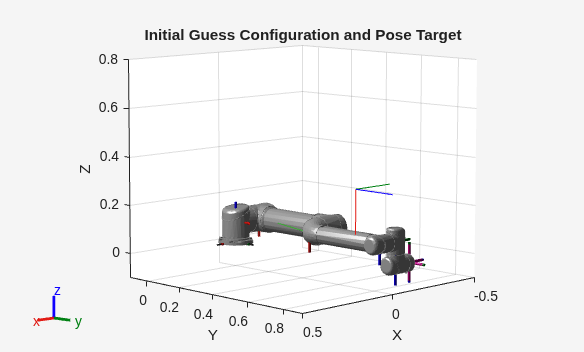
Solve for a configuration that reaches the pose target using the specified weights and initial guess configuration.
[config,solninfo] = ik(ee,tform(poseTarget),weights,initGuessConfig);
show(robot,config,PreservePlot=false);
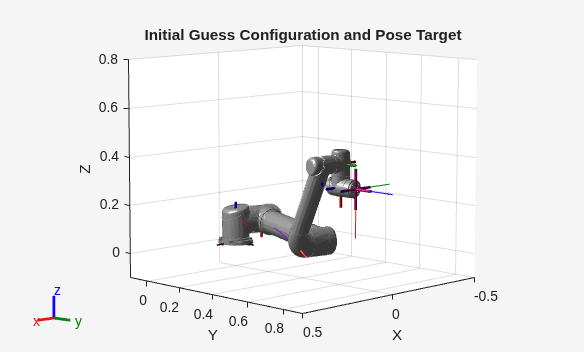
title("End-Effector Target Pose Achieved")
hold off
solninfo.Status
References
[1] Badreddine, Hassan, Stefan Vandewalle, and Johan Meyers. "Sequential Quadratic Programming (SQP) for Optimal Control in Direct Numerical Simulation of Turbulent Flow." Journal of Computational Physics. 256 (2014): 1–16. doi:10.1016/j.jcp.2013.08.044.
[2] Bertsekas, Dimitri P. Nonlinear Programming. Belmont, MA: Athena Scientific, 1999.
[3] Goldfarb, Donald. "Extension of Davidon’s Variable Metric Method to Maximization Under Linear Inequality and Equality Constraints." SIAM Journal on Applied Mathematics. Vol. 17, No. 4 (1969): 739–64. doi:10.1137/0117067.
[4] Nocedal, Jorge, and Stephen Wright. Numerical Optimization. New York, NY: Springer, 2006.
[5] Sugihara, Tomomichi. "Solvability-Unconcerned Inverse Kinematics by the Levenberg–Marquardt Method." IEEE Transactions on Robotics Vol. 27, No. 5 (2011): 984–91. doi:10.1109/tro.2011.2148230.
[6] Zhao, Jianmin, and Norman I. Badler. "Inverse Kinematics Positioning Using Nonlinear Programming for Highly Articulated Figures." ACM Transactions on Graphics Vol. 13, No. 4 (1994): 313–36. doi:10.1145/195826.195827.

