isbetween
R2026bDetermine which elements are within specified range
Syntax
Description
specifies options using one or more name-value arguments in addition to any of the
input argument combinations in the previous syntaxes. For example, for an input
table TF = isbetween(___,Name=Value)A, TF =
isbetween(A,lower,upper,OutputFormat="tabular") returns the output
TF as a table.
Examples
Create a row vector, and find elements in the vector that are within a specified range.
A = [1 3 5 7 9]; TF = isbetween(A,2,7)
TF = 1×5 logical array
0 1 1 1 0
Display the values of the elements that are within the range.
val = A(TF)
val = 1×3
3 5 7
Create a numeric matrix.
A = repmat(1:7,4,1)
A = 4×7
1 2 3 4 5 6 7
1 2 3 4 5 6 7
1 2 3 4 5 6 7
1 2 3 4 5 6 7
Determine which elements in each row are within a specified range. The lower bound, specified as a column vector, sets the lower bound of the range for the corresponding row of the input data. The upper bound, specified as a scalar, sets the upper bound for all rows of the input data.
lower = [1; 2; 3; 4]; upper = 6; TF = isbetween(A,lower,upper)
TF = 4×7 logical array
1 1 1 1 1 1 0
0 1 1 1 1 1 0
0 0 1 1 1 1 0
0 0 0 1 1 1 0
Create a row vector, and determine which elements in the vector are within a specified range. Specify the interval type as "open" to exclude the lower and upper bounds.
A = 1:7;
TF = isbetween(A,3,6,"open")TF = 1×7 logical array
0 0 0 1 1 0 0
Include the lower bound by specifying the interval type as "closedleft". Any elements equal to the lower bound return 1 (true).
TF2 = isbetween(A,3,6,"closedleft")TF2 = 1×7 logical array
0 0 1 1 1 0 0
Include the upper bound by specifying the interval type as "closedright". Any elements equal to the upper bound return 1 (true).
TF3 = isbetween(A,3,6,"closedright")TF3 = 1×7 logical array
0 0 0 1 1 1 0
Compare the interval types by displaying the array elements within the specified ranges.
val = A(TF)
val = 1×2
4 5
val2 = A(TF2)
val2 = 1×3
3 4 5
val3 = A(TF3)
val3 = 1×3
4 5 6
Create an array of datetime values.
A = datetime(2024,5,16:2:26)
A = 1×6 datetime
16-May-2024 18-May-2024 20-May-2024 22-May-2024 24-May-2024 26-May-2024
Specify the lower and upper bounds for a range of dates.
lower = datetime(2024,01,01);
upper = "2024-05-22";Determine which elements are within the closed interval.
TF = isbetween(A,lower,upper)
TF = 1×6 logical array
1 1 1 1 0 0
Display the values of elements that are within the range.
val = A(TF)
val = 1×4 datetime
16-May-2024 18-May-2024 20-May-2024 22-May-2024
Create a table of data.
T = table([1;3;5;7],[2;4;6;8])
T = 4×2 table
Var1 Var2
____ ____
1 2
3 4
5 6
7 8
Return a table that indicates the elements in T are within a specified range.
TF = isbetween(T,3,7,OutputFormat="tabular")TF = 4×2 table
Var1 Var2
_____ _____
false false
true true
true true
true false
Replace any elements in the input table that are outside of the specified range with a missing value.
T.Var1(~TF.Var1) = missing; T.Var2(~TF.Var2) = missing
T = 4×2 table
Var1 Var2
____ ____
NaN NaN
3 4
5 6
7 NaN
Create a table with three variables of different data types.
num = rand(6,1); num2 = single(rand(6,1)); dt = datetime(2016:2021,1,1)'; T = table(num,num2,dt)
T = 6×3 table
num num2 dt
_______ _______ ___________
0.81472 0.2785 01-Jan-2016
0.90579 0.54688 01-Jan-2017
0.12699 0.95751 01-Jan-2018
0.91338 0.96489 01-Jan-2019
0.63236 0.15761 01-Jan-2020
0.09754 0.97059 01-Jan-2021
Specify the bounds for variables of different data types in one-row tables.
lower = table(0.2,single(0.1),datetime(2018,1,1),VariableNames=["num" "num2" "dt"])
lower = 1×3 table
num num2 dt
___ ____ ___________
0.2 0.1 01-Jan-2018
upper = table(0.9,Inf,datetime(2020,1,1),VariableNames=["num" "num2" "dt"])
upper = 1×3 table
num num2 dt
___ ____ ___________
0.9 Inf 01-Jan-2020
Determine which elements in the num and dt variables are within the specified ranges.
TF = isbetween(T,lower,upper,DataVariables=["num" "dt"])
TF = 6×3 logical array
1 0 0
0 0 0
0 0 1
0 0 1
1 0 1
0 0 0
Alternatively, if you specify the bounds as one-row tables containing only the bounds for num and dt, you do not need to specify the DataVariables name-value argument.
Input Arguments
Input data, specified as a scalar, vector, matrix, multidimensional array, table, or timetable.
A must be an object with the class methods
lt (<) or le (<=).
Data Types: single | double | int8 | int16 | int32 | int64 | uint8 | uint16 | uint32 | uint64 | logical | char | string | categorical | datetime | duration | table | timetable
Lower bound of the range, specified as a scalar, vector, matrix,
multidimensional array, table, or timetable. lower must
be an object with the class methods lt (<) or
le (<=).
| Input Data Type | Bound Behavior | How to Specify lower |
|---|---|---|
| Array | Same lower bound for all elements of
A | Scalar |
| Array | Different lower bound for each column of
A | Row vector |
| Array | Different lower bound for each row of
A | Column vector |
| Array | Same bound for all elements of
A | Array of the same size as A |
| Table or timetable | Same lower bound for all elements of
A | Scalar |
| Table or timetable | Different lower bound for each variable of
A | One-row table or timetable with variables from
A |
| Table or timetable | Different lower bound for each element of
A | Table or timetable with the same variable names and
number of rows as A |
Upper bound of the range, specified as a scalar, vector, matrix,
multidimensional array, table, or timetable. upper must
be an object with the class methods lt (<) or
le (<=).
| Input Data Type | Bound Behavior | How to Specify upper |
|---|---|---|
| Array | Same upper bound for all elements of
A | Scalar |
| Array | Different upper bound for each column of
A | Row vector |
| Array | Different upper bound for each row of
A | Column vector |
| Array | Same upper for all elements of
A | Array of the same size as A |
| Table or timetable | Same upper bound for all elements of
A | Scalar |
| Table or timetable | Different upper bound for each variable of
A | One-row table or timetable with variables from
A |
| Table or timetable | Different upper bound for each element of
A | Table or timetable with the same variable names and
number of rows as A |
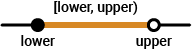
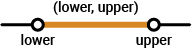
Type of interval that defines the range of allowed values, specified as one of the values in this table.
Type of Interval | Diagram | Description |
|---|---|---|
|
| Include |
|
| Exclude |
|
| Exclude
|
|
| Include
|
Name-Value Arguments
Specify optional pairs of arguments as
Name1=Value1,...,NameN=ValueN, where Name is
the argument name and Value is the corresponding value.
Name-value arguments must appear after other arguments, but the order of the
pairs does not matter.
Example: TF =
isbetween(A,lower,upper,OutputFormat="tabular")
Table or timetable variables to operate on, specified as one of the
values in this table. TF contains logical
0 (false) for variables not
specified by DataVariables unless the value of
OutputFormat is
"tabular".
If you do not specify DataVariables,
isbetween operates on all variables in
A.
| Indexing Scheme | Values to Specify | Examples |
|---|---|---|
Variable name |
|
|
Variable index |
|
|
Function handle |
|
|
Variable type |
|
|
Example: TF = isbetween(T,lower,upper,DataVariables=["Var1"
"Var2" "Var4"])
Output data type, specified as one of these values:
"logical"— Return the outputTFas a logical array."tabular"— For table input data, return the outputTFas a table. For timetable input data, return the outputTFas a timetable.
Example: TF =
isbetween(T,lower,upper,OutputFormat="tabular")
Output Arguments
Indicator for elements within range, returned as a logical scalar, vector,
matrix, multidimensional array, table, or timetable. TF
contains logical 1 (true) where the
corresponding element is within the specified range, and logical
0 (false) otherwise.
Data Types: logical
Extended Capabilities
The
isbetween function supports tall arrays with the following usage
notes and limitations:
First argument must be a tall datetime, tall duration, or tall string array.
Name-value arguments
DataVariablesandOutputFormatare not supported.
For more information, see Tall Arrays.
Usage notes and limitations:
Input data or bounds of type
datetimeordurationis not supported.
Refer to the usage notes and limitations in the C/C++ Code Generation section. The same usage notes and limitations apply to GPU code generation.
The isbetween
function fully supports thread-based environments. For more information, see Run MATLAB Functions in Thread-Based Environment.
The
isbetween function fully supports GPU arrays.
To run the function on a GPU, specify the input data as a gpuArray (Parallel Computing Toolbox). For more
information, see Run MATLAB Functions on a GPU (Parallel Computing Toolbox).
The
isbetween function fully supports distributed arrays. For more
information, see Run MATLAB Functions with Distributed Arrays (Parallel Computing Toolbox).
Version History
Introduced in R2014bGenerate C or C++ code for the isbetween function. For
usage notes and limitations, see C/C++ Code
Generation.
Determine which elements are within a range that you specify for an input array of
any data type, a table, or a timetable. Previously, isbetween
supported only date and time input data.
For data in a table or timetable, you can return a table or timetable containing
logical values instead of a logical array by using the
OutputFormat name-value argument. You can also specify
tabular variables to operate on by using the DataVariables
name-value argument.
isbetween supports implicit expansion when the arguments are
datetime or duration arrays. Previously,
implicit expansion was supported for only numeric and string data types.
MATLAB Command
You clicked a link that corresponds to this MATLAB command:
Run the command by entering it in the MATLAB Command Window. Web browsers do not support MATLAB commands.
Select a Web Site
Choose a web site to get translated content where available and see local events and offers. Based on your location, we recommend that you select: .
You can also select a web site from the following list
How to Get Best Site Performance
Select the China site (in Chinese or English) for best site performance. Other MathWorks country sites are not optimized for visits from your location.
Americas
- América Latina (Español)
- Canada (English)
- United States (English)
Europe
- Belgium (English)
- Denmark (English)
- Deutschland (Deutsch)
- España (Español)
- Finland (English)
- France (Français)
- Ireland (English)
- Italia (Italiano)
- Luxembourg (English)
- Netherlands (English)
- Norway (English)
- Österreich (Deutsch)
- Portugal (English)
- Sweden (English)
- Switzerland
- United Kingdom (English)
![Closed interval [lower, upper]](interval-notation-02.png)
![Half-open interval (lower, upper]](interval-notation-04.png)