How to duplicate field chart?
Martinov on 21 Nov 2025 (Edited on 21 Nov 2025)
Latest activity Reply by Christopher Stapels on 26 Nov 2025

Hello,
I have Arduino DIY Geiger Counter, that uploads data to my channel here in ThingSpeak (3171809), using ESP8266 WiFi board. It sends CPM values (counts per minute), Dose, VCC and Max CPM for 24h. They are assignet to Field from 1 to 4 respectively. How can I duplicate Field 1, so I could create different time chart for the same measured unit? Or should I duplicate Field 1 chart, and how? I tried to find the answer here in the blog, but I couldn't.
I have to say that I'm not an engineer or coder, just can simply load some Arduino sketches and few more things, so I'll be very thankfull if someone could explain like for non-IT users.
Regards,
Emo
Christopher Stapels
Christopher Stapels on 21 Nov 2025
Can you cliarify what you mean my "Duplicate Field 1"?
Do you mean the settings on the field plot, like number of points and axis scale and so forth?
If I understand your question correctly, I think the easiest way to do what you want is to use a custom visualization. Then you can copy the code for another custom visualization, but change the field you read data from.
psuedo code:
%Read data from channel field x
myData=thingSpeakRead(...);
%plot data
plot(myData.timestamps,myData.xvals...);
%adjust settings
ylabel("dose");
You can use the MATLAB AI chat playground to help you generate the code for the custom visualization. I can also give you more description here if that is what you are interested in.
You might also just be asking how to add a field plot. That you can do in the "add visualizations" button on the channel view page.
Thanks for putting up the radiation levels. I built scintillation based dosimeters in a previous engagement, so I think it would be cool to have rad monitors on ThingSpeak from all over the world, kind of like all the weather stations.
Martinov
Martinov on 21 Nov 2025 (Edited on 21 Nov 2025)

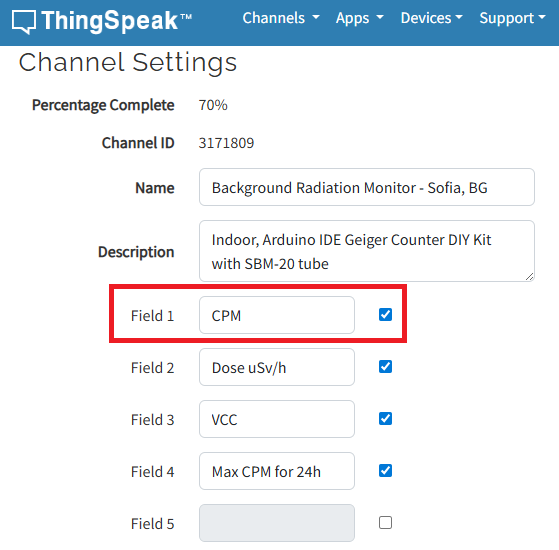
Yeah, you said it better - just wanted to add a field plot that uses the same field 1 data (red rectangle on the picture above). Currently, the plot set to use that field is showing readings for an one hour back. I want to make another plot, that uses the same field 1, but this time will set it to show reading for a week, or month etc. I hope I managed to explain it understandable. If not, sorry, I'm a physician, not a coder (if that's an excuse at all hahah).
Christopher Stapels
Christopher Stapels on 21 Nov 2025
Yeah, lets make a custom visualization.
Instructions are here.
in general, click the green button that says MATLAB visualizations and click "create a 2d line plot". Then fill in the data and muck with the thingspeakread line to get the data you want
[data, time] = thingSpeakRead(readChannelID, 'Field', fieldID1, 'NumPoints', 30, 'ReadKey', readAPIKey);
In that line, you can change numpoints to numdays or numminutes to get the data range you want. You can then perform infinite customization on the plot. You can look in the documentation or use the AI chat playground i liked above to use natural language to describe what you want. Like "Give me a thicker line plot with red axis labels and a title of 'radiation plot' ". They the AI will show you the code you can copy into your visualization to get the plot you want (blue marker points, black background, inset close up etc.). When you are done, save and run, then it should show on your channel view. You can add multiple visualizations. They wont have the live update features of the thingspeak plots but you get way more options.
If you definitely need the thingspeak plot, you can write code to copy the data to multiple fields in another channel and configure each field view how you like it. Lemme know if you need help with that.
Martinov
Martinov on 23 Nov 2025
Maaan, that's AWESOME! Many, many thanks for suggesting the AI playground option! :)
I managed to make some really nice plot that shows two types of data - raw readings and average values. In the next couple of days I'll make a month (or three) readings plot, as well as a mean daily dose plot for... some period :D
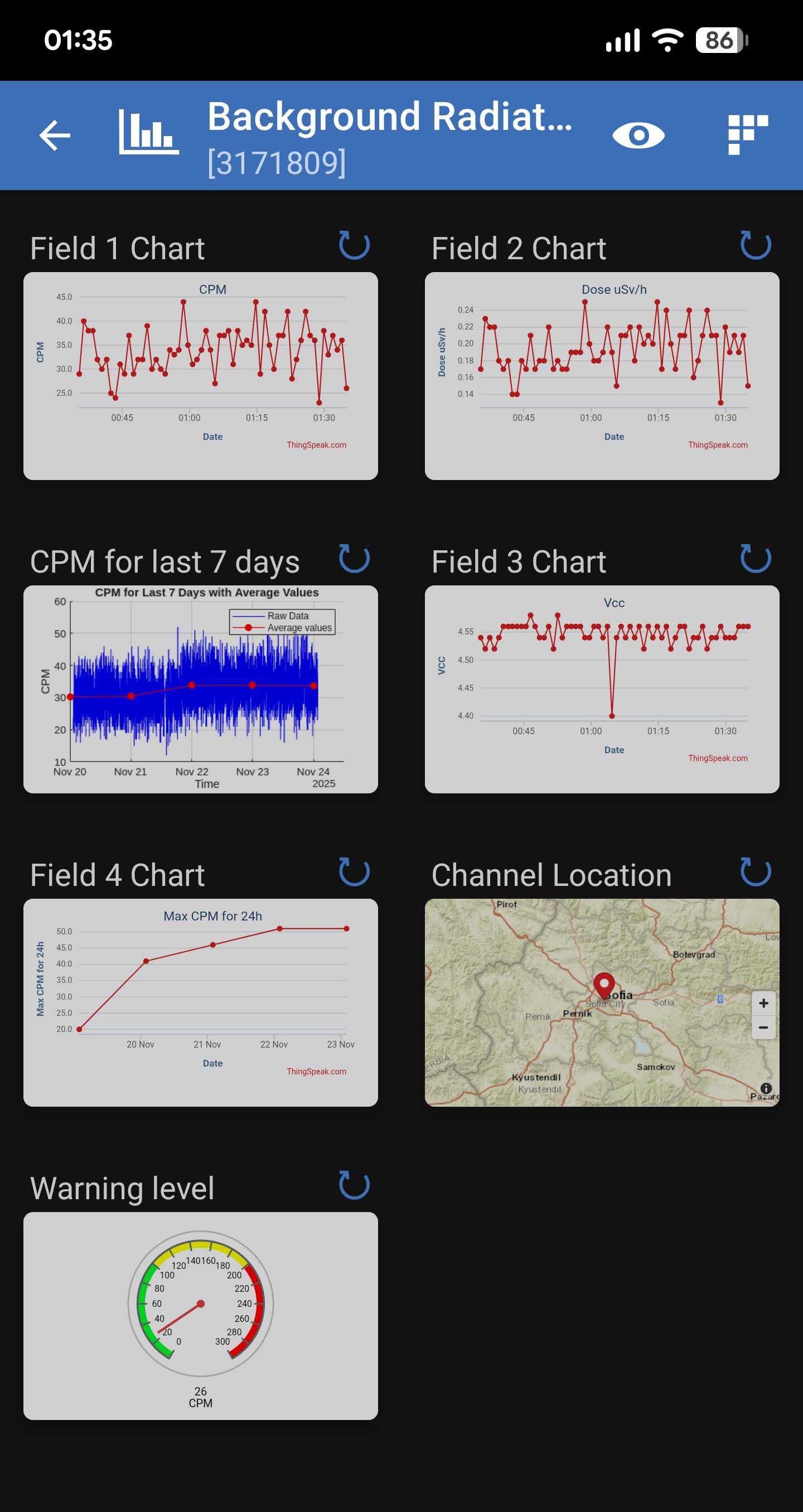
Here is the plot:
Here is the channel:
Again - many thanks for your help, appreciate it! :)
P.S.: I can even see it on my phone with ThingShow app. Great! :)
Christopher Stapels
Christopher Stapels on 24 Nov 2025
Nice work! Thanks for sharing the final result too. Now you can use a time control to email weekly dose reports, or react app to raise the radiation shield when the dose goes over a limit...
Martinov
Martinov on 26 Nov 2025 (Edited on 26 Nov 2025)
Hi,
And thanks for suggesting these cool options!
I generated an Alert ApiKey and set TimeControl preset for weekly dose reports using this MATLAB code (with the help of AI Chat Playground of course):
% Channel IDs and API keys
radiationChannelID = 3171809; % Your radiation channel ID
alertApiKey = 'TAKPxxxxxxxxxxxxxxxx'; % Your alerts API key
% Set the URL for the HTTP call
alertUrl = "https://api.thingspeak.com/alerts/send";
% Set web options for the HTTP request
options = weboptions("HeaderFields", ["ThingSpeak-Alerts-API-Key", alertApiKey]);
% Read the radiation data for the past week from Field 2
radiationData = thingSpeakRead(radiationChannelID, 'NumDays', 7, 'Fields', 2);
% Check if the radiation level is high
isHighRadiation = any(radiationData > 0.4); % Check if any value exceeds 0.4 µSv/h
% Prepare the alert body based on the radiation level
if isHighRadiation
alertBody = 'Warning: High radiation levels detected in the past week.';
else
alertBody = 'Radiation levels are normal in the past week.';
end
% Prepare the alert subject
alertSubject = 'Radiation Dose Alert';
% Send the alert
try
webwrite(alertUrl, "body", alertBody, "subject", alertSubject, options);
catch someException
fprintf("Failed to send alert: %s\n", someException.message);
end
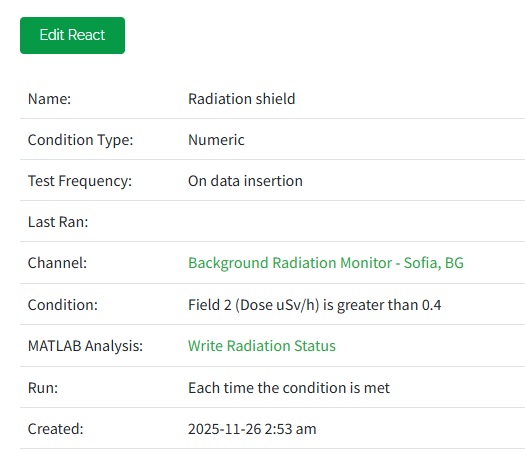
So, my question is, can I use the same code when creating a React to raise the radiation shield, because I coudn't find what MATLAB analysis code should be used there?
Christopher Stapels
Christopher Stapels on 26 Nov 2025
If I was instrumenting this secret radiation lab, I would have the radiation shield controlled by a device that is reading a Thingspeak channel to know what its state should be. Thus in my case, the code in the react app would be different and it would be code that uses thingSpeakWrite to write to the control channel to open the shield. In your case, the code you use depends on how you are instrumenting the radiation shield. By the way, you can alse use timecontrol to do more custom tests that what are allowed by react. React App is just a simplified set of criteria that ThingSepak runs for you to decide to run code that you choose. You can also put the decision criteria into the code called by timecontrol.
Martinov
Martinov on 24 Nov 2025

Didn't know I could set weekly reports, nice! Have to do some research on that option with React app. Is it part of MATHLab or it's separate app? Thanks!

Martinov
Martinov on 21 Nov 2025 (Edited on 21 Nov 2025)

Many thanks for your answer! I'll try to figure out what's needed and how to work with the info you provided. AI is a good suggestion, since the coding needed here isn't sounds like rocket science. Yeah, it's still beyond my knowledge, but it looks very doable with some ai help. Will definitely give you a feedback.
