Fraction of unexplained variance:
Hi All,
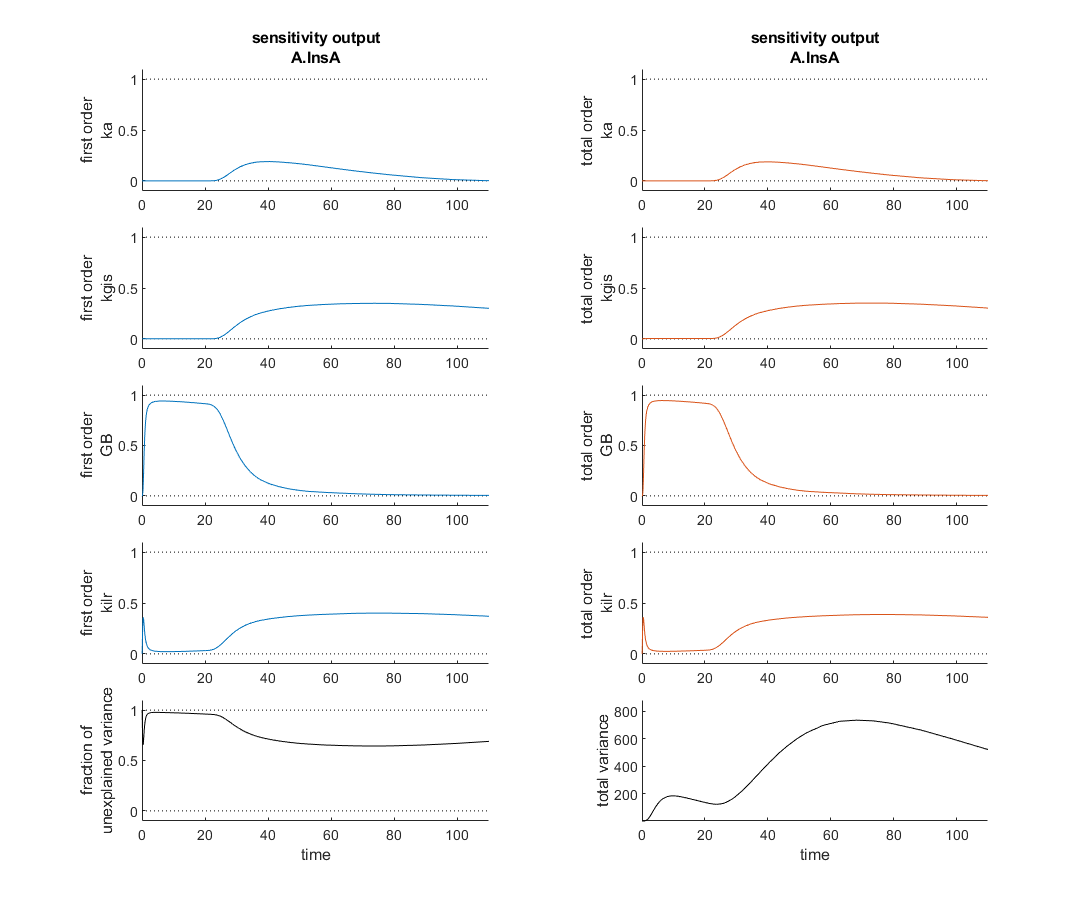
I'm currently verifying a global sensitivity analysis done in SimBiology and I'm a touch confused. This analysis was run with every parameter and compartment volume in the model. To my understanding the fraction of unexplained variance is 1 - the sum of the first order variances, therefore if the model dynamics are dominated by interparameter effects you might see a higher fraction of unexplained variance. In this analysis however, as the attached figure shows (with input at t=20 minutes), the most sensitive four parameters seem to sum, in first order sensitivities to roughly one at each time point and the total order sensitivies appear nearly identical. So how is the fraction of unexplained variance near one?
Thank you for your help!
3 Comments
Time Descending
Hi Daniel,
Thank you for reporting this! Your expectation about the first order indices and the unexplained variance is correct. This looks like a bug in the plot of the "unexplained variance". Could you confirm that you only see this issue when you specify the Parameters name-value argument?
Dependent on the release of MATLAB you are working with, you can easily fix the issue to unblock your work. You can make the following change (e.g. in ... R2023a, R2023b, R2024a). In the MATLAB Command Window type
edit SimBiology.gsa.Sobol.plot
to open the plotting code in the MATLAB Editor. Navigate to line 673 and replace
obj.SobolIndices(i,observableIndex(j)).FirstOrder
with
obj.SobolIndices(parameterIndex(i),observableIndex(j)).FirstOrder
The reported Sobol indices are unaffected by this issue. We will fix this as soon as possible in the product.
Thank you.
-Florian

Hi Florian,
Thank you very much! I don't need the unexplained residuals to be correct right now, so I'm in no rush to fix it, glad to know my intuition was correct. Though when I attempted to implement your fix I didn't have permission to edit Sobol.m! I would probably need to go into my program files and edit it manually, I suspect.
With regards to "Could you confirm that you only see this issue when you specify the Parameters name-value argument?" I'm afraid I'm not entirely sure what you mean. Assuming I'm understanding you correct, I plotted the figure with plot(sobolResults) sans names values and it produced this slice:

Which to my eyes show an unexplained variance of ~zero for the majority of the time series. (Note the rapid decrease on the left hand side) Alas, with 27 parameters this is the largest I could get it immediately!
Thank you for following up, Daniel! The information you provided helped to fix the issue.
Re - applying the fix: it looks like you will need to override write-protection of the file to make the changes. If you do not use the MATLAB Editor to make the change, please run
clear all
in the MATLAB Command Window after making the change. Caution, this will clear all variables in your MATLAB Workspace. Please save your work before doing this.
Unrelated: I wanted to point out this feature ranking example on FileExchange. If you are trying to find the most important parameters for fitting, feature ranking may be a good option.
-Florian
Sign in to participate

