Main Content

Results for

Paul
Paul
Last activity on 23 Dec 2025 at 15:15

Inspired in part by Christmas Trees, I'm curious about people's experience using AI to generate Matlab code.
1. Do you use AI to generate production code or just for experimentation/fun code?
2. Do you use the AI for a complete solution? Or is it more that the AI gets you most of the way there and you have to apply the finishing touches manually?
3. What level of quality would you consider the generated code? Does it follow "standard" Matlab coding practices? Is it well commented? Factored into modular functions? Argument checking? Memory efficient? Fast execution? Etc.?
4. Does the AI ever come up with a good or clever solution of which you wouldn't have thought or maybe of which you weren't even aware?
5. Is it easy/hard to express your requirements in a manner that the AI tool effectively translates into something useful?
6. Any other thoughts you'd care to share?
Edit 15 Oct 2025: Removed incorrect code. Replaced symmatrix2sym and symfunmatrix2symfun with sym and symfun respectively (latter supported as of 2024b).
The Symbolic Math Toolbox does not have its own dot and and cross functions. That's o.k. (maybe) for garden variety vectors of sym objects where those operations get shipped off to the base Matlab functions
x = sym('x',[3,1]); y = sym('y',[3,1]);
which dot(x,y)
/MATLAB/toolbox/matlab/specfun/dot.m
dot(x,y)
ans = 

which cross(x,y)
/MATLAB/toolbox/matlab/specfun/cross.m
cross(x,y)
ans = 
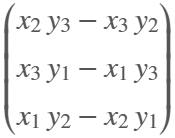
But now we have symmatrix et. al., and things don't work as nicely
clearvars
x = symmatrix('x',[3,1]); y = symmatrix('y',[3,1]);
z = symmatrix('z',[1,1]);
sympref('AbbreviateOutput',false);
dot() expands the result, which isn't really desirable for exposition.
eqn = z == dot(x,y)
eqn = 
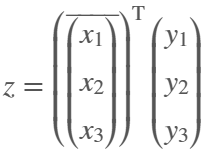
Also, dot() returns the the result in terms of the conjugate of x, which can't be simplifed away at the symmatrix level
assumeAlso(sym(x),'real')
class(eqn)
ans = 'symmatrix'
try
eqn = z == simplify(dot(x,y))
catch ME
ME.message
end
ans = 'Undefined function 'simplify' for input arguments of type 'symmatrix'.'
To get rid of the conjugate, we have to resort to sym
eqn = simplify(sym(eqn))
eqn = 

but again we are in expanded form, which defeats the purpose of symmatrix (et. al.)
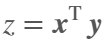
But at least we can do this to get a nice equation
eqn = z == x.'*y
eqn = 
dot errors with symfunmatrix inputs
clearvars
syms t real
x = symfunmatrix('x(t)',t,[3,1]); y = symfunmatrix('y(t)',t,[3,1]);
try
dot(x,y)
catch ME
ME.message
end
ans = 'Invalid argument at position 2. Symbolic function is evaluated at the input arguments and does not accept colon indexing. Instead, use FORMULA on the function and perform colon indexing on the returned output.'
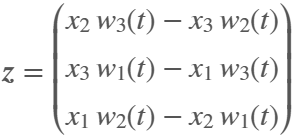
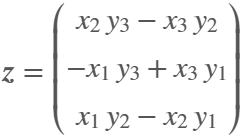
Cross works (accidentally IMO) with symmatrix, but expands the result, which isn't really desirable for exposition
clearvars
x = symmatrix('x',[3,1]); y = symmatrix('y',[3,1]);
z = symmatrix('z',[3,1]);
eqn = z == cross(x,y)
eqn = 
And it doesn't work at all if an input is a symfunmatrix
syms t
w = symfunmatrix('w(t)',t,[3,1]);
try
eqn = z == cross(x,w);
catch ME
ME.message
end
ans = 'A and B must be of length 3 in the dimension in which the cross product is taken.'
In the latter case we can expand with
eqn = z == cross(sym(x),symfun(w)) % x has to be converted
eqn(t) = 
But we can't do the same with dot (as shown above, dot doesn't like symfun inputs)
try
eqn = z == dot(sym(x),symfun(w))
catch ME
ME.message
end
ans = 'Invalid argument at position 2. Symbolic function is evaluated at the input arguments and does not accept colon indexing. Instead, use FORMULA on the function and perform colon indexing on the returned output.'
Looks like the only choice for dot with symfunmatrix is to write it by hand at the matrix level
x.'*w
ans(t) = 
or at the sym/symfun level
sym(x).'*symfun(w) % assuming x is real
ans(t) = 
Ideally, I'd like to see dot and cross implemented for symmatrix and symfunmatrix types where neither function would evaluate, i.e., expand, until both arguments are subs-ed with sym or symfun objects of appropriate dimension.
Also, it would be nice if symmatrix could be assumed to be real. Is there a reason why being able to do so wouldn't make sense?
try
assume(x,'real')
catch ME
ME.message
end
ans = 'Undefined function 'assume' for input arguments of type 'symmatrix'.'
Apparently, the back end here is running 2025b, hovering over the Run button and the Executing In popup both show R2024a.
ver matlab
------------------------------------------------------------------------------------------------- MATLAB Version: 25.2.0.2998904 (R2025b) MATLAB License Number: 40912989 Operating System: Linux 6.8.0-1019-aws #21~22.04.1-Ubuntu SMP Thu Nov 7 17:33:30 UTC 2024 x86_64 Java Version: Java 1.8.0_292-b10 with AdoptOpenJDK OpenJDK 64-Bit Server VM mixed mode ------------------------------------------------------------------------------------------------- MATLAB Version 25.2 (R2025b)
Paul
Paul
Last activity on 30 Jun 2025

For the last day or two, I've been getting "upstream" and other various errors on Answers. Seems to come and go. Anyone else having similar issues?
Should plotting functions, such as plot, semilogx, etc. internally apply squeeze to inputs?
For example, the ubiquitous bode from the Control System Toolbox always returns 3D outputs
w = logspace(-1,3,100);
[m,p] = bode(tf(1,[1 1]),w);
size(m)
ans = 1×3
1 1 100
<mw-icon class=""></mw-icon>
and therefore plotting requires an explicit squeeze (or rehape, or colon)
% semilogx(w,squeeze(db(m)))
Similarly, I'm using page* functions more regularly and am now generating 3D results whereas my old code would generate 2D. For example
x = [1;1];
theta = reshape(0:.1:2*pi,1,1,[]);
Z = [cos(theta), sin(theta);-sin(theta),cos(theta)];
y = pagemtimes(Z,x);
Now, plotting requires squeezing the inputs
% plot(squeeze(theta),squeeze(y))
Would there be any drawbacks to having plot, et. al., automagically apply squeeze to its inputs?
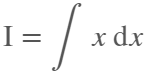
The int function in the Symbolic Toolbox has a hold/release functionality wherein the expression can be held to delay evaluation
syms x I
eqn = I == int(x,x,'Hold',true)
eqn = 
which allows one to show the integral, and then use release to show the result
release(eqn)
ans = 
I think I already submitted an enhancement request for the same functionality for symsum.
Maybe it would be nice to be able to hold/release any symbolic expression to delay the engine from doing evaluations/simplifications that it typically does. For example:
x*(x+1)/x, sin(sym(pi)/3)
ans = 
ans = 
If I'm trying to show a sequence of steps to develop a result, maybe I want to explicitly keep the x/x in the first case and then say "now the x in the numerator and denominator cancel and the result is ..." followed by the release command to get the final result.
Perhaps held expressions could even be nested to show a sequence of results upon subsequent releases.
Held expressions might be subject to other limitations, like maybe they can't be fplotted.
Seems like such a capability might not be useful for problem solving, but might be useful for exposition, instruction, etc.
I just now discovered Discussions.
Can anyone provide insight into the intended difference between Discussions and Answers and what should be posted where?
Just scrolling through Discussions, I saw postst that seem more suitable Answers?
What exactly does Discussions bring to the table that wasn't already brought by Answers?
Maybe this question is more suitable for a Discussion ....

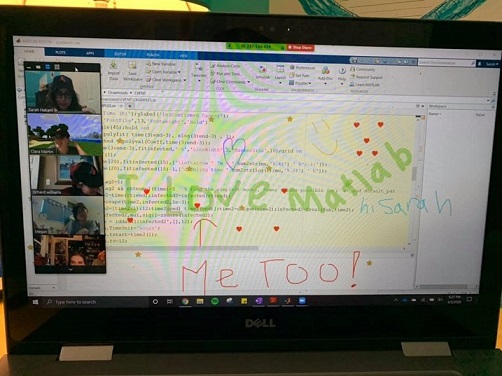
One community within MathWorks that has been helping students continue their learning is MATLAB Student Ambassadors. Despite new challenges with transitioning to distance learning, student ambassadors have done a truly amazing job. In a blog that was published recently, I discuss 3 examples of the great things that our student ambassadors have done to aid distance learning. Click here to read the blog. I hope after reading this blog you share my level of admiration for these students.

Student Ambassador at University of Houston hosting a fun and informative virtual event.