Results for

The ability to plot multiple signals on a plot and then use the plot browser to interactively control which ones are displayed has been one of the most useful features of the plotting tools and many of my scripts embed the command to open it after results analysis and plotting. It's been removed in 2025A with the comment that the Property Inspector provides the alternative. It doesn't. Having to go back into the menu to select the plot edit features to get to the Property Inspector (which doesn't provide an efficient alternative to the plot browser) has made the workflow very inefficient. Please bring it back a.s.a.p. !!!!

Hello Community,
We're excited to announce that registration is now open for the MathWorks AUTOMOTIVE CONFERENCE 2025! This event presents a fantastic opportunity to connect with MathWorks and industry experts while exploring the latest trends in the automotive sector.
Event Details:
- Date: April 29, 2025
- Location: St. John’s Resort, Plymouth, MI
Featured Topics:
- Virtual Development
- Electrification
- Software Development
- AI in Engineering
Whether you're a professional in the automotive industry or simply interested in these cutting-edge topics, we highly encourage you to register for this conference.
We look forward to seeing you there!

This topic is for discussing highlights to the current R2025a Pre-release.

So you've downloaded the R2025a pre-release, tried Dark mode and are wondering what else is new. A lot! A lot is new!
One thing I am particularly happy about is the fact that Apple Accelerate is now the default BLAS on Apple Silicon machines. Check it out by doing
>> version -blas
ans =
'Apple Accelerate BLAS (ILP64)'
If you compare this to R2024b that is using OpenBLAS you'll see some dramatic speed-ups in some areas. For example, I saw up to 3.7x speed-up for matrix-matrix multiplication on my M2 Mabook Pro and 2x faster LU factorisation.
Details regarding my experiments are in this blog post Life in the fast lane: Making MATLAB even faster on Apple Silicon with Apple Accelerate » The MATLAB Blog - MATLAB & Simulink . Back then you had to to some trickery to switch to Apple Accelerate, now its the default.
Hi everyone
The R2025a pre-release is now available to licensed users. I highly encourage you to download, give it a try and give us some feedback.
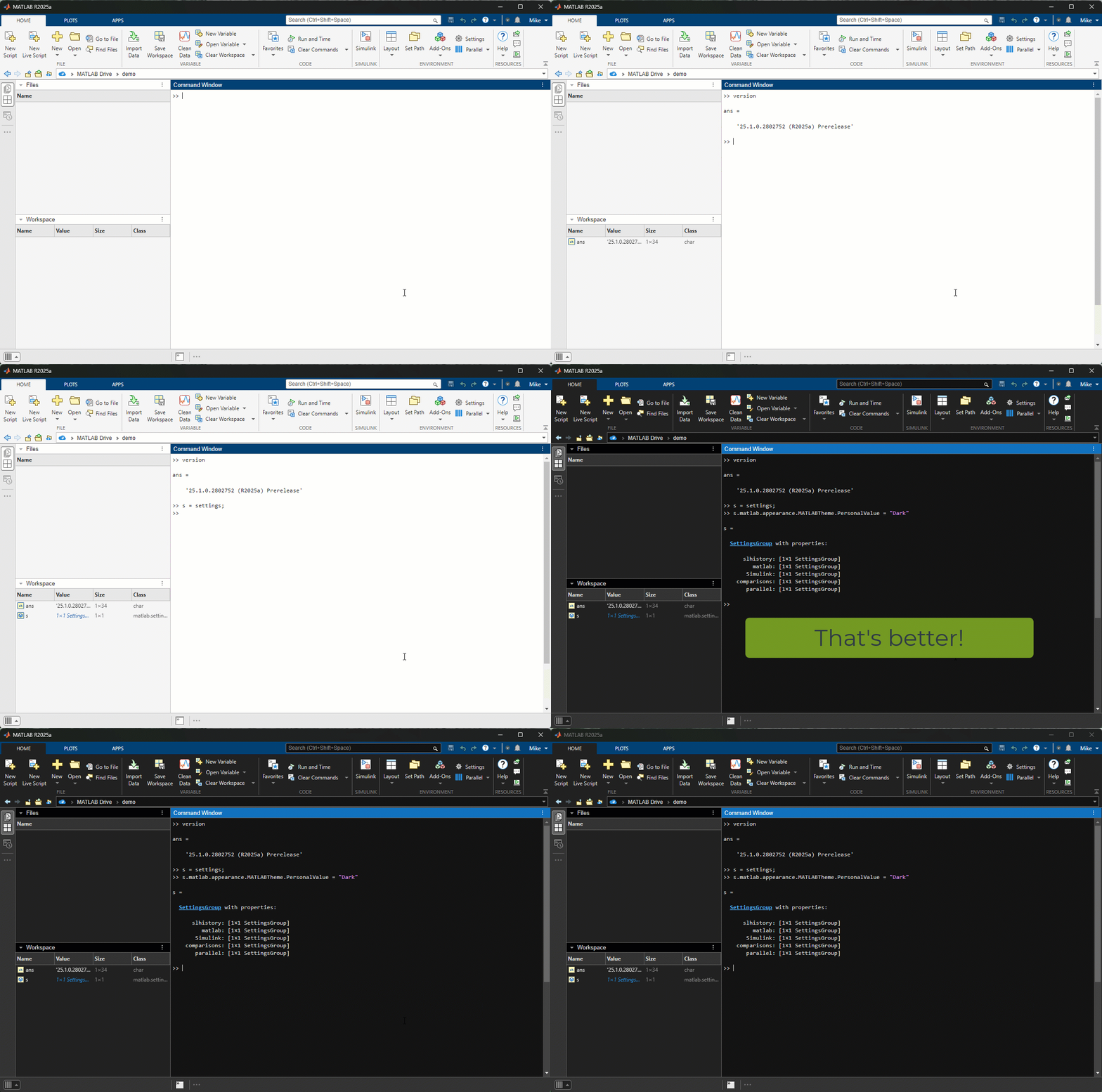
The first thing I tried was switching to Dark mode. Here's the magic
>> s = settings;
>> s.matlab.appearance.MATLABTheme.PersonalValue = "Dark";