Results for

I have been a loyal MATLAB user for 25 years, starting from my university days. While many of my peers migrated to Python, I stayed for the stability, compatibility, and clean environment. However, I am finding the 2025 version exceptionally laggy. Despite running it on an $10k high-end machine, simple tasks like viewing variables and plotting take up to 60 seconds - actions that were near instantaneous in the 2020 version. I want to stay continue with MATLAB, but this performance gap is a major hurdle and irritation. I hope these optimization issues can be addressed quickly.

MATLAB EXPO India | 7 May | Bengaluru
Get inspired by the latest trends and real-world customer success stories transforming industries. Learn from trusted experts across 4 tracks.
- AI & Autonomous Systems
- Electrification
- Systems & Software Engineering
- Radar, Wireless & HDL
Register at bit.ly/matlabexpocommunity


Digital Twin Development of PEARL Autonomous Surface System Thermal Management
The top session of the countdown showcases how the PEARL engineering team used a digital twin to solve real‑world thermal challenges in a solar‑powered autonomous marine platform operating in extreme environments. After thermal shutdown events in the field, the team built a model that predicts temperatures at multiple locations with ~1% accuracy, while balancing accuracy with model complexity.
Beyond the technology, this keynote delivers practical lessons for predictive modeling and digital twins that apply well beyond marine systems.
We hope you’ve enjoyed the Top 10 countdown series—and a big thank‑you to Olivier de Weck at Massachusetts Institute of Technology, for delivering such a compelling and insightful keynote.
🎥 If you missed it live, be sure to watch the recording to see why it earned the #1 spot at MATLAB EXPO 2026.

MATLAB EXPO India is Back!
This in-person events brings together engineers, scientists, and researchers to explore the latest trends in engineering and science, and discover new MATLAB and Simulink capabilities to apply to your work.
May 7, 2026 l Bengaluru
Register at bit.ly/matlabexpocommunity
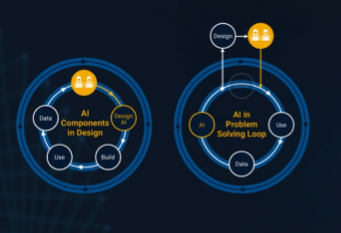
It’s no surprise this keynote landed at #2. MaryAnn Freeman, Senior Director of Engineering, AI, and Data Science explores how AI, especially generative AI, is transforming the way engineers design, build, and innovate. From accelerating the design loop with faster, data‑driven solutions, to blending human creativity with AI insights, to evolving engineering tools that turn ideas into build‑ready systems. This keynote shows how embedded intelligence helps engineers push past traditional limits and bridge imagination with real‑world impact.
If you’re curious about how AI is reshaping engineering workflows today (and what that means for the future of design), this is a must‑watch.
👉 Watch the keynote recording and see why it was one of the most popular sessions of MATLAB EXPO Online 2025.

PLEASE, PLEASE, PLEASE... make MATLAB Copilot available as an option with a home license.
Please change the documentation window (https://www.mathworks.com/help/index.html) so I don't have to first click a magnifying glass before I can to get to a text field to enter my search term.

Software‑defined vehicles are becoming reality—and this #3 ranked session shows how. In this keynote, Daniel Scurtu (NXP) demonstrates how MathWorks and NXP are working together to accelerate system‑level embedded development.
🔋 Using a vehicle electrification demo that runs across multiple NXP processors, you’ll see:
- Model‑Based Design workflows from concept to deployment
- Intelligent battery management and motor control
- Automatic code generation and hardware deployment
- ☁️ Real‑time cloud analytics and over‑the‑air updates
🛠️ Featuring MATLAB and Simulink products alongside NXP tools like Model-based Design Toolbox (MBDT), S32 Design Studio IDE, and Real-Time Drivers (RTD), this session highlights an end‑to‑end approach that reduces complexity and speeds the transition to software‑defined vehicles.

Dear all,
Recently I started working on a VS Code-style integrated terminal for the MATLAB IDE.
The terminal is installed as an app and runs inside a docked figure. You can launch the terminal by clicking on the app icon, running the command integratedTerminal or via keyboard shortcut.
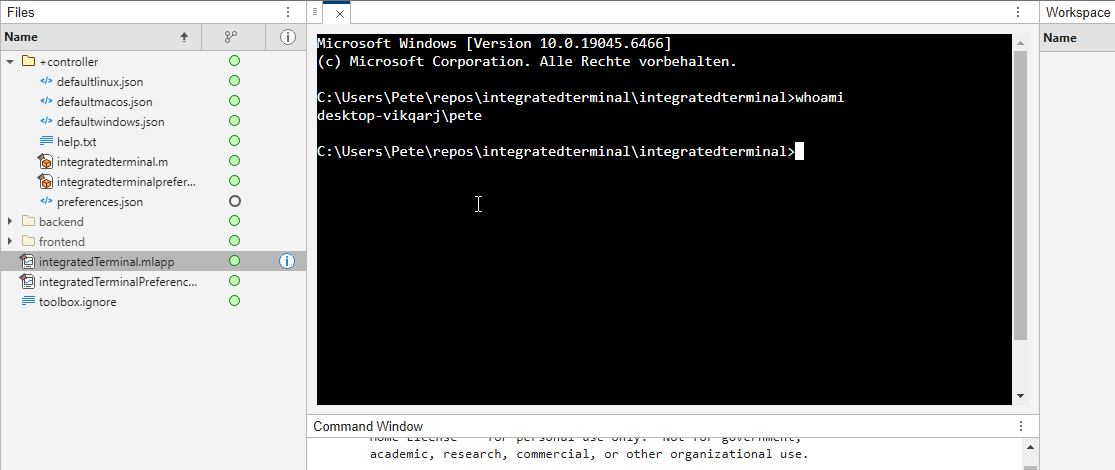
It's possible to change the shell which is used. For example, I can set the shell path to C://Git//bin//bash.exe and use Git Bash on Windows. You can also change the theme. You can run multiple terminals.
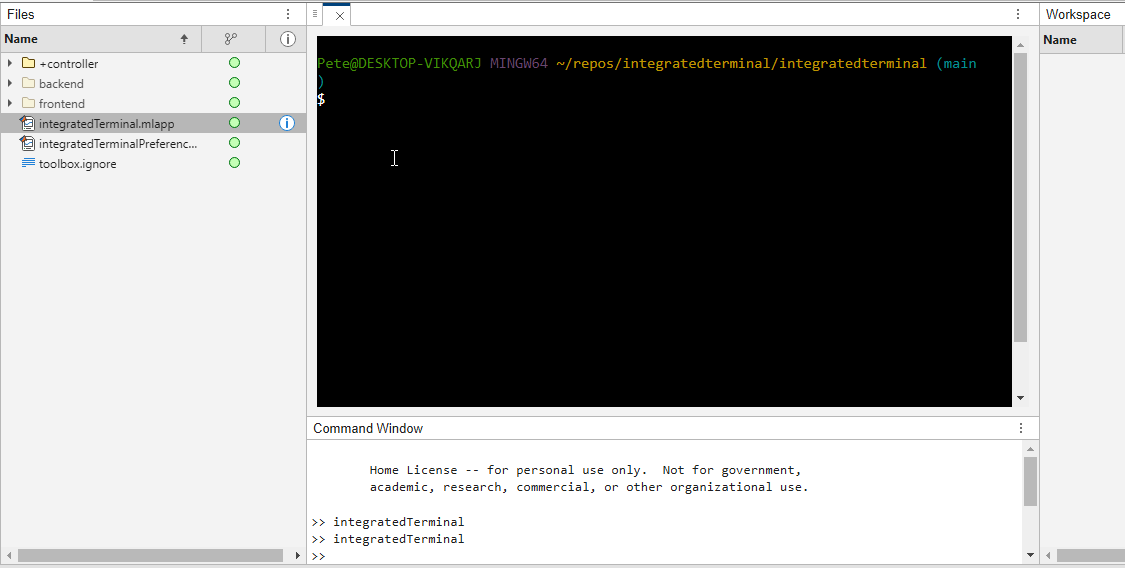
I hope you like it and any feedback will be much appreciated. As soon as it's stable enough I can release it as a toolbox.
What’s New in MATLAB and Simulink in 2025
If you missed this session live, this is one of those “everyone’s talking about it” updates you’ll want to catch up on. 👀
This session is packed with the kinds of enhancements that quietly (and not so quietly) change how you work every day.
Here’s why it earned a spot in our Top 4:
- A redesigned MATLAB desktop with customizable sidebars and light/dark themes—built to adapt to how you work
- New side panels for coding and development tasks, plus more control over organizing and customizing figures
- MATLAB Copilot, a generative AI assistant optimized for MATLAB to help you explore ideas, learn techniques, and boost productivity directly in the desktop
- Simulink workflow improvements like a redesigned Simulink scope, more detailed info in quick insert, and automatic signal line straightening
- Enhanced Python integration across MATLAB and Simulink
- New AI deployment options optimized for Qualcomm and Infineon hardware targets
If staying current with MATLAB and Simulink is part of your role—or your edge—this session is a must‑watch. Missing it means missing context for features that will shape how you work in 2026 and beyond.
💬 Discussion topic:
Which single update from this release do you think will most improve your day‑to‑day workflow, and why?

🤖 What does it take to make robotic motion feel… human?
In this session, Tetsushi Sotowa shares how NSK is combining advanced control techniques with deep learning to enable human‑like grasping in electric grippers
You’ll see a real‑world case study featuring:
- Bilateral and force control systems developed in‑house
- MATLAB and Simulink–based control workflows
- Deep learning integration using Deep Learning Toolbox
- A practical path from mechatronics research to intelligent actuation
The result: an AI‑enhanced actuator capable of more natural, responsive grasping—bringing robotics one step closer to human motion.
👉 Interested in AI‑driven robotics and advanced control? Check out the session now from MATLAB EXPO 2025.
Missed a crowd‑favorite session feautring Marko Gecic at Infineon and Lucas Garcia at MathWorks?
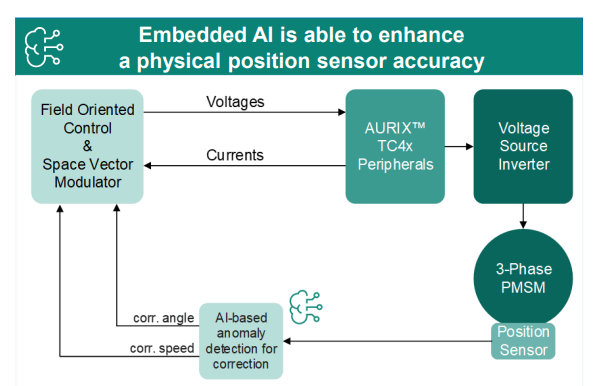
This talk shows how to verify and test AI for real‑time, safety‑critical systems using an AI virtual sensor that estimates motor rotor position on an Infineon AURIX TC4x microcontroller. Built with MATLAB and Simulink, the demo covers training, verification, and real‑time control across a wide range of operating conditions.
You’ll see practical techniques to test robustness, measure sensitivity to input perturbations, and detect out‑of‑distribution behavior—critical steps for meeting standards like ISO 26262 and ISO 8800. The session also highlights how Model‑Based Design leverages AURIX TC4x features such as the PPU and CDSP to deploy AI with confidence.
Featuring: Dr. Arthur Clavière, Collins Aerospace
How can we be confident that a machine learning model will behave safely on data it’s never seen—especially in avionics? In this session, Dr. Arthur Clavière introduces a formal methods approach to verifying maching learning generalization. The talk highlights how formal verification can be apploied toneural networks in safety-critical avionics systems.
💬 Discussion question:
Where do you see formal verification having the biggest impact on deploying ML in safety‑critical systems—and what challenges still stand in the way?
Join the conversation below 👇

I was reading Yann Debray's recent post on automating documentation with agentic AI and ended up spending more time than expected in the comments section. Not because of the comments themselves, but because of something small I noticed while trying to write one. There is no writing assistance of any kind before you post. You type, you submit, and whatever you wrote is live.
For a lot of people that is fine. But MATLAB Central has users from all over the world, and I have seen questions on MATLAB Answers where the technical reasoning is clearly correct but the phrasing makes it hard to follow. The person knew exactly what they meant. The platform just did not help them say it clearly.
I want to share a few ideas around this. They are not fully formed proposals but I think the direction is worth discussing, especially given how much AI tooling MathWorks has built recently.
What the platform has today
When you write a post in Discussions or an answer in MATLAB Answers, the editor gives you basic formatting options. Code blocks, some text styling, that is mostly it. The AI Chat Playground exists as a separate tool, and MATLAB Copilot landed in R2025a for the desktop. But none of that is inside the editor where people actually write community content.
Four things are missing that I think would make a real difference.
Grammar and clarity checking before you post
Not a forced rewrite. Just an optional Check My Draft button that highlights unclear sentences or anything that might trip a reader up. The user reviews it, decides what to change, then posts.
What makes this different from plugging in Grammarly is that a general-purpose tool does not know that readtable is a MATLAB function. It does not know that NaN, inf, or linspace are not errors. A MATLAB-aware checker could flag things that generic tools miss, like someone writing readTable instead of readtable in a solution post.
The llms-with-matlab package already exists on GitHub. Something like this could be built on top of it with a prompt that includes MATLAB function vocabulary as context. That is not a large lift given what is already there.
Translation support
MATLAB Central already has a Japanese-language Discussions channel. That tells you something about the community. The platform is global but most of the technical content is in English, and there is a real gap there.
Two options that would help without being intrusive:
- Write in your language, click Translate, review the English version, then post. The user is still responsible for what goes live.
- A per-post Translate button so readers can view content in a language they are more comfortable with, without changing what is stored on the platform.
A student who has the right answer to a MATLAB Answers question might not post it because they are not confident writing in English. Translation support changes that. The community gets the answer and the contributor gets the credit.
In-editor code suggestions
When someone writes a solution post they usually write the code somewhere else, test it, copy it, paste it, and format it manually. An in-editor assistant that generates a starting scaffold from a plain-text description would cut that loop down.
The key word is scaffold, not a finished answer. The label should say something like AI-generated draft, verify before posting so it is clear the person writing is still accountable. MATLAB Copilot already does something close to this inside the desktop editor. Bringing a lighter version of it into the community editor feels like a natural extension of what already exists.
A note on feasibility
These ideas are not asking for something from scratch. MathWorks already has llms-with-matlab, the MCP Core Server, and MATLAB Copilot as infrastructure. Grammar checking and translation are well-solved problems at the API level. The MATLAB-specific vocabulary awareness is the part worth investing in. None of it should be on by default. All of it should be opt-in and clearly labeled when it runs.
One more thing: diagrams in posts
Right now the only way to include a diagram in a post is to make it externally and upload an image. A lightweight drag-and-drop diagram tool inside the editor would let people show a process or structure quickly without leaving the platform. Nothing complex, just boxes and arrows. For technical explanations it is often faster to draw than to write three paragraphs.
What I am curious about
I am a Data Science student at CU Boulder and an active MATLAB user. These ideas came up while using the platform, not from a product roadmap. I do not know what is already being discussed internally at MathWorks, so it is entirely possible some of this is in progress.
Has anyone else run into the same friction points when writing on MATLAB Central? And for anyone at MathWorks who works on the community platform, is the editor something that gets investment alongside the product tools?
Happy to hear where I am wrong on the feasibility side too.
AI assisted with grammar and framing. All ideas and editorial decisions are my own.
🚀 Unlock Smarter Control Design with AI
What if AI could help you design better controllers—faster and with confidence?
In this session, Naren Srivaths Raman and Arkadiy Turevskiy (MathWorks) show how control engineers are using MATLAB and Simulink to integrate AI into real-world control design and implementation.
You’ll see how AI is being applied to:
🧠 Advanced plant modeling using nonlinear system identification and reduced order modeling
📡 Virtual sensors and anomaly detection to estimate hard-to-measure signals
🎯 Datadriven control design, including nonlinear MPC with neural statespace models and reinforcement learning
⚡ Productivity gains with generative AI, powered by MATLAB Copilot
At #9 in our MATLAB EXPO 2025 countdown: From Tinkerer to Developer—A Journey in Modern Engineering Software Development
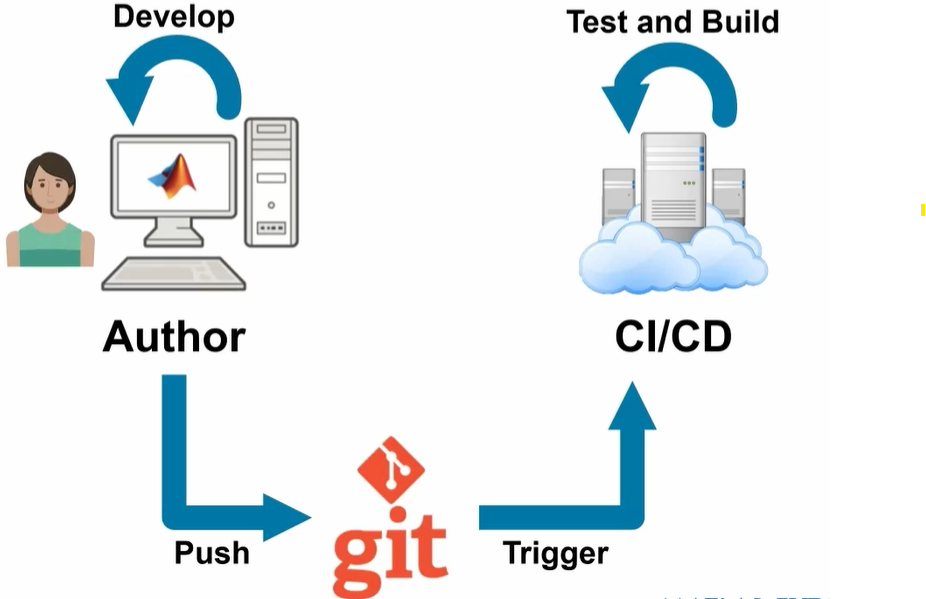
A big thank‑you to Greg Diehl at NAVAIR and Michelle Allard at MathWorks, the team behind this session, for sharing their multi‑year evolution from rapid‑fire experimenting to disciplined, scalable software development.
If you’ve ever wondered what it really takes to move MATLAB code from “it works!” to “it’s ready for production,” this talk captures that transition. The team highlights how improved testing practices, better structure, and close collaboration with MathWorks experts helped them mature their workflows and tackle challenges around maintainability and code quality.
Curious about the pivotal moments that helped them level up their engineering software practices?
Couldn’t catch everything at MATLAB EXPO 2025? You’re not alone. Across keynotes and track talks, there were too many gems for one sitting. For the next 9 weeks, we’ll reveal the "Top 10" sessions attended (workshops excluded)—one per week—so you can binge the best and compare notes with peers.
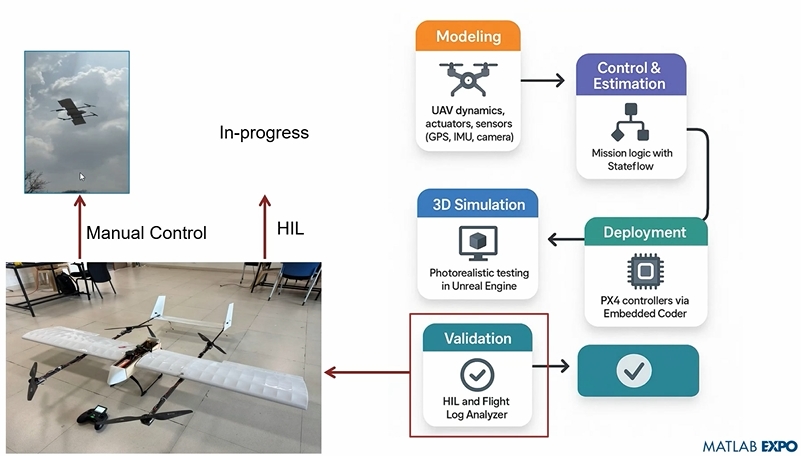
Starting at #10: Simulation-Driven Development of Autonomous UAVs Using MATLAB
A huge thanks to Dr. Shital S. Chiddarwar from Visvesvaraya National Institute of Technology Nagpur who delivered this presentation online at MATLAB EXPO 2025. Are you curious how this workflow accelerates development and boosts reliability?

Currently, the open-source MATLAB Community is accessed via the desktop web interface, and the experience on mobile devices is not very good—especially switching between sections like Discussion, FEX, Answers, and Cody is awkward. Having a dedicated app would make using the community much more convenient on phones.
Similarty,github has Mobile APP, It's convient for me.

I struggle with animations. I often want a simple scrollable animation and wind up having to export to some external viewer in some supported format. The new Live Script automation of animations fails and sabotages other methods and it is not well documented so even AIs are clueless how to resolve issues. Often an animation works natively but not with MATLAB Online. Animation of results seems to me rather basic and should be easier!

Frequently, I find myself doing things like the following,
xyz=rand(100,3);
XYZ=num2cell(xyz,1);
scatter3(XYZ{:,1:3})
But num2cell is time-consuming, not to mention that requiring it means extra lines of code. Is there any reason not to enable this syntax,
scatter3(xyz{:,1:3})
so that I one doesn't have to go through num2cell? Here, I adopt the rule that only dimensions that are not ':' will be comma-expanded.

