How to change axes in tiledlayout with different x and y axes
Show older comments
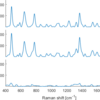
I have 3 data sets with 2 different x axes, which I like to plot as a stackedplot. As far as I understood, this is not possible for a stackedplot, as I always need the same x axes. So I used tiledlayout and ploted those 3 separetely. When I try to adjust the XLimits and YLimits I get errors.
This is what I did so far:
XAxislow = 400;
XAxishigh = 1800;
t=tiledlayout(3,1);
ax1 = nexttile;
plot(wave_raman,spec_raman);
ax1 = gca;
ax1.Box = 'off';
ax1.FontSize=11;
ax1.LineWidth=1.2;
ax1.XLimits = [XAxislow XAxishigh];
ax1.YLimits= [0 400];
ax2 = nexttile;
ln2 = plot(wave_gauss3*A3,spec_gauss3);
ax2 = gca;
ax2.Box = 'off';
ax2.FontSize=11;
ax2.LineWidth=1.2;
ax2.XLimits = [XAxislow XAxishigh];
ax2.AxesProperties.YLimits= [0 40];
ax3 = nexttile;
ln3 = plot(wave_gauss4*A4,spec_gauss4);
ax3 = gca;
ax3.Box = 'off';
ax3.FontSize=11;
ax3.LineWidth=1.2;
ax3.XLimits = [XAxislow XAxishigh];
ax3.AxesProperties.YLimits= [0 40];
txt = xlabel(t,'Raman shift [cm^{-1}]');
txt2 = ylabel(t,'Raman intensity');
t.TileSpacing = 'tight'; %compact tight none
t.Padding = 'compact'; %compact tight
txt.FontSize = 12;
txt.Color = 'black';
txt2.FontSize = 12;
txt2.Color = 'black';
Accepted Answer
Simon Chan
on 13 Apr 2022
In order to set the limits, use the following
ax1.XLim = [XAxislow XAxishigh];
ax1.YLim = [0 400];
instead of
ax1.XLimits = [XAxislow XAxishigh];
ax1.YLimits= [0 400];
More Answers (0)
Categories
Find more on Polar Plots in Help Center and File Exchange
Community Treasure Hunt
Find the treasures in MATLAB Central and discover how the community can help you!
Start Hunting!
