write
R2026bWrite logs to rosbag log file
Description
Examples
Retrieve all the information from the rosbag log file.
rosbag('info','path_record.bag')
Path:     /tmp/Bdoc26b_3351752_2774996/tpa813e002/ros-ex73035957/path_record.bag
Version:  2.0
Duration: 10.5s
Start:    Jul 05 2021 08:09:52.86 (1625486992.86)
End:      Jul 05 2021 08:10:03.40 (1625487003.40)
Size:     13.3 KB
Messages: 102
Types:    geometry_msgs/Point [4a842b65f413084dc2b10fb484ea7f17]
Topics:   /circle  51 msgs  : geometry_msgs/Point
          /line    51 msgs  : geometry_msgs/Point
Create a rosbagreader object of all the messages in the rosbag log file.
reader = rosbagreader('path_record.bag');Select all the messages related to the topic '/circle'.
bagSelCircle = select(reader,'Topic','/circle');
Retrieve the list of timestamps from the topic.
timeStamps = bagSelCircle.MessageList.Time;
Retrieve the messages in the selection as a cell array.
messages = readMessages(bagSelCircle);
Create a rosbagwriter object to write the messages to a new rosbag file.
circleWriter = rosbagwriter('circular_path_record.bag');Write all the messages related to the topic '/circle' to the new rosbag file.
write(circleWriter,'/circle',timeStamps,messages);Remove the rosbagwriter object from memory and clear the associated object.
delete(circleWriter)
clear circleWriter
Retrieve all the information from the new rosbag log file.
rosbag('info','circular_path_record.bag')
Path:     /tmp/Bdoc26b_3351752_2774996/tpa813e002/ros-ex73035957/circular_path_record.bag
Version:  2.0
Duration: 10.4s
Start:    Jul 05 2021 08:09:52.86 (1625486992.86)
End:      Jul 05 2021 08:10:03.29 (1625487003.29)
Size:     8.8 KB
Messages: 51
Types:    geometry_msgs/Point [4a842b65f413084dc2b10fb484ea7f17]
Topics:   /circle  51 msgs  : geometry_msgs/Point
Load the new rosbag log file.
readerCircle = rosbagreader('circular_path_record.bag');Create a time series for the coordinates.
tsCircle = timeseries(readerCircle,'X','Y');
Plot the coordinates.
plot(tsCircle.Data(:,1),tsCircle.Data(:,2))
axis equal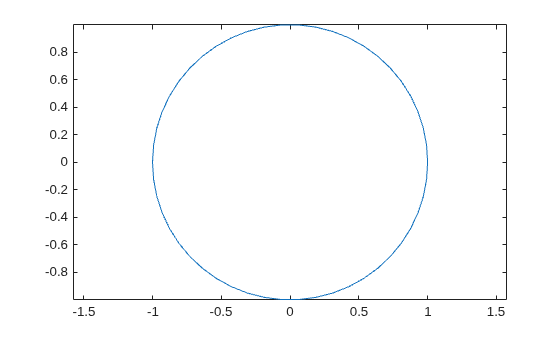
Create a rosbagwriter object and a rosbag file in the current working directory. Specify the compression format of the message chunks and the size of each message chunk.
bagwriter = rosbagwriter("bagfile.bag", ...
    "Compression","lz4",...
    "ChunkSize",1500)
bagwriter =
  rosbagwriter with properties:

       FilePath: '/tmp/Bdoc26b_3351752_2719827/tpd9dbf837/ros-ex26181333/bagfile.bag'
      StartTime: 0
        EndTime: 0
    NumMessages: 0
    Compression: 'lz4'
      ChunkSize: 1500                                                                    Bytes
       FileSize: 4117                                                                    Bytes
Start node and connect to ROS master.
rosinit
The value of the ROS_MASTER_URI environment variable, http://172.23.65.36:59698, will be used to connect to the ROS master.
Initializing global node /matlab_global_node_97709 with NodeURI http://172.23.65.36:44647/ and MasterURI http://172.23.65.36:59698.
Write a single log to the rosbag file.
timeStamp = rostime("now");
rosMessage = rosmessage("nav_msgs/Odometry");
write(bagwriter,"/odom",timeStamp,rosMessage);
bagwriter
bagwriter =
  rosbagwriter with properties:

       FilePath: '/tmp/Bdoc26b_3351752_2719827/tpd9dbf837/ros-ex26181333/bagfile.bag'
      StartTime: 1.7861e+09
        EndTime: 1.7861e+09
    NumMessages: 1
    Compression: 'lz4'
      ChunkSize: 1500                                                                    Bytes
       FileSize: 4172                                                                    Bytes
Shut down the ROS network.
rosshutdown
Shutting down global node /matlab_global_node_97709 with NodeURI http://172.23.65.36:44647/ and MasterURI http://172.23.65.36:59698.
Remove rosbag writer object from memory and clear the associated object.
delete(bagwriter)
clear bagwriter
Create a rosbagreader object and load all the messages in the rosbag log file. Verify the recently written log.
bagreader = rosbagreader('bagfile.bag')bagreader =
rosbagreader with properties:
FilePath: '/tmp/Bdoc26b_3351752_2719827/tpd9dbf837/ros-ex26181333/bagfile.bag'
StartTime: 1.7861e+09
EndTime: 1.7861e+09
NumMessages: 1
AvailableTopics: [1×3 table]
AvailableFrames: {0×1 cell}
MessageList: [1×4 table]
bagreader.AvailableTopics
ans = 1×3 table
             NumMessages       MessageType                                                                                                                                                                                                                                                                                                           MessageDefinition
             ___________    _________________    __________________________________________________________________________________________________________________________________________________________________________________________________________________________________________________________________________________________________________________________________________________________________________________________________________________________________________________________________________________________________________________________________________________________________________________________________________________________

    /odom         1         nav_msgs/Odometry    {'std_msgs/Header Header↵  uint32 Seq↵  Time Stamp↵  char FrameId↵char ChildFrameId↵geometry_msgs/PoseWithCovariance Pose↵  geometry_msgs/Pose Pose↵    geometry_msgs/Point Position↵      double X↵      double Y↵      double Z↵    geometry_msgs/Quaternion Orientation↵      double X↵      double Y↵      double Z↵      double W↵  double[36] Covariance↵geometry_msgs/TwistWithCovariance Twist↵  geometry_msgs/Twist Twist↵    geometry_msgs/Vector3 Linear↵      double X↵      double Y↵      double Z↵    geometry_msgs/Vector3 Angular↵      double X↵      double Y↵      double Z↵  double[36] Covariance↵'}
Input Arguments
Version History
Introduced in R2021b

