Control a Quanser QUBE Pendulum with a Raspberry Pi using Reinforcement Learning
This example shows how to train a reinforcement learning policy deployed on a Raspberry Pi® board to control a Quanser QUBE™-Servo 2 inverted pendulum system. The goal of the policy is to swing up and balance the pendulum in the upright position. For more information regarding the Quanser pendulum system, see Quanser QUBE™-Servo 2.
Introduction
When an agent needs to interact with a physical system, you can use different architectures to allocate the required computations. Three different architectures, with their advantages and disadvantages, are discussed in Examine Approaches to Fine Tune a Deployed Policy. This example implements the third architecture.
Here, the learning algorithm runs in a desktop MATLAB process, while the policy (that is, the control process) is executed on a Raspberry Pi board. The control process collects experiences by interacting with the pendulum system, and periodically sends these experiences to the learning process. The learning process then uses the experiences received from the control process to update the actor and critic parameters of the agent, and then periodically sends the updated actor parameters to the control process. The control process then updates the policy parameters with the new parameters received by the learning process.
The figure illustrates this architecture.
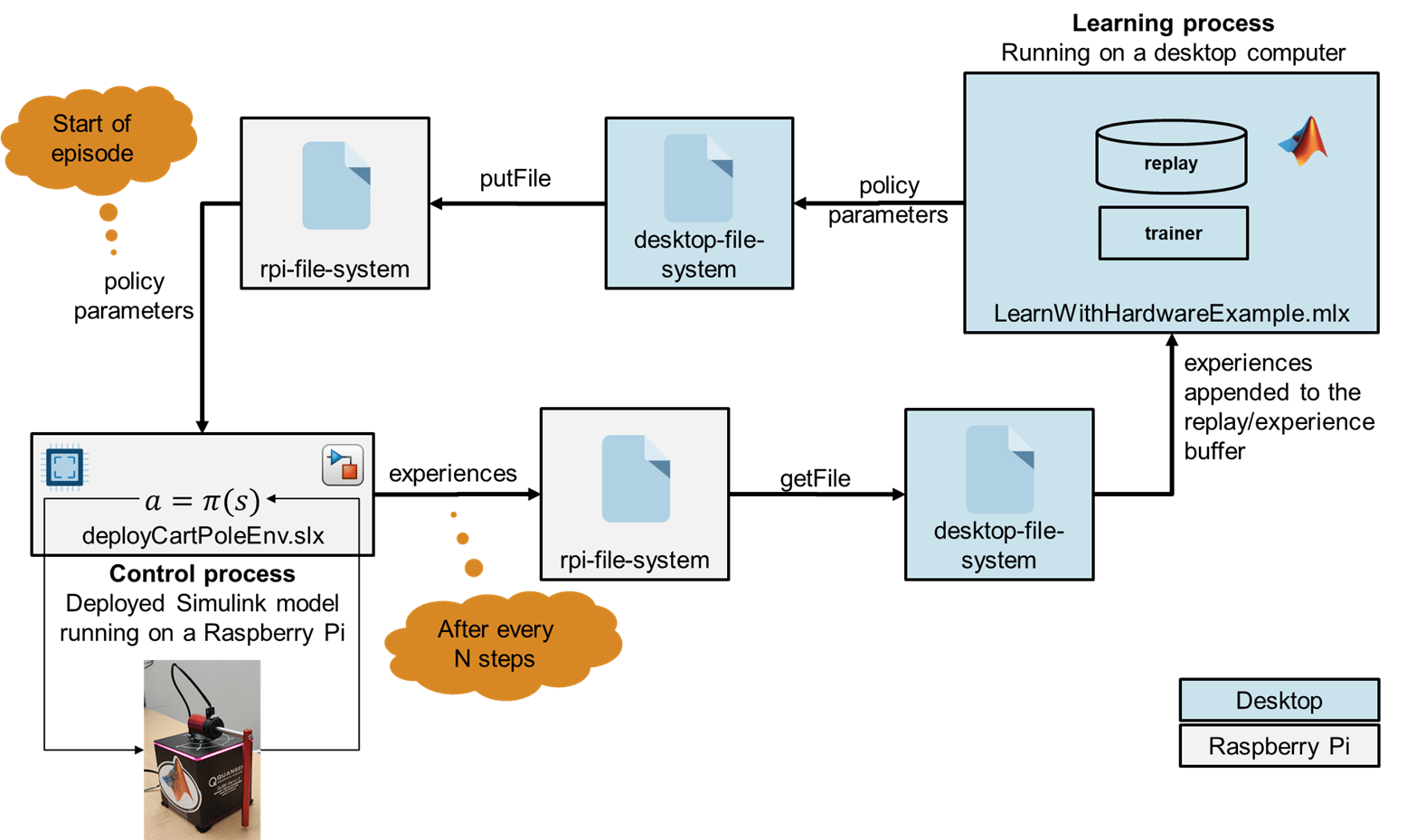
In this figure, the control process is deployed (from a Simulink® model) on a Raspberry Pi board. The Raspberry Pi board interacts with the Quanser QUBE pendulum system using a serial peripheral interface (SPI) connection. The control process runs the agent policy and collects experiences by controlling the Quanser QUBE pendulum system. The process regularly updates its policy parameters with new policy parameters read from a parameter file that the learning process regularly writes on the Raspberry Pi board. The control process also periodically saves the collected experiences to experience files in the Raspberry Pi board file system.
The learning process runs (in MATLAB) on a desktop computer. This process reads the files on the Raspberry Pi board that contain the new collected experiences, uses the experiences to train the agent, and periodically writes to the Raspberry Pi board a file that contains new policy parameters for the control board to read.
Create Quanser QUBE Pendulum Environment Specifications
The Quanser QUBE-Servo 2 pendulum system is a rotational inverted pendulum with two degrees of freedom. The pendulum is attached to the motor arm by a free revolute joint. The arm is actuated by a DC motor. The control process containing the agent policy is designed in Simulink and deployed (using the Raspberry Pi® Blockset) on a Raspberry Pi board, which interacts with the pendulum system using a Serial Peripheral Interface (SPI) connection. This example uses the Quanser QFLEX 2 Embedded module to enable SPI communication with the QUBE-Servo 2. The goal of the agent is to swing up and balance the pendulum in the upright position. The pendulum system is an underactuated system, with the agent controlling the motor that rotates along the vertical axis. For more information on the Quanser pendulum system, wiring, and command packet structure, see Quanser QUBE™-Servo 2.
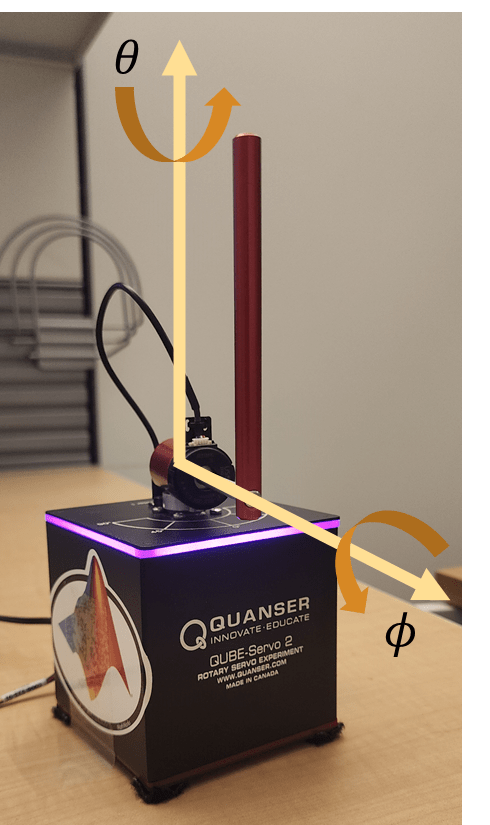
For this environment:
The observation is the vector . Using the sine and cosine of the measured angles can facilitate training by representing the otherwise discontinuous angular measurements by a continuous two-dimensional parameterization.
The action is the normalized input voltage command to the servo motor.
The reward signal is defined as follows:
The above reward function penalizes six terms:
Deviations from the forward position of the motor arm ().
Deviations for the inverted position of the pendulum ().
The angular speed of the motor arm .
The angular speed of the pendulum .
The control action .
Changes to the control action .
The system constraints are needed to prevent the motor from deviating too far from the center position and to avoid the pendulum potentially hitting the power cord. They also ensure the pendulum does not swing too quickly, as swinging too fast can cause the magnetically coupled pendulum to decouple from the base. The agent is rewarded while the system constraints are satisfied (that is ). Additionally, the episode is terminated early if any of the constraints are violated.
Define the observation specification obsInfo and action specification actInfo. These specifications are needed to create the agent. The sample time for the environment and the agent is 0.005 seconds.
obsInfo = rlNumericSpec([7 1]);
obsInfo.Description = "sinTheta, cosTheta, thetaDot, sinPhi, cosPhi, phiDot, uPrevious";

actInfo = rlNumericSpec([1 1]);
actInfo.LowerLimit = -1;
actInfo.UpperLimit = 1;
actInfo.Description = "motorVoltage";

sampleTime = 0.005;
Review Control Process Simulink Model and Define Environment Parameters
The control process code is generated from a Simulink model and deployed on the Raspberry Pi board. This process runs indefinitely, because the stop time of the Simulink model used to generate the process executable is set to Inf.
Open the model.
mdl = 'deployQuanserQubeEnvironment';
open_system(mdl);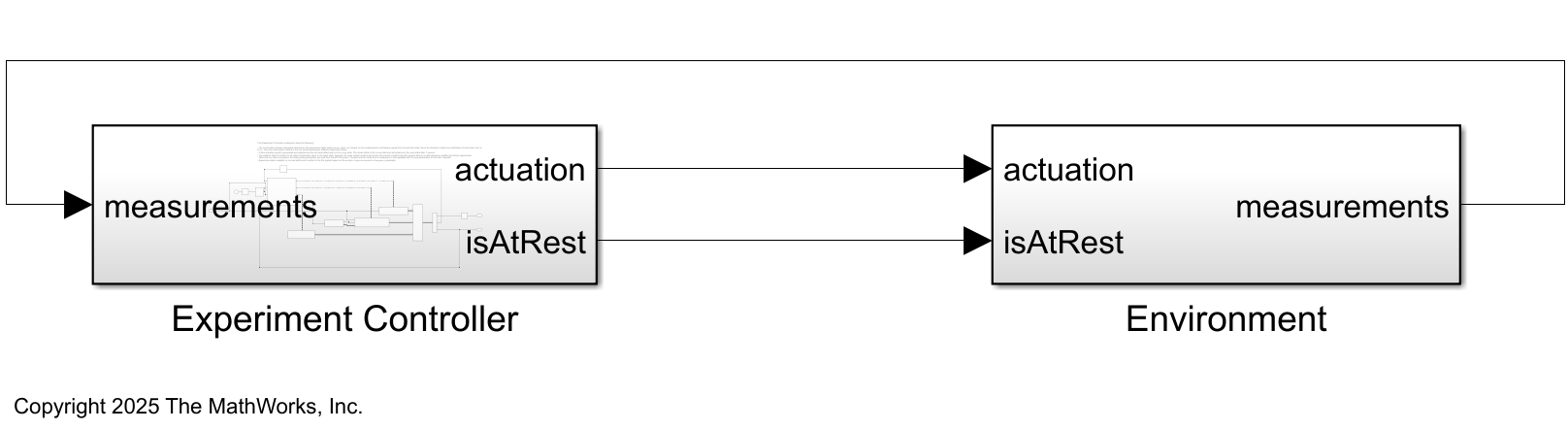
This model consists of two main subsystems:
The
Environmentsubsystem interacts with the Quanser QUBE Servo-2 hardware.The
ExperimentControllersubsystem contains the reinforcement learning policy, the experiment mode state switching control module, the policy parameter update module, and the experience saving module.
The Environment subsystem interacts with the Quanser QUBE Servo-2 hardware. Specifically, the RPI_Driver block takes the actuation (the motor voltage), the enable signal for the motor enableMotor, and the signal to reset the encoders as inputs and returns the next measurement y consisting of the motor angle () and pendulum angle () as output. It uses the SPI Controller Transfer block to write data to and read data from SPI peripheral device; see SPI Controller Transfer (Raspberry Pi Blockset) for more information. The Furuta_State_Estimator block uses the next measurement coming from the RPI_Drive block to estimate the states and.
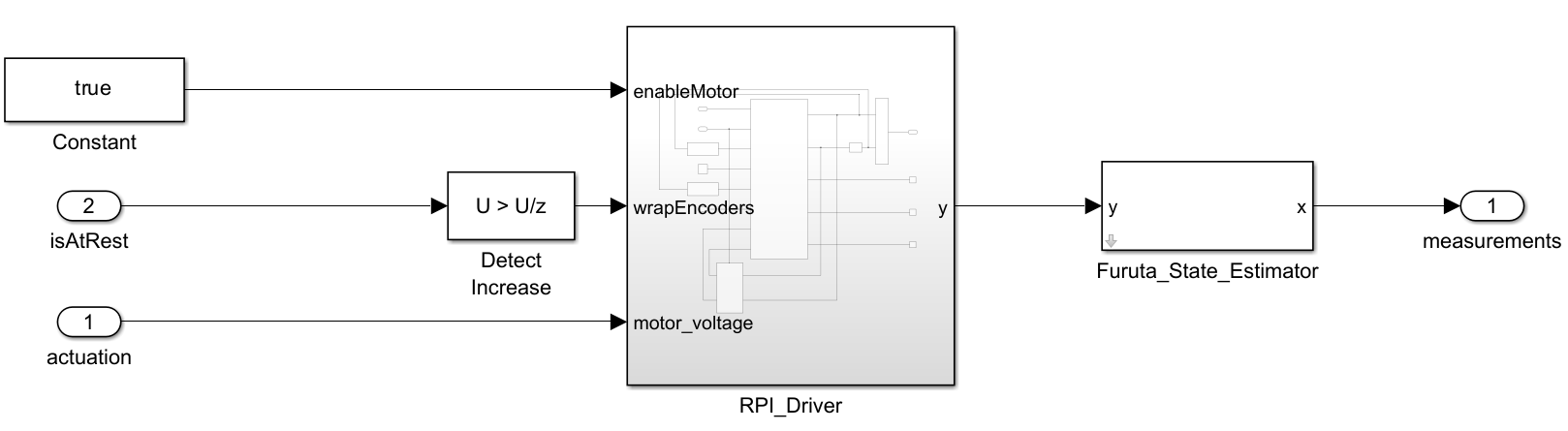
Within the Experiment Controller subsystem:
The
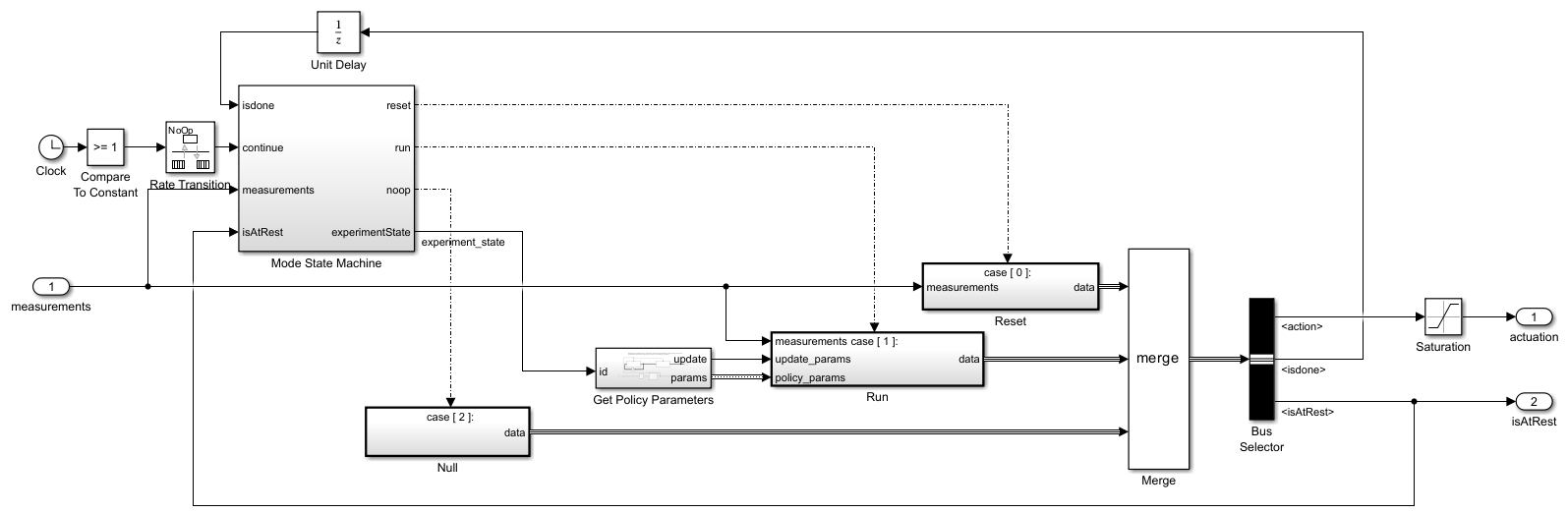
ModeStateMachinesubsystem determines the experiment mode states (no-op, reset, and run) based on themeasurementsand theisdonesignals from the last time step. Because the Simulink model runs indefinitely (its stop time is set toInf), the Mode State Machine is responsible for switching between different experiment states. It does so by enabling the Reset, Run and Null subsystems according to the needed mode.When in the no-op state, the
ExperimentControllersubsystem generates a zero actuation signal and does not transmit experiences to the learning process running on the MATLAB desktop. The model starts in the no-op state and advances to the reset state after one second.A reset system with appropriate logic and control is an essential part of the experiment process, as it is needed to safely return the system to a valid operating condition for further experiments or runs. In this example, the system is reset to its initial configuration ( for the motor arm and or for the pendulum) using a linear-quadratic regulator (LQR), which takes the states () as inputs and outputs the motor voltage needed to quickly achieve the desired configuration.
When the run state is activated, a MATLAB function called by the
GetPolicyParameterssubsystem reads the latest policy parameters from a parameter file in the Raspberry Pi file system. The policy block inside theRunsubsystem is then updated with the new parameters for the next "episode."
The
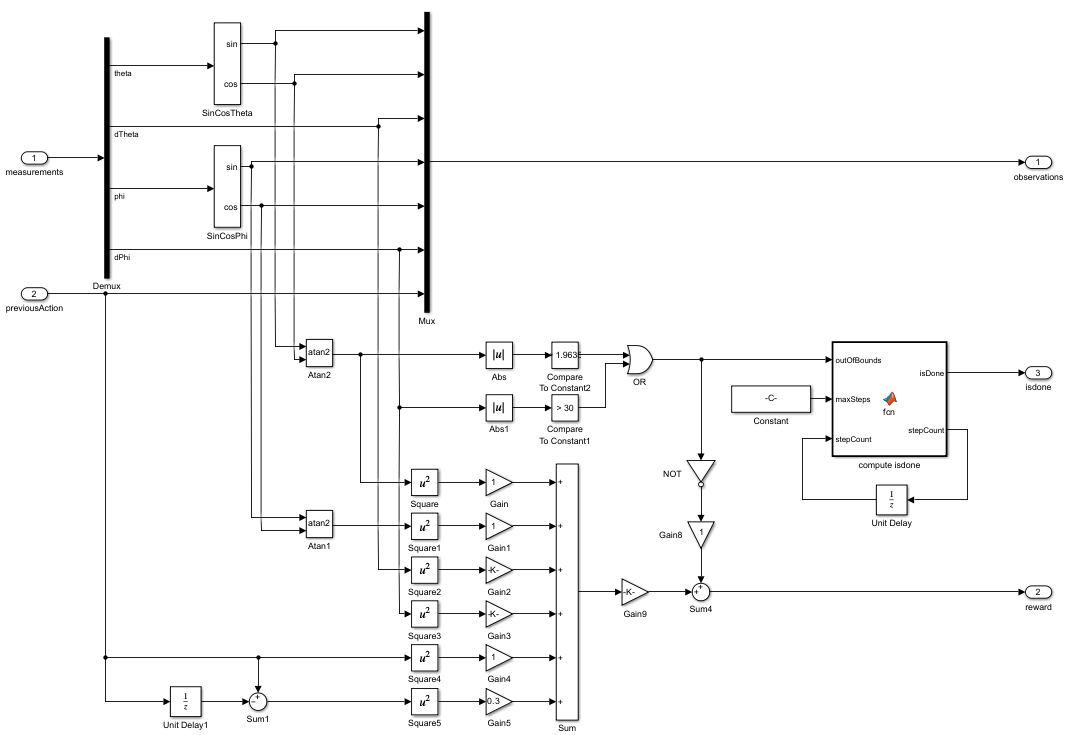
ProcessDatasubsystem (under theRunsubsystem, and shown in the following figure) computes theobservations,reward, andisdonesignals given the measurements from theEnvironmentsubsystem. For this example, the measurements are and . The seven observations are computed using the measurements.
The
RemoteAgentsubsystem (under theRunsubsystem, and shown in the following figure) maps observations to actions using the updated policy parameters. Additionally, theExperienceWritersubsystem collects experiences in a circular buffer and writes the buffer to experience files in the Raspberry Pi file system, with a frequency given by theenvData.ExperiencesWriteFrequencyparameter.
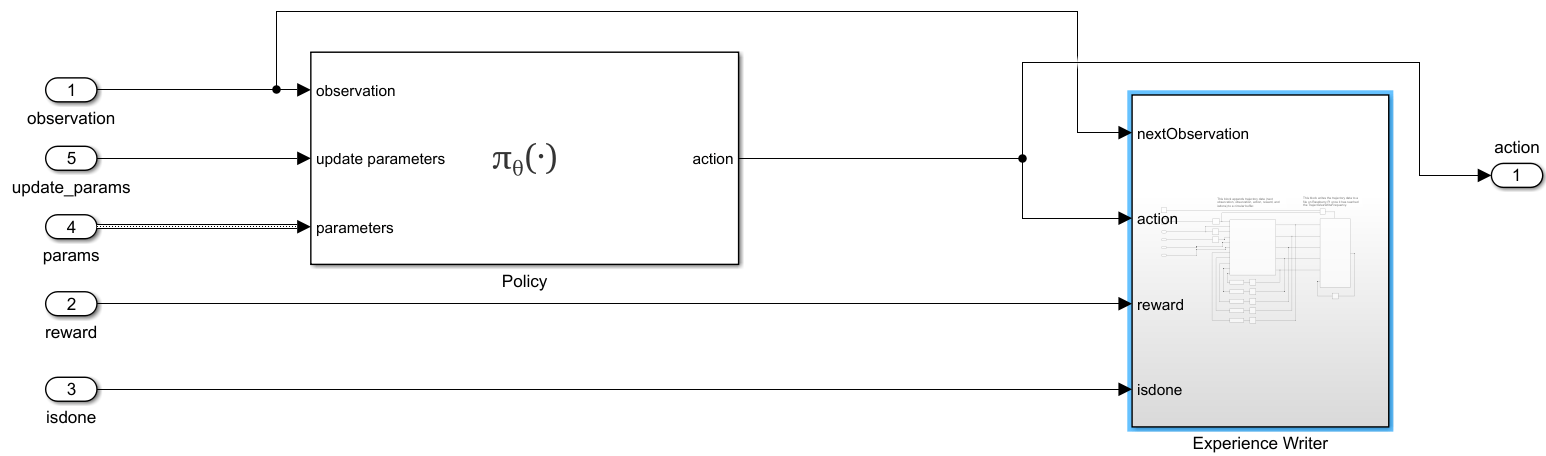
You can use the command generatePolicyBlock(agent) to generate a Simulink policy block. For more information, see generatePolicyBlock.
Use the local function environmentParameters to define the parameters needed by the environment and the reset controller. This function is defined at the end of this example.
envData = environmentParameters(sampleTime);
Create a structure representing a circular buffer to store experiences. The buffer is saved to a file based on the writing frequency specified by envData.ExperiencesWriteFrequency.
tempExperienceBuffer.NextObservation = ...
    zeros(obsInfo.Dimension(1),envData.ExperiencesWriteFrequency);
tempExperienceBuffer.Observation = ...
    zeros(obsInfo.Dimension(1),envData.ExperiencesWriteFrequency);
tempExperienceBuffer.Action = ...
    zeros(actInfo.Dimension(1),envData.ExperiencesWriteFrequency);
tempExperienceBuffer.Reward = ...
    zeros(1,envData.ExperiencesWriteFrequency);
tempExperienceBuffer.IsDone = ...
    zeros(1,envData.ExperiencesWriteFrequency,"uint8");
You use this structure as a reference when the policy parameters are converted from bytes of data to a structure (deserialization).
agentData.TempExperienceBuffer = tempExperienceBuffer;
Create SAC Agent
Fix the random number stream with the seed 0 and random number algorithm Mersenne Twister to reproduce the same initial learnable parameters used in the agent. For more information on controlling the seed used for random number generation, see rng.
previousRngState = rng(0, "twister");The output previousRngState is a structure that contains information about the previous state of the stream. You restore the state at the end of the example.
Create an agent initialization object to initialize the actor and critic networks with the hidden layer size 64. For more information on agent initialization options, see rlAgentInitializationOptions.
initOptions = rlAgentInitializationOptions("NumHiddenUnit",64);Create a default SAC agent using the observation specifications, action specifications, and initialization options. For more information, see rlSACAgent.
agent = rlSACAgent(obsInfo,actInfo,initOptions);
Specify the agent options for training. For more information, see rlSACAgentOptions. For this training:
Specify the sample time, experience buffer length, and mini-batch size.
Set the actor and critic learning rates to
1e-3, and entropy weight learning rate to3e-4. A fast learning rate causes drastic updates that can lead to divergent behaviors, while a slow learning rate value can require many updates before reaching the optimal point.Use a gradient threshold of
1to clip the gradients. Clipping the gradients can improve training stability.Specify the initial entropy component weight and the target entropy value.
agent.SampleTime = sampleTime;
agent.AgentOptions.ExperienceBufferLength = 1e6;
agent.AgentOptions.MiniBatchSize = 256;

agent.AgentOptions.ActorOptimizerOptions.LearnRate = 1e-3;
agent.AgentOptions.ActorOptimizerOptions.GradientThreshold = 1;
for criticIndex = 1:2
    agent.AgentOptions.CriticOptimizerOptions(criticIndex).LearnRate = 1e-3;
    agent.AgentOptions.CriticOptimizerOptions(criticIndex).GradientThreshold = 1;
end

agent.AgentOptions.EntropyWeightOptions.LearnRate = 3e-4;
agent.AgentOptions.EntropyWeightOptions.EntropyWeight = 0.1;
agent.AgentOptions.EntropyWeightOptions.TargetEntropy = -1;
Define offline training options using the rlTrainingFromDataOptions object. You use trainFromData to train the agent from the collected experience data appended to the experience buffer. Set the number of steps to 200 and the max epochs to 1 to take 200 learning steps to train the agent when new experiences are collected. The actual training progress (episode rewards) can be obtained from the control process, so you do not need to plot the progress of offline training.
trainFromDataOptions = rlTrainingFromDataOptions;
trainFromDataOptions.MaxEpochs = 1;
trainFromDataOptions.NumStepsPerEpoch = 200;
trainFromDataOptions.Plots = "none";

agentData.Agent = agent;
agentData.TrainFromDataOptions = trainFromDataOptions;
agentData.Ts = sampleTime;
Build, Deploy, and Start the Control Process on Raspberry Pi Board
Connect to the Raspberry Pi board using the IP address, username, and password. For this example, you need Raspberry Pi® Blockset. See Get Started with Raspberry Pi Blockset (Raspberry Pi Blockset) for details on setting up your Raspberry Pi hardware.
Replace the information in the code below with the login credentials of your Raspberry Pi board.
ipaddress ="172.31.172.170"; username =
"guestuser"; password =
"guestpasswd";
Create a raspberrypi object and store it in the agentData structure.
agentData.RPi = raspberrypi(ipaddress,username,password)
agentData = struct with fields:
    TempExperienceBuffer: [1×1 struct]
                   Agent: [1×1 rl.agent.rlSACAgent]
    TrainFromDataOptions: [1×1 rl.option.rlTrainingFromDataOptions]
                      Ts: 0.0050
                     RPi: [1×1 raspberrypi]
Create variables that store folder and file information for parameters and experiences.
% Folder for storing experiences on Raspberry Pi
experiencesFolderRPi = "~/pendulumExperiments/experiences/";
% Folder for storing parameters on Raspberry Pi
parametersFolderRPi = "~/pendulumExperiments/parameters/";

% Folder for storing experiences on desktop computer
experiencesFolderDesktop = ...
    fullfile(".","pendulumExperiments","experiences/");
% Folder for storing parameters on desktop computer
parametersFolderDesktop = ...
    fullfile(".","pendulumExperiments","parameters/");

parametersFile = "parametersFile.dat";
Use the structure agentData to store information related to the agent.
agentData.ExperiencesFolderRPi = experiencesFolderRPi;
agentData.ExperiencesFolderDesktop = experiencesFolderDesktop;
agentData.ParametersFolderRPi = parametersFolderRPi;
agentData.ParametersFolderDesktop = parametersFolderDesktop;
agentData.ParametersFile = parametersFile;
Create a local folder to save the parameters and experiences if you do not already have one.
if ~exist(fullfile(".","pendulumExperiments/"),'dir')
   % Making the experiences folder
    mkdir(fullfile(".","pendulumExperiments/"));
end
Remove files containing variables that store old experience information if the experiences folder exists.
if exist(experiencesFolderDesktop,'dir')
    % If the experiences folder exists,
    % remove the folder to delete any old files.
    rmdir(experiencesFolderDesktop,'s');
end
Create the folder to collect the experiences.
mkdir(experiencesFolderDesktop);
Remove files containing variables that store old parameter information if the parameters folder exists.
if exist(parametersFolderDesktop,'dir')
    % If the parameter folder exists,
    % remove the folder to delete any old files.
    rmdir(parametersFolderDesktop,'s');
end
Create the parameters folder.
mkdir(parametersFolderDesktop);
Check if the folder where experience files are stored exists on the Raspberry Pi. If the folder does not exist, create one. To create the folder, use the supporting function createFolderOnRPi, which is defined at the end of this example. This function uses the system command, with the Raspberry Pi object as first input argument, to send a command to the Raspberry Pi Linux operating system. For more information, see Run Linux Shell Commands on Raspberry Pi Hardware (Raspberry Pi Blockset).
createFolderOnRPi(agentData.RPi, agentData.ExperiencesFolderRPi);
Check if the parameters folder exists on the Raspberry Pi board. If not, create one.
createFolderOnRPi(agentData.RPi, agentData.ParametersFolderRPi);
Read the current state of the experiences folder using listFolderContentsOnRPi. This function is defined at the end of this example.
dirContent = listFolderContentsOnRPi( ...
    agentData.RPi, agentData.ExperiencesFolderRPi);
Check for and remove all the old experience files from the Raspberry Pi board.
if ~isempty(dirContent)
    system(agentData.RPi,convertStringsToChars("rm -f " +...
       agentData.ExperiencesFolderRPi + "*.*"));
end
Use the writePolicyParameters function to save the initial policy parameters to a file on the desktop computer and to send the parameters in the agentData structure to the Raspberry Pi. This function is defined at the end of this example.
agentData.UseExplorationPolicy = true;
writePolicyParameters(agentData);
Store the policy parameter structure in envData. This structure is used as a reference to convert the serialized data to a structure in the Get Policy Parameters subsystem mentioned earlier.
envData.ParametersStruct = policyParameters( ...
    getExplorationPolicy(agentData.Agent));
Use the slbuild (Simulink) (Simulink) command to build and deploy the model on the Raspberry Pi board.
Use evalc to capture the text output from code generation, for possible later inspection.
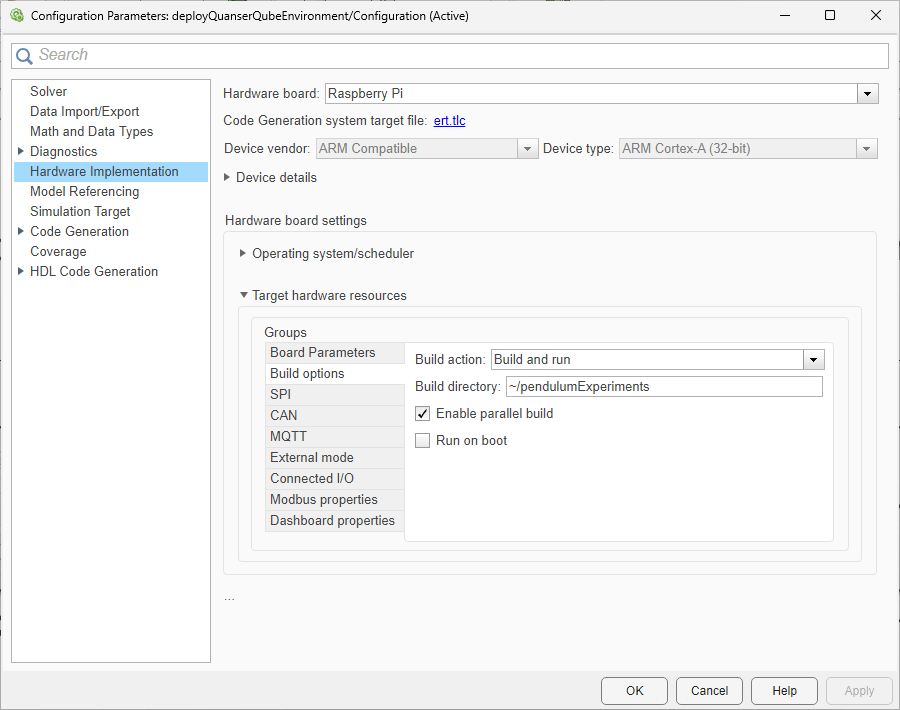
buildLog = evalc("slbuild(mdl)");The model is configured only to build and deploy. You can also specify the build directory.
Start the model deployed on the Raspberry Pi Board.
runModel(agentData.RPi,mdl);
You can use the isModelRunning function to determine whether the model is running on the board. The isModelRunning returns true if the model is running on the Raspberry Pi board.
isModelRunning(agentData.RPi,mdl)
ans = logical
   1
Run Training Loop
The example executes the training loop, as a part of the learning process, on the desktop computer.
Create variables to monitor training.
trainingResultData.CumulativeRewardTemp = 0;
trainingResultData.CumulativeReward = [];
trainingResultData.AverageCumulativeReward = [];
trainingResultData.AveragingWindowLength = 15;
trainingResultData.NumOfEpisodes = 0;
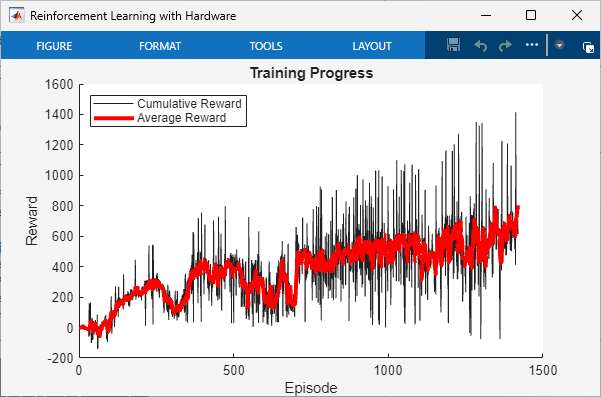
Stop training when the agent receives an average cumulative reward greater than 800 or a maximum of 5000 episodes.
rewardStopTrainingValue = 800;
maxEpisodes = 5000;
To train the agent, set doTraining to true.
doTraining =  false;
Create a figure for training visualization using the buildRemoteTrainingMonitor local function. This function is defined at the end of this example.
if doTraining
    [trainingPlot,...
     trainingResultData.LineReward,...
     trainingResultData.LineAverageReward] = ...
         buildRemoteTrainingMonitor();
    % Enable the training visualization plot.
    set(trainingPlot,Visible="on");
end
The training repeats the following steps:
Check if the deployed control process Simulink model has generated new experiences. If it did, get the experiences from the Raspberry Pi board to the desktop computer.
Read the experiences and append them to the replay buffer using
readNewExperiences. ThereadNewExperiencesfunction is defined at the end of this example. Once the function reads the experiences, they are deleted from the Raspberry Pi board.Train the agent from the collected data using
trainFromData.Save the updated policy parameters to the Raspberry Pi board using
writePolicyParameters. This function is defined at the end of this example.
if doTraining
    while true
        % Look for any experience files.
        dirContent = listFolderContentsOnRPi( ...
            agentData.RPi,agentData.ExperiencesFolderRPi);

        if ~isempty(dirContent)

            % Display the new found experience files.
            fprintf('%s  %4d new experience file found\n', ...
                datetime('now'), numel(dirContent));

            % Use the readNewExperiences function to read
            % new experience files and append experiences
            % to the replay buffer.
            [agentData, trainingResultData] = readNewExperiences( ...
                dirContent,agentData,trainingResultData);

            if agentData.Agent.ExperienceBuffer.Length>=...
                agent.AgentOptions.MiniBatchSize
                % Perform a learning step for the agent
                % using data in the experience buffer.
                offlineTrainStats = trainFromData( ...
                    agentData.Agent,agentData.TrainFromDataOptions);
            end

            % Save the updated actor parameters to a file on the
            % desktop computer and send the file to the Raspberry Pi.
            writePolicyParameters(agentData);
        end

        if ~isempty(trainingResultData.AverageCumulativeReward)
            % Check if at least one experience was read to prevent
            % AverageCumulativeReward reward from being empty.
            if trainingResultData.AverageCumulativeReward(end) > ...
                    rewardStopTrainingValue ...
                    || trainingResultData.NumOfEpisodes>=maxEpisodes
                % Use break to exit the training loop when
                % the average cumulative reward is greater than
                % rewardStopTrainingValue or the number of
                % episodes is more than maxEpisodes.
                break
            end
        end
    end
else
    % If you did not train the agent, load the agent from a file.
    load("trainedAgentQuanserQube.mat");
    agent.UseExplorationPolicy = false;
    agentData.Agent = agent;
end
Stop the model deployed to the Raspberry Pi Board.
if isModelRunning(agentData.RPi,mdl)
    stopModel(agentData.RPi,mdl);
end
Evaluate Trained Policy
Evaluate the trained policy on the Raspberry Pi board, using greedy actions. Change the policy to act greedily by setting the policy parameter Policy_UseMaxLikelihoodAction to true.
agentData.UseExplorationPolicy = false;
Send the policy parameters to the Raspberry Pi board.
writePolicyParameters(agentData);
Remove all the old experience files on the board.
system(agentData.RPi,convertStringsToChars("rm -f " +...
   agentData.ExperiencesFolderRPi + "*.*"));
Create variables to monitor evaluation.
evaluationResultData.CumulativeRewardTemp = 0;
evaluationResultData.CumulativeReward = [];
evaluationResultData.AverageCumulativeReward = [];
evaluationResultData.AveragingWindowLength = 10;
evaluationResultData.NumOfEpisodes = 0;
evaluationMaxEpisodes = 5;
Start the model deployed on the Raspberry Pi Board.
if ~isModelRunning(agentData.RPi,mdl)
    runModel(agentData.RPi,mdl);
end
The evaluation repeats the following steps:
Check if the deployed Control Process model has generated new experiences. If it did, send the experiences from the Raspberry Pi board to the desktop computer.
Read the experiences and append them to the replay buffer using
readNewExperiences.
while true
    % See if there are any new experiences.
    dirContent = listFolderContentsOnRPi( ...
        agentData.RPi, agentData.ExperiencesFolderRPi);

    if ~isempty(dirContent)

fprintf('%s  %4d new experience file found\n', ...
datetime('now'), numel(dirContent));

        % Read new experience files,
        % and append experiences to the replay buffer.
        [agentData, evaluationResultData] = readNewExperiences( ...
            dirContent,agentData,evaluationResultData);
    end

    if evaluationResultData.NumOfEpisodes>=evaluationMaxEpisodes
        % Use break to exit the evaluation loop when the number of
        % episodes is more than evaluationMaxEpisodes.
        break
    end
end
15-Dec-2025 08:30:59     1 new experience file found
15-Dec-2025 08:31:00     1 new experience file found
15-Dec-2025 08:31:01     1 new experience file found
15-Dec-2025 08:31:02     1 new experience file found
15-Dec-2025 08:31:03     1 new experience file found
15-Dec-2025 08:31:10     1 new experience file found
15-Dec-2025 08:31:11     1 new experience file found
15-Dec-2025 08:31:12     1 new experience file found
15-Dec-2025 08:31:13     1 new experience file found
15-Dec-2025 08:31:14     1 new experience file found
15-Dec-2025 08:31:22     1 new experience file found
15-Dec-2025 08:31:23     1 new experience file found
15-Dec-2025 08:31:24     1 new experience file found
15-Dec-2025 08:31:25     1 new experience file found
15-Dec-2025 08:31:26     1 new experience file found
15-Dec-2025 08:31:34     1 new experience file found
15-Dec-2025 08:31:35     1 new experience file found
15-Dec-2025 08:31:36     1 new experience file found
15-Dec-2025 08:31:37     1 new experience file found
15-Dec-2025 08:31:38     1 new experience file found
15-Dec-2025 08:31:46     1 new experience file found
15-Dec-2025 08:31:47     1 new experience file found
15-Dec-2025 08:31:48     1 new experience file found
15-Dec-2025 08:31:49     1 new experience file found
15-Dec-2025 08:31:50     1 new experience file found
Compute the average of episode rewards.
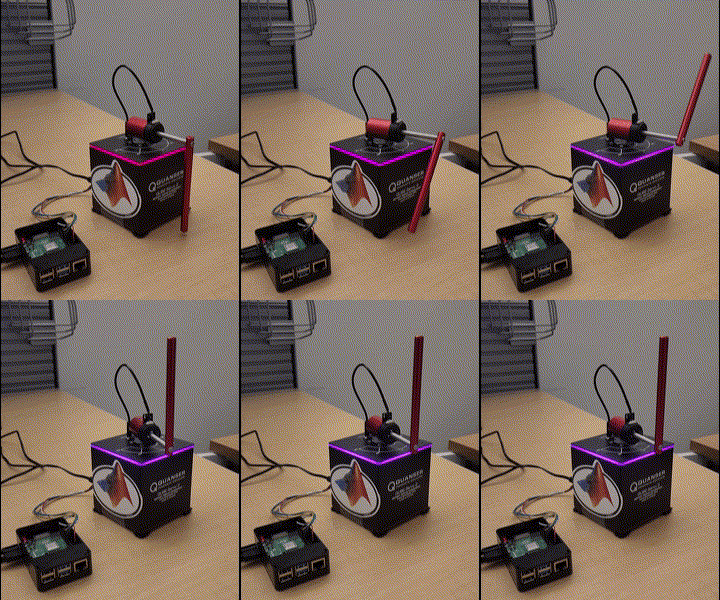
mean(evaluationResultData.CumulativeReward)
ans =
664.4980
This value shows that that policy is able to swing up and balance the pendulum in the upright position as shown in the video below.
Stop the model deployed on the Raspberry Pi Board.
if isModelRunning(agentData.RPi,mdl)
    stopModel(agentData.RPi,mdl);
end
Restore the random number stream using the information stored in previousRngState.
rng(previousRngState);
Local Functions
Write Policy Parameters
The writePolicyParameters function extracts the policy parameters from the agent, writes them to a file, and sends the file to the Raspberry Pi board.
function writePolicyParameters(agentData)

    % Open a file for saving the policy parameters on the desktop computer.
    filepath = fullfile( ...
        agentData.ParametersFolderDesktop, agentData.ParametersFile);
    fid = fopen(filepath,'w+');
    cln = onCleanup(@()fclose(fid));

    if agentData.UseExplorationPolicy
        % Get exploration policy parameters.
        parameters = policyParameters(getExplorationPolicy(agentData.Agent));
    else
        % Get greedy policy parameters.
        parameters = policyParameters(getGreedyPolicy(agentData.Agent));
    end

    % Convert the policy parameters into a vector of uint8 values
    % (serialization) and save it to a file.
    fwrite(fid,structToBytes(parameters),'uint8');

    % Send the file from the desktop to the Raspberry Pi board.
    putFile(agentData.RPi,...
            convertStringsToChars(fullfile( ...
                agentData.ParametersFolderDesktop, ...
                agentData.ParametersFile)), ...
            convertStringsToChars( ...
                agentData.ParametersFolderRPi+agentData.ParametersFile));
end
Read New Experiences
The readNewExperiences function moves new experience files from the Raspberry Pi board to the desktop computer, reads the experiences, and appends them to the replay buffer.
function [agentData, trainingResultData] = ...
    readNewExperiences(dirContent,agentData, trainingResultData)

    for ii=1:length(dirContent)

        % Move file from Raspberry Pi board to the desktop computer.
        getFile(agentData.RPi, ...
            convertStringsToChars( ...
                agentData.ExperiencesFolderRPi+dirContent(ii)), ...
            convertStringsToChars(agentData.ExperiencesFolderDesktop));

        % Remove the moved file from Raspberry Pi board.
        system(agentData.RPi,convertStringsToChars("rm -f " + ...
            agentData.ExperiencesFolderRPi+dirContent(ii)));

        % Open the moved file on desktop for reading the data.
        fid = fopen(fullfile( ...
            agentData.ExperiencesFolderDesktop,dirContent(ii)),'r');
        cln = onCleanup(@()fclose(fid));

        % Read data from the file.
        experiencesBytes = fread(fid,'*uint8');

        % Convert the uint8s to experience structure.
        tempExperienceBuffer = bytesToStruct( ...
            experiencesBytes,agentData.TempExperienceBuffer);

        % Compute the cumulative reward and updating the plots.
        trainingResultData = computeCumulativeReward( ...
            trainingResultData,tempExperienceBuffer);

        % Get the experiences ready to append to the replay buffer.
        for kk=size(tempExperienceBuffer.Observation,2):-1:1
            experiences(kk).NextObservation = ...
                {tempExperienceBuffer.NextObservation(:,kk)};
            experiences(kk).Observation = ...
                {tempExperienceBuffer.Observation(:,kk)};
            experiences(kk).Action = {tempExperienceBuffer.Action(:,kk)};
            experiences(kk).Reward = tempExperienceBuffer.Reward(kk);
            experiences(kk).IsDone = tempExperienceBuffer.IsDone(kk);
        end

        % Append the new experiences to the replay buffer.
        append(agentData.Agent.ExperienceBuffer,experiences);
    end
end
Compute Cumulative Reward from Experiences
The computeCumulativeReward function computes the cumulative reward and updates the learning plot.
function trainingResultData = computeCumulativeReward( ...
    trainingResultData,tempExperienceBuffer)

    isDone = tempExperienceBuffer.IsDone;
    reward = tempExperienceBuffer.Reward;
    N = length(isDone);
    while N > 0
        if any(isDone) % checking if there are any isDones
            endOfEpIdx = find(isDone,1);
            trainingResultData.CumulativeRewardTemp = ...
                trainingResultData.CumulativeRewardTemp ...
                + sum(reward(1:endOfEpIdx));

            % Append the new episode cumulative reward.
            trainingResultData.CumulativeReward = ...
                [trainingResultData.CumulativeReward; ...
                 trainingResultData.CumulativeRewardTemp];

            % Temporary variable used to compute the cumulative reward
            trainingResultData.CumulativeRewardTemp = 0;

            % Update the plots.
            trainingResultData.NumOfEpisodes = ...
                trainingResultData.NumOfEpisodes+1;
            trainingResultData.AverageCumulativeReward = ...
                movmean(trainingResultData.CumulativeReward,...
                trainingResultData.AveragingWindowLength,1);

            % Update the monitor.
            if isfield(trainingResultData, "LineReward") && ...
                     ~isempty(trainingResultData.LineReward)

                addpoints( ...
                    trainingResultData.LineReward, ...
                    trainingResultData.NumOfEpisodes,...
                    trainingResultData.CumulativeReward(end));

                addpoints( ...
                    trainingResultData.LineAverageReward, ...
                    trainingResultData.NumOfEpisodes,...
                    trainingResultData.AverageCumulativeReward(end));
            end
            drawnow;

            % Truncate the trajectory.
            isDone(1:endOfEpIdx) = [];
            reward(1:endOfEpIdx) = [];
            N = length(isDone);

        else
            % If there are no more isDone (plural noun),
            % compute the cumulative reward and store it
            % in the temporary variable.
            trainingResultData.CumulativeRewardTemp = ...
                trainingResultData.CumulativeRewardTemp ...
                + sum(reward(1:N));
            N = 0;
        end
    end
end
Create Figure for Training Visualization
The buildRemoteTrainingMonitor function creates a figure for training visualization.
function [trainingPlot, lineReward, lineAverageReward] = ...
    buildRemoteTrainingMonitor()

    plotRatio = 16/9;
    trainingPlot = figure( ...
                Visible="off", ...
                HandleVisibility="off", ...
                NumberTitle="off", ...
                Name="Reinforcement Learning with Hardware");

    trainingPlot.Position(3) = ...
         plotRatio * trainingPlot.Position(4);

    ax = gca(trainingPlot);

    lineReward = animatedline(ax);
    lineAverageReward = animatedline(ax,Color="r",LineWidth=3);
    xlabel(ax,"Episode");
    ylabel(ax,"Reward");
    legend(ax,"Cumulative Reward","Average Reward", ...
           Location="northwest")
    title(ax,"Training Progress");
end
Assign Parameter Values Related to Environment
The environmentParameters function assigns various parameter values needed for the environment and the reset controller.
function envData = environmentParameters(sampleTime)

    envData.MaxStepsPerSim = uint32(1000);
    envData.Ts = sampleTime;  % sec
    envData.ExperiencesWriteFrequency = 200;

    % For the reset controller: using LQR
    envData.LQRK = [1.3831 0.39192 -1.085 -0.082812];

end
Create Folder on Raspberry Pi Board
The createFolderOnRPi function creates a folder on the Raspberry Pi board if not exists.
function createFolderOnRPi(RPi, FolderRPi)

    system(RPi,convertStringsToChars("if [ ! -d " +...
        FolderRPi + " ]; then mkdir -p " +...
        FolderRPi + "; fi"));
end
List Contents of Folder on Raspberry Pi Board
The listFolderContentsOnRPi function lists contents of a folder on the Raspberry Pi board.
function dirContent = listFolderContentsOnRPi(RPi, experiencesFolderRPi)

    dirTemp = system(RPi,convertStringsToChars("ls " +...
        experiencesFolderRPi));
    dirContent = strsplit(dirTemp);
    dirContent(end) = [];
end
See Also
Functions
Blocks
Objects
rlReplayMemory|rlStochasticActorPolicy|rlSACAgent|rlSACAgentOptions|rlTrainingFromDataOptions
Topics
- Generate Policy Block for Deployment
- Train Policy Deployed on Raspberry Pi
- Train Reinforcement Learning Policy Using Custom Training Loop
- Train Reinforcement Learning Agent Offline to Control Quanser QUBE Pendulum
- Train Reinforcement Learning Agents
- Examine Approaches to Fine Tune a Deployed Policy
- Create Custom Reinforcement Learning Agents
- Use Predefined Control System Environments

