Main Content

Radar Waveform Generator

Create, impair, visualize, and export modulated radar waveforms

Since R2026a

Description

The Radar Waveform Generator app lets you generate radar waveforms found in the Phased Array System Toolbox™. The app generates these waveforms:

Waveforms

  • FMCW

  • Linear FM

  • Rectangular

  • Phase Coded

  • Nonlinear FM

  • All other waveforms available in Wireless Waveform Generator (Communications Toolbox) found in the Communications Toolbox™.

Using the app, you can:

App capabilities

  • Export these waveforms to your workspace or to a .mat or .bb file.

  • Export waveform generation code and parameters to a runnable MATLAB® script or a Simulink® block.

    • Use the exported script to generate your waveform, without the app, from the command line.

    • Use the exported block as a waveform source in a Simulink model. For more information, see the Create Waveforms Using Wireless Waveform Generator App (Communications Toolbox) block.

  • Visualize the waveform using

    Visualization

    • Time Scope

    • Spectrum Analyzer

    • Spectrogram

    • Ambiguity Function

    • Autocorrelation Function

  • Distort the waveforms by adding radio frequency (RF) impairments, such as additive white Gaussian noise (AWGN), phase offset, frequency offset, DC offset, in-phase and quadrature (IQ) imbalance, and memoryless cubic nonlinearity.

Exporting waveforms

  • Use the app to create waveforms in your workspace or save them to a .mat, .bb, or .txt file.

  • Use the exported script to generate your waveform without the app from the command line.

  • Use the exported block as a waveform source in a Simulink model. The exported block name is derived from the name of the waveform.
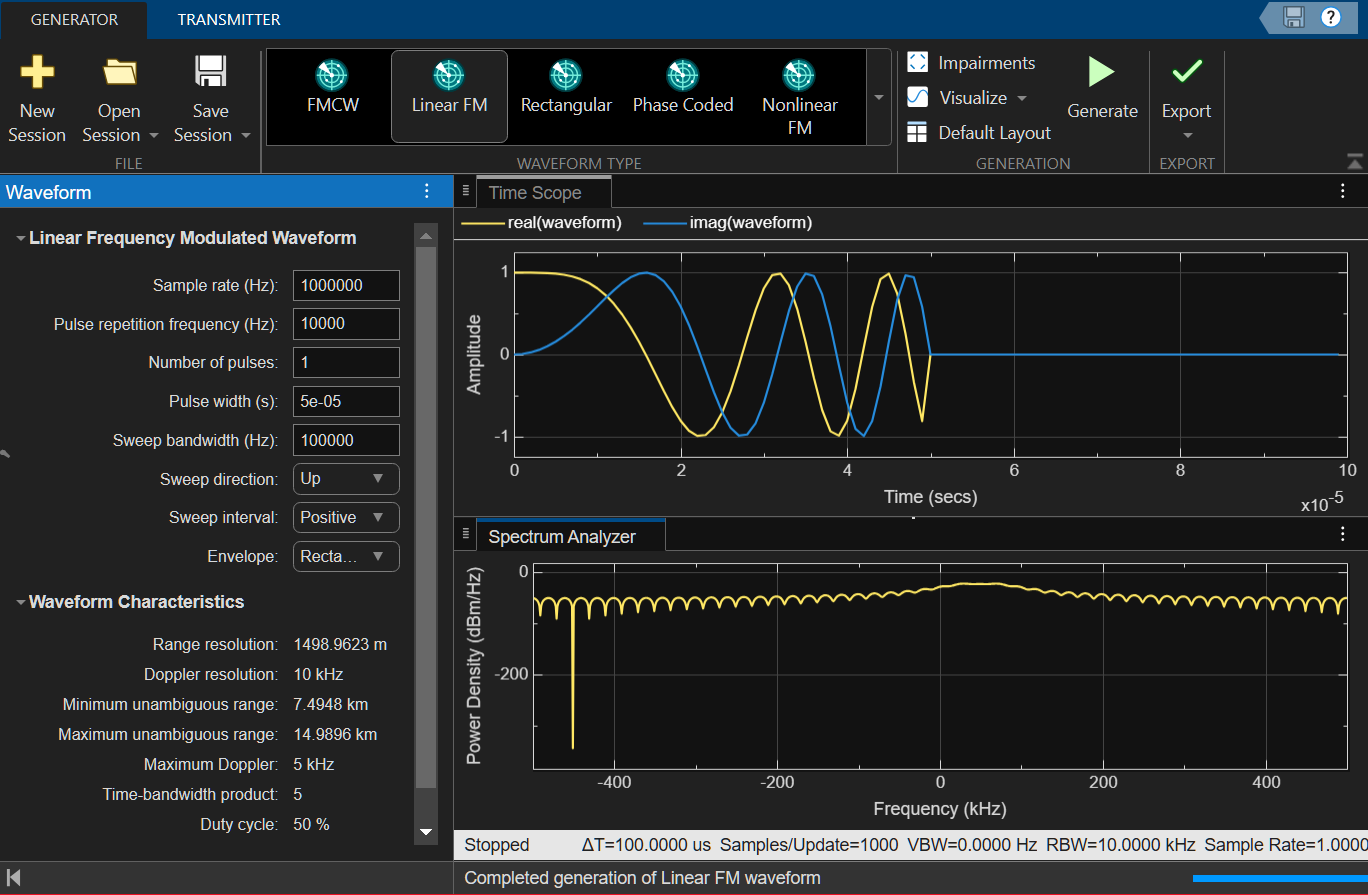
Radar waveform generator opening screen

Open the Radar Waveform Generator App

  • MATLAB toolstrip: On the Apps tab, under Radar and Tracking select the Radar Waveform Generator app. Icon

  • Alternatively, at the MATLAB command line, enter radarWaveformGenerator.

Examples

expand all

  1. Open the Radar Waveform Generator from the Apps gallery .

  2. From the Generator tab, select the FMCW icon.

  3. Set the Sweep time (s) to 0.01 sec.

  4. Set the Sweep direction to Down.

  5. Select a Symmetric Sweep interval.

  6. Set the Number of sweeps to three.

  7. From the Visualize tab, select Time scope and Spectrum analyzer displays and then generate the plots.
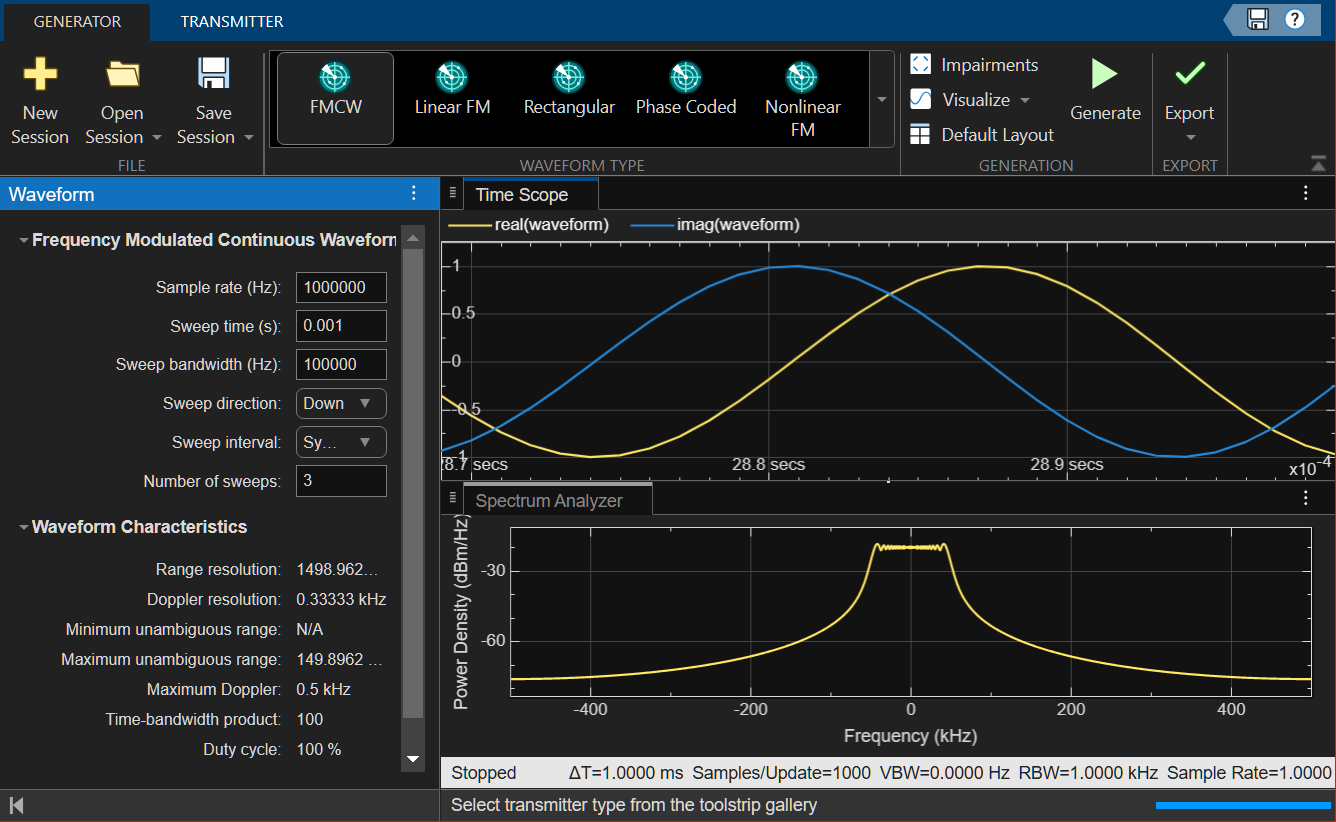
    FMCW time and spectrum display

    The time scope displays the real and imaginary parts of the waveform. The spectrum analyzer displays the power density.

  1. Open the Radar Waveform Generator from the Apps gallery.

  2. From the Generator tab, select the Linear FM icon.

  3. Set the Sample rate (Hz) to 1000000.

  4. Set the Pulse repetition frequency (Hz) to 10000.

  5. Set the Number of pulses to 2.

  6. Set the Pulse width (s) to 5e05.

  7. Set the Sweep bandwidth (Hz) to 10000.

  8. Set the Sweep direction to Down.

  9. Select a Positive Sweep interval.

  10. Select the Envelope as Rectangular.

  11. From the Visualize tab, select Time scope, Spectrum analyzer, and Spectrogram to display the plots.
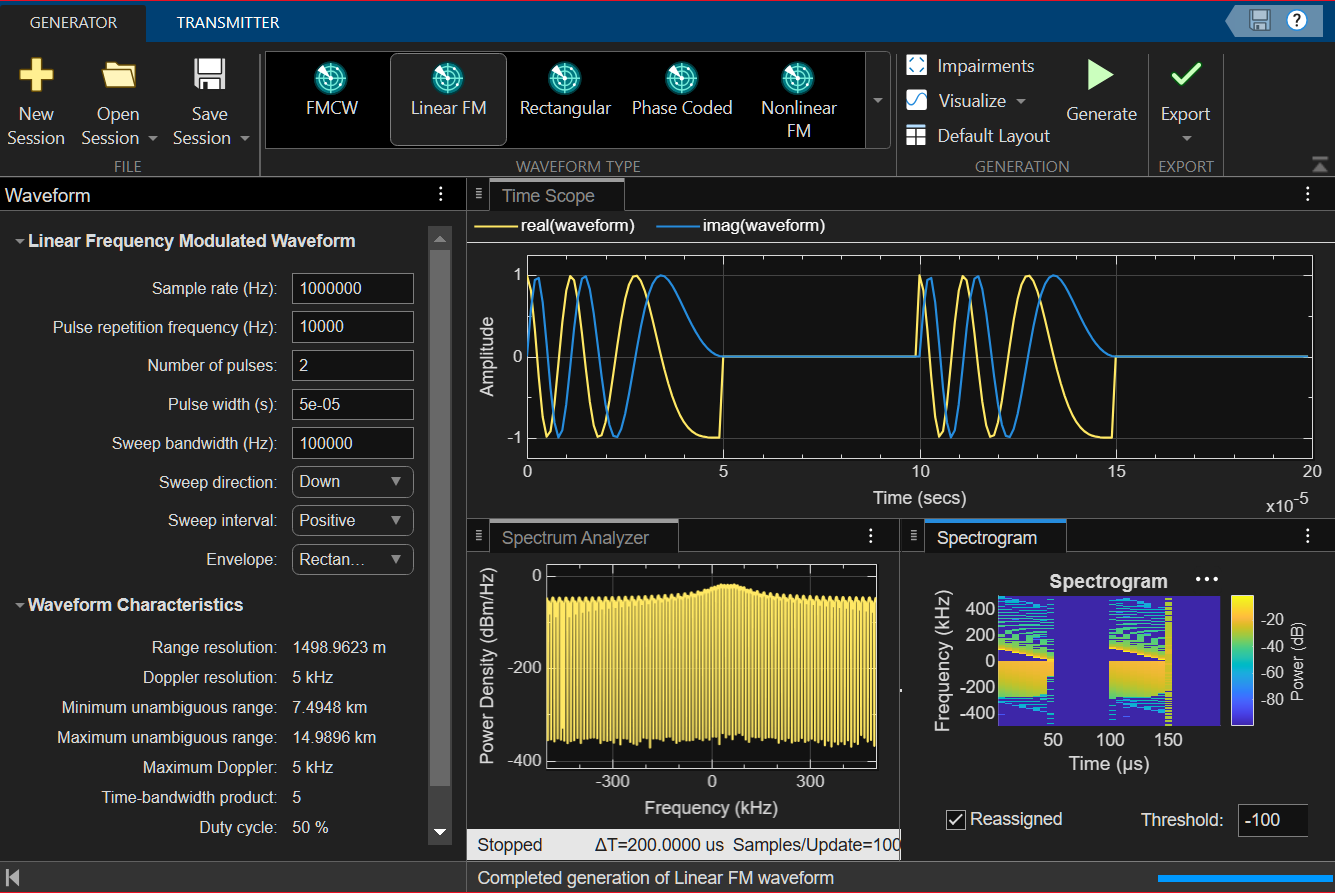
    Linear FM display

  1. Open the Radar Waveform Generator from the Apps gallery.

  2. From the Generator tab, select the Phase Coded Waveform icon.

  3. Set the Sample rate (Hz) to 1000000.

  4. Set the Pulse repetition frequency (Hz) to 5000.

  5. Set the Number of pulses to 4.

  6. Set the Code to Frank.

  7. Set the Chip width (s) to 1e-06.

  8. Set the Number of chips to 4.

  9. Open the Impairments tab and select the select the AWGN impairment. Set the SNR (db) value to 10 to show a higher noise level.

  10. From the Visualize tab, select Time Scope,and Ambiguity Function to display the plots.
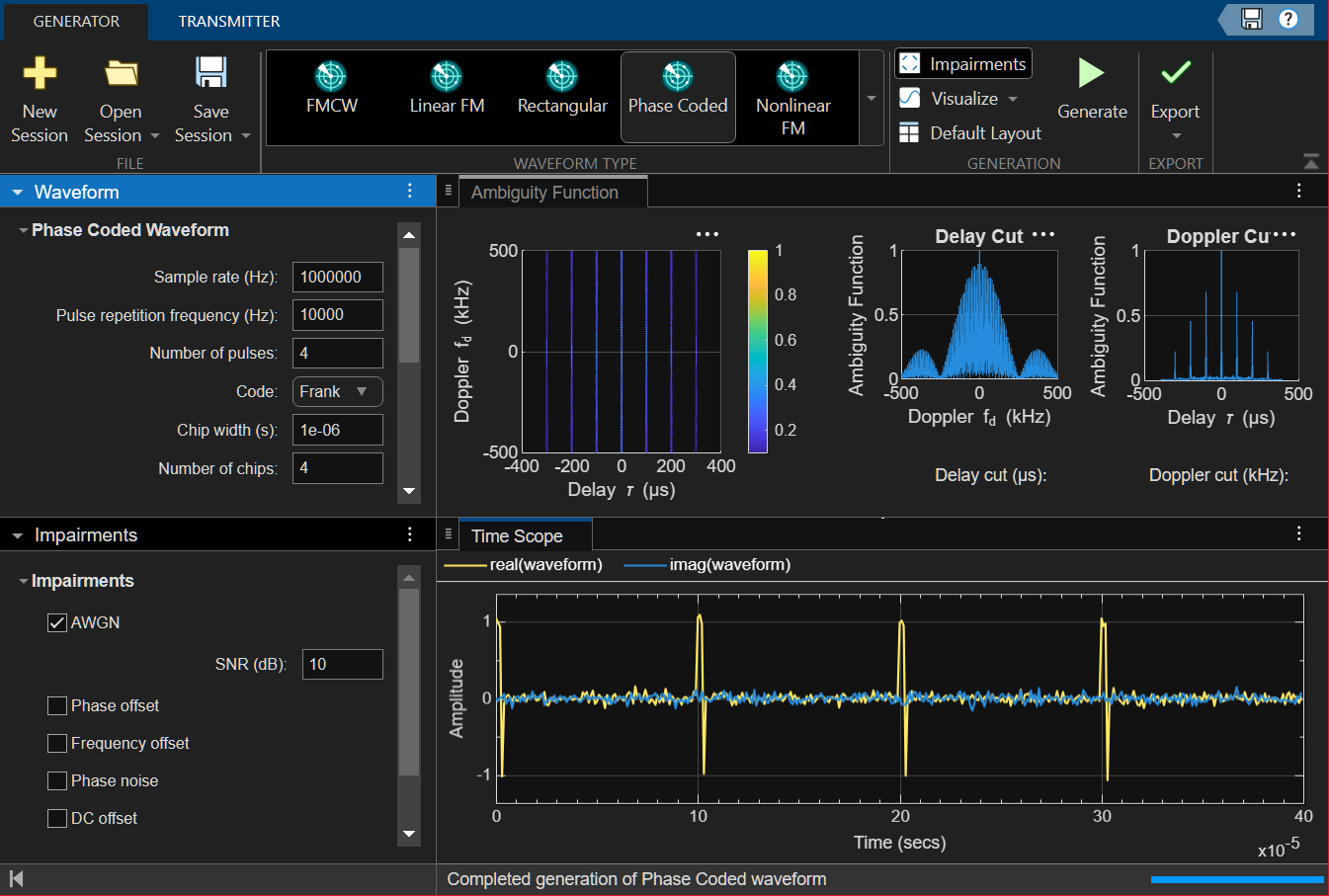
    Phase Coded Waveform

  1. Open the Radar Waveform Generator from the Apps gallery.

  2. From the Generator tab, select the Nonlinear FM icon.

  3. Set the Sample rate (Hz) to 1000000.

  4. Set the Pulse repetition frequency (Hz) to 10000.

  5. Set Frequency modulation to Hybrid Linear-Tangent.

  6. Set Linear-tangent balance to 0.5.

  7. Set Tangent curve portion to 1.4.

  8. Set the Number of pulses to 4.

  9. Set the Pulse width (s) to 5e-05.

  10. Set the Sweep bandwidth (Hz) to 100000.

  11. Set the Sweep direction to Up.

  12. Select a Positive Sweep interval.

  13. Select the Envelope as Rectangular.

  14. Open the Impairments tab and select the select the Frequency offset impairment. Set the Frequency offset (Hz) value to 300.

  15. From the Visualize tab, select Time Scope,Spectrum Analyzer, and Autocorrelation Function to display the plots.
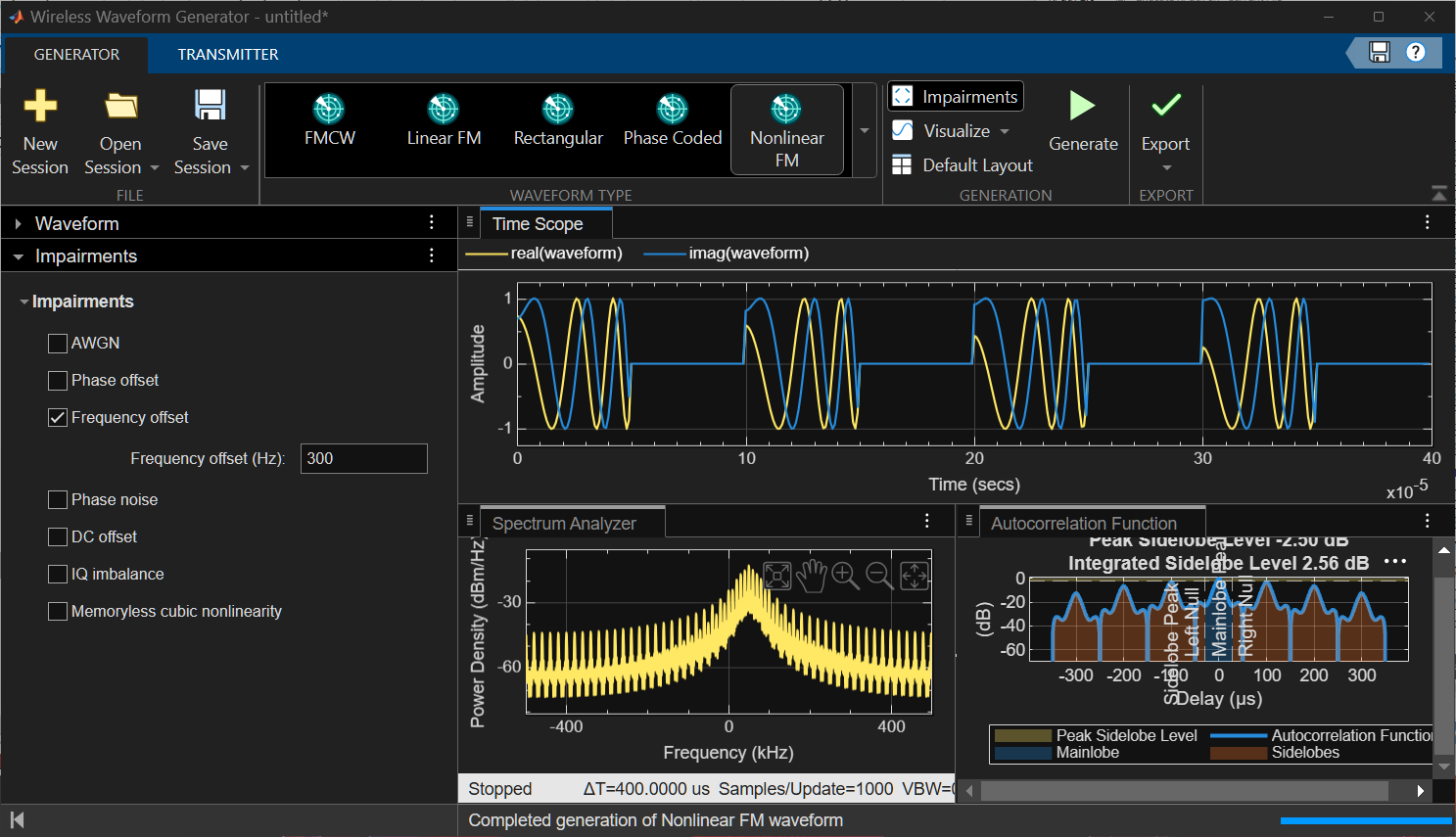
    Nonlinear FM Modulated Waveform

Parameters

expand all

Frequency Modulated Continuous Waveform

Sample rate, specified as a positive scalar. The quantity Sample rate (Hz)*Sweep time (s) must be a positive integer. Units are in Hz.

Duration of the up sweep or down sweep, specified as a positive scalar. Units are in seconds.

If Sweep direction is Triangle, the sweep time is half the sweep period because each period consists of an up sweep and a down sweep. If Sweep direction is Up or Down, the sweep time equals the sweep period.

The product of Sample rate (Hz) and Sweep time (s) must be is a positive integer.

Specify the bandwidth of the linear FM sweeping, in Hz, as a positive scalar.

Sweep direction, specified as Up, Down, or Triangle. Sweep direction indicates the direction of the linear FM sweep.

Location of FM sweep interval, specified as Positive or Symmetric, If you set this value to Positive, the waveform sweeps in the interval between 0 and B, where B is the Sweep bandwidth value. If you set this value to Symmetric, the waveform sweeps in the interval between –B/2 and B/2.

Number of sweeps in the waveform, specified as a positive integer.

Linear Frequency Modulated Waveform

Signal sample rate, specified as a positive scalar. The ratio of sample rate to pulse repetition frequency must be a positive integer, so the number of samples in each pulse must be an integer value. Units are in Hertz.

Pulse repetition frequency (PRF), specified as a positive scalar. Units are in Hz. The pulse repetition interval (PRI) is the inverse of the pulse repetition frequency PRF value. The PRF must satisfy these restrictions:

  • The product of Pulse repetition frequency (Hz) and Pulse width (s) must be less than or equal to one. This condition requires that the pulse width is less than one PRI.

  • The ratio of Sample rate (Hz) to Pulse repetition frequency (Hz) must be an integer. This condition requires that the number of samples in one PRI is an integer.

Number of pulses in each output, specified as a positive integer.

Pulse time duration, specified as a positive scalar. The value must satisfy Pulse width (s) ≤ 1/Sample rate (Hz). Units are in seconds.

Bandwidth of linear FM sweep, specified as a positive scalar. Units are in Hz.

Direction of the linear FM sweep, specified as Up or Down.

Location of the FM sweep interval, specified asPositive or Symmetric.

  • If Sweep interval is Positive, the waveform sweeps the interval between 0 and B where B is the sweep bandwidth in the Sweep bandwidth (Hz) dropdown menu.

  • If Sweep interval is Symmetric, the waveform sweeps the interval between -B/2 and B/2.

Waveform envelope, specified as Rectangular or Gaussian.

Rectangular Waveform

Signal sample rate, specified as a positive scalar. The ratio of sample rate to pulse repetition frequency must be a positive integer, so the number of samples in each pulse must be an integer value. Units are in Hertz.

Pulse repetition frequency (PRF), specified as a positive scalar. Units are in Hz. The pulse repetition interval (PRI) is the inverse of the pulse repetition frequency PRF value. The PRF must satisfy these restrictions:

  • The product of Pulse repetition frequency (Hz) and Pulse width (s) must be less than or equal to one. This condition requires that the pulse width is less than one PRI.

  • The ratio of Sample rate (Hz) to Pulse repetition frequency (Hz) must be an integer. This condition requires that the number of samples in one PRI is an integer.

Number of pulses in each output, specified as a positive integer.

Pulse time duration, specified as a positive scalar. The value must satisfy Pulse width (s) ≤ 1/Sample rate (Hz). Units are in seconds.

Phased Coded Waveform

Signal sample rate, specified as a positive scalar. The ratio of sample rate to pulse repetition frequency must be a positive integer, so the number of samples in each pulse must be an integer value. Units are in Hertz.

Pulse repetition frequency (PRF), specified as a positive scalar. Units are in Hz. The pulse repetition interval (PRI) is the inverse of the pulse repetition frequency PRF value. The PRF must satisfy these restrictions:

  • The product of Pulse repetition frequency (Hz) and Pulse width (s) must be less than or equal to one. This condition requires that the pulse width is less than one PRI.

  • The ratio of Sample rate (Hz) to Pulse repetition frequency (Hz) must be an integer. This condition requires that the number of samples in one PRI is an integer.

Number of pulses in each output, specified as a positive integer.

Phase code type used in phase modulation, specified as:

  • Frank

  • P1

  • P2

  • Px

  • Zadoff-Chu

  • P3

  • P4

  • Barker

  • Maximum Length Sequence

  • Quadratic Residue Sequence

The time duration of each chip in a phase-coded waveform, specified as a positive scalar. For this waveform, the pulse duration is equal to the product of the Chip width (s) and number of chips.

The value of this property must satisfy these constraints:

  • Chip width (s) is less than or equal to (1./(NumChips*PRF)) – the total time duration of all chips cannot exceed the duration of the pulse.

  • (Sample rate (Hz)*Chip width (s)) is an integer value – the number of samples in a chip must be an integer.

Units are in seconds.

Number of chips per pulse in a phase-coded waveform, specified as a positive integer. The value of this property must be less than or equal to 1./(Chip width (s)*Pulse repetition frequency (Hz)) – the total time duration of all chips cannot exceed the pulse repetition interval.

This table shows additional constraints on the number of chips for different code types.

If the Code parameter is ...Then the Number of chips parameter must be...
Frank, P1, or PxA perfect square
P2An even number that is a perfect square
Barker2, 3, 4, 5, 7, 11, or 13
Maximum Length Sequence7, 15, 31, 63, 127, 255, 511, 1023, 2047, 4095, 8191
Quadratic Residue SequenceAny prime number of the form 4n-1 where n is an integer.

Sequence index used in Zadoff-Chu code, specified as a positive integer. The value of Sequence index must be relatively prime to the value of the Number of chips parameter.

Dependencies

To enable this parameter, set the Code parameter to Zadoff-Chu.

Nonlinear FM Waveform

Signal sample rate, specified as a positive scalar. The ratio of sample rate to pulse repetition frequency must be a positive integer, so the number of samples in each pulse must be an integer value. Units are in Hertz.

Pulse repetition frequency (PRF), specified as a positive scalar. Units are in Hz. The pulse repetition interval (PRI) is the inverse of the pulse repetition frequency PRF value. The PRF must satisfy these restrictions:

  • The product of Pulse repetition frequency (Hz) and Pulse width (s) must be less than or equal to one. This condition requires that the pulse width is less than one PRI.

  • The ratio of Sample rate (Hz) to Pulse repetition frequency (Hz) must be an integer. This condition requires that the number of samples in one PRI is an integer.

Frequency modulation type of the nonlinear FM waveform, specified as 'Polynomial' , 'Hyperbolic', 'Hybrid Linear-Tangent', or 'Stepped Price'.

  • When you set the Frequency modulation to 'Polynomial' the app generates a waveform with an instantaneous frequency that follows a polynomial function. You specify the coefficients in the Polynomial coefficients field. The object normalizes the resulting frequency function such that each pulse sweeps the bandwidth you specify in the Sweep bandwidth field.

  • When you set the Frequency modulation to 'Hyperbolic' the app generates a hyperbolic frequency modulated (HFM) waveform. Use the Hyperbolic start frequency field to set the start frequency of the hyperbolic sweep.

  • When you set the Frequency modulation to 'Hybrid Linear-Tangent', the app generates a hybrid NLFM waveform that combines an LFM waveform with a tan-FM waveform as described by Collins and Atkins [1]. You can specify the balance between LFM and tan-FM in the Linear-tangent balance field, and the portion of the tan(x) curve to used for tan-FM in the Tangent curve portion field.

  • When you set the Frequency modulation to 'Stepped Price' the app generates a stepped version of the Price's NLFM waveform as given by Levanon and Mozeson [2]. The Sweep bandwidth field is inactive and is determined by the bandwidth factors in the Bandwidth factors field and the number of frequency steps in the Number of frequency steps field.

Start frequency of the hyperbolic frequency modulated waveform, specified as a positive scalar. Units are in Hz.

Dependencies

To enable this field, set the Frequency modulation to Hyperbolic.

Coefficients of the polynomial frequency function, specified as a length-(N+1) real-valued vector. The vector represents the coefficients of an N-th degree polynomial. The first entry in Polynomial coefficients is the coefficient of the highest power N of the polynomial. The last entry is the coefficient of the power zero term of the polynomial.

Dependencies

To enable this field, set the Frequency modulation field to 'Polynomial'.

Balance factor between linear FM and tan-FM functions for a hybrid linear-tangent NLFM waveform, specified as a scalar. Units are dimensionless.

Dependencies

To enable this field, set the Frequency modulation to Hybrid Linear-Tangent.

Portion of the tan(x) curve between -π/2 and +π/2 to use as a tangent term in the hybrid linear-tangent FM frequency function, specified as a scalar between 0 and +π/2.

Dependencies

To enable this field, set the Frequency modulation to Hybrid Linear-Tangent.

Number of frequency steps for the stepped form of Price's NLFM, specified as a positive integer.

Example: 10

Dependencies

To enable this field, set the Frequency modulation field to Stepped Price.

Number of pulses in each output, specified as a positive integer.

Pulse time duration, specified as a positive scalar. The value must satisfy Pulse width (s) ≤ 1/Sample rate (Hz). Units are in seconds.

Bandwidth of linear FM sweep, specified as a positive scalar. Units are in Hz.

Sweep direction, specified as Up, Down, or Triangle. Sweep direction indicates the direction of the FM sweep. This parameter does not apply when Frequency modulation is specified as 'Polynomial'.

If you set this value to Positive, the waveform sweeps in the interval between 0 and B, where B is the Sweep bandwidth value. If you set this value to Symmetric, the waveform sweeps in the interval between –B/2 and B/2. This parameter does not apply when Frequency modulation is specified as 'Hyperbolic'.

Waveform envelope function, specified as Rectangular or Gaussian.

Algorithms

The app supports different waveform impairments. A more detailed explanation of these impairments can be found in the Communications Toolbox when available.

  • Impairments

    ImpairmentUnitsDefault value
    AWGNSNR (dB)20
    Phase offsetphase offset (dB)pi/8
    Frequency offsetFrequency offset (Hz)10
    Phase NoiseLevels (dBc/Hz)[-60 -80]
    Frequency offsets (Hz)[200000 400000]
    DC offsetDC offset (V)0.1+0.2i
    IQ imbalanceAmplitude imbalance (dB)8
    Phase imbalance (rad)pi/5
    Memoryless cubic nonlinearityLinear gain (dB)0
    IIP3 (dBm)30
    AM/PM conversion (deg/dB)10

References

[1] Collins, T., and P. Atkins. "Nonlinear frequency modulation chirps for active sonar." IEE Proceedings-Radar, Sonar and Navigation 146.6 (1999): 312-316.

[2] Levanon, N. and E. Mozeson. Radar Signals. Hoboken, NJ: John Wiley & Sons, 2004.

Version History

Introduced in R2026a