patchMicrostripCircular
R2026bCreate standard or AI-based probe-fed circular microstrip patch antenna
Description
Use the default patchMicrostripCircular object to create a probe-fed
circular microstrip patch antenna resonating around 1 GHz. By default, the patch is
centered at the origin with feed point along the radius and the ground plane on the
xy- plane at z = 0.
Circular microstrip antennas are used as low-profile antennas in airborne and spacecraft applications. These antennas also find use in portable wireless applications because they are lightweight, low cost, and easily manufacturable.

You can perform full-wave EM-solver-based analysis on the standard
patchMicrostripCircular antenna, or you can create an
AIAntenna object and use AI‑based analysis to explore the design
space and tune the antenna for your application.
Creation
Syntax
Description
circularpatch = patchMicrostripCircular creates a
standard (full-wave EM) probe-fed circular microstrip patch antenna with
default property values. The default dimensions are chosen for an operating
frequency of around 1 GHz.
circularpatch = patchMicrostripCircular(
sets properties using one or more name-value arguments.
PropertyName=Value)PropertyName is the property name and
Value is the corresponding value. You can specify
several name-value arguments in any order as
PropertyName1=Value1,...,PropertyNameN=ValueN.
Properties that you do not specify, retain their default values.
For example, circularpatch =
patchMicrostripCircular(Radius=0.2) creates a circular patch
of radius 0.2 m.
You can create a standard
patchMicrostripCircularantenna resonating at a desired frequency using thedesignfunction. For example, to create a standardpatchMicrostripCircularantenna resonating at 1 GHz, use this code.>> design(patchMicrostripCircular,1e9)
You can also create an AI-based version of the
patchMicrostripCircularantenna resonating at a desired frequency using the samedesignfunction. Set theForAIargument in thedesignfunction totrueto create anAIAntennaobject. To use this feature, you need a license for the Statistics and Machine Learning Toolbox™ in addition to the Antenna Toolbox™. For example, to create an AI-basedpatchMicrostripCircularantenna resonating at 1 GHz, use this code.The AI‑based>> design(patchMicrostripCircular,1e9,ForAI=true)
patchMicrostripCircularantenna retains the Radius and Height properties of the standard antenna as tunable properties and introduces SubstrateEpsilonR as an additional tunable property. All other properties derived from the standard antenna become read‑only. To find the upper and lower bounds of the tunable properties, use thetunableRangesfunction.To create a standard
patchMicrostripCircularantenna from the AI‑based antenna, use theexportAntennafunction.
Properties
Object Functions
axialRatio | Calculate and plot axial ratio of antenna or array |
bandwidth | Calculate and plot absolute bandwidth of antenna or array |
beamwidth | Beamwidth of antenna |
charge | Charge distribution on antenna or array surface |
current | Current distribution on antenna or array surface |
design | Create antenna, array, or AI-based antenna resonating at specified frequency |
efficiency | Calculate and plot radiation efficiency of antenna or array |
EHfields | Electric and magnetic fields of antennas or embedded electric and magnetic fields of antenna element in arrays |
feedCurrent | Calculate current at feed for antenna or array |
impedance | Calculate and plot input impedance of antenna or scan impedance of array |
info | Display information about antenna, array, or platform |
memoryEstimate | Estimate memory required to solve antenna or array mesh |
mesh | Generate and view mesh for antennas, arrays, and custom shapes |
meshconfig | Change meshing mode of antenna, array, custom antenna, custom array, or custom geometry |
msiwrite | Write antenna or array analysis data to MSI planet file |
optimize | Optimize antenna and array catalog elements using SADEA or TR-SADEA algorithm |
pattern | Plot radiation pattern of antenna, array, or embedded element of array |
patternAzimuth | Azimuth plane radiation pattern of antenna or array |
patternElevation | Elevation plane radiation pattern of antenna or array |
peakRadiation | Calculate and mark maximum radiation points of antenna or array on radiation pattern |
rcs | Calculate and plot monostatic and bistatic radar cross section (RCS) of platform, antenna, or array |
resonantFrequency | Calculate and plot resonant frequency of antenna |
returnLoss | Calculate and plot return loss of antenna or scan return loss of array |
show | Display antenna, array, AI-based antenna, platform, or shape |
sparameters | S-parameters for antenna or array |
stlwrite | Write mesh information to STL file |
vswr | Calculate and plot voltage standing wave ratio (VSWR) of antenna or array element |
Examples
Create and view a default circular microstrip patch.
cp = patchMicrostripCircular
cp =
  patchMicrostripCircular with properties:

               Radius: 0.0798
               Height: 0.0060
            Substrate: [1×1 dielectric]
    GroundPlaneLength: 0.3000
     GroundPlaneWidth: 0.3000
    PatchCenterOffset: [0 0]
           FeedOffset: [-0.0525 0]
            Conductor: [1×1 metal]
                 Tilt: 0
             TiltAxis: [1 0 0]
                 Load: [1×1 lumpedElement]
show(cp)
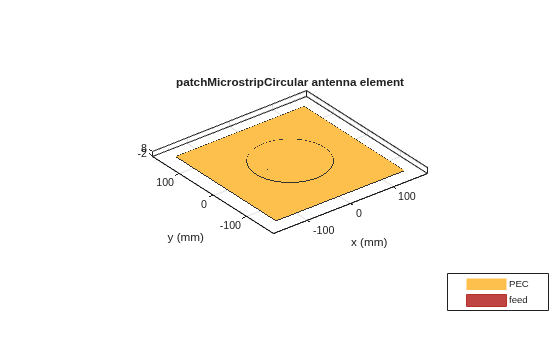
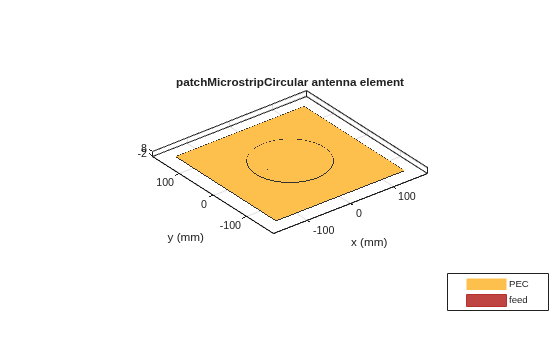
Create a circular patch antenna using given values. Display the antenna.
cp = patchMicrostripCircular(Radius=0.0798, Height=6e-3,...
        GroundPlaneLength=0.3, GroundPlaneWidth=0.3,...
        FeedOffset=[-0.0525 0]);
show(cp)
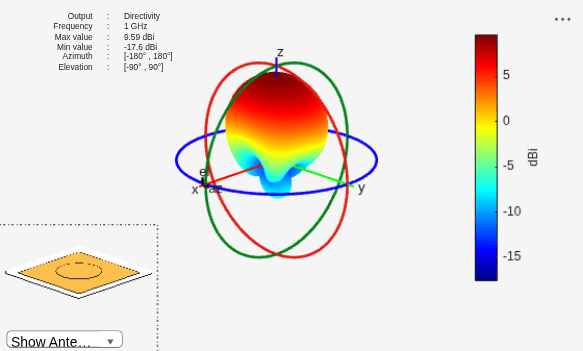
Plot the pattern of the patch antenna at 1GHz.
pattern(cp,1e9);
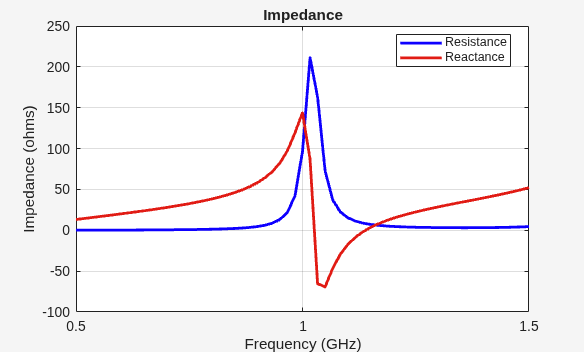
Calculate the impedance of the antenna over a frequency span of 0.5 GHz to 1.5 GHz.
f = linspace(0.5e9,1.5e9,61);
impedance(cp,f);
Create an AI-based circular microstrip patch antenna operating at 1 GHz.
pAI = design(patchMicrostripCircular(Substrate=dielectric("FR4")),1e9,ForAI=true)pAI =
AIAntenna with properties:
Antenna Info
AntennaType: 'patchMicrostripCircular'
InitialDesignFrequency: 1.0000e+09
Tunable Parameters
Radius: 0.0371
Height: 0.0038
SubstrateEpsilonR: 4.8000
Show read-only properties
Set patch radius, height, and substrate relative permittivity.
pAI.Radius = 0.033;
pAI.Height = 0.0035;
pAI.SubstrateEpsilonR = 5.5;
Calculate antenna's resonant frequency.
resonantFrequency(pAI)
ans =
1.0773e+09
Convert the AIAntenna to a standard circular microstrip patch antenna.
pmC = exportAntenna(pAI)
pmC =
  patchMicrostripCircular with properties:

               Radius: 0.0330
               Height: 0.0035
            Substrate: [1×1 dielectric]
    GroundPlaneLength: 0.1387
     GroundPlaneWidth: 0.1387
    PatchCenterOffset: [0 0]
           FeedOffset: [-0.0121 0]
            Conductor: [1×1 metal]
                 Tilt: 0
             TiltAxis: [1 0 0]
                 Load: [1×1 lumpedElement]

