Break X Axis

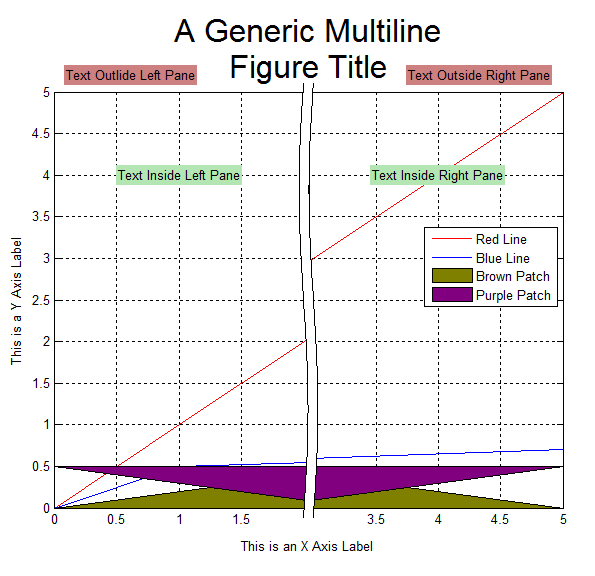
Splits the x-axis into 2 disjoint regions in order to hide an uninteresting portion of a figure.

You are now following this Submission

Features
1.) Minimal fuss, just works
2.) Professional looking graphs
3.) Works with all 2D graphics objects: Lines, Text, Patches, Images, etc.
5.) Obeys ‘XTickMode’ for automatic or manual positioning of tick marks.
6.) Obeys ‘Layer’ property
7.) Works with semilogy plots and with either axis reversed
8.) Can resize after splitting axis
8.) Possible to unsplit axis

Limitations
1.) No support for semilogx or loglog plots
2.) Creates extra copies of the data which may be problematic when displaying very large data sets.
3.) Text inside an axes must have 'Clipping' turned 'Off' or be added after splitting the axis. Otherwise it may be rendered twice. See TextExample.m for more details.

Cite As

Peter (2026). Break X Axis (https://uk.mathworks.com/matlabcentral/fileexchange/42905-break-x-axis), MATLAB Central File Exchange. Retrieved .

Acknowledgements

Inspired by: BreakAxis, BreakXAxis, BreakPlot

Inspired: Aesethetic Axis Breaks, Break Y Axis

General Information

MATLAB Release Compatibility

  • Compatible with any release

Platform Compatibility

  • Windows
  • macOS
  • Linux
Version Published Release Notes Action
1.2.0.0

Added a screen shot

1.1.0.0

Fixed a bug that caused plots to be misaligned in some complex figures.

1.0.0.0