You are now following this Submission
- You will see updates in your followed content feed
- You may receive emails, depending on your communication preferences
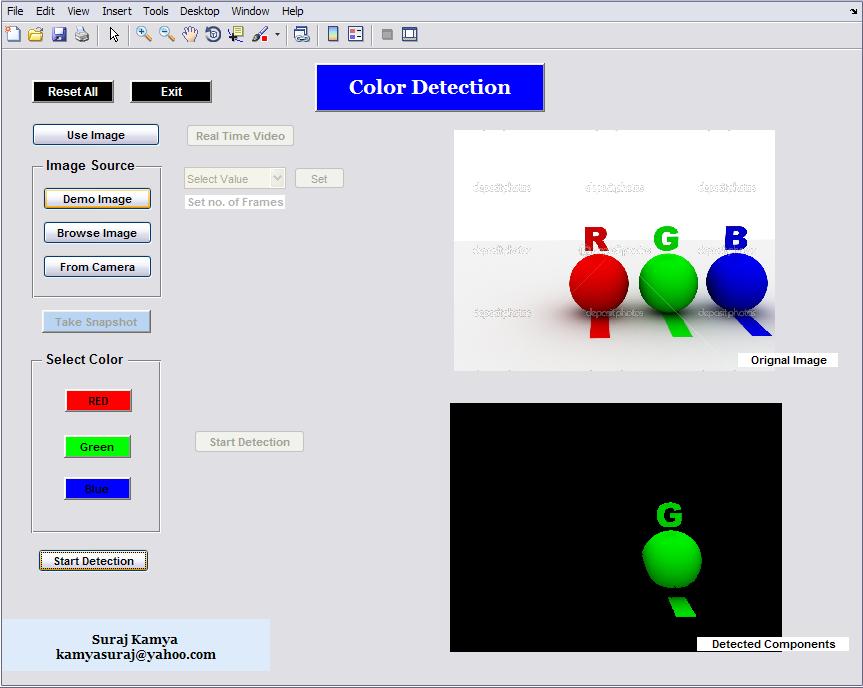
RGB color detection in images and Real time video is presented in this project.
# Color Detection in Image
1. Click on Use Image
2. Select image source
*Demo Image (Already in files)
*Browse Image (Use your own acc. to supported formats: jpg,bmp,jpeg,png)
*From Camera (after preview click on Take Snapshot)
3. Choose color
4. Start Detection
# Color detection in Real Time Video
1. Click On Real Time Video
2. Select no. of frames and click on set. (Time duration of Live Video)
3. Select color
4. Start Detection
-- In detected Components black screen will appear. Whenever it detect a color component it shows only that color.--
Cite As
Suraj Kamya (2026). Color Detection (https://uk.mathworks.com/matlabcentral/fileexchange/37611-color-detection), MATLAB Central File Exchange. Retrieved .
Acknowledgements
Inspired: Color Detection and Separation using Matlab, Arduino &Webcam
General Information
- Version 1.0.0.0 (284 KB)
MATLAB Release Compatibility
- Compatible with any release
Platform Compatibility
- Windows
- macOS
- Linux
| Version | Published | Release Notes | Action |
|---|---|---|---|
| 1.0.0.0 |