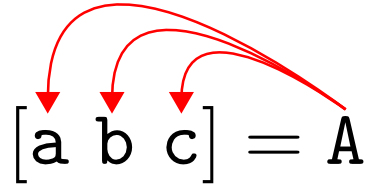
disperse

Assign elements of an input array to individual output variables with a single function call.
1.2K Downloads
Updated 30 Nov 2011

View License

Editor's Note: This file was selected as MATLAB Central Pick of the Week

Oftentimes when using Matlab we find ourselves having to perform a series of repetitive assignments from some kind of array, e.g., a=A(1); b=A(2); c=A(3); . . . etc. Inevitably we ask ourselves, is there a way to do this more simply? DISPERSE is syntactic sugar for performing these kinds of tasks with a single function call.

DISPERSE is not the same as DEAL. For example, if A is a vector then [a b c d] = disperse(A) performs a=A(1), b=A(2), c=A(3), and d=A(4), whereas [a b c d] = deal(A) performs a=A, b=A, c=A, and d=A.

DISPERSE generalizes to arbitrary dimensions, and is extended to follow analogous behavior on cell arrays and structure arrays. For example, if A is an RGB image, then [r g b] = disperse(A) grabs the R, G, and B color channels from A. See the documentation for more examples.

---------
Edit: I was recently notified that there is a similar submission called VECT2VAR. For vector inputs, these functions are equivalent; however, DISPERSE also works on higher-dimensional objects, which is handy when dealing with matrices, images, videos, etc.

Cite As

Sam Hallman (2026). disperse (https://uk.mathworks.com/matlabcentral/fileexchange/33866-disperse), MATLAB Central File Exchange. Retrieved .

MATLAB Release Compatibility
Created with R2009b
Compatible with any release
Platform Compatibility
Windows macOS Linux
Categories
Find more on Structures in Help Center and MATLAB Answers
Acknowledgements

Inspired: Surface area

Version Published Release Notes
1.2.0.0

Edited the description to acknowledge a related submission. Edited the comments to mention the html documentation.

1.0.0.0