You are now following this Submission
- You will see updates in your followed content feed
- You may receive emails, depending on your communication preferences
by Davide Di Gloria
with the great contribution of Franz-Gerold Url
Render RGB text over RGB or grayscale images of ANY RESOLUTION!
usage:
out=rendertext(target, text, color, pos, mode1, mode2)
target ... MxNx3 or MxN matrix
text ... string (NO LINE FEED SUPPORT)
color ... vector in the form [r g b] 0-255
pos ... position (r,c)
optional arguments: (default is 'ovr','left')
mode1 ... 'ovr' to overwrite, 'bnd' to blend text over image
mode2 ... text aligment 'left', 'mid' or 'right'.
out ... has same size of target
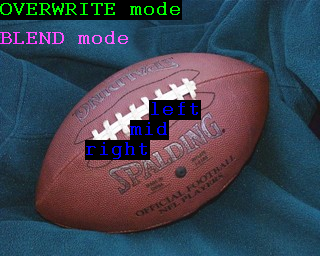
example (generates the sceenshot above):
in=imread('football.jpg');
out=rendertext(in,'OVERWRITE mode',[0 255 0], [1, 1]);
out=rendertext(out,'BLEND mode',[255 0 255], [30, 1], 'bnd', 'left');
out=rendertext(out,'left',[0 0 255], [101, 150], 'ovr', 'left');
out=rendertext(out,'mid',[0 0 255], [130, 150], 'ovr', 'mid');
out=rendertext(out,'right',[0 0 255], [160, 150], 'ovr', 'right');
imshow(out
have fun (and give credit)!
Cite As
Davide Di Gloria (2026). Render RGB text over RGB or Grayscale Image (https://uk.mathworks.com/matlabcentral/fileexchange/26940-render-rgb-text-over-rgb-or-grayscale-image), MATLAB Central File Exchange. Retrieved .
Acknowledgements
Inspired: Microscopy Image Browser (MIB), Microscopy Image Browser 2 (MIB2)
General Information
- Version 1.2.0.0 (3.83 KB)
MATLAB Release Compatibility
- Compatible with any release
Platform Compatibility
- Windows
- macOS
- Linux
