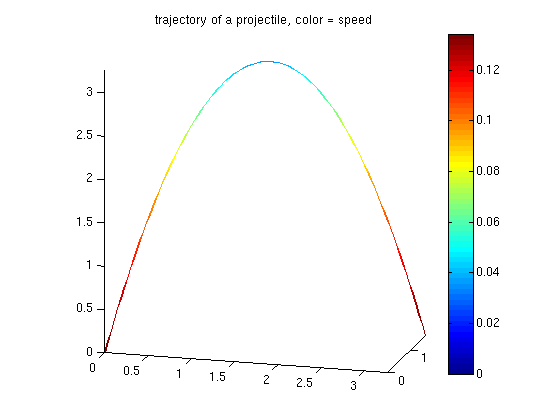
3D colored line plot
plots a 3-D "line" with c-data as color
Makes a surface object and the colouring is controlled by the colormap.
Example:
v_start = [2 1 8]; % m/s
g = 9.81; % m/(s^2)
t_impact = 2*v_start(3)/g; % s
t = [0:t_impact/100:t_impact]'; % s
x = v_start(1)*t; % m
y = v_start(2)*t; % m
z = v_start(3)*t-1/2*g*t.^2; % m
velocity = ([[x(2:numel(t)) y(2:numel(t)) z(2:numel(t))]-[x(1:numel(t)-1) y(1:numel(t)-1) z(1:numel(t)-1)];[0 0 0]]); % m/s
speed = sqrt(sum(velocity.^2,2)); % m/s
color_line3(x,y,z,speed);
axis equal vis3d; view(15,15);
title('trajectory of a projectile, color = speed');
axis equal vis3d; view(15,15);
colorbar
Cite As
Georg Stillfried (2026). 3D colored line plot (https://uk.mathworks.com/matlabcentral/fileexchange/23566-3d-colored-line-plot), MATLAB Central File Exchange. Retrieved .
MATLAB Release Compatibility
Platform Compatibility
Windows macOS LinuxCategories
- MATLAB > Graphics > 2-D and 3-D Plots > Line Plots >
Tags
Acknowledgements
Inspired by: Colored line or scatter plot
Discover Live Editor
Create scripts with code, output, and formatted text in a single executable document.
