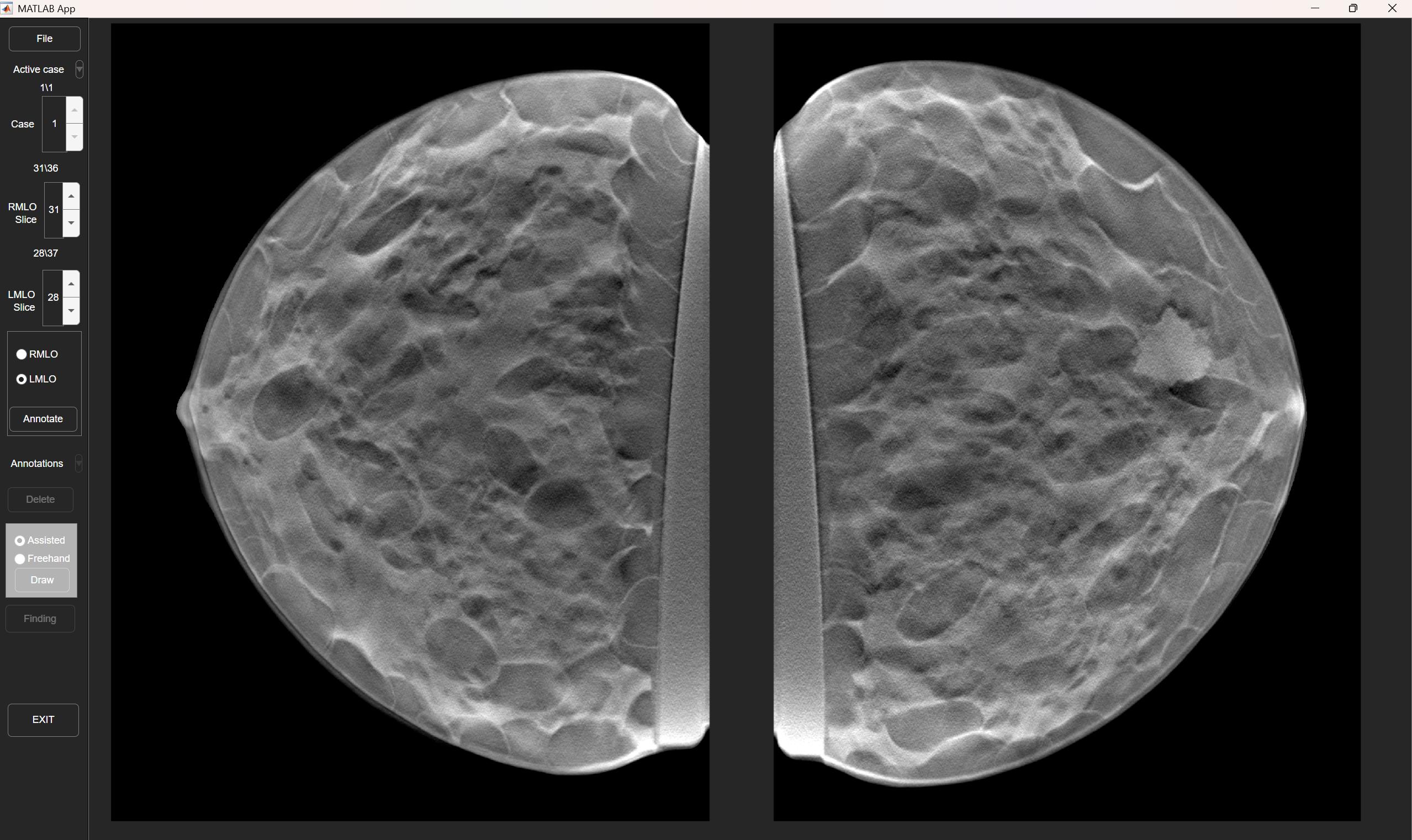
Mammo Annotation App

Version 1.0.0 (742 KB) by Magnus
This is a custom-designed GUI allowing review and annotation of radiological breast images
1 Download
Updated 10 Dec 2025

View License

This is a custom-designed GUI allowing review and annotation of radiological breast images (Digital mammography, 2D, and Digital breast tomosynthesis, 3D). It was designed to provide a quick and easy way to manually or semi-automatically draw breast lesion outlines and classify lesions according to established BIRADS guidelines. Is is intended to be used with a two or three screen setup, where 3D images are displayed on one monitor, 2D images on the other monitor and the annotation window optionally on a third smaller monitor (which can also optionally be a touch screen allowign a stylus to be used for annotations).
This is not a medical device and should under no circumstances be used for diagnostic or clinical purposes. It is ia work in progress and we aim to continually update it with additional fucntionality, including support for other radiological images.
Input images should be provided in following structure:
- Case 1
- TOMO_LMLO
- Slice1.dcm
- Slice...
- TOMO_RMLO
- L-CC
- Image.dcm
- R-CC
- L-MLO
- R-MLO
- Case 2
- Case ...
GUI OVERVIEW - MAIN WINDOW
  • File: Through this menu the user browses available directories and selects a folder of cases. The current case number is displayed just below the File button.
  • Case: These arrow keys are used to switch between cases. A case can also be selected through the active case drop-down menu just above it. Selecting a new case leads to it being loaded and displayed on both screens in DBT and DM.
  • Slice: For the DBT view, this number displays the current slice for the respective 3D stack of images (RMLO and LMLO). Pressing the buttons will automatically go to the next and previous slice, as will using the arrow keys or the mouse wheel (for the selected image).
  • Annotate: Pressing this button will bring up an annotation window, allowing either Assisted or Freehand annotation. After annotation is done and Finding is pressed, a further pop-up window is displayed allowing the selection of lesion morphological information. Each lesion type (mass, microcalcification, architectural distortion and asymmetry) is visually indicated by a distinct outline colour.
  • Annotation: This dropdown menu displays a list of previously saved annotations on the select case, and selecting one of them will automatically jump to the correct slice. Selecting an active annotation also activates the Delete-button which allows individual annotations to be removed.

Cite As

Magnus Dustler (2025). <Your Title> (https://www.mathworks.com/matlabcentral/fileexchange/<...>), MATLAB Central File Exchange. Retrieved December 10, 2025.

MATLAB Release Compatibility
Created with R2024b
Compatible with any release
Platform Compatibility
Windows macOS Linux
Tags Add Tags
Acknowledgements

Inspired by: SC - powerful image rendering

Community Treasure Hunt

Find the treasures in MATLAB Central and discover how the community can help you!

Start Hunting!
Version Published Release Notes
1.0.0