

The Magnetometer Calibration App is designed to help users calibrate their magnetometers by correcting for hard-iron and soft-iron distortions. This ensures accurate and reliable magnetic field measurements.
- Easy-to-use interface for uploading and processing data
- Automatic calculation of hard-iron and soft-iron offsets
- Output of calibrated magnetometer data
- Visualization of raw and calibrated data.
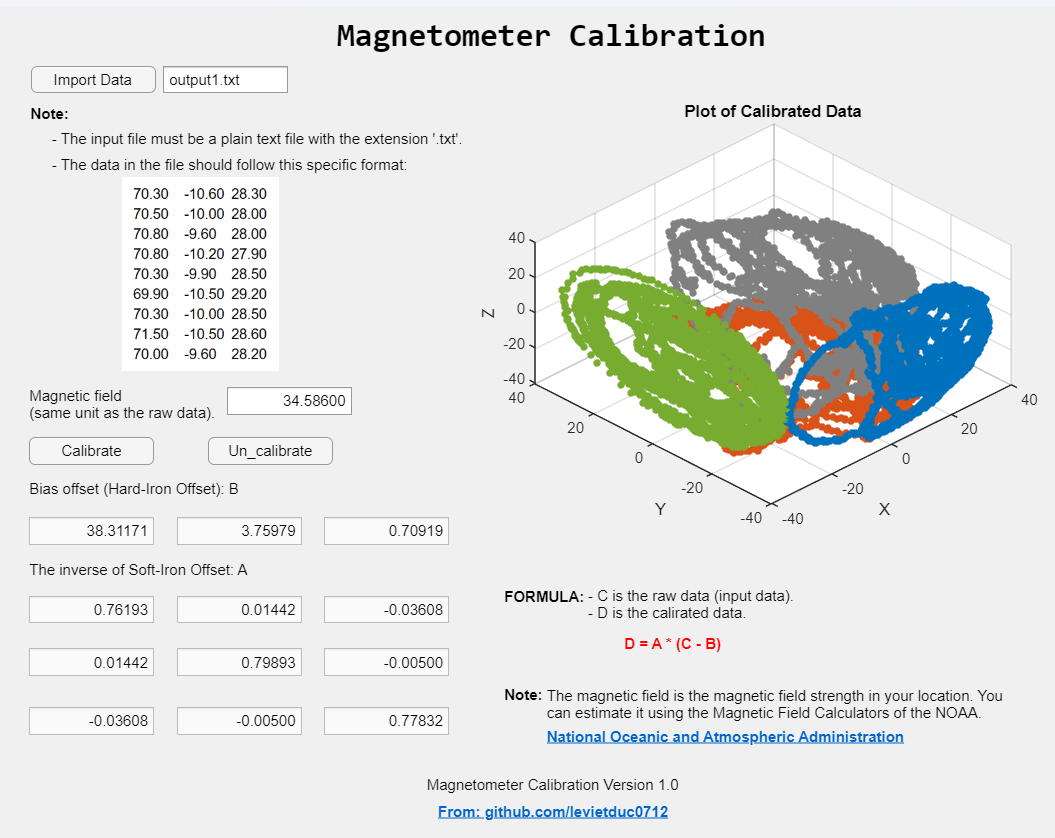
-
Prepare your data file:
- The input file must be a plain text file with the extension
.txt. - Data format: Each line should contain three floating.
- Point numbers separated by a tab (
\t), representing the X, Y, and Z values respectively. - Example:
70.30 -10.60 28.30 70.50 -10.00 28.00 70.80 -9.60 28.00 70.80 -10.20 27.90 70.30 -9.90 28.50 69.90 -10.50 29.20 70.30 -10.00 28.50 71.50 -10.50 28.60 70.00 -9.60 28.20 - The input file must be a plain text file with the extension
- Run the app:
- Follow the on-screen instructions to upload your data file and perform the calibration.
- The app will output the calibrated magnetometer data and display visualizations comparing raw and calibrated data.
This project is licensed under the GPL-3.0 license. See the LICENSE file for details.
For any questions or support, please contact levietduc0712@gmail.com.
Cite As
Le Duc (2025). CalibMag (https://github.com/levietduc0712/CalibMag), GitHub. Retrieved .
MATLAB Release Compatibility
Platform Compatibility
Windows macOS LinuxTags
Community Treasure Hunt
Find the treasures in MATLAB Central and discover how the community can help you!
Start Hunting!Discover Live Editor
Create scripts with code, output, and formatted text in a single executable document.
Versions that use the GitHub default branch cannot be downloaded
| Version | Published | Release Notes | |
|---|---|---|---|
| 1.0.0 |
|

You can also select a web site from the following list
Americas
- América Latina (Español)
- Canada (English)
- United States (English)
Europe
- Belgium (English)
- Denmark (English)
- Deutschland (Deutsch)
- España (Español)
- Finland (English)
- France (Français)
- Ireland (English)
- Italia (Italiano)
- Luxembourg (English)
- Netherlands (English)
- Norway (English)
- Österreich (Deutsch)
- Portugal (English)
- Sweden (English)
- Switzerland
- United Kingdom(English)
Asia Pacific
- Australia (English)
- India (English)
- New Zealand (English)
- 中国
- 日本Japanese (日本語)
- 한국Korean (한국어)