Automatic re routing using ai.
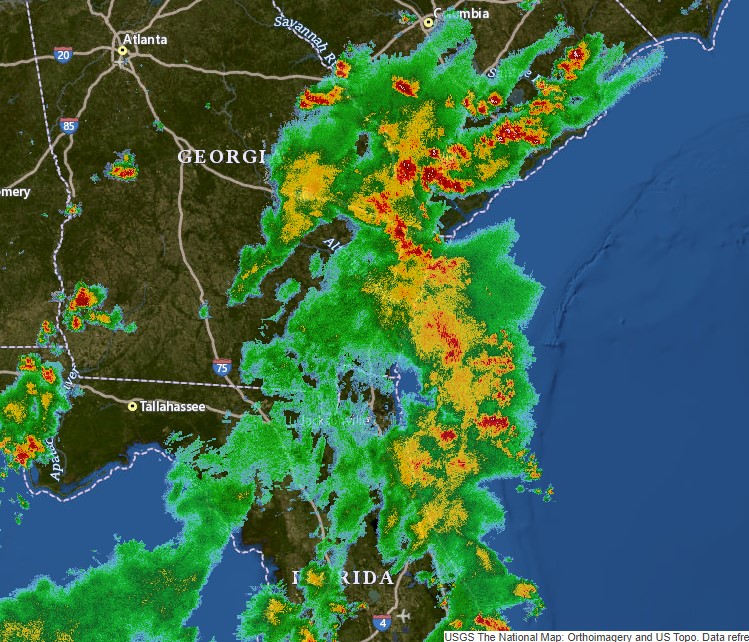
im trying to draw a path for the aircraft. so the aircraft needs to avoid all the red zones in the radar image i have and should travel only on green zones even the waypoints are on redzones.
% Load the radar image
radar_image = imread('radar.jpg');
I = radar_image;
% Display the radar image
figure;
imshow(I);
% Select waypoints
disp('Select the waypoints:');
[x, y] = ginput;
waypoints = [x, y];
% Save waypoints
save('waypoints.mat', 'waypoints');
% Load saved waypoints
load('waypoints.mat');
% Plot waypoints and connect them with lines
hold on;
plot(waypoints(:, 1), waypoints(:, 2), 'ro', 'LineWidth', 2);
plot(waypoints(:, 1), waypoints(:, 2), 'r--', 'LineWidth', 1);
% Load aircraft icon image
aircraft_icon = imread('aircraft_icon.png');
% Resize the aircraft icon image
desired_size = 30; % Change this value to adjust the size of the aircraft icon
aircraft_icon_resized = imresize(aircraft_icon, [desired_size, desired_size]);
% Animate aircraft using AI algorithm
tolerance = 5; % Tolerance for reaching waypoints
max_steps = 100; % Maximum steps to reach the destination
step_size = 1; % Step size for potential field calculations
% Plot the initial position of the aircraft
current_pos = waypoints(1, :);
h = image(current_pos(1), current_pos(2), aircraft_icon_resized);
set(h, 'AlphaData', 0.7); % Set the transparency (optional)
for i = 1:size(waypoints, 1)-1
start = waypoints(i, :);
finish = waypoints(i+1, :);
% Perform A* algorithm to find an alternate path through green zones
alternate_path = A_star(start, finish);
for j = 1:size(alternate_path, 1)-1
% Initialize the position of the aircraft
current_pos = alternate_path(j, :);
next_waypoint = alternate_path(j+1, :);
% Continue to the next waypoint if the current position is already near the waypoint
if norm(current_pos - next_waypoint) <= tolerance
continue;
end
% Perform animation to move the aircraft through the potential field
animateAircraft(current_pos, next_waypoint, max_steps, step_size, h);
% Update the radar image I with the current position of the aircraft
I(round(current_pos(2)), round(current_pos(1))) = 0;
end
end
function animateAircraft(current_pos, next_waypoint, max_steps, step_size, h)
% Animate the aircraft to move from current_pos to next_waypoint
for t = 1:max_steps
% Check if the aircraft has reached the destination waypoint
if norm(current_pos - next_waypoint) <= tolerance
break;
end
% Calculate potential field forces
attractive_force = next_waypoint - current_pos;
repulsive_force = zeros(1, 2);
% Calculate the repulsive forces from each red and yellow region
red_regions = find(I == 1);
yellow_regions = find(I == 2);
for k = 1:length(red_regions)
[r, c] = ind2sub(size(I), red_regions(k));
obstacle = [c, r];
repulsive_force = repulsive_force + calculate_repulsive_force(current_pos, obstacle);
end
for k = 1:length(yellow_regions)
[r, c] = ind2sub(size(I), yellow_regions(k));
obstacle = [c, r];
repulsive_force = repulsive_force + calculate_repulsive_force(current_pos, obstacle);
end
% Combine the forces to get the total force
total_force = attractive_force + 0.5 * repulsive_force; % Reduce repulsive force to move through obstacles more easily
% Normalize the total force and move the aircraft
total_force = total_force / norm(total_force);
current_pos = current_pos + step_size * total_force;
% Update the aircraft position on the plot
set(h, 'XData', current_pos(1), 'YData', current_pos(2));
drawnow; % Force the plot to update
% Pause for a short duration to visualize the animation
pause(0.05);
end
end
function force = calculate_repulsive_force(position, obstacle, I)
% Constants for the potential field calculation
repulsive_gain = 1000; % Adjust this value to control the obstacle avoidance strength
min_distance = 5; % Minimum distance to avoid division by zero
% Calculate the distance and direction to the obstacle
distance = norm(position - obstacle);
direction = (position - obstacle) / distance;
% Check if the obstacle is a waypoint
is_waypoint = false;
waypoints = [1, 2; 3, 4; 5, 6]; % Replace this with the actual waypoints' coordinates
for i = 1:size(waypoints, 1)
if isequal(obstacle, waypoints(i, :))
is_waypoint = true;
break;
end
end
% Check the color of the obstacle in the radar image
color = I(round(obstacle(2)), round(obstacle(1)));
% Calculate the repulsive force
if ~is_waypoint && color ~= 0 % Obstacle is not a waypoint or 0
force = repulsive_gain / max(distance, min_distance)^2 * direction;
else
force = zeros(1, 2);
end
end
this the code im using. But according to the output im getting, the aircraft is still travelling through all the red and yellow zones.i have tagged the aircraft_icon.png and rada.jpg images which have been used in the code. can somebody help me out with this?
1 Comment
Time Descending
This forum is targeted to ThingSpeak workflows of IoT data collection and analysis of IoT data.
Can you please consider posting your question on MATLAB answers ? I think you will get a lot more viewers with related capabilities and interests.
Sign in to participate
Tags