Main Content

Results for

function Shrinking_bvp4c
clc
clear all
clear all
% defining parameters
k=0.5,K=0.8,M=0.3,S=2.0;
sol1 = bvpinit(linspace(0,20,25),[1 1 1 0]);
sol = bvp4c(@bvp2D,@bc2D,sol1);
x = sol.x;
y = sol.y;
%%% Plotting of the velocity
figure (1)
plot(x, y(2, :) ,'linewidth', 1)
hold on
xlabel('\eta', 'fontweight', 'bold', 'fontsize', 16)
ylabel('f^{\prime}(\eta)', 'fontweight', 'bold', 'fontsize', 16)
%% Residual of the boundary conditions
function residual = bc2D(y0, yinf)
residual=[y0(1)-S; y0(2) - 1; yinf(2)];
end
%% System of First Order ODEs
function yvector = bvp2D(t,y)
yy1 = 1/y(1)*(y(2)*y(2)-y(1)*y(3)-y(4)+k*(2*y(2)*y(4)-y(3)*y(3))+M*y(2)+K*y(2));
yvector = [y(2);y(3);yy1];
end
end
For Valentine's day this year I tried to do something a little more than just the usual 'Here's some MATLAB code that draws a picture of a heart' and focus on how to share MATLAB code. TL;DR, here's my advice
  1. Put the code on GitHub. (Allows people to access and collaborate on your code)
  2. Set up 'Open in MATLAB Online' in your GitHub repo (Allows people to easily run it)
I used code by @Zhaoxu Liu / slandarer and others to demonstrate. I think that those two steps are the most impactful in that they get you from zero to one but If I were to offer some more advice for research code it would be
3. Connect the GitHub repo to File Exchange (Allows MATLAB users to easily find it in-product).
4. Get a Digitial Object Identifier (DOI) using something like Zenodo. (Allows people to more easily cite your code)
There is still a lot more you can do of course but if everyone did this for any MATLAB code relating to a research paper, we'd be in a better place I think.
What do you think?
On my computers, this bit of code produces an error whose cause I have pinpointed,
load tstcase
ycp=lsqlin(I, y, Aineq, bineq);
Error using parseOptions
Too many output arguments.
Error in lsqlin (line 170)
[options, optimgetFlag] = parseOptions(options, 'lsqlin', defaultopt);
^^^^^^^^^^^^^^^^^^^^^^^^^^^^^^^^^^^^^^^^^^^
The reason for the error is seemingly because, in recent Matlab, lsqlin now depends on a utility function parseOptions, which is shadowed by one of my personal functions sharing the same name:
C:\Users\MWJ12\Documents\mwjtree\misc\parseOptions.m
C:\Program Files\MATLAB\R2024b\toolbox\shared\optimlib\parseOptions.m % Shadowed
The MathWorks-supplied version of parseOptions is undocumented, and so is seemingly not meant for use outside of MathWorks. Shouldn't it be standard MathWorks practice to put these utilities in a private\ folder where they cannot conflict with user-supplied functions of the same name?
It is going to be an enormous headache for me to now go and rename all calls to my version of parseOptions. It is a function I have been using for a long time and permeates my code.
General observations on practical implementation issues regarding add-on versioning
I am making updates to one of my File Exchange add-ons, and the updates will require an updated version of another add-on. The state of versioning for add-ons seems to be a bit of a mess.
First, there are several sources of truth for an add-on’s version:
  • The GitHub release version, which gets mirrored to the File Exchange version
  • The ToolboxVersion property of toolboxOptions (for an add-on packaged as a toolbox)
  • The version in the Contents.m file (if there is one)
Then, there is the question of how to check the version of an installed add-on. You can call matlab.addon.installedAddons, which returns a table. Then you need to inspect the table to see if a particular add-on is present, if it is enabled, and get the version number.
If you can get the version number this way, then you need some code to compare two semantic version numbers (of the form “3.1.4”). I’m not aware of a documented MATLAB function for this. The verLessThan function takes a toolbox name and a version; it doesn’t help you with comparing two versions.
If add-on files were downloaded directly and added to the MATLAB search path manually, instead of using the .mtlbx installer file, the add-on won’t be listed in the table returned by matlab.addon.installedAddon. You’d have to call ver to get the version number from the Contents.m file (if there is one).
Frankly, I don’t want to write any of this code. It would take too long, be challenging to test, and likely be fragile.
Instead, I think I will write some sort of “capabilities” utility function for the add-on. This function will be used to query the presence of needed capabilities. There will still be a slight coding hassle—the client add-on will need to call the capabilities utility function in a try-catch, because earlier versions of the add-on will not have that utility function.
I also posted this over at Harmonic Notes
Los invito a conocer el libro "Sistemas dinámicos en contexto: Modelación matemática, simulación, estimación y control con MATLAB", el cual ya está disponible en formato digital.
El libro integra diversos temas de los sistemas dinámicos desde un punto de vista práctico utilizando programas de MATLAB y simulaciones en Simulink y utilizando métodos numéricos (ver enlace). Existe mucho material en el blog del libro con posibilidades para comentarios, propuestas y correcciones. Resalto los casos de estudio
Creo que el libro les puede dar un buen panorama del área con la posibilidad de experimentar de manera interactiva con todo el material de MATLAB disponible en formato Live Script. Lo mejor es que se pueden formular preguntas en el blog y hacer propuestas al autor de ejercicios resueltos.
Son bienvenidos los comentarios, sugerencias y correcciones al texto.
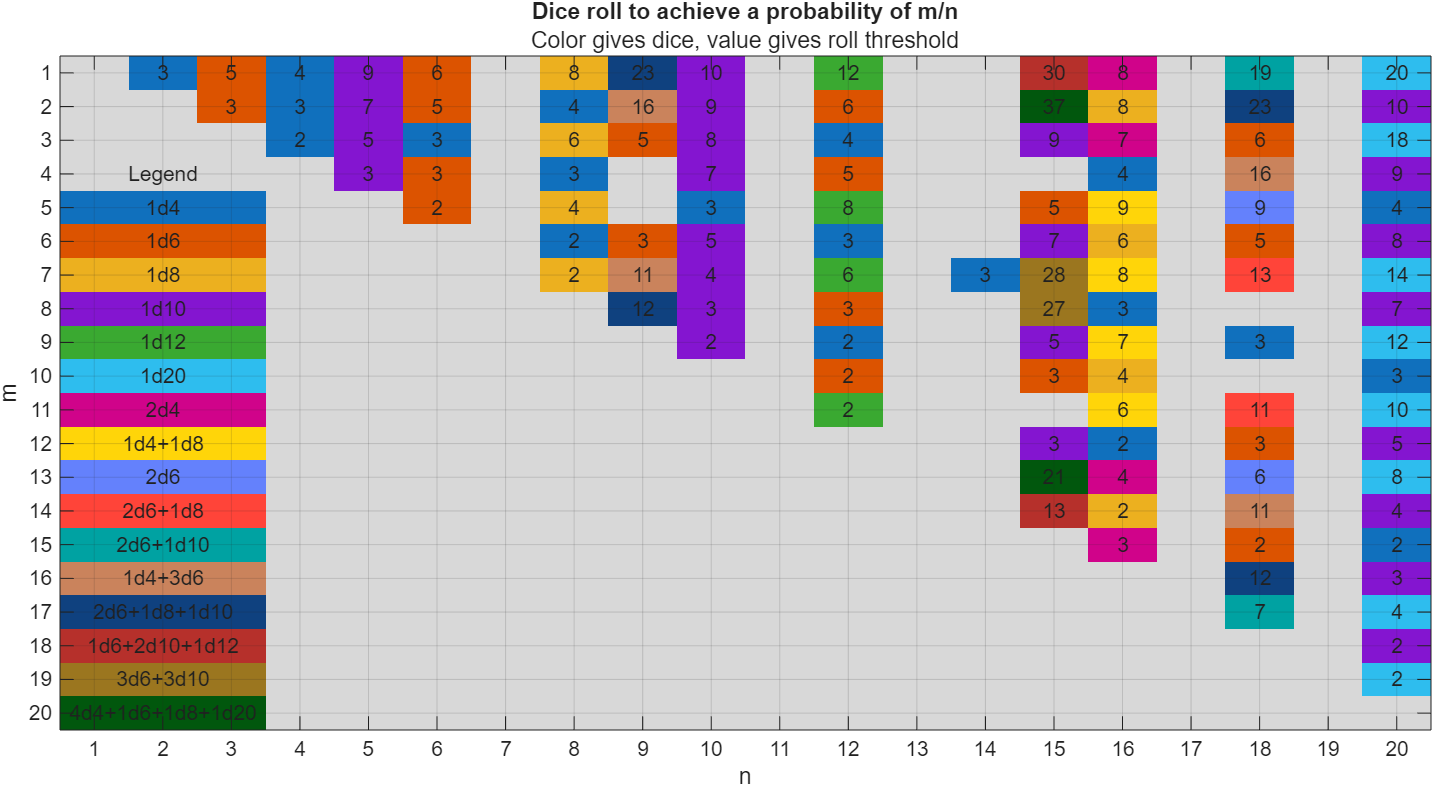
I got thoroughly nerd-sniped by this xkcd, leading me to wonder if you can use MATLAB to figure out the dice roll for any given (rational) probability. Well, obviously you can. The question is how. Answer: lots of permutation calculations and convolutions.
In the original xkcd, the situation described by the player has a probability of 2/9. Looking up the plot, row 2 column 9, shows that you need 16 or greater on (from the legend) 1d4+3d6, just as claimed.
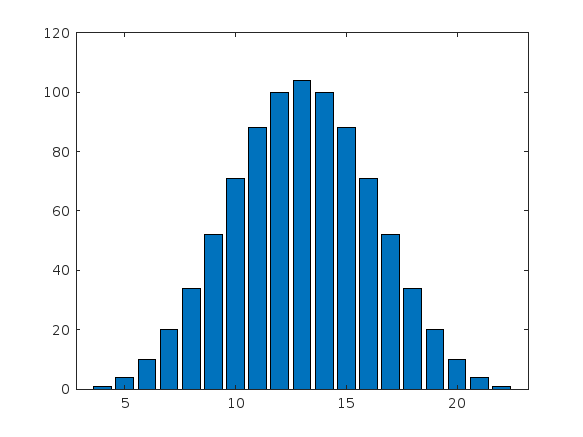
If you missed the bit about convolutions, this is a super-neat trick
[v,c] = dicedist([4 6 6 6]);
bar(v,c)
% Probability distribution of dice given by d
function [vals,counts] = dicedist(d)
% d is a vector of number of sides
n = numel(d); % number of dice
% Use convolution to count the number of ways to get each roll value
counts = 1;
for k = 1:n
counts = conv(counts,ones(1,d(k)));
end
% Possible values range from n to sum(d)
maxtot = sum(d);
vals = n:maxtot;
end

I noticed recently that my data is no longer updating on thingspeak again. Is there a connectivity issues with thingspeak

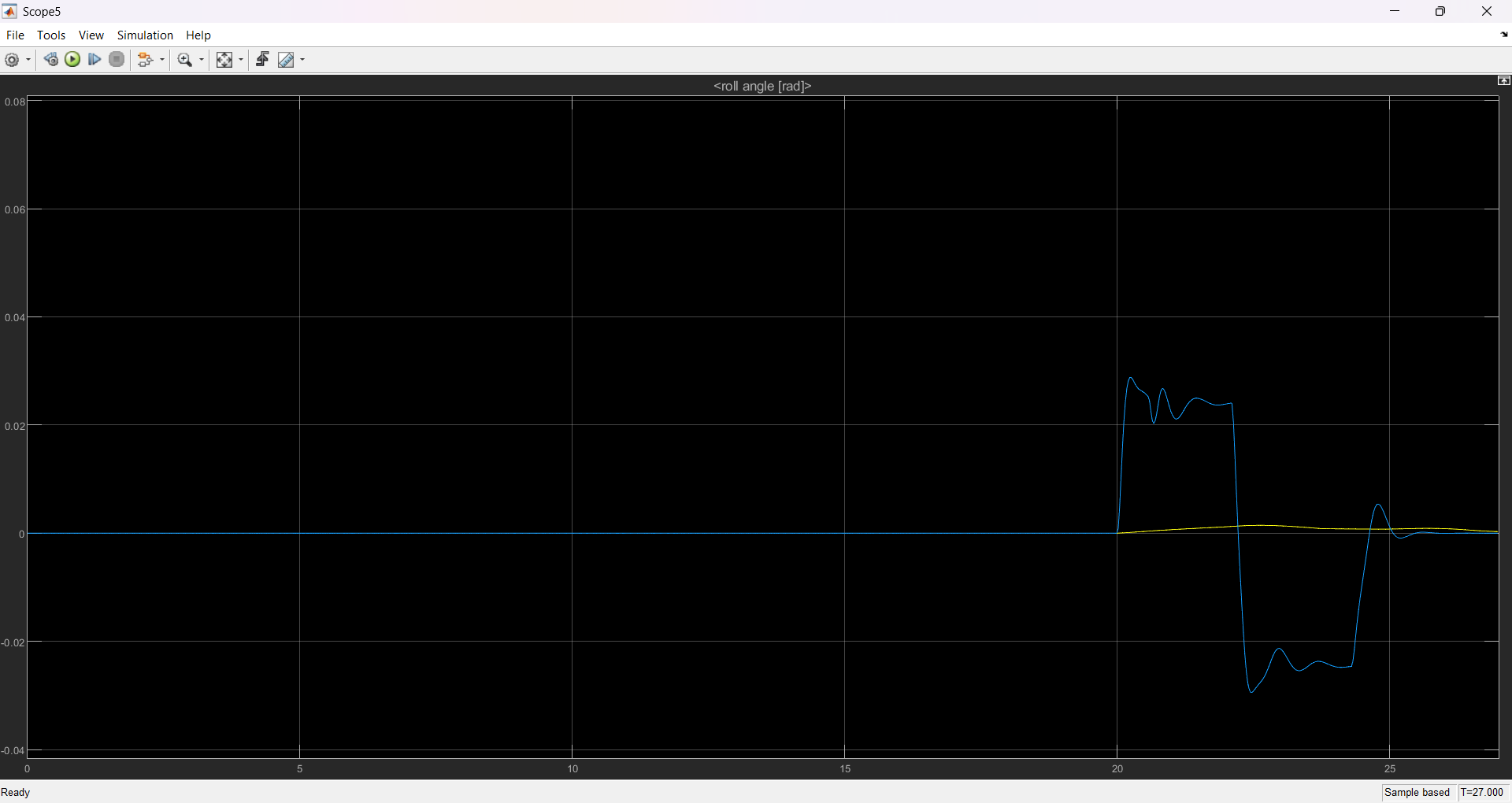
I have already created a 8-DOF electric vehicle model in MATLAB and during the verification method, I noticed that the roll angle does not really align with the data from CarMaker. I would like to seek for the oppinion from this community on how to improve the graph that I have obtained. I have also attatched the parameters of this vehicle as well as the graph that I have obtained. The blue plots indicates the data from a real world based electric model from CarMaker and yellow is from the 8-DOF model in matlab.
these are the vehicle parameters
data.g = 9.81; % [m/s^2] acceleration of gravity
data.f_res = 1.1e-2; % [-] rolling friction parameter
data.k_res = 6.5e-7; % [s^2/m^2] rolling friction coefficient
data.rho = 1.205; % [kg/m^3] air density
data.area = 2.156; % [m^2] cross section
data.cx = 0.30; % [-] drag coefficient
data.mass = 2200.10; % [kg] total vehicle mass
data.Jx = 552.75; % [kg*m^2] roll-axis inertia
data.Jz = 3002.5; % [kg*m^2] yaw-axis inertia
data.Jw = 2; % [kg*m^2] spin-axis inertia of wheel
data.radius = 0.3401; % [m] wheel radius
% Reduced Pacejka tyre model data
data.tyre_par(1) = 82.8868; % Pacejka coeff.
data.tyre_par(2) = 1.2070; % Pacejka coeff.
data.tyre_par(3) = 1.1351; % Pacejka coeff.
data.tyre_par(4) = 14.4035; % Pacejka coeff.
data.tyre_par(5) = 1.1932; % Pacejka coeff.
data.tyre_par(6) = -0.0001; % Pacejka coeff.
data.tyre_par(7) = 2.1219; % Pacejka coeff.
% Pacejka 5.2 tyre model data
tyre = ImportTyreData('.', 'Tyre_VSM.tir');
tyre = rmfield(tyre, 'file');
data.tyre_par_full = tyre;
data.wbase_f = 1.4727; % [m] front wheelbase
data.wbase_r = 1.4553; % [m] rear wheelbase
data.wbase = data.wbase_f + data.wbase_r; % [m] wheelbase
data.track = 1.655; % [m] track
data.h_cg = 0.631; % [m] centre of gravity height from ground
data.h_roll = 0.091; % [m] roll centre height from ground
data.k_roll_f = 8.67e4; % [Nm] roll stiffness at front
data.k_roll_r = 7.80e4; % [Nm] roll stiffness at rear
data.c_roll_f = 1.2e6; % [Nm/s] roll damping at front
data.c_roll_r = 6e5; % [Nm/s] roll damping at rear
data.k_act_roll = 0.9; % [-] active anti-roll coefficient
data.em_curve = [ % electric motor torque-speed curve
0, 900, 1000, 1100, 1200, 1300 % [RPM]
1500, 1500, 1400, 1000, 500, 0 % [Nm]
];
data.torque_bk_lb = -5e3; % [Nm] minimum brake torque
my code is as below:
#include "DHT.h"
#define DHTPIN 15 // what pin we're connected to
#define DHTTYPE DHT11
DHT dht(DHTPIN, DHTTYPE);
#define THINGSPEAK_API_KEY "1P4RY69D3YMP9R5W"
#include <SoftwareSerial.h>
#include <OneWire.h>
#include <DallasTemperature.h>
//-----------------------------
#include <ArduinoJson.h>
StaticJsonDocument<200>JsonDocument;
SoftwareSerialmyserial(10, 11);
//-------------------------
float voltage;
unsignedintfrac;
//---------------------
#define ONE_WIRE_BUS 5
OneWireoneWire(ONE_WIRE_BUS);
DallasTemperaturesensors(&oneWire);
floatCelcius = 0;
float Fahrenheit = 0;
//==========================================================================================================
bytesensorInterrupt = 0; // 0 = digital pin 2
bytesensorPin = 2;
// The hall-effect flow sensor outputs approximately 4.5 pulses per second per
// litre/minute of flow.
floatcalibrationFactor = 5.5; //==========================================================we change cal factor 4.5 to 5.5 if not work chnage again(4.5)
//========== 5.5 calibration factor is working efficent then 4.5 , 7.5 ,and 6.5
volatile byte pulseCount;
floatflowRate;
unsignedintflowMilliLitres;
unsigned long totalMilliLitres, tempTotal = -1;
unsigned long oldTime;
//-------------------------------------------------------
intpH_Value;
float Voltage;
//----------------------------------------------------------------------------------------------
void setup() {
// put your setup code here, to run once:
Serial.begin(9600);
myserial.begin(9600);
//--------------------------------
pinMode(sensorPin, INPUT);
digitalWrite(sensorPin, HIGH);
pulseCount = 0;
flowRate = 0.0;
flowMilliLitres = 0;
totalMilliLitres = 0; // ============================================================
oldTime = 0;
attachInterrupt(sensorInterrupt, pulseCounter, FALLING);
sensors.begin();
//------------------------------------------------
/********************GSM Communication Starts********************/
if (myserial.available())
Serial.write(myserial.read());
myserial.println("AT");
delay(1000);
myserial.println("AT+SAPBR=3,1,\"Contype\",\"GPRS\"");
delay(1000);
ShowSerialData();
myserial.println("AT+SAPBR=3,1,\"APN\",\"www\"");//APN
delay(1000);
ShowSerialData();
myserial.println("AT+SAPBR=1,1");
delay(1000);
ShowSerialData();
myserial.println("AT+SAPBR=2,1");
delay(1000);
ShowSerialData();
//---------------------------------
}
void loop() {
// put your main code here, to run repeatedly:
inti;
for (i = 0; i< 20; i++)
{
flow_meter();
}
temperature();
turbidity();
delay(1000);
gsm();
}
voidflow_meter()
{
if ((millis() - oldTime) > 1000) // Only process counters once per second
{
// Disable the interrupt while calculating flow rate and sending the value to
// the host
detachInterrupt(sensorInterrupt);
// Because this loop may not complete in exactly 1 second intervals we calculate
// the number of milliseconds that have passed since the last execution and use
// that to scale the output. We also apply the calibrationFactor to scale the output
// based on the number of pulses per second per units of measure (litres/minute in
// this case) coming from the sensor.
flowRate = ((1000.0 / (millis() - oldTime)) * pulseCount) / calibrationFactor;
// Note the time this processing pass was executed. Note that because we've
// disabled interrupts the millis() function won't actually be incrementing right
// at this point, but it will still return the value it was set to just before
// interrupts went away.
oldTime = millis();
// Divide the flow rate in litres/minute by 60 to determine how many litres have
// passed through the sensor in this 1 second interval, then multiply by 1000 to
// convert to millilitres.
flowMilliLitres = (flowRate / 60) * 1000;
// Add the millilitres passed in this second to the cumulative total
totalMilliLitres += flowMilliLitres;
// Print the flow rate for this second in litres / minute
/* Serial.print("Flow rate: ");
Serial.print(int(flowRate)); // Print the integer part of the variable
Serial.print("."); // Print the decimal point */
// Determine the fractional part. The 10 multiplier gives us 1 decimal place.
frac = (flowRate - int(flowRate)) * 10;
Serial.print(frac, DEC) ; // Print the fractional part of the variable
Serial.println("L/min");
/* // Print the number of litres flowed in this second
Serial.print(" Current Liquid Flowing: "); // Output separator
Serial.print(flowMilliLitres);
Serial.print("mL/Sec");
// Print the cumulative total of litres flowed since starting
Serial.print(" Output Liquid Quantity: "); // Output separator
Serial.print(totalMilliLitres);
Serial.println("mL"); */
if ( tempTotal != totalMilliLitres ) {
tempTotal = totalMilliLitres;
// displayVolumeOfWater(totalMilliLitres );
}
// Reset the pulse counter so we can start incrementing again
pulseCount = 0;
// Enable the interrupt again now that we've finished sending output
attachInterrupt(sensorInterrupt, pulseCounter, FALLING);
}
//=========================================================================================================================
}
voidpulseCounter()
{
// Increment the pulse counter
pulseCount++;
}
//-------------------------------------------------------------------------
void temperature()
{
sensors.requestTemperatures();
Celcius = sensors.getTempCByIndex(0);
Fahrenheit = sensors.toFahrenheit(Celcius);
Serial.print(" C ");
Serial.print(Celcius);
// Serial.print(" F ");
// Serial.println(Fahrenheit);
delay(1000);
}
//------------------------------------------------------------
void turbidity()
{
intsensorValue = analogRead(A0);
voltage = sensorValue * (5.0 / 1024.0);
// Serial.println ("Sensor Output (V):");
Serial.println (voltage);
// Serial.println();
delay(1000);
}
//------------------------------------------------------------
voidgsm()
{
myserial.println("AT+HTTPINIT");
delay(1000);
ShowSerialData();
myserial.println("AT+HTTPPARA=\"CID\",1");
delay(1000);
ShowSerialData();
StaticJsonDocument<200>JsonDocument;
JsonObject& object = JsonDocument.createObject();
object.set("TE", Celcius);
object.set("TU", voltage);
object.set("WF", frac);
delay(1000);
object.printTo(Serial);
Serial.println(" ");
String sendtoserver;
object.prettyPrintTo(sendtoserver);
delay(1000);
//myserial.println("AT+HTTPPARA=\"URL\",\"https://api.thingspeak.com/update?api_key=\""); //Server address
myserial.println("AT+HTTPPARA=\"URL\",\"https://api.thingspeak.com/update?api_key=\""); //Server address
delay(1000);
ShowSerialData();
myserial.println("AT+HTTPPARA=\"CONTENT\",\"application/json\"");
delay(1000);
ShowSerialData();
myserial.println("AT+HTTPDATA=" + String(sendtoserver.length()) + ",100000");
Serial.println(sendtoserver);
delay(1000);
ShowSerialData();
myserial.println(sendtoserver);
delay(2000);
ShowSerialData;
myserial.println("AT+HTTPACTION=1");
delay(1000);
ShowSerialData();
myserial.println("AT+HTTPREAD");
delay(1000);
ShowSerialData();
myserial.println("AT+HTTPTERM");
delay(1000);
ShowSerialData;
}
voidShowSerialData()
{
while (myserial.available() != 0)
Serial.write(myserial.read());
delay(1000);
}
I am very pleased to share my book, with coauthors Professor Richard Davis and Associate Professor Sam Toan, titled "Chemical Engineering Analysis and Optimization Using MATLAB" published by Wiley: https://www.wiley.com/en-us/Chemical+Engineering+Analysis+and+Optimization+Using+MATLAB-p-9781394205363
Also in The MathWorks Book Program:
Chemical Engineering Analysis and Optimization Using MATLAB® introduces cutting-edge, highly in-demand skills in computer-aided design and optimization. With a focus on chemical engineering analysis, the book uses the MATLAB platform to develop reader skills in programming, modeling, and more. It provides an overview of some of the most essential tools in modern engineering design.
Chemical Engineering Analysis and Optimization Using MATLAB® readers will also find:
  • Case studies for developing specific skills in MATLAB and beyond
  • Examples of code both within the text and on a companion website
  • End-of-chapter problems with an accompanying solutions manual for instructors
This textbook is ideal for advanced undergraduate and graduate students in chemical engineering and related disciplines, as well as professionals with backgrounds in engineering design.
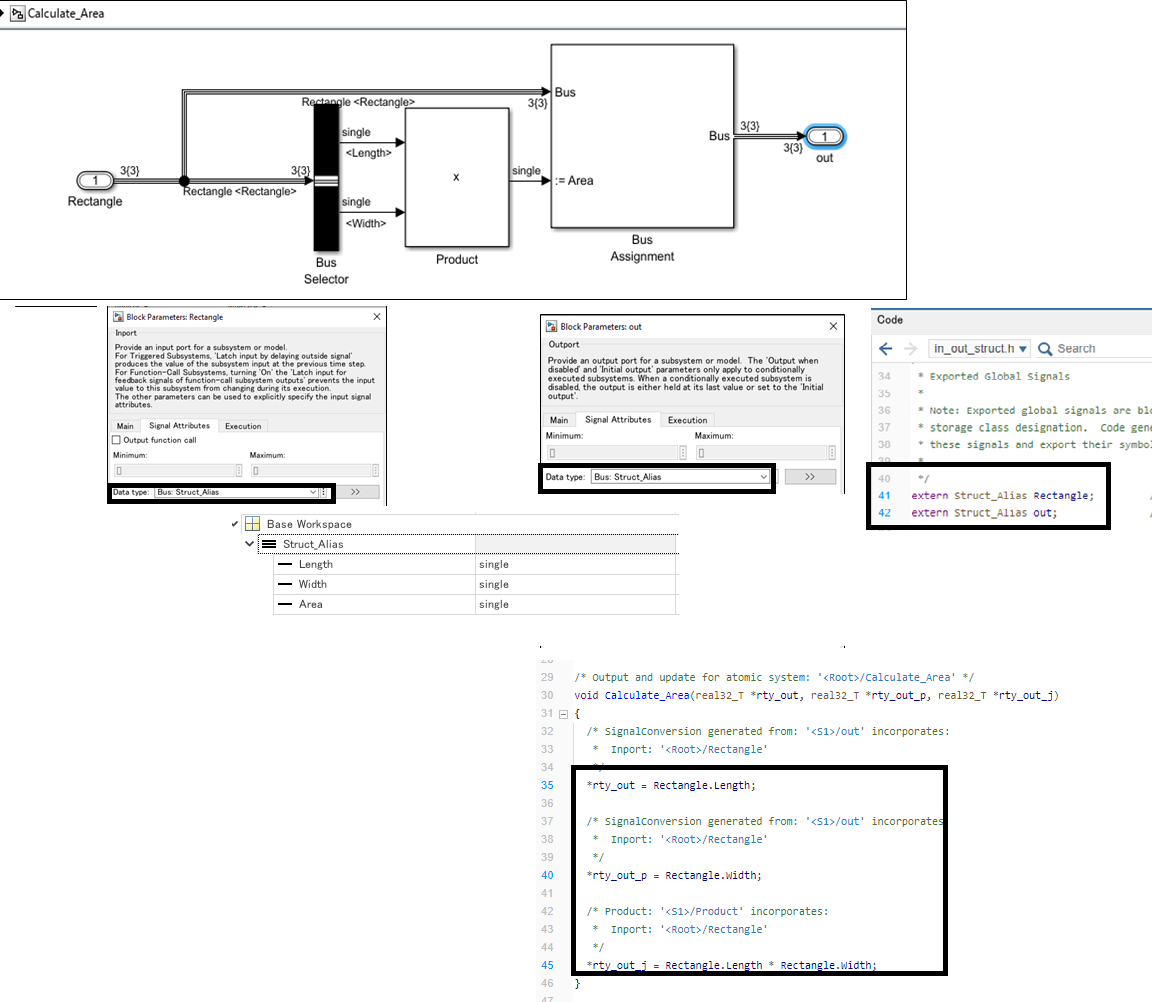
My intention is to generate th code as mentioned below
void computeArea() {
rectangle.area = rectangle.length * rectangle.width;
}
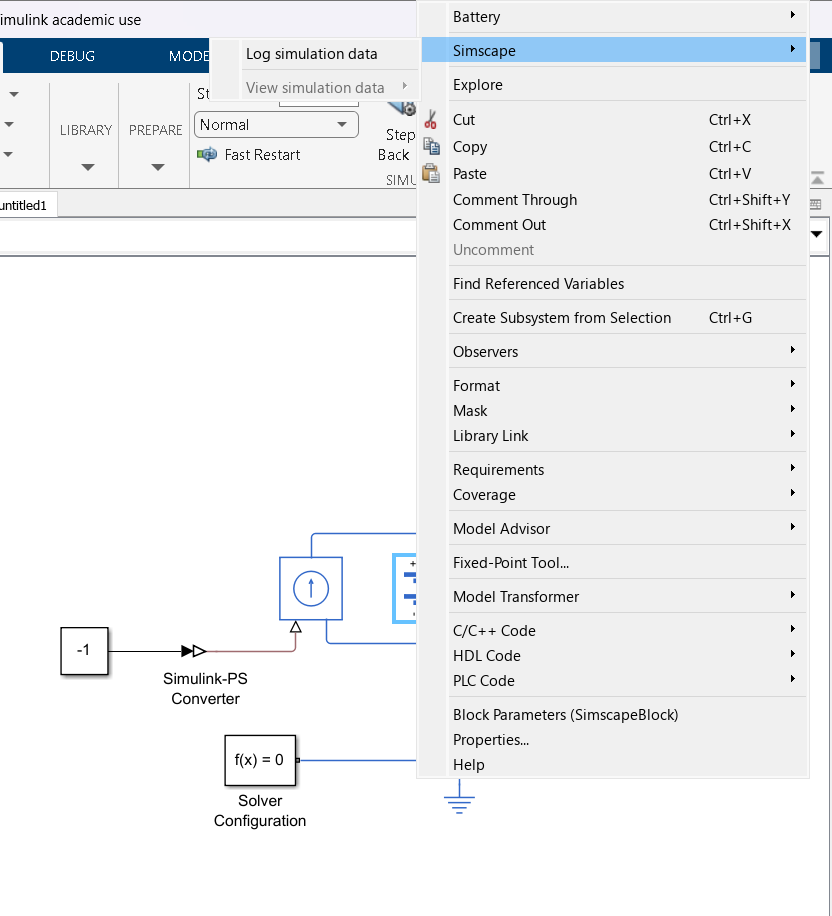
ı m tryna prepare a battery simulation with simulink but when ı push right click on "battery-table based" , and then ı go simscape button, and ı just only see "log simulation data" . Have you any reccomend for this problem? It s probably an easy solution, but ı can't
Need code to collect data of waterflow sensor using ESP 8266 and to stoe it in ThingSpeak cloud
This is the question I am trying to solve and I also uploading the code i have written and error I am getting, Please help me the error please.
Ciao a Tutti,qualche mese fa avevo costruito una stazione meteo con un esp32 e vari sensori.
Tutto funzionava, adesso però ho riprovato, e non funziona più. Ho provato a creare un canale nuovo con nuovo ID canale, nuovo ID Client, nuovo Utente (uguale al Client) e nuova Password. si connette (ho inserito un comando se connesso a MQTT scrivi.....) ma non publica i dati.
Non reisco a saltarne fuori, ècambiato qualche cosa?
grazie a tutti
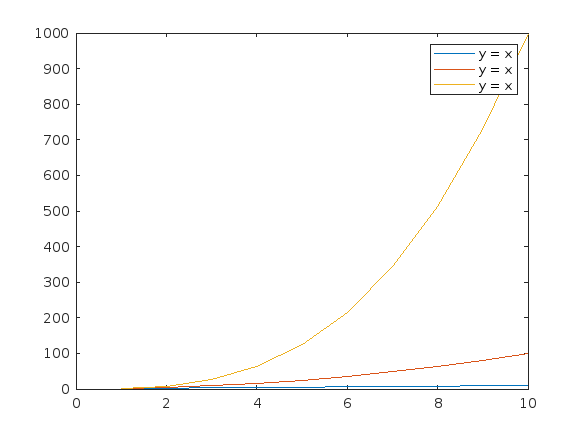
Currently, according to the official documentation, "DisplayName" only supports character vectors or single scalar string as input. For example, when plotting three variables simultaneously, if I use a single scalar string as input, the legend labels will all be the same. To have different labels, I need to specify them separately using the legend function with label1, label2, label3.
Here's an example illustrating the issue:
x = (1:10)';
y1 = x;
y2 = x.^2;
y3 = x.^3;
% Plotting with a string scalar for DisplayName
figure;
plot(x, [y1,y2,y3], DisplayName="y = x");
legend;
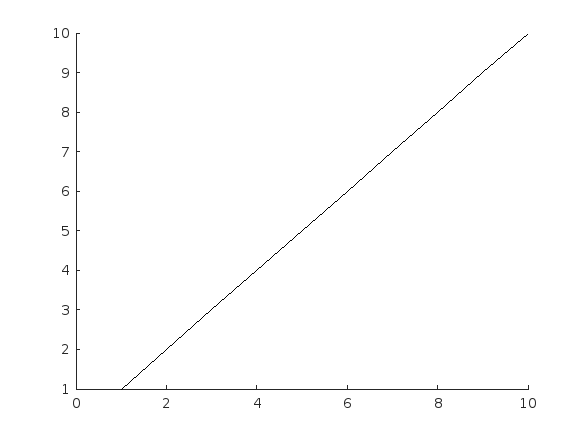
% To have different labels, I need to use the legend function separately
figure;
plot(x, [y1,y2,y3], DisplayName=["y = x","y = x^2","y=x^3"]);
Error using plot
Value must be a character vector or a string scalar.
% legend("y = x","y = x^2","y=x^3");
Hello,
could it be that there is currently is a stability problem with the MQTT-Broker? I can establisth a connection successfully using the MQTTX client (web and win64 installation). I tried all possible ports an connection types. It disconnects all the time after a few seconds of establishing a connection successfully. So it was not possible to subscribe any item. I do not think the problem is in my side... By the way, protocol verision 3.1.1 ist supported, 5.0 not, am I right?
Maybe you could give me a hint,
Best regards,
Manfred

Hi!

I’m facing a problem in which I need an “intermediate” level of detail for my simulation.

In my case, I’d like to simulate a radar altimeter flying at low altitude over some terrain or sea. Over this surface, suppose to have an obstacle (tree/house/ship/…). I know everything about my altimeter (pulsed radar, frenquency, pulse duration, beam width, …). A possible outcome of such a simulation could be the assessment of the impact of different gain patterns on the received pulse.

What I have always found on the internet are either too simple solution (like solving the radar equations) or too complex (Method of Moments, or similar approaches).

Regarding the radar equation, I have always wandered how it can deal with the echoes coming from the outer regions of the beamwidth of the altimeter antenna (the equation only has the boresight gain as input parameter).

On the other hand, in my opinion, approaches like MoM are really too complicated and beyond my scope.

I had a look and tried to implement some of the Matlab functions that already exist (e.g., the ones on the FMCW Radar Altimeter Simulation example), but I don’t think they meet my needs.

So I decided to try to write my own code, providing the shape of the terrain/sea surface, the shape for the obstacles (for now, just simple shapes)… I guess I’d have to sample the domain, evaluating the echoes for all these elements… however, even in this case there are a lot of parameters that I don’t know how to handle properly, for example: - is it reasonable to discretize terrain or sea instead of assuming some model for the backscatter? - how should the domain be discretized? - how can I guarantee the conservation of power, considering the effects of the radiation pattern of the antenna and the aforementioned discretization of the domain?

Thanks in advance for your support.

Best regards, Alessandro

Three former MathWorks employees, Steve Wilcockson, David Bergstein, and Gareth Thomas, joined the ArrayCast pod cast to discuss their work on array based languages. At the end of the episode, Steve says,
> It's a little known fact about MATLAB. There's this thing, Gareth has talked about the community. One of the things MATLAB did very, very early was built the MATLAB community, the so-called MATLAB File Exchange, which came about in the early 2000s. And it was where people would share code sets, M files, et cetera. This was long before GitHub came around. This was well ahead of its time. And I think there are other places too, where MATLAB has delivered cultural benefits over and above the kind of core programming and mathematical capabilities too. So, you know, MATLAB Central, File Exchange, very much saw the future.
João Pedro
João Pedro
Last activity on 22 Jan 2025

Hey guys! I'm undergraduate in aerospace engineering at Brazil and I has done researchs in aeroelasticity fields in the last years.
Recently, I start to use dde23 for solve problems involved time-delay and active control. However, in my last code, I found some problems and I'd like some help for understand what is going wrong. Below, It's the code I'm using.
clc
close all
clear
%% Definicao das variaveis
% Caracteristicas do escoamento
rho = 1; % densidade do escoamento
c0 = 1.0; c1 = 0.165; c2 = 0.0455; c3 = 0.335; c4 = 0.3; % coeficientes de Wagner
omega_c = 17.83; % frequencia critica de flutter
Uc = 26.8903;
U = 1.20 * Uc;
% Caracteristicas do aerofolio
a = -0.15; % distancia entre eixo de referencia e o CE
b = 0.5; % semicorda
m = 20; % massa do aerofolio
H_alpha = 7; % nao-linearidade estrutural - hardening
omega_h = 2*pi; % frequencia natural de plunge
omega_alpha = 6*pi; % frequencia natural de pitch
x_alpha = 0.25; % distancia entre CG e CE
r_alpha = 0.75; % raio de giracao do aerofolio
% Caracteristicas do nonlinear energy sink
delta = 0.75; % posicao adimensional
gamma_n = 5e5; % rigidez adimensional
mi_n = 0.10; % razao de massa
lambda_n_c = (sqrt(3) / 3) * mi_n * omega_c;
lambda_n = 0.5 * lambda_n_c; % amortecimento adimensional
G = 1;
%% Definindo a solucao do sistema
tspan = 0:0.1:120; % vetor temporal
history = [0; deg2rad(1); 0; 0; 0; 0; 0; 0]; % historico para t < 0
delays = [1; 1; 1; 1]; % definicao do delay para as variaveis: xi, alpha, up e xb
ddefun = @(t, y, Z) dydt(t, y, Z, m, a, b, r_alpha, x_alpha, omega_h, omega_alpha, H_alpha, G, mi_n, lambda_n, gamma_n, delta, rho, U, c0, c1, c2, c3, c4);
sol = dde23(ddefun, delays, history, tspan);
%%
function dydt = dydt(t, y, Z, m, a, b, r_alpha, x_alpha, omega_h, omega_alpha, H_alpha, G, mi_n, lambda_n, gamma_n, delta, rho, U, c0, c1, c2, c3, c4)
% transformacao das quatro equacoes que regem a dinamica do sistema
% em oito equacoes - variaveis de estados - com o objetivo de reduzir a
% ordem do sistema:
% xi = y(1); alpha = y(2); up = y(3); xb = y(4);
% xi_d = y(5); alpha_d = y(6); up_d = y(7); xb_d = y(8)
xi_delay = Z(:,1);
alpha_delay = Z(:,2);
up_delay = Z(:,3);
xb_delay = Z(:,4);
y_tau = [xi_delay; alpha_delay; up_delay; xb_delay];
M1 = [1, x_alpha, 0, 0; x_alpha, r_alpha^2, 0, 0; mi_n, -delta*mi_n, -mi_n, 0; 0, 0, 0, 1];
M2 = (pi*rho*b^2/m) * [-1, a, 0, 0; 0, -(1/8+a^2), 0, 0; 0, 0, 0, 0; 0, 0, 0, 0];
M = M1 - M2;
C1 = [0, 0, lambda_n, 0; 0, 0, -delta*lambda_n, 0; 0, 0, -lambda_n, 0; -1, -(1/2-a), 0, (c2+c4)*U/b];
C2 = [2*pi*rho*U*b^2*(c0-c1-c3)*(-1/(m*b)), (pi*rho*b^3*(U/b)+2*pi*rho*U*b^2*(c0-c1-c3)*(1/2-a))*(-1/(m*b)), 0, 2*pi*rho*U*b^2*(U/b)*(c1*c2+c3*c4)*(-1/(m*b));
2*pi*rho*U*b^3*(c0-c1-c3)*(1/2+a)*(1/(m*b^2)), (-pi*rho*b^4*(1/2-a)*(U/b)+2*pi*rho*U*b^3*(1/2+a)*(c0-c1-c3)*(1/2-a))*(1/(m*b^2)), 0, 2*pi*rho*U*b^3*(U/b)*(c1*c2+c3*c4)*(1/2+a)*(1/(m*b^2));
0, 0, 0, 0; 0, 0, 0, 0];
C = C1 - C2;
K1 = [omega_h^2, 0, gamma_n*y(3)^2, 0; 0, (omega_alpha*r_alpha)^2*(1+H_alpha*y(2)^2), -delta*gamma_n*y(3)^2, 0;
0, 0, -gamma_n*y(3)^2, 0; 0, -(U/b), 0, c2*c4*(U/b)];
K2 = [G/m, (2*pi*rho*U*b^2*(c0-c1-c3)*(U/b)*(-1/(m*b)))-(G/m*delta), -G/m, 2*pi*rho*U*b^2*(U/b)^2*(c2*c4)*(c1+c3)*(-1/(m*b));
-G/m*delta, (2*pi*rho*U*b^3*(c0-c1-c3)*(1/2+a)*(U/b)*(1/(m*b^2)))+(G/m*delta^2), G/m*delta, 2*pi*rho*U*b^3*(U/b)^2*(1/2+a)*(c2*c4)*(c1+c3)*(1/(m*b^2));
-G/m, G/m*delta, G/m, 0; 0, 0, 0, 0];
K = K1 - K2;
T = [-G/m, G/m*delta, G/m, 0; G/m*delta, -G/m*delta^2, -G/m*delta, 0; G/m, -G/m*delta, -G/m, 0; 0, 0, 0, 0];
N = zeros(4, 4);
I = eye(4);
A = [N, I; M\-K, M\-C];
B = [N; M\T];
dydt = A*y + B*y_tau;
end