Oversampling ADC to reduce the noise in F28335
8 Comments
Time Descending
The idea behind "oversampling" is to take multiple samples during the same time step and perform some sort of operation on those samples to mitigate the effect of noise, without needing to wait for multiple time steps, thus inducing a measurement latency.
A common method to address noise is to simply calculate the mean or average of the oversampled signals.
This white paper discusses the use of oversampling to address ADC noise.
According to the documentation for the F28335, you can perform sequential ADC conversions on the same channel multiple times from the same "trigger" and store the results of all the conversions. Then you can apply any method you choose to mitigate noise in the measurements.
http://www.ti.com/lit/ds/symlink/tms320f28335.pdf (page 122 - last paragraph)
If you are using the Embedded Coder Support Package for Texas Instruments C2000 Processors, you can enable the same channel to be captured multiple times by configuring the ADC block "Input Channels" tab.
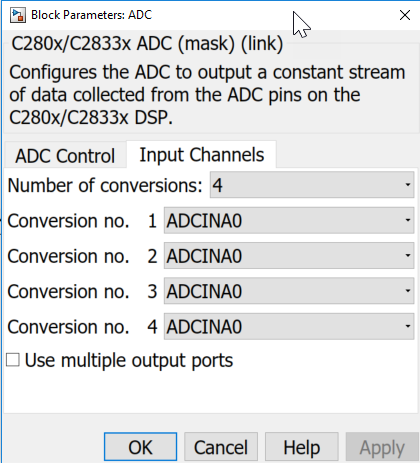
In this case, the output of all four conversions will be a vector signal with 4 elements.
In the following screenshot, you can see an example implementation for averaging the four samples captured by the ADC:

The " Sum of Elements " block sums the vector elements from the ADC block, and the gain of "1/4" rescales by the number of sampled elements to produce the mean value of the 4 samples.
The use of "4" elements is not strictly necessary, but does work out nicely as dividing by a power of two with integer datatypes results in a bit-shift in the generated C-code instead of a multiply or divide, which is generally a faster operation to perform. (Though I'm not one to promote premature optimization, but thought I would point this out as an option)

A great explanation for everyone who is using C2000. Thank you so much.
Can I use A and B and divide by 16 to have better noise mitigation?
Yes: You can use A & B
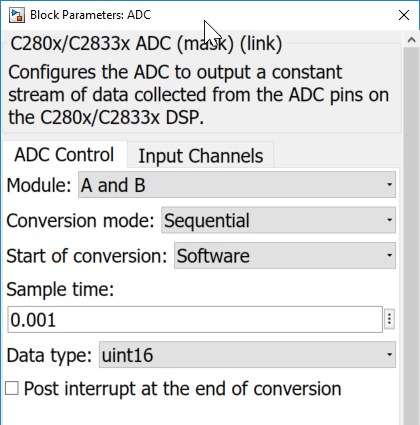

Enhanced Noise Mitigation: Maybe I cannot say if it will result in better noise mitigation. It's possible, but there are too many factors for me to guess. It depends on the spectral content of your noise and the algorithm you choose to apply on the resulting conversions for noise mitigation.
Thanks again for the detailed reply. I understand everything depends on the noise source as well. i am using hardware as well by using RC low pass filter and wanted to use in the digital domains (like oversampling ). The last question in my mind is let's say the sampling of ADC is 1 ms. therefore it samples every 1 ms and keeps the value in the ADC sequentially.
ADC 1ms - ADCA00
                             ADC 2ms - ADCA01      ...................
.
.
.
ADC 16ms - ADCA15.
Therefore, I need to do any optimization every 16 seconds like averaging. Does the sum of elements will update its value every 1 ms instead of 16ms? am I right? How you got uint16 output from the gain. When I did the same it came something else. As I am working with C2000 system. Any optimization technique needs to work within the time frame.
To choose the output datatype of a gain block, go to the "Signal Attributes" tab in the gain block dialog

There are lots of options for selecting the output datatype. You can explicitly choose a datatype like uint16 (unsigned 16-bit integer) or use some method of inheritance. In this example, the output datatype is selected to be the same as the input to the gain block.
I recommend reading more about datatyping in Simulink https://www.mathworks.com/help/simulink/ug/how-simulink-determines-parameter-data-type.html
If you look at the generated code, you will see that all 16 registers of the ADC are read each time step.
That means, sampling 16 times in the same 1ms time step.
In this case, the "step" function is running at a 1ms sample time. Note that it does the following:
- Prepare the ADC for measurement (i.e. clear registers)
- Trigger the start of the ADC conversion
- Wait for the ADC conversions to complete
- Gather the results of the conversions
- Operate on the gathered results
/* Model step function - 0.001 second sample time*/
void oversamplingAdc_step(void)
{
uint16_T tmp;
int16_T i;
/* S-Function (c280xadc): '<Root>/ADC' */
{
  /*{1} - Get ready for new conversion*/
  AdcRegs.ADCTRL2.bit.RST_SEQ1 = 1;  /* Reset SEQ1 module*/
  AdcRegs.ADCST.bit.INT_SEQ1_CLR = 1;/*clear INT sequencer*/
  /*{2} - Trigger conversion start*/
  AdcRegs.ADCTRL2.bit.SOC_SEQ1 = 1;  /* Software Trigger*/
  /*{3} - Wait for conversion completion*/
  while (AdcRegs.ADCST.bit.INT_SEQ1 == 0) {
  }                                  /*Wait for Sequencer INT bit to clear */
    asm(" RPT #11 || NOP");
    /*{4} - Read registers*/
    oversamplingAdc_B.ADC[0] = (AdcRegs.ADCRESULT0) >> 4;
    oversamplingAdc_B.ADC[1] = (AdcRegs.ADCRESULT1) >> 4;
    oversamplingAdc_B.ADC[2] = (AdcRegs.ADCRESULT2) >> 4;
    oversamplingAdc_B.ADC[3] = (AdcRegs.ADCRESULT3) >> 4;
    oversamplingAdc_B.ADC[4] = (AdcRegs.ADCRESULT4) >> 4;
    oversamplingAdc_B.ADC[5] = (AdcRegs.ADCRESULT5) >> 4;
    oversamplingAdc_B.ADC[6] = (AdcRegs.ADCRESULT6) >> 4;
    oversamplingAdc_B.ADC[7] = (AdcRegs.ADCRESULT7) >> 4;
    oversamplingAdc_B.ADC[8] = (AdcRegs.ADCRESULT8) >> 4;
    oversamplingAdc_B.ADC[9] = (AdcRegs.ADCRESULT9) >> 4;
    oversamplingAdc_B.ADC[10] = (AdcRegs.ADCRESULT10) >> 4;
    oversamplingAdc_B.ADC[11] = (AdcRegs.ADCRESULT11) >> 4;
    oversamplingAdc_B.ADC[12] = (AdcRegs.ADCRESULT12) >> 4;
    oversamplingAdc_B.ADC[13] = (AdcRegs.ADCRESULT13) >> 4;
    oversamplingAdc_B.ADC[14] = (AdcRegs.ADCRESULT14) >> 4;
    oversamplingAdc_B.ADC[15] = (AdcRegs.ADCRESULT15) >> 4;
  }
  /*{5} - Operate on conversion results*/
  /* Sum: '<Root>/Sum of Elements' */
  tmp = 0U;
  for (i = 0; i < 16; i++) {
    tmp += oversamplingAdc_B.ADC[i];
  }
/* Gain: '<Root>/Gain' incorporates: * Sum: '<Root>/Sum of Elements' */ averagedValue = (uint16_T)(((uint32_T)oversamplingAdc_P.Gain_Gain * tmp) >> 19U); }
Thanks for your help. The oversampling is working perfectly and also reduces noise a lot.
Tags

