How to add time dalay to duty cycle calculated from matlabfuction block in simulink

Hi,
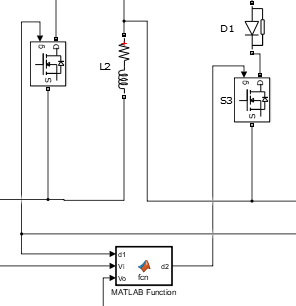
I am using matlab fuction block to calculate duty ratio for a MOSFET . How do I incorporate time delay in the calculated duty cycle. Duty cycle of S3 should be delayed by d1 in the picture.Kindly help
5 Comments
Time Descending
From MATLAB function, you will get constant value. You compare the d2 and sawtoothwave or triangular wave (use Repeating sequence) to get gate pulses

I had a question from my observation from picture:
- How do you connected 2 input signals together? I am talking about g and d1 both are input signals.
- If you want to use the Matlab function to generate delay b/w d1 signal and d2 signal u can do it by using the loop in function taking time period and delay u want to generate.

Assuming d1 as a PWM gate drive signal, you can directly connect d1 to a Variable Time/Transport delay unit first input, selecting Variable Time Delay from the drop down menu. You then connect the constant source block with value for time delay entered to the second input of the above time delay unit. The output of this time delay unit is d2 which is given to the gate of S3. Embedded MATLAB Function may NOT be necessary in this case.

Generate pwm pulses using pwm block, use delay block which is available in Simulink library, put the value of delay in the delay block. Or in pwm pulse generator, you’re given a parameter called delay. Use that.

As per your model,
direct duty cycle can not be given into the Mosfet.
Mosfet need PWM pulses
Sign in to participate

