multiCameraParameters
Description
The multiCameraParameters object stores the intrinsic and
extrinsic parameters of a multi-camera system estimated during multi-camera
calibration.
Creation
Create a multiCameraParameters object using the
estimateMultiCameraParameters function.
Properties
Extrinsic Parameters
This property is read-only.
Pose of each camera relative to the origin camera
ReferenceCameraIndex, specified as a
numCameras-element vector of rigidtform3d objects. numCameras
represents the number of cameras.
This property is read-only.
Index of the origin camera, specified as an integer. This camera
defines the reference coordinate system, and all other camera poses are
defined relative to this reference camera. The pose of the reference
camera is represented as rigidtform3d(eye(4)).
Number of cameras in the system, specified as an integer.
Intrinsic Parameters
This property is read-only.
Intrinsic parameters for all cameras in the multi-camera system,
specified as a numCameras-element cell array
containing cameraIntrinsics objects,
fisheyeIntrinsics objects, or a combination of both.
numCameras is the number of cameras.
Accuracy of Estimated Parameters
This property is read-only.
Average Euclidean distance between reprojected points and detected points over all image pairs, specified as a scalar in pixels.
Data Types: double
This property is read-only.
Average reprojection error for each camera, specified a numCameras-element vector. numCameras is the number of cameras.
This property is read-only.
Average reprojection error of each image in pixels, specified as an numViews-by-numCameras vector.
This property is read-only.
Average reprojection error of each view in pixels, specified as an numViews-by-1 vector
This property is read-only.
World points reprojected onto calibration images, specified as a numKeyPoints-by-2-by-numViews-by-numCameras-by-patternCount matrix.
Settings Used to Estimate Multi-Camera Parameters
This property is read-only.
Number of unique calibration patterns captured in the calibration images, specified as a scalar.
This property is read-only.
Poses of calibration patterns relative to the reference pattern,
specified as a P-element vector of rigidtform3d objects, where P
represents the number of calibration patterns. The reference pattern is
the first element of the PatternPoses vector, stored
as PatternPoses(1). Subsequent elements represent the
poses of other patterns relative to this reference pattern. The
reference pattern's pose is given by
rigidtform3d(eye(4)).
This property is read-only.
Number of pattern views to estimate camera poses, specified as an integer.
This property is read-only.
Covisibility of cameras based on the calibration images, specified as a numCameras-by-numCameras logical matrix. numCameras is the number of cameras.
This property is read-only.
World coordinates of pattern keypoints in the calibration pattern, specified as a numKeyPoints-by-2 matrix. numKeyPoints is the number of keypoints in the pattern.
This property is read-only.
Units of world points, specified as a character vector or string scalar. This value describes the unit of measure.
Examples
Estimate the relative position and orientation of six cameras with overlapping fields of view by using calibration images that contain a single ChArUco board.
Download the calibration images.
calibImagesURL = "https://www.mathworks.com/supportfiles/vision/data/overlapping-cameras-charuco.zip"; calibImagesDir = fullfile(pwd,"overlapping-cameras-charuco"); calibImagesZip = fullfile(pwd,"overlapping-cameras-charuco.zip"); if ~exist(calibImagesZip,"file") disp("Downloading calibration images (52 MB)...") websave(calibImagesZip,calibImagesURL); end
Downloading calibration images (52 MB)...
if ~exist(calibImagesDir,"dir") unzip(calibImagesZip,pwd) end
Specify calibration image filenames for each camera.
numCameras = 6; camDirPrefix = "Cam00"; imageFiles = cell(1,numCameras); for i = 1:numCameras camDir = fullfile(calibImagesDir,camDirPrefix+i); imds = imageDatastore(camDir); imageFiles{i} = imds.Files; end imageFiles = [imageFiles{:}];
Define the ChArUco board properties. Specify checker size and marker size in centimeters.
markerFamily = "DICT_6X6_1000"; patternDims = [5 5]; markerSize = 6.8; % in cm checkerSize = 9.15; % in cm numKeyPoints = prod(patternDims - 1); minMarkerId = 144;
Detect the key points of the ChArUco board in the calibration images.
imagePoints = detectPatternPoints(imageFiles,"charuco-board",patternDims, ... markerFamily,checkerSize,markerSize,MinMarkerID=minMarkerId);
[==================================================] 100% Elapsed time: 00:00:09 Estimated time remaining: 00:00:00
Generate the world points for the pattern.
worldPoints = patternWorldPoints("charuco-board",patternDims,checkerSize);Load the intrinsic parameters of the six cameras. These parameters have been estimated using the Using the Single Camera Calibrator App.
ld = load("sixCameraIntrinsics.mat");Perform multi-camera calibration.
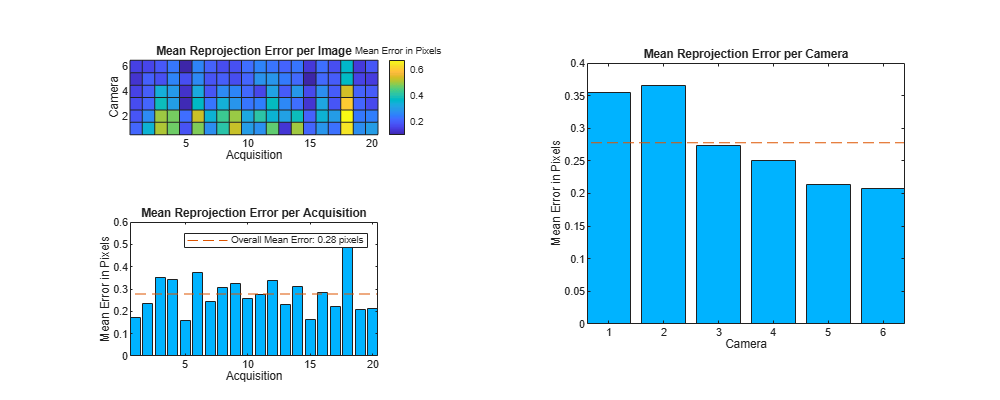
params = estimateMultiCameraParameters(imagePoints,worldPoints,ld.intrinsics,WorldUnits="cm");Visualize the calibration accuracy.
figure(Position=[100,100,1000,400]) showReprojectionErrors(params)
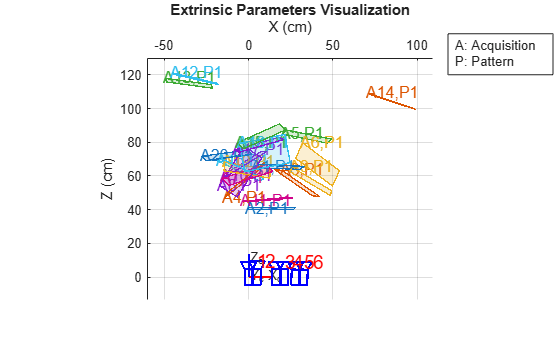
Visualize the camera extrinsic parameters.
figure showExtrinsics(params) view(2)
Version History
Introduced in R2025aAdded the PatternCount, PatternPoses
MeanReprojectionErrorPerView,
MeanReprojectionErrorPerImage, and
ReprojectedPoints properties to support multiple calibration
patterns.
The MeanReprojectionError property is computed as the mean of
MeanReprojectionErrorPerImage over all images, omitting
NaN values.
See Also
Apps
Objects
Functions
MATLAB Command
You clicked a link that corresponds to this MATLAB command:
Run the command by entering it in the MATLAB Command Window. Web browsers do not support MATLAB commands.
Select a Web Site
Choose a web site to get translated content where available and see local events and offers. Based on your location, we recommend that you select: .
You can also select a web site from the following list
How to Get Best Site Performance
Select the China site (in Chinese or English) for best site performance. Other MathWorks country sites are not optimized for visits from your location.
Americas
- América Latina (Español)
- Canada (English)
- United States (English)
Europe
- Belgium (English)
- Denmark (English)
- Deutschland (Deutsch)
- España (Español)
- Finland (English)
- France (Français)
- Ireland (English)
- Italia (Italiano)
- Luxembourg (English)
- Netherlands (English)
- Norway (English)
- Österreich (Deutsch)
- Portugal (English)
- Sweden (English)
- Switzerland
- United Kingdom (English)