Setting Up Communication Between ArduPilot Hardware and Ground Control Station
R2026bReliable communication between the Ground Control Station (GCS) and the flight controller is essential for mission execution, monitoring, control, safety, and data analysis. This link forms a critical component in any unmanned vehicle system. This topic explains two primary options for connecting your flight controller hardware to the GCS: USB and telemetry radio.
Communication Methods
The following image shows the different ways you can connect to the GCS.
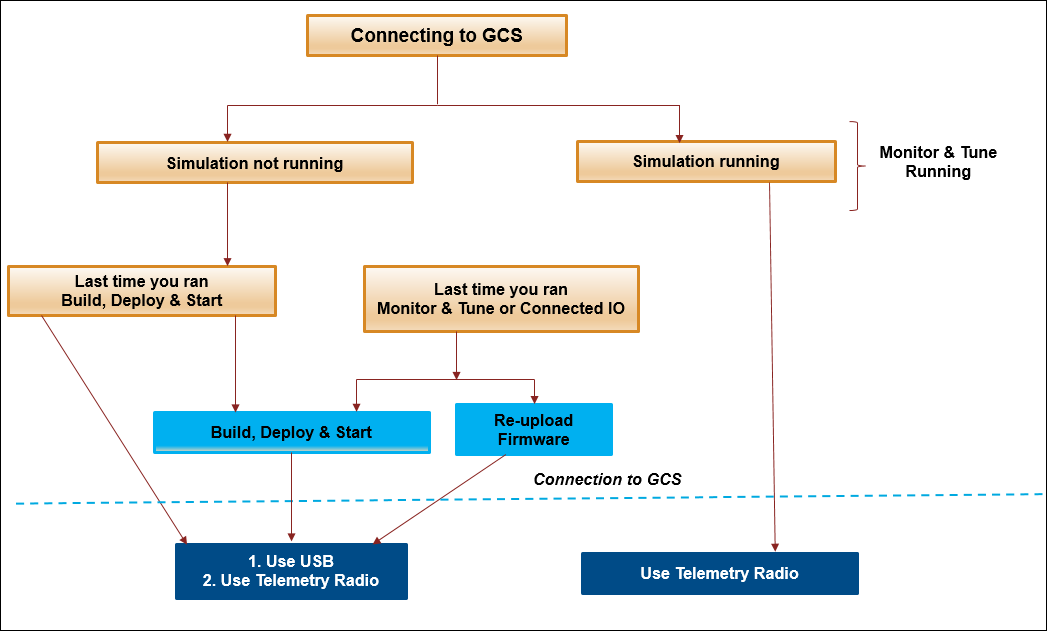
Choose between a USB connection and a telemetry radio connection to connect your flight controller with the GCS.
USB Connection
You connect the flight controller directly to the host computer using a USB cable. This method provides a stable and high-speed communication channel, ideal for configuration and direct data transfer. This method is ideal for configuration, firmware updates, and direct data transfer.
Plug one end of the USB cable into your flight controller and the other into your computer.
Open your GCS software. For example, Mission Planner.
In the GCS, select the COM port associated with your flight controller and click Connect.
When using Monitor & Tune action or Connected IO mode, Simulink® occupies the USB port for communication with the flight controller. During or after these operations, the GCS cannot connect via USB until the USB protocol is reset.
To restore USB connectivity to the GCS:
Option 1: Run Build, Deploy & Start from Simulink
Deploy your model using the Build, Deploy & Start option in Simulink. This action resets the USB protocol to MAVLink, allowing GCS communication.
Option 2: Re-upload ArduPilot® Firmware from GCS
Upload the ArduPilot firmware again using the GCS (for example, Mission Planner). This process resets the USB port protocol to MAVLink, enabling USB connectivity. Refer to the ArduPilot documentation for detailed steps. Use your GCS to re-upload the ArduPilot firmware. This also resets the USB protocol to MAVLink. For more information, see Loading Firmware - Copter documentation.
Telemetry Radio Connection
Use telemetry radios for wireless communication between the GCS and the flight controller, ideal for in-field operations.
Connect the ground telemetry module to your computer via USB.
Connect the air telemetry module to the
TELEM1orTELEM2port on the flight controller.Connect the Rx pin of the
TELEMport to the Tx pin of the air module, and the Tx pin of theTELEMport to the Rx pin of the air module.Open your GCS software.
In the GCS, select the correct COM port for the ground telemetry module.
Set the baud rate according to your flight controller’s configuration
SERIAL1_BAUDorSERIAL2_BAUDparameters in the GCS).Click Connect in your GCS software.

