sltest.testsequence.useScenario
R2026bConvert Test Sequence block to scenario mode
Description
sltest.testsequence.useScenario(
converts the Test Sequence block, specified by blockPath,scenarioName)blockPath, to use
scenarios. Scenarios are tabs in the Test Sequence editor that enable you to define and run
separate test sequences in a single Test Sequence block. After conversion,
all existing steps in the block are moved to a scenario
tab named scenarioName. If you convert a Test Sequence block to use
scenarios, you cannot revert the block to non-scenario mode, even if it contains only one
scenario.
Examples
Change the Test Sequence block in the
sltestRollRefTestModel to use scenarios.
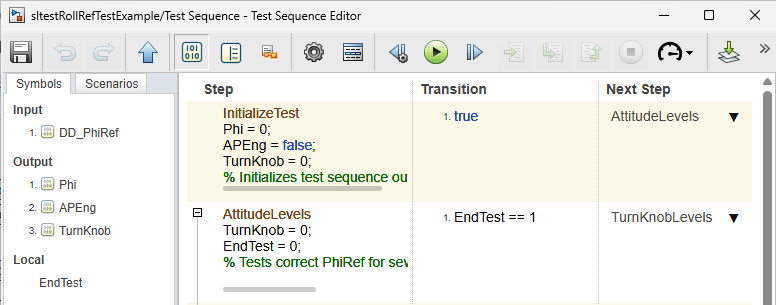
Open the model. Double-click the Test Sequence block to view it before you change it to use scenarios.
openExample('sltestRollRefTestExample');
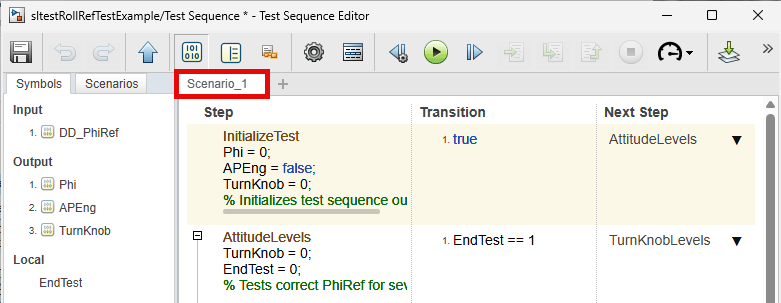
Change the Test Sequence block to use scenarios and name the first scenario
Scenario_1.
sltest.testsequence.useScenario...
   ('sltestRollRefTestExample/Test Sequence',...
   'Scenario_1');
Close the model without saving it.
close_system(Model,0)
Input Arguments
Version History
Introduced in R2020b

