Import File Log Data as Parquet Format Files Using MATLAB or Third-Party Tools
R2026bThis example shows how to import Simulink® Real-Time™ file log data as Parquet format files by using MATLAB® or third-party tools. After importing to the development computer, the example also shows how to use the MATLAB parquetread function to view the signal log data.
This approach is useful for direct access to the logged Parquet format file logs when Simulink Real-Time is not available on the computer that downloads the file logs.
Note: Test engineers with access to Simulink Real-Time can instead consider using the workflow in Import File Log Data as Parquet Format Files Using Simulink Real-Time. For an overview of ways to import file log data, see Import File Log Data from Speedgoat Target Computer.
Generate File Logs for Import
Create a Target object for the default target computer and connect to the target computer. In the MATLAB Command Window, type:
tg = slrealtime;
connect(tg);
Open the model slrt_ex_osc. Configure the model for the connected target computer.
model = 'slrt_ex_osc';
open_system(model);
modelSTF = getSTFName(tg);
set_param(model,'SystemTargetFile',modelSTF);
Build the model.
evalc('slbuild(model)');Close the model.
bdclose(model);
Using the Target object tg, load and start the real-time application for multiple runs with different values for the Transfer Fcn block C parameter. Set the maximum number of logs to be retained and suppress automatic import of the generated file logs.
load(tg,model);
start(tg,AutoImportFileLog=false,FileLogMaxRuns=4);
while ~strcmp(tg.status,'stopped')
    pause(0.1);
end
load(tg,model);
setparam(tg,'slrt_ex_osc/Transfer Fcn','C',-100);
start(tg,AutoImportFileLog=false,FileLogMaxRuns=4);
while ~strcmp(tg.status,'stopped')
    pause(0.1);
end
load(tg,model);
setparam(tg,'slrt_ex_osc/Transfer Fcn','C',-50);
start(tg,AutoImportFileLog=false,FileLogMaxRuns=4);
while ~strcmp(tg.status,'stopped')
    pause(0.1);
end
Copy Parquet Log Files from Target Computer to Local Folders
If Simulink Real-Time is unavailable, you can copy the logged Parquet files from the target computer by using MATLAB functions or third-party tools, such as the PuTTY pscp utility or FileZilla®.
To access the logged data, connect to the SFTP (SSH File Transfer Protocol) server on the target computer by using port 22, the default user name slrt, and the default password slrt. In the file system on the target computer, file log data is stored in application-specific folders, which contain subfolders for each file log run. For example:
/home/slrt/applications /<model>/logdata/run_<X>
This example Windows system command shows how to use the PuTTY pscp utility to copy the content of the applications folder from a target computer with IP address 192.168.7.5 at port 22 to the local directory C:\work\my_logdata\.
"C:\Program Files\PuTTY\pscp.exe" -v -P 22 -pw slrt -r slrt@192.168.7.5:applications C:\work\my_logdata\
For this example, you can use the MATLAB sftp and mget functions to copy the Parquet format log files from the target computer to the development computer. In the MATLAB Command Window, type:
baseDir = "C:\work\my_logdata\";
s = sftp('192.168.7.5','slrt',Password='slrt',StartingFolder='/home/slrt/applications/slrt_ex_osc/logdata');
mget(s,'*',baseDir);
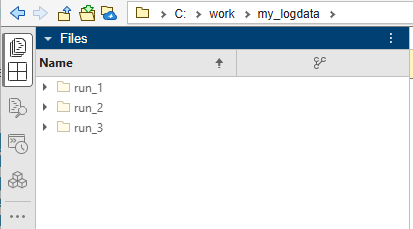
The run_<X> folders are copied to the specified local destination folder.
Read Parquet Format Log Files in MATLAB
To read the file logs from the three runs in Parquet format, in the MATLAB Command Window, type:
dataRun1 = parquetread(fullfile(baseDir,"run_1","FL_001.parquet"));
dataRun2 = parquetread(fullfile(baseDir,"run_2","FL_001.parquet"));
dataRun3 = parquetread(fullfile(baseDir,"run_3","FL_001.parquet"));
Save the imported data runs into a single MAT file.
save('filelog.mat','dataRun1','dataRun2','dataRun3');
See Also
import | openImportDialog | parquetread | start
Topics
- Direct File Log Import into the Simulation Data Inspector by Using Simulink Real-Time
- Import File Log Data as Parquet Format Files by Using Simulink Real-Time
- Import File Log Data Manually into the Simulation Data Inspector by Using Simulink Real-Time
- Import File Log Data from Speedgoat Target Computer

