Share Simulink Cache File for Faster Analysis
R2026bYou can share the Simulink® cache file for faster Simulink Design Verifier™ analysis. When you analyze a model, Simulink Design Verifier performs a compatibility check and creates a Simulink cache file that contains the model representation information and the analysis results. If there is no change in the model, Simulink Design Verifier reuses the model representation and the analysis results from the Simulink cache file without performing the compatibility check again. For more information, see Share Simulink Cache Files for Faster Simulation and Reuse Model Representation for Analysis.
Store the Simulink Cache File
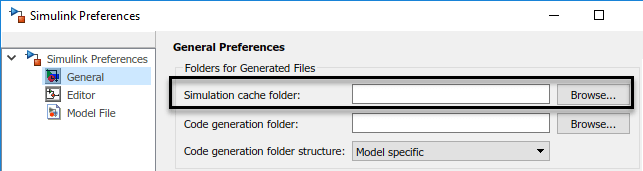
The Simulink cache file is stored in the location specified in the Simulink Settings > General Settings dialog box, under Simulation cache folder. By default, the Simulink cache file is stored in the current working directory. Simulink Design Verifier organizes files within the Simulink cache folder to reduce the possibility of encountering errors due to path length limitations (since R2024b).
The file name of the Simulink cache is the same as the file name of the model with an
.slxc file extension.
Reuse the Simulink Cache File
You can reuse the Simulink cache file to speed up the Simulink
Design Verifier analysis for later use by yourself or others. When you perform
Simulink
Design Verifier analysis, the software determines whether to rebuild the model
representation based on the Rebuild model representation option. By
default, this option is set to If change is detected and
if there is no change in the model, the software reuses the model representation
from the Simulink cache file for analysis.
If Rebuild model representation is set to
Always or if the software detects any change in the
model during analysis, the software rebuilds the model representation and updates
the Simulink cache file.
Note
The Simulink cache file accumulates model representation build artifacts for the release in which it was created and is platform dependent. This cache file does not support cross-release compatibility.
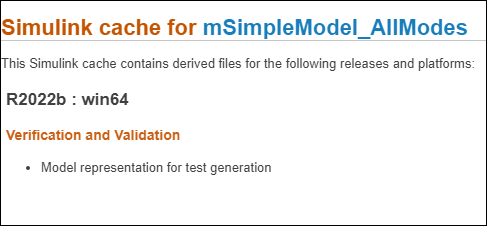
For information on what a specific Simulink cache contains, double-click the Simulink cache file. The report contains information of supported releases, platforms, and model representation.
For example, suppose a team is working on large models and uses a source control system to manage design files. To reduce the amount of time for Simulink Design Verifier analysis, the team follows these steps:
A developer pulls the latest version of the Simulink model from the source control system.
Performs Simulink Design Verifier test case generation analysis and shares the latest version of Simulink the test cases to the source control system and the cache files to the build archive.
Test engineer pulls all the
slxcfiles for faster analysis.Performs test case extension on the same model by using the existing test cases. If no changes are detected in the model, the model representation and analysis results from the Simulink cache file is reused for analysis. For a detailed example, see Extend Existing Test Cases by Reusing Model Representation and Resume an Incomplete Analysis.
If the test engineer, changes the model or Simulink Design Verifier options that affects the compatibility results, the model representation is rebuilt and the Simulink cache file is updated. For more information on Simulink Design Verifier options that leverage the reuse of model representation, see Simulink Design Verifier Options.
Model Reference Hierarchy
If the model includes a model reference hierarchy, one or more
slxc files are generated. Consider the example, Analyze Test Harness with Schedule for Initialize, Reset, Reinitialize, and Terminate Functions. In this case the
compatibility check on the sldvExportFcnIRTScheduler model
generates cache files for both, sldvExportFcnIRTScheduler and
sldvExportFcnIRT models.

For faster analysis, you must share all the slxc files with the
test engineer.

