Interface (AB-Rotational)
R2026bInterface (AB-Rotational) block

To add a block to a model, double-click the canvas and start typing the block name. Then, select the block from the list.
Libraries:
Simscape /
Foundation Library /
Rotational /
Utilities
Description
The Interface (AB-Rotational) block represents a rigid connection between an angle-based and a non-angle-based mechanical rotational network. Port angular velocities are equal. Torques at the interface are equal and opposite.
The Angle-based port parameter value determines the block orientation. Align the block positive direction with the positive direction of the connected angle-based network.
The block logs the variable t:
If Angle-based port is
Bab,trepresents the torque of the angle-based rotational network at port Bab acting on the non-angle-based rotational network at port F.If Angle-based port is
Fab,trepresents the torque of the non-angle-based rotational network at port B acting on the angle-based rotational network at port Fab.
For more information, see Data Logging.
Examples
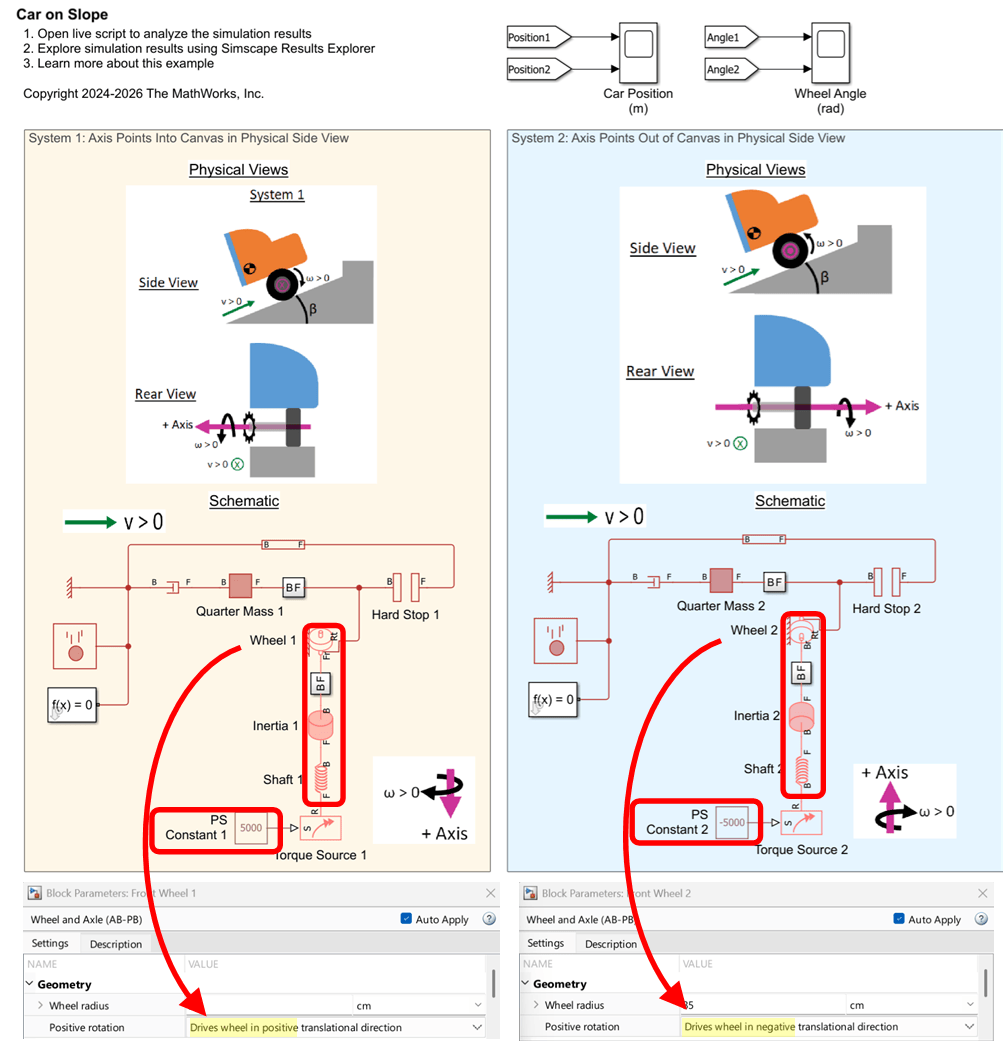
Interfacing Angle-Based Rotational and Position-Based Translational Networks
Demonstrates how you can define positive directions for translation and rotation in your physical view and adjust the Simscape™ network to achieve the desired behavior. It highlights the flexibility of Simscape in mapping physical directions to schematic representations.
Ports
Conserving
Parameters
Extended Capabilities
Version History
Introduced in R2026a

