show
Description
show( shows layerobj)layer
information in visual form.
show(
shows layerobj,Name=Value)layer information with optional name-values specified.
Examples
Use the show function to diplay a layer of a pcb
Read-in a pcb file
Use the pcbFileRead object to read in a file. Accepted file formats are:
ODB++
Allegro
Native
Here we are using a native format file
pfile = pcbFileRead('native_ExampleBoard_Allegro')pfile =
pcbFileRead with properties:
FileName: 'native_ExampleBoard_Allegro'
NumLayers: 5
MetalLayer: [1 3 5]
DielectricLayer: [2 4]
LayerHeight: [0.0184 0.0104 0.0092 0.0012 0]
NumCadnets: 7
NumPadStacks: 6
NumComponents: 8
NumParts: 5
Create a layer object
Crate a layer object of metal layer 1
layerobj = layer(pfile,1)
layerobj =
layer with properties:
pcBoard: [1×1 pcbFileRead]
LayerNumber: 1
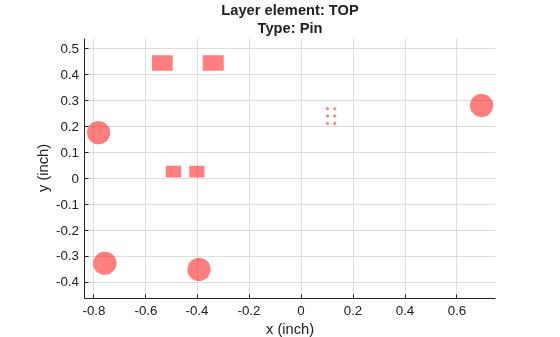
Type: 'Pin'
LayerHeight: 0.0184
NumSurfaces: 1
NumPins: 14
NumVias: 4
NumTraces: 21
EntityList: [1×1 struct]
Show the layer
Use the show function
show(layerobj)

Input Arguments
The layer object specified as a string.
Example: show(layerobjname)
Data Types: string
Name-Value Arguments
Specify optional pairs of arguments as
Name1=Value1,...,NameN=ValueN, where Name is
the argument name and Value is the corresponding value.
Name-value arguments must appear after other arguments, but the order of the
pairs does not matter.
Example: show(layerobjname,Color='red',LineWidth=1)
Use 'Color' to specify the color.
Example: Color='red'
Data Types: string
Use LineWidth to specify the line width.
Example: LineWidth = 1
Data Types: double
Use LineStyle to specify the line style.
Example: LineStyle = '-'
Data Types: char
Version History
Introduced in R2021a
MATLAB Command
You clicked a link that corresponds to this MATLAB command:
Run the command by entering it in the MATLAB Command Window. Web browsers do not support MATLAB commands.
Select a Web Site
Choose a web site to get translated content where available and see local events and offers. Based on your location, we recommend that you select: .
You can also select a web site from the following list
How to Get Best Site Performance
Select the China site (in Chinese or English) for best site performance. Other MathWorks country sites are not optimized for visits from your location.
Americas
- América Latina (Español)
- Canada (English)
- United States (English)
Europe
- Belgium (English)
- Denmark (English)
- Deutschland (Deutsch)
- España (Español)
- Finland (English)
- France (Français)
- Ireland (English)
- Italia (Italiano)
- Luxembourg (English)
- Netherlands (English)
- Norway (English)
- Österreich (Deutsch)
- Portugal (English)
- Sweden (English)
- Switzerland
- United Kingdom (English)