modulator
Modulator object
Description
Creation
Properties
Name of modulator, specified as the comma-separated pair consisting of
'Name' and a character vector. All names must be
valid MATLAB® variable names.
Example: Name='mod'
Since R2024b
Conversion type, specified as either:
'mod'— Modulator'demod'— Demodulator
Example: Model='demod'
Since R2026a
Sideband of a modulator, specified as either:
'upper'— This is the default value whenModelis set to'demod'and denotes that the RF carrier frequency is higher than local oscillator frequency.'lower'— This is the default value whenModelis set to'mod'and denotes that the RF carrier frequency is lower than local oscillator frequency.
This table summarizes the modulator operations when
Sideband is set.
| Input/Output | Model | Sideband | Operation |
|---|---|---|---|
| RF/IF | 'demod' | 'lower' | IF = LO - RF |
'upper' | IF = RF - LO | ||
| IF/RF | 'mod' | 'lower' | RF = LO - IF |
'upper' | RF = LO + IF |
Example: Sideband='upper'
Available power gain, specified as a nonnegative scalar in dB.
Example: Gain=10
Noise figure, specified as a real finite nonnegative scalar in dB.
Example: NF=10
Since R2026a
Second-order input-referred intercept point, specified as a real positive number in dBm.
Example: IIP2=8
Since R2026a
Third-order input-referred intercept point, specified as a real positive number in dBm.
Example: IIP3=10
Since R2026a
Input 1 dB compression point, specified as a real positive number in dBm.
Example: IP1dB=20
Since R2026a
Input saturation point, specified as a positive real number in dBm.
Example: IPsat=20
Local oscillator frequency, specified as a real finite positive scalar in Hz.
Example: LO=2e9
Name of the two-port Touchstone file that contains modulator data, specified as a string scalar or character vector.
Example: FileName='default.s2p'
Since R2026a
Modulator system data, specified as an rfSystemParameters object.
Example: SystemData=rfSystemParameters('Mod_model.csv')
Ideal image reject filtering at the input of the modulator, specified as a
numeric or logical 1 (true) or 0 (false). Setting this
property to false or 0 might affect harmonic balance
results.
Example: ImageReject=1
Example: ImageReject=true
Ideal channel select filtering at the output of the modulator, specified
as a numeric or logical 1 (true) or 0 (false). Setting
this property to false or 0 might affect harmonic balance
results.
Example: ChannelSelect=1
Example: ChannelSelect=false
Input impedance, specified as a positive real part finite scalar in ohms. You can also use a complex value with a positive real part.
Example: Zin=40
Output impedance, specified as a scalar in ohms. You can also use a complex value with a positive real part.
Example: Zout=40
Number of ports, specified as a scalar integer. This property is read-only.
Names of port terminals, specified as a cell vector. This property is read-only.
Object Functions
clone | Create copy of existing circuit element or circuit object |
Examples
Create a downconverter modulator with a local oscillator (LO) frequency of 100 MHz.
m = modulator(Model='demod',LO=100e6)m =
modulator: Modulator element
Name: 'Modulator'
Model: 'demod'
LO: 100000000
Gain: 0
Zin: 50
Zout: 50
NF: 0
IIP2: Inf
IIP3: Inf
IP1dB: Inf
IPsat: Inf
OPsat: Inf
ImageReject: 1
ChannelSelect: 1
Create a modulator object with a gain of 4 dB and local oscillator (LO) frequency of 2 GHz. Create another modulator object has an output third-order intercept (OIP3) of 13 dBm.
mod1 = modulator(Gain=4,LO=2e9); mod2 = modulator(OIP3=13);
Build a two-port circuit using the modulators.
c = circuit([mod1 mod2])
c =
circuit: Circuit element
ElementNames: {'Modulator' 'Modulator_1'}
Elements: [1×2 modulator]
Nodes: [0 1 2 3]
Name: 'unnamed'
Create an amplifier with a gain of 4 dB.
a = amplifier(Gain=4);
Create a modulator with an OIP3 of 13 dBm.
m = modulator(OIP3=13);
Create an N-port element using passive.s2p.
n = nport('passive.s2p');Create an RF element with a gain of 10 dB.
r = rfelement(Gain=10);
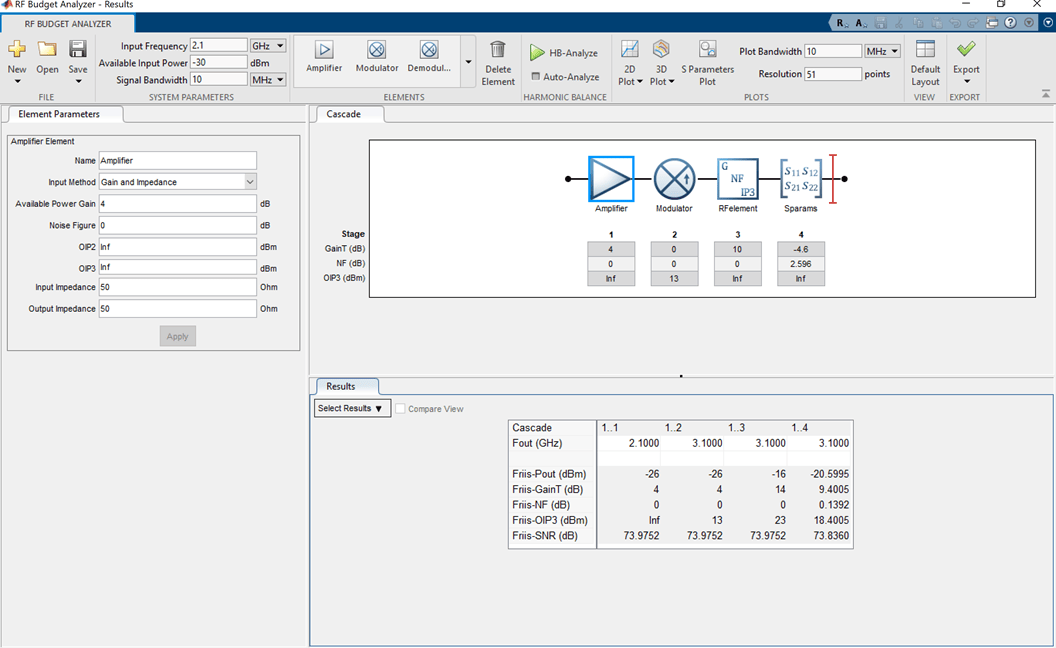
Calculate the RF budget of a series of RF elements at an input frequency of 2.1 GHz, an available input power of –30 dBm, and a bandwidth of 10 MHz.
b = rfbudget([a m r n],2.1e9,-30,10e6)
b =
rfbudget with properties:
Elements: [1x4 rf.internal.rfbudget.Element]
InputFrequency: 2.1 GHz
AvailableInputPower: -30 dBm
SignalBandwidth: 10 MHz
Solver: Friis
AutoUpdate: true
Analysis Results
OutputFrequency: (GHz) [ 2.1 3.1 3.1 3.1]
OutputPower: (dBm) [ -26 -26 -16 -20.6]
TransducerGain: (dB) [ 4 4 14 9.4]
NF: (dB) [ 0 0 0 0.1391]
IIP3: (dBm) [ Inf 9 9 9]
OIP3: (dBm) [ Inf 13 23 18.4]
SNR: (dB) [73.98 73.98 73.98 73.84]
Type the show command at the command window to display the analysis in the RF Budget Analyzer app.
show(b)
Version History
Introduced in R2017aYou can now specify IIP2, IIP3, IP1dB, and IPsat to model an
modulator object.
Use the new Sideband property to model modulator
sidebands.
Use the new SystemData property to model a
modulator object.
Starting in R2026a, the OIP2 and OIP3
properties are replaced with the new IIP2 and
IIP3 properties. Use the new properties to specify input
second and third order nonlinearities.
When executing code with the modulator object from earlier
releases with OIP2 or OIP3, the software
will replace these with IIP2 and IIP3
properties, respectively
Use the new Model property in the
modulator object to specify the type of conversion as
modulation or demodulation.
The ConverterType property of the modulator
object will be removed in a future release. Use the new Model
property instead.
When executing code with the modulator object that use the
ConverterType property, the software will replace this
property with the new Model property.
modulator is recommend over rfckt.mixer.
rfdata.ip3, rfdata.power, and
rfdata.nf because it enables you to:
Create a two-port modulator element.
Specify third-order intercept points.
Specify the noise figure value.
Build a
circuitobject with a modulator element.Model a modulator in an RF chain created using an
rfbudgetobject or the RF Budget Analyzer app.Export the modulator element to RF Blockset™ or to
rfsystemfor circuit envelope or idealized baseband analysis.
MATLAB Command
You clicked a link that corresponds to this MATLAB command:
Run the command by entering it in the MATLAB Command Window. Web browsers do not support MATLAB commands.
Select a Web Site
Choose a web site to get translated content where available and see local events and offers. Based on your location, we recommend that you select: .
You can also select a web site from the following list
How to Get Best Site Performance
Select the China site (in Chinese or English) for best site performance. Other MathWorks country sites are not optimized for visits from your location.
Americas
- América Latina (Español)
- Canada (English)
- United States (English)
Europe
- Belgium (English)
- Denmark (English)
- Deutschland (Deutsch)
- España (Español)
- Finland (English)
- France (Français)
- Ireland (English)
- Italia (Italiano)
- Luxembourg (English)
- Netherlands (English)
- Norway (English)
- Österreich (Deutsch)
- Portugal (English)
- Sweden (English)
- Switzerland
- United Kingdom (English)