matlab.buildtool.tasks.PackageTask Class
R2026bNamespace: matlab.buildtool.tasks
Superclasses: matlab.buildtool.Task
Description
The matlab.buildtool.tasks.PackageTask class provides a built-in task for building a package
(.mltbx file) from a TOML project. A task created from the
PackageTask class automatically uses the configuration in the matlab.toml project
definition file. For more information about TOML projects, see MATLAB Projects TOML Format (.toml).
Tasks that you create with the PackageTask class support incremental
builds. For more information, see Up-to-Date Check.
Creation
Description
task = matlab.buildtool.tasks.PackageTask creates
a task for building a package from a TOML project that defines a single package.
task = matlab.buildtool.tasks.PackageTask(
creates a task for building the package with the specified name. Specifying
packageName)packageName is optional if the TOML file defines a single package.
If the TOML file defines multiple packages, you must specify the name of the package to
build.
task = matlab.buildtool.tasks.PackageTask(___,Name=Value)
sets the Description and Dependencies properties
using one or more name-value arguments in addition to any of the input argument
combinations in previous syntaxes. The class inherits these properties from the Task class. For
example, task =
matlab.buildtool.tasks.PackageTask("MyPackage",Dependencies=["pcode" "mex"])
creates a task that builds a package named "MyPackage" and that depends
on the "pcode" and "mex" tasks.
Input Arguments
Properties
Examples
Build a package from a TOML project by using the PackageTask class.
Open the example and then open the MyCalculator project.
proj = openProject("MyCalculator");The project contains source files in the src folder, test files in the tests folder, a build file, and a matlab.toml project definition file.
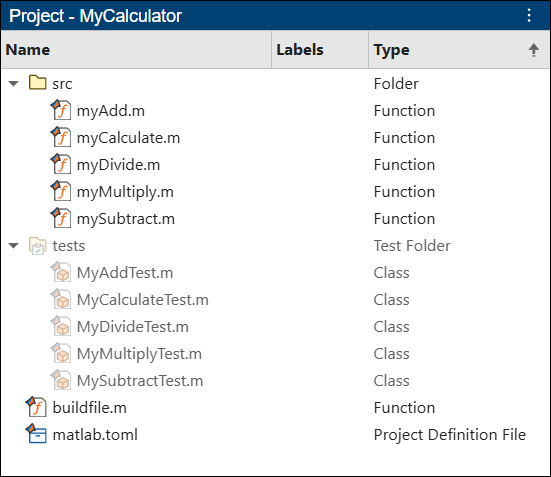
This code shows the contents of the matlab.toml project definition file. The TOML file defines a package named BasicCalculator in the MyCalculator project. The package root folder is a folder named derived, which contains P-code files that a PcodeTask instance generates from the source files in src.
name = "MyCalculator"

[folders]
path = [
    "src",
]
test = [
    "tests",
]

[[package]]
name = "BasicCalculator"
display-name = "Basic Calculator"
version = "1.0.0"
id = "8a570041-0b92-4b8c-bb0e-2bece78cc8af"
package-root = "derived"
This code shows the contents of the build file, which contains tasks created from built-in task classes in the matlab.buildtool.tasks namespace. The "package" task in the build file builds a package from the package configuration in the TOML file. Because the "package" task bundles the P-code files in the derived folder generated by the "pcode" task, it specifies the "pcode" task as a dependency.
function plan = buildfile
import matlab.buildtool.tasks.*

plan = buildplan(localfunctions);

plan("clean") = CleanTask;
plan("check") = CodeIssuesTask;
plan("test") = TestTask("tests",SourceFiles="src");
plan("pcode") = PcodeTask("src","derived");
plan("package") = PackageTask(Dependencies="pcode");

plan.DefaultTasks = ["check" "test" "package"];
end
Run the default tasks in the build file. The build tool runs the "check", "test", "pcode", and "package" tasks. Using the properties in the [[package]] table of the TOML file, the "package" task builds a package (.mltbx file) and stores it in the project.
buildtool
** Starting check

Analysis Summary:
    Total Files: 11
         Errors: 0 (Threshold: 0)
       Warnings: 0 (Threshold: Inf)
           Info: 0 (Threshold: Inf)
** Finished check

** Starting test
.......... .......... ....

Test Summary:
    Total Tests: 24
         Passed: 24
         Failed: 0
     Incomplete: 0
       Duration: 0.18841 seconds testing time.

** Finished test

** Starting pcode
** Finished pcode

** Starting package
Created package 'C:\work\ExampleManager\user.26b_053026\matlab-ex31513240\MyCalculator\BasicCalculator.mltbx'
** Finished package

Build Successful:
    4 Tasks: 0 Failed, 0 Skipped
    11.943 sec total build time
Create tasks for building multiple packages from a TOML project by
using instances of the PackageTask class.
Suppose your project has a TOML file that defines multiple packages.
name = "ECG Monitor"

[folders]
path = [
    "app",
    "utilities",
]
test = [
    "tests",
]

[dependencies]
algorithms = {version = "7.*", id = "51e10b9d-0524-45d5-b0e6-31f24593bf3e"}

[[package]]
name = "ecgmonitor"
display-name = "ECG Monitor"
version = "1.2.3"
id = "45b304b4-51bd-4cd8-9002-1e20779719c4"
package-root = "app"

[[package]]
name = "ecgmonitor-dev"
display-name = "ECG Monitor (DEV)"
version = "1.2.3-dev"
id = "ffeb8a92-585d-44f6-ae8b-cd30a147f18a"
package-root = "app"

[[package]]
name = "bloodpressure"
display-name = "Blood Pressure"
version = "3.2.8"
id = "75d70c0e-a37b-4d42-9ed2-159067b9d22b"
package-root = "blood pressure"
In a build file in the project root folder, create tasks for building packages from the package configurations in the TOML file. Because the TOML file defines multiple packages, you must specify the name of the package to build during task creation.
function plan = buildfile
import matlab.buildtool.tasks.*

plan = buildplan(localfunctions);

plan("clean") = CleanTask;
plan("check") = CodeIssuesTask;
plan("test") = TestTask("tests",SourceFiles=["app" "utilities"]);
plan("pkgEcg") = PackageTask("ecgmonitor");
plan("pkgEcgDev") = PackageTask("ecgmonitor-dev");
plan("pkgBP") = PackageTask("bloodpressure");

plan.DefaultTasks = ["check" "test" "pkgEcg" "pkgBP"];
end
More About
Tips
You cannot overwrite or remove the action of a built-in task, but you can specify additional task actions. For example, append an action to the
Actionsproperty of a built-in task.plan("myTask").Actions(end+1) = @myAction;
Version History
Introduced in R2026b

