Surface
R2026bDescription
A Surface object displays a 3-D surface within a 3-D viewer.
Properties of the object control the appearance and behavior of the surface.
Creation
You can create a Surface object in these ways:
surfaceshow— Create aSurfaceobject from surface data (since R2026b). Thesurfaceshowfunction does not require you to specify a 3-D viewer.The
images.ui.graphics.Surfacefunction described here. This function requires you to specify a 3-D viewer.
Syntax
Description
s = images.ui.graphics.Surface(viewer) creates a
Surface object and sets the Parent
property as the specified 3-D viewer viewer. Use
s to query and modify properties of the Surface
object after you create the object.
s = images.ui.graphics.Surface(viewer,
also sets
properties
of the object using one or more name-value arguments.PropertyName=Value)
For example, images.ui.graphics.Surface(viewer,Alpha=0.5) creates a
Surface object with a transparency of 0.5.
Properties
Surface grayscale data displayed in the viewer, specified as a 3-D logical array
with nonsingleton dimensions or as a triangulation object containing 3-D points.
Object is visible in the 3-D scene, specified as
Since R2025a
Picking state of the surface, specified as one of the strings in the table. Use this
property to toggle whether the viewer displays point coordinates for the surface. This
option is useful when a viewer contains multiple child objects, and you want to view or
hide coordinates for certain volumes or surfaces. Toggle the visibility of the
information display tool from the viewer context menu, or by using the
DisplayInfo property of the Viewer
object.
| Value | Description |
|---|---|
"visible" | The viewer can pick the surface if it is visible in the scene, and cannot pick the surface if it is not visible. Control the
visibility of the surface by using the |
"on" | The viewer can pick the surface. |
"off" | The viewer cannot pick the surface. |
Transformation applied to the surface in the 3-D scene, specified as an affinetform3d, rigidtform3d,
simtform3d,
or transltform3d
object. Use the Transformationaffinetform3d object that
performs an identity transformation.
Transparency of the surface, specified as a numeric scalar in the range [0, 1].
Fully opaque surfaces render most quickly, and specifying a value other than
1.0 (the default) can increase rendering time.
Color of the surface, specified as one of these values.
RGB triplet, color name, short color name, or hexadecimal color code — Use the same color for all the vertices on the surface.
n-by-3 numeric matrix representing n RGB triplets — Use a different color for each vertex on the surface. Each row of the matrix defines one color. The number of rows must equal the number of vertices.
For a custom color, specify an RGB triplet or a hexadecimal color code.
An RGB triplet is a three-element row vector whose elements specify the intensities of the red, green, and blue components of the color. The intensities must be in the range
[0,1], for example,[0.4 0.6 0.7].A hexadecimal color code is a string scalar or character vector that starts with a hash symbol (
#) followed by three or six hexadecimal digits, which can range from0toF. The values are not case sensitive. Therefore, the color codes"#FF8800","#ff8800","#F80", and"#f80"are equivalent.
Alternatively, you can specify some common colors by name. This table lists the named color options, the equivalent RGB triplets, and the hexadecimal color codes.
| Color Name | Short Name | RGB Triplet | Hexadecimal Color Code | Appearance |
|---|---|---|---|---|
"red" | "r" | [1 0 0] | "#FF0000" |
|
"green" | "g" | [0 1 0] | "#00FF00" |
|
"blue" | "b" | [0 0 1] | "#0000FF" |
|
"cyan"
| "c" | [0 1 1] | "#00FFFF" |
|
"magenta" | "m" | [1 0 1] | "#FF00FF" |
|
"yellow" | "y" | [1 1 0] | "#FFFF00" |
|
"black" | "k" | [0 0 0] | "#000000" |
|
"white" | "w" | [1 1 1] | "#FFFFFF" |
|


This table lists the default color palettes for plots in the light and dark themes.
| Palette | Palette Colors |
|---|---|
Before R2025a: Most plots use these colors by default. |
|
|
|


You can get the RGB triplets and hexadecimal color codes for these palettes using the
orderedcolors
and rgb2hex
functions. For example, get the RGB triplets for the "gem" palette and
convert them to hexadecimal color
codes.
RGB = orderedcolors("gem");
H = rgb2hex(RGB);
Example: Color="r"
Example: Color="green"
Example: Color=[0 0.4470 0.7410]
Example: Color="#00FFFF"
Clipping planes applied locally to the object, specified as an N-by-4 matrix where each row corresponds to the equation for a clipping plane. The maximum number of clipping planes N is six. Each clipping plane is specified as a 1-by-4 vector, in world coordinates, following the Hessian normal form where the first three values represent the normal vector of the plane and the fourth value is the signed distance from the origin to the plane.
Display surface as wireframe mesh, specified as
When this value is "on", the surface is rendered as a wireframe
mesh. When this value is "off", the faces are rendered according to
the color and transparency of the object.
Examples
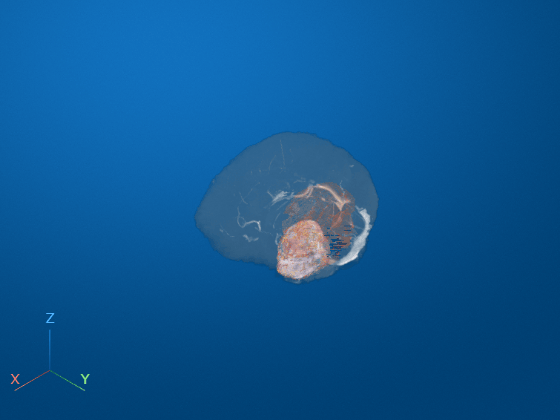
Load a 3-D image and corresponding label data.
datadir = fullfile(toolboxdir("images"),"imdata","BrainMRILabeled");
load(fullfile(datadir,"images","vol_001.mat"))
load(fullfile(datadir,"labels","label_001.mat"))
The label data has three classes. Create binary masks for each class.
mask1 = (label == 1);
mask2 = (label == 2);
mask3 = (label == 3);
Display the scene using a Viewer object.
viewer = viewer3d;
Display the image data using a Volume object. Render the image data using maximum intensity projection.
obj = volshow(vol,Parent=viewer, ...
    RenderingStyle="MaximumIntensityProjection");
Create three Surface objects, one for each class. Display the surfaces using the lines colormap. Skip the first color, which is a shade of blue that is similar to the color of the scene. The three surfaces appear orange, yellow, and purple, respectively.
cmap = lines;
surf1 = images.ui.graphics.Surface(viewer,Color=cmap(2,:),Data=mask1);
surf2 = images.ui.graphics.Surface(viewer,Color=cmap(3,:),Data=mask2);
surf3 = images.ui.graphics.Surface(viewer,Color=cmap(4,:),Data=mask3);