MQTT Client Publish
R2026bMQTT Client Publish block

To add a block to a model, double-click the canvas and start typing the block name. Then, select the block from the list.
Libraries:
Industrial Communication Toolbox /
MQTT
Description
The MQTT Client Publish block publishes messages to one or more MQTT topics.
Each input port publishes messages to a corresponding MQTT topic specified in the Topics to publish parameter.
Note
You must associate the MQTT Client Publish block with an MQTT Client. You can create the client to connect to the MQTT broker using the MQTT pane in the Configuration Parameters dialog box of the model. You must add at least one MQTT Client Subscribe or MQTT Client Publish block in the model to enable this pane. For more information, see Configure MQTT Client in Simulink.
Examples
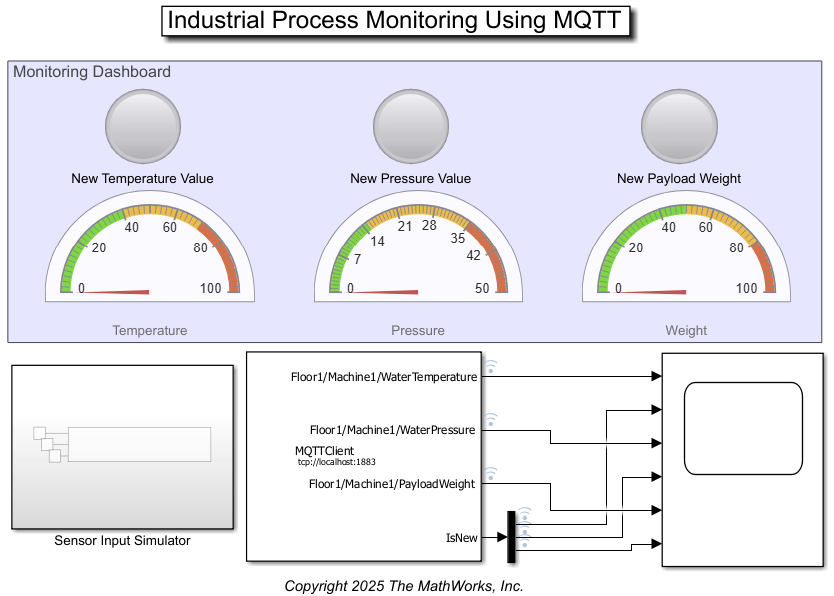
Industrial Process Monitoring Using MQTT
Monitor an industrial process using the MQTT Client blocks in Simulink®. You can connect to an MQTT broker using a Simulink model that acts as an MQTT client. You can publish messages to an MQTT topic using the MQTT Client Publish block and read messages from a topic using the MQTT Client Subscribe block.
Ports
Input
Parameters
Programmatic Use: Add Block
To add the block programmatically, use the add_block function with one of these library block paths as the source.
"mqttlib/MQTT Client Publish"
Example: add_block("mqttlib/MQTT Client Publish","myModel/myBlock",MakeNameUnique="on")
For information about programmatic access to individual block parameters, see the Programmatic Use section of parameter descriptions on this page.
Extended Capabilities
Version History
Introduced in R2025a

