Verify HLS Code Using a Generated HLS Test Bench
R2026bUse a generated HLS test bench to verify that the generated HLS code produces the same results as your MATLAB® algorithm. The test bench applies input stimulus from your MATLAB test bench to the HLS DUT and compares the output against expected values before you synthesize the design.
Verify the Generated HLS Code
To verify the HLS code using a test bench:
Open the HDL Workflow Advisor.
In the HDL Workflow Advisor, select MATLAB to HLS as the Code Generation Workflow.
In the Define Input Types step, add the MATLAB Function and MATLAB Test Bench files.
Select the Workflow as Generic ASIC/FPGA and the Synthesis tool as Xilinx Vitis HLS in the Select Code Generation Target step.
Click Verify with HLS Test Bench to verify the generated HLS code.
Optionally, select Generate HLS test bench and Simulate generated test bench. These options enable MATLAB to simulate the HLS test bench by using the HLS DUT.
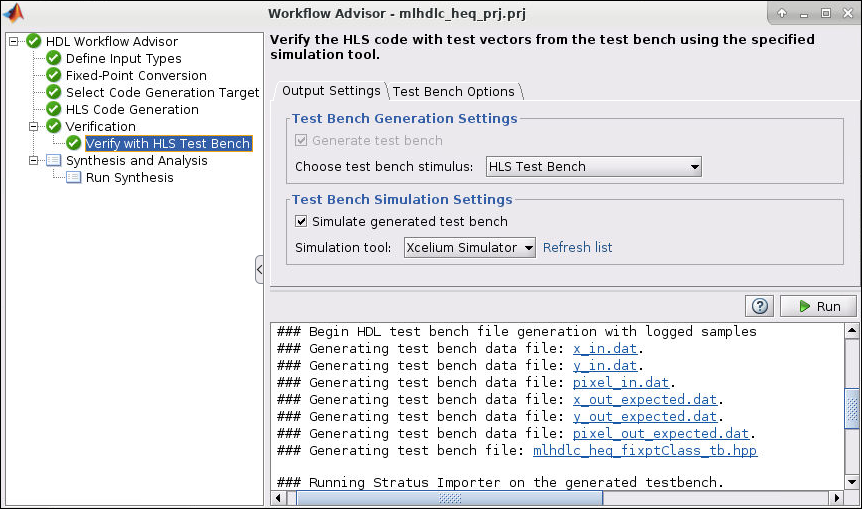
Click Run.
If the test bench and simulation execute successfully, you see messages similar to these in the message pane:
### Begin TestBench generation.
Code generation successful.
### Collecting data ...
### Begin HLS test bench file generation with logged samples
### Generating test bench data file: x in.dat.
### Generating test bench data file: y out expected.dat.
### Generating test bench data file: delayed xout expected.dat.
### Generating test bench file: mlhdlc sfir1Class tb. hpp
### Generating main function file: mlhdlc sfir1 main.cpp
### Generating project_script.tcl file: project script.tcl
### Generating Xilinx Vitis HLS project: C:\Users\Local\Temp\mlhdlc_sfir1\codegen\mlhdlc_sfir1\hdlsrc
### Generating project creation report createProject log.txt.
### Project creation successful.
### Simulating the design 'mlhdlc_sfir1' using 'Xilinx Vitis HLS'.
### Generating sim_script.tcl file: sim script.tcl
### Generating Simulation Report sim log.txt
### Simulation successful.
If errors appear in the message pane, fix them and click Run.
Additional Notes
After you click Run, the test bench generates the
.datfiles, such asx_in.datandy_out_expected.dat, that contain the input and the expected output values to the top-level DUT and a test bench class file.After the test bench generates the files, the selected HLS synthesis tool creates a project in the current working folder.
The simulation compiles and executes the generated HLS code and test bench with input values stored in the
x_in.datfile. The simulation verifies that the generated HLS code output matches the expected MATLAB output stored in they_out_expected.datfile.
See Also
Workflow
Advisor | coder.HlsConfig

