Deploy and Run Top-Hat Filtering on NVIDIA Jetson Orin Nano
R2026bThis example shows how to deploy a top-hat filtering algorithm on an NVIDIA® Jetson™ Orin Nano board by using the MATLAB® Coder™ Support Package for NVIDIA Jetson and NVIDIA DRIVE® Platforms. The algorithm uses the imtophat (Image Processing Toolbox) function to perform morphological top-hat filtering on a grayscale image. You generate CUDA® code that uses GPU kernel functions to calculate the output image in parallel.
Prerequisites
To run this example, you must have:
An NVIDIA Jetson embedded platform.
An Ethernet crossover cable to connect the target board and host PC. If you connect the board to a local network, a cable is not required.
Additionally, set up the target hardware board by using the Hardware Setup tool. For more information, see Prerequisites for Generating Code for NVIDIA Boards.
Connect the Host Computer to NVIDIA Hardware
The MATLAB Coder Support Package for NVIDIA Jetson and NVIDIA DRIVE Platforms uses an SSH connection over TCP/IP to execute commands while building and running the generated code on the Jetson or DRIVE platforms. Connect the target board to the same network as the host computer or use an Ethernet crossover cable to connect the board to the host computer. For information on how to set up and configure your board, see the NVIDIA documentation.
To communicate with the NVIDIA Jetson hardware, create a live hardware connection object by using the jetson function. When connecting to the target board for the first time, provide the host name or IP address, username, and password of the target board.
hwobj = jetson("jetson-deviceaddress","username","password");
When you call the jetson function without input arguments, the hardware connection object reuses the device address, username, and password from the last successful connection.
hwobj = jetson;
### Checking for CUDA availability on the target...
### Checking for 'nvcc' in the target system path...
### Checking for cuDNN library availability on the target...
### Checking for TensorRT library availability on the target...
### Checking for prerequisite libraries is complete.
### Gathering hardware details...
### Checking for third-party library availability on the target...
### Gathering hardware details is complete.
Board name              : NVIDIA Jetson Orin Nano Developer Kit
CUDA Version            : 12.2
cuDNN Version           : 8.9
TensorRT Version        : 8.6.2
GStreamer Version       : 1.20.3
V4L2 Version            : 1.22.1
SDL Version             : 1.2
OpenCV Version          : 4.8.0
Available Webcams       : Logitech Webcam C925e
Available GPUs          : Orin
Available Digital Pins  : 7  11  12  13  15  16  18  19  21  22  23  24  26  29  31  32  33  35  36  37  38  40
Verify GPU Environment on Target Board
Before generating GPU code, verify that the code generation environment has the compilers and libraries necessary for running this example by using the coder.checkGpuInstall function. Create a configuration object for checking the code generation environment by using the coder.gpuEnvConfig function with the jetson hardware type. When you set the Quiet property of the configuration object to true, the coder.checkGpuInstall function does not generate output unless verification fails.
envCfg = coder.gpuEnvConfig("jetson");
envCfg.BasicCodegen = 1;
envCfg.Quiet = 1;
envCfg.HardwareObject = hwobj;
coder.checkGpuInstall(envCfg);
Prepare Inputs for the Entry-Point Function
The top-hat filtering algorithm, imtophatDemo_gpu.m, accepts an input image, img, and a structuring element neighborhood, Nhood, and filters the input by using the imtophat function. The imtophat function computes the morphological opening of the image by using the imopen (Image Processing Toolbox) function. It uses the structuring element neighborhood to compute the dilation and then erosion of the input image, and then subtracts the result from the original image. The function displays the filtered image and the frames per second of the application.
type imtophatDemo_gpufunction imtophatDemo_gpu(img, Nhood) %#codegen
% Copyright 2019-2026 The MathWorks, Inc.
coder.gpu.kernelfun;
% Object Initializations
hwobj = jetson();
dispObj = imageDisplay(hwobj);
% Text position
position = [1 15];
accuTime = 0;
% Perform TopHat filtering
for i = 1:5000
startTime = tic;
out = imtophat(img, Nhood);
endTime = toc(startTime);
accuTime = accuTime + endTime * 1000;
averageTime = accuTime / i;
% Print the FPS to a variable
fpsText = sprintf('FPS: %.2f | Time: %.2f ms', 1000/averageTime, averageTime);
% Insert FPS on the image
outImg = insertText(out, position, fpsText, AnchorPoint="LeftTop");
% Display
transposedImage = permute(outImg, [2 1 3]);
image(dispObj, transposedImage);
end
end
This example filters an image of grains of rice, rice.png, to remove uneven background illumination. Assign the image data to a variable named original and display it by using the imshow function.
original = imread("rice.png");
imshow(original),title("Input to Top-Hat Filtering");
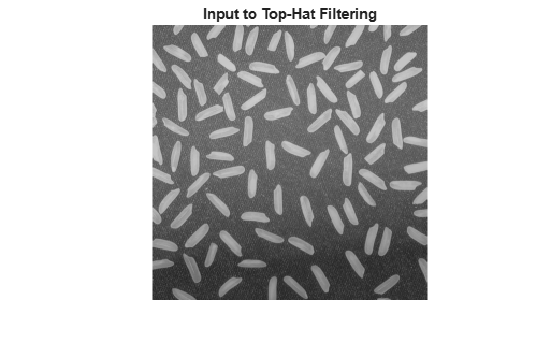
Create a structuring element. To create a filtered image without background illumination, create a disc-shaped structuring element with a radius of 12, and create a variable, Nhood, that contains the structuring element neighborhood.
se = strel("disk",12);
Nhood = se.Neighborhood;
Generate and Deploy CUDA Code on the Target
To generate a CUDA executable, create a GPU code configuration object by using the coder.gpuConfig function with the exe build type.
cfg = coder.gpuConfig("exe");Use the coder.hardware function to create a hardware configuration object for the Jetson platform. Assign it to the Hardware property of the GPU code configuration object cfg.
cfg.Hardware = coder.hardware("NVIDIA Jetson");To generate a main file and compile an executable, set the GenerateExampleMain property of the code configuration object to GenerateCodeAndCompile.
cfg.GenerateExampleMain = "GenerateCodeAndCompile";To generate CUDA code, use the codegen command. Specify the GPU code configuration object cfg and the function input arguments original and Nhood to the command. The code generator generates CUDA code on the host machine, copies the generated files to the target, and builds the executable in the workspace directory specified by the workspaceDir property of the hardware object, hwobj.
codegen -args {coder.Constant(original), coder.Constant(Nhood)} -config cfg imtophatDemo_gpu -report
### Checking for CUDA availability on the target...
### Checking for 'nvcc' in the target system path...
Code generation successful: View report
Run the Application on the Target
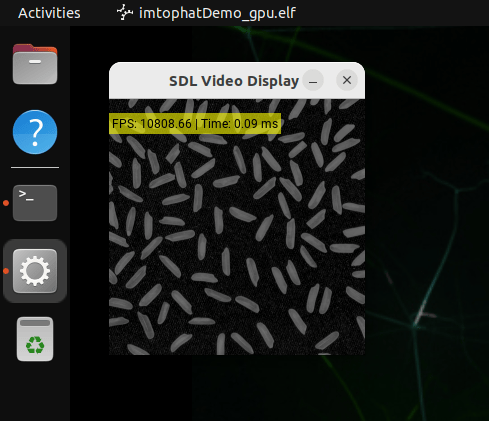
Use the runApplication method of the hardware object to launch the application on the target hardware. An SDL Video Display dialog opens and shows the filtered image on the display connected to NVIDIA Jetson.
runApplication(hwobj,"imtophatDemo_gpu");### Launching the executable on the target... Executable launched successfully with process ID 51264. Displaying the simple runtime log for the executable... Note: For the complete log, run the following command in the MATLAB command window: system(hwobj,'cat /home/ubuntu/buildDir_codegentest/MATLAB_ws/R2026b/Z/user/ExampleManager/user.Feb19/nvidia-ex76795897/imtophatDemo_gpu.log')
Terminate the Application
To terminate the application on the Jetson board, use the killApplication method of the hardware object.
killApplication(hwobj,"imtophatDemo_gpu");
