Fourth-Order Section Filter
R2026bFourth-Order Section Filter block

To add a block to a model, double-click the canvas and start typing the block name. Then, select the block from the list.
Libraries:
DSP System Toolbox /
Filtering /
Filter Implementations
Description
The Fourth-Order Section Filter block implements a cascade of fourth-order section filters in Simulink®. You can specify the numerator and denominator coefficients of the filter in the block parameters dialog box or through input ports.
Examples
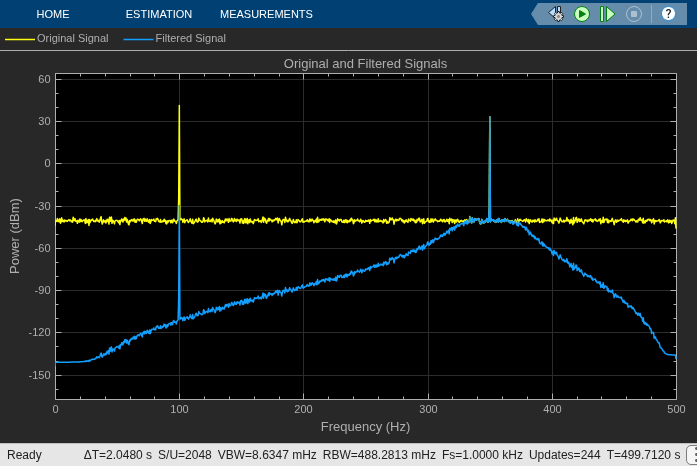
Filter Noisy Signal Using Fourth-Order Section (FOS) Filter in Simulink
Filter noisy sinusoidal signal using fourth order section filter in Simulink.
Ports
Input
Input signal, specified as a vector or a matrix. The input can be a variable size signal. The frame size of the signal can change during simulation but the number of channels cannot.
The input must be signed when it is a fixed-point signal. (since R2026b)
This port is unnamed until you set the Coefficient source
parameter to Input ports.
Data Types: single | double | fixed point (since R2026b)
Complex Number Support: Yes
Specify the numerator coefficients of the fourth-order section filter as a P-by-5 matrix, where P is the number of filter sections. For more details on this input port, see the Numerator coefficients of filter parameter.
While the simulation is running, you can change the number of sections (rows) in the numerator coefficients. You can also change the coefficient values.
When the input is fixed point, the numerator coefficients must also be signed fixed point. The numerator and denominator must have the same data type. (since R2026b)
Dependencies
To enable this port, set the Coefficient source parameter
to Input ports.
Data Types: single | double | fixed point (since R2026b)
Complex Number Support: Yes
Specify the denominator coefficients of the fourth-order section filter as a P-by-5 matrix or a P-by-4 matrix, where P is the number of filter sections. For more details on this input port, see the Denominator coefficients of filter parameter.
While the simulation is running, you can change the number of sections (rows) in the denominator coefficients. You can also change the coefficient values.
When the input is fixed point, the denominator coefficients must also be signed fixed point. The numerator and denominator must have the same data type. (since R2026b)
Dependencies
To enable this port, set the Coefficient source parameter
to Input ports.
Data Types: single | double | fixed point (since R2026b)
Complex Number Support: Yes
Output
The block returns the filtered output as a vector or a matrix. The output has the same size as the input. The output signal is complex if either the input signal, the numerator coefficients, or the denominator coefficients are complex.
When the input is floating point, the output data type is the same as the input data type. When the input is fixed point, the output data type is determined by the Output data type parameter. (since R2026b)
This port is unnamed until you set the Coefficient source
parameter to Input ports.
Data Types: single | double | fixed point (since R2026b)
Complex Number Support: Yes
Parameters
Specify the filter coefficient source as one of the following:
Dialog parameters— Specify the filter coefficients through the Numerator coefficients of filter and the Denominator coefficients of filter parameters in the block dialog box.Input ports— Specify the filter coefficients through the Num and Den input ports.Filter object— Specify the filter coefficients using adsp.FourthOrderSectionFilterobject.
To view the filter response, set this parameter to Dialog
parameters or Filter object, and then click
the View Filter Response button.
Specify the numerator coefficients b of the fourth-order section filter as a P-by-5 matrix, where P is the number of filter sections.
In the transfer function form, the following equation represents the fourth-order section filter:
where,
a — Denominator coefficients matrix. For more details on how to specify this matrix, see Denominator coefficients of filter.
k — Row index.
You cannot change the size of this parameter during simulation, but you can change its value.
Dependencies
To enable this parameter, set Coefficient source to
Dialog parameters.
Tunable: Yes
Data Types: single | double
Complex Number Support: Yes
Specify the denominator coefficients a of the fourth-order section filter as a P-by-5 matrix or a P-by-4 matrix, where P is the number of filter sections.
The block algorithm assumes that the value of the leading coefficients is always 1. If the denominator is of size P-by-4, the block algorithm places 1s in the first column to make the denominator size P-by-5. If the denominator is of size P-by-5 and the elements in the first column do not equal 1, the algorithm replaces the values in the first column with 1s.
In the transfer function form, the following equation represents the fourth-order section filter:
where,
b — Numerator coefficients matrix. For more details on how to specify this matrix, see Numerator coefficients of filter.
k — Row index.
You cannot change the size of this parameter during simulation, but you can change its value.
Dependencies
To enable this parameter, set Coefficient source to
Dialog parameters.
Tunable: Yes
Data Types: single | double
Complex Number Support: Yes
Specify the filter coefficients using a dsp.FourthOrderSectionFilter object. You can enter this object directly in
the Filter parameter. Alternatively, you can create this object in
the MATLAB® workspace or model workspace and specify the filter variable in the
Filter parameter. When you specify the filter as a variable and
you simulate the model, you cannot change the complexity, data type, or size of the
filter coefficients in the workspace between simulations.
Dependencies
To enable this parameter, set Coefficient source to
Filter object.
Clicking this button opens the filter visualizer and displays the magnitude response
of the fourth-order section filter. The response is based on the coefficients that you
specify in the block dialog box. If you set Coefficient source to
Input ports and click Apply, the
block disables this button.
To update the filter response while the visualizer is running, modify the coefficients in the block dialog box and click Apply.
You can configure the plot settings and the frequency response measurements from the interface of the visualizer.
On the Scope tab, you can enable the legend, specify to plot both magnitude and phase responses of the filter, modify the plot settings, generate a script to re-create the plot, and save or share the settings. On the Measurements tab, you can enable data cursors, and display the peak values of the filter response.
For more details on the filter visualizer interface and its tools, see Configure Filter Visualizer.
Dependencies
To enable this button, you must specify the filter coefficients directly in the
block dialog box or through the dsp.FourthOrderSectionFilter
object.
Specify the type of simulation to run. You can set this parameter to:
Interpreted execution— Simulate model using the MATLAB interpreter. This option shortens startup time.Code generation— Simulate model using generated C code. The first time you run a simulation, Simulink generates C code for the block. The C code is reused for subsequent simulations as long as the model does not change. This option requires additional startup time but provides faster subsequent simulations.
Data Types Tab
Use these parameters to control the fixed-point data type settings in the Fourth-Order Section Filter block. (since R2026b)
Note
To enable this tab, set the
Coefficient source parameter in the Main tab
to Dialog parameters or Input
ports. (since R2026b)
Since R2026b
Specify the rounding method for fixed-point operations as one of the following:
FloorRound
For more details, see Rounding Modes.
Since R2026b
Specify whether the overflows saturate or wrap.
off— The block wraps the result of its fixed-point operations.on— The block saturates the result of its fixed-point operations.
For details about overflow actions, see Overflow Handling for fixed-point operations.
Since R2026b
Specify the coefficients word- and fraction-length designations using the
fixdt (Simulink) function. The block uses this
data type to represent the numerator and denominator coefficients in fixed-point
operations.
Dependencies
To enable this parameter, set Coefficient source in the
Main tab to Dialog
parameters.
Since R2026b
Specify the accumulator word- and fraction-length designations as
Inherit: Inherit via internal rule or as a signed
fixdt (Simulink) object.
Since R2026b
Specify the output word- and fraction-length designations as Inherit:
Same as input or as a signed fixdt (Simulink) object.
When you set this parameter to Inherit: Same as input,
the output data type is the same as the input data type.
Block Characteristics
Data Types |
|
Direct Feedthrough |
|
Multidimensional Signals |
|
Variable-Size Signals |
|
Zero-Crossing Detection |
|
More About
This diagram shows the structure of each section supported by the fourth-order section filter along with the fixed-point settings.
This diagram shows the structure of the overall filter with multiple sections.
Extended Capabilities
C/C++ Code Generation
Generate C and C++ code using Simulink® Coder™.
Version History
Introduced in R2022aThe Fourth-Order Section Filter block now supports fixed-point data types in both simulation and code generation. Use the Rounding method, Saturate on integer overflow, Coefficients data type, Accumulator data type, and Output data type parameters to configure the fixed-point settings.
Starting in R2022b, when you pass numerator and denominator coefficients through the input ports of the Fourth-Order Section Filter block, you can change the number of sections (rows) in the filter coefficients while the simulation is running.
You can also specify the coefficients in the block dialog box using a dsp.FourthOrderSectionFilter object. Set Coefficient source
to Filter object and specify a
dsp.FourthOrderSectionFilter object directly in the
Filter parameter. Alternatively, you can create this object in the
MATLAB workspace or model workspace and specify the filter variable in the
Filter parameter.
See Also
Objects
Blocks
MATLAB Command
You clicked a link that corresponds to this MATLAB command:
Run the command by entering it in the MATLAB Command Window. Web browsers do not support MATLAB commands.


Select a Web Site
Choose a web site to get translated content where available and see local events and offers. Based on your location, we recommend that you select: .
You can also select a web site from the following list
How to Get Best Site Performance
Select the China site (in Chinese or English) for best site performance. Other MathWorks country sites are not optimized for visits from your location.
Americas
- América Latina (Español)
- Canada (English)
- United States (English)
Europe
- Belgium (English)
- Denmark (English)
- Deutschland (Deutsch)
- España (Español)
- Finland (English)
- France (Français)
- Ireland (English)
- Italia (Italiano)
- Luxembourg (English)
- Netherlands (English)
- Norway (English)
- Österreich (Deutsch)
- Portugal (English)
- Sweden (English)
- Switzerland
- United Kingdom (English)