Integrate ACAS Xu Neural Networks into Simulink
R2026bThis example shows how to integrate the ACAS Xu family of neural networks into a Simulink® model to simulate the movements of two unmanned aerial vehicles (UAV). The example uses the ACAS Xu neural networks to control the behavior of the ownship based on the actions of the intruder ship. This example is step 8 in a series of examples that take you through formally verifying a set of neural networks that output steering advisories to aircraft to prevent them from colliding with other aircraft.
To run this example, open Verify and Deploy Airborne Collision Avoidance System (ACAS) Xu Neural Networks and navigate to Step8IntegrateACASXuNeuralNetworksIntoSimulinkExample.m. This project contains all of the steps for this workflow. You can run the scripts in order or run each one independently.
The Simulink model used in this example is based on the Tuning Waypoint Following Controller for Fixed-Wing UAV (UAV Toolbox) example.
Explore Simulink Model
Open the Simulink model.
open("ACAS_Scenario/ACAS_Scenario.slx")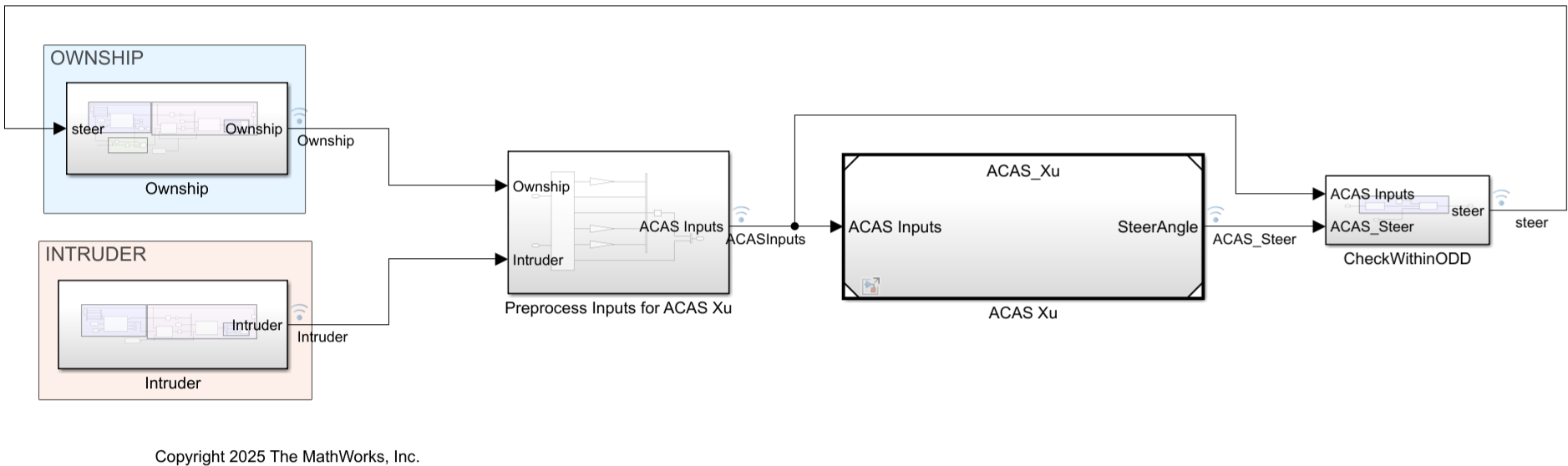
The model contains five subsystems:
Ownship— Ownship waypoint following controller, containing a pathing algorithm, fixed wing physics, and the ACAS Xu advisories.Intruder— Intruder waypoint following controller, containing a pathing algorithm and fixed wing physics.Preprocess Inputs for ACAS Xu— Converts the heading angles and position of the aircraft to the geometric inputs needed for the ACAS Xu networks. This subsystem also converts between metric and imperial units as needed for the ACAS Xu neural networks.ACAS Xu— Implements the ACAS Xu neural networks and issues a steering advisory based on the current aircraft configuration.CheckWithinODD— Monitors whether the network inputs are within the operational design domain (ODD) of the networks and rejects predictions made outside of the ODD.
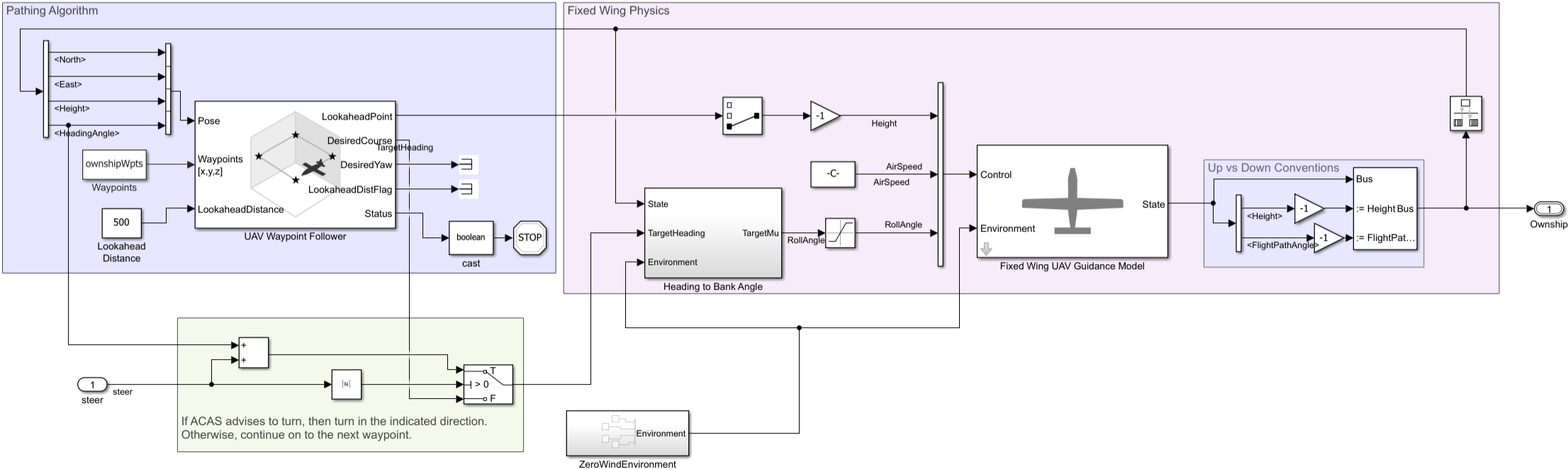
The pathing algorithm integrates the waypoint following controller with the fixed wing guidance model. This model demonstrates how to extract the necessary information from the guidance model output bus signal and feed it into the waypoint following controller. The model assembles the control and environment inputs for the guidance model block.
The fixed wing physics model approximates the kinematic behavior of a closed-loop system consisting of the fixed wing aerodynamics and an autopilot. This guidance model is suitable for simulating small UAV flights at a low fidelity, near the stable flight conditions of the UAVs.
For more information on this model, see Tuning Waypoint Following Controller for Fixed-Wing UAV (UAV Toolbox).
Ownship Subsystem
The Ownship subsystem contains a pathing algorithm, fixed wing physics, and the ACAS Xu advisories.
Intruder Subsystem
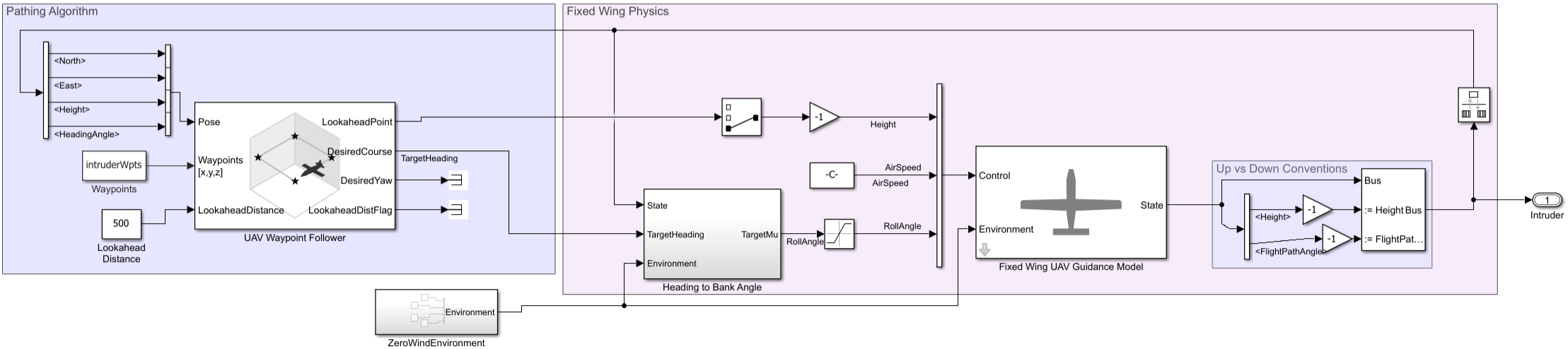
The Intruder subsystem contains a pathing algorithm and fixed wing physics.
Preprocess Inputs for ACAS Xu Subsystem
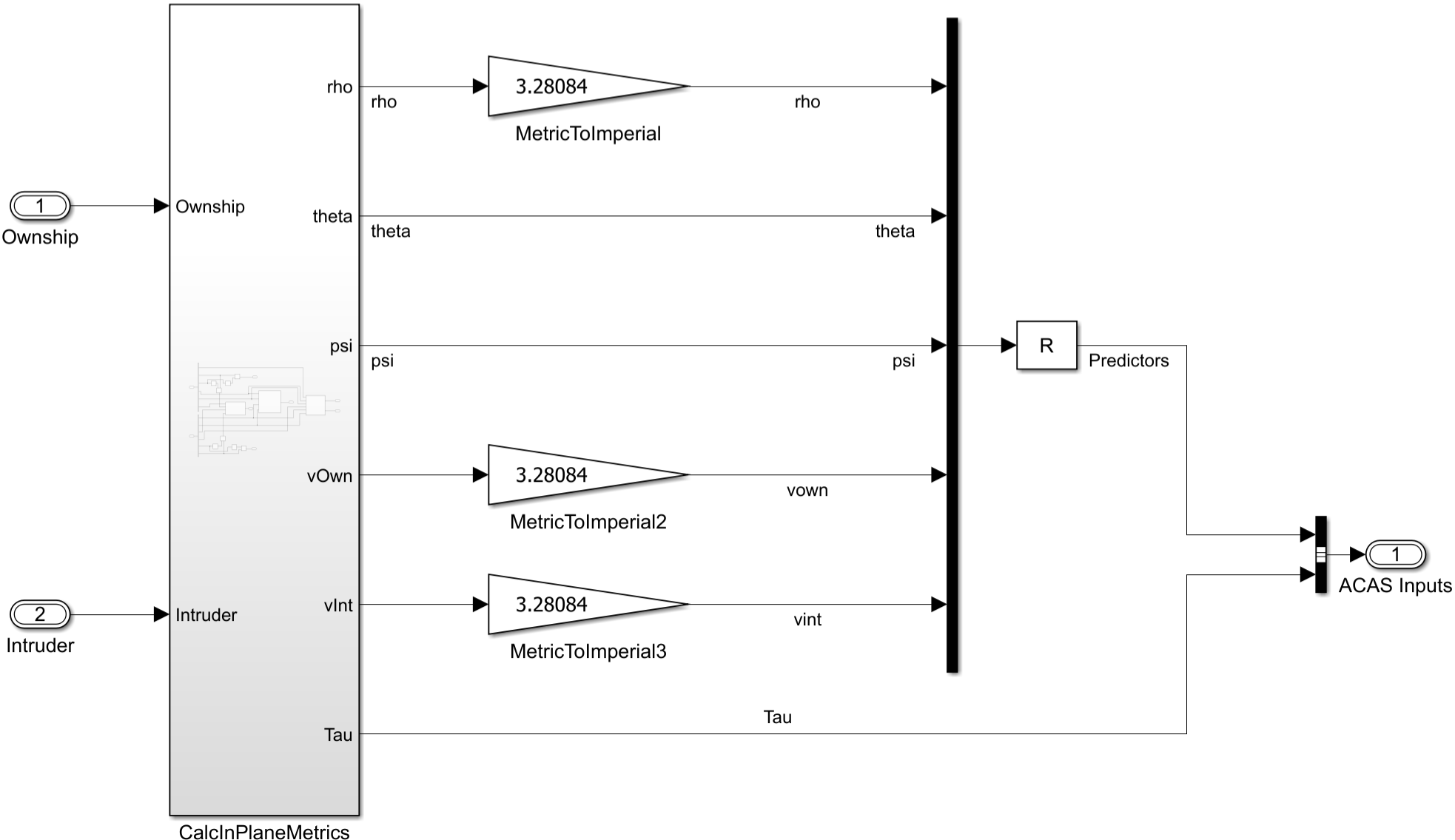
The Preprocess Inputs for ACAS Xu Subsystem converts the heading angles and position of the aircraft to the geometric inputs needed for the ACAS Xu networks. This subsystem also converts between metric and imperial units as needed for the ACAS Xu neural networks.
ACAS Xu Subsystem
The ACAS Xu subsystem implements the ACAS Xu neural networks and issues a steering advisory based on the current aircraft configuration.
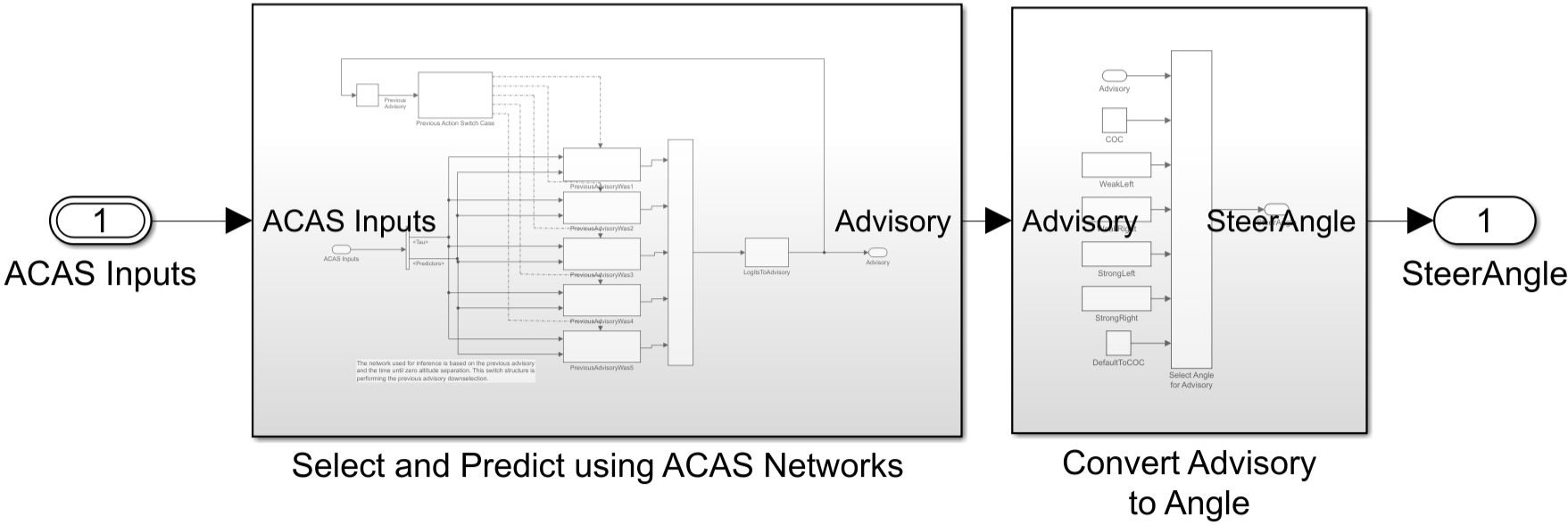
The 45 ACAS Xu neural networks are integrated using deep learning layer blocks. The layer blocks provide full requirements traceability down to the elementary operations of the neural network and to any generated code. The ACAS Xu subsystem takes the advisories predicted by the networks, maps them to steering angles, and then issues the steering angle to the ownship.
You can generate Simulink models that represent a neural network automatically by using the exportNetworkToSimulink function. For more information about deep learning layer blocks, see List of Deep Learning Layer Blocks and Subsystems.

CheckWithinODD Subsystem
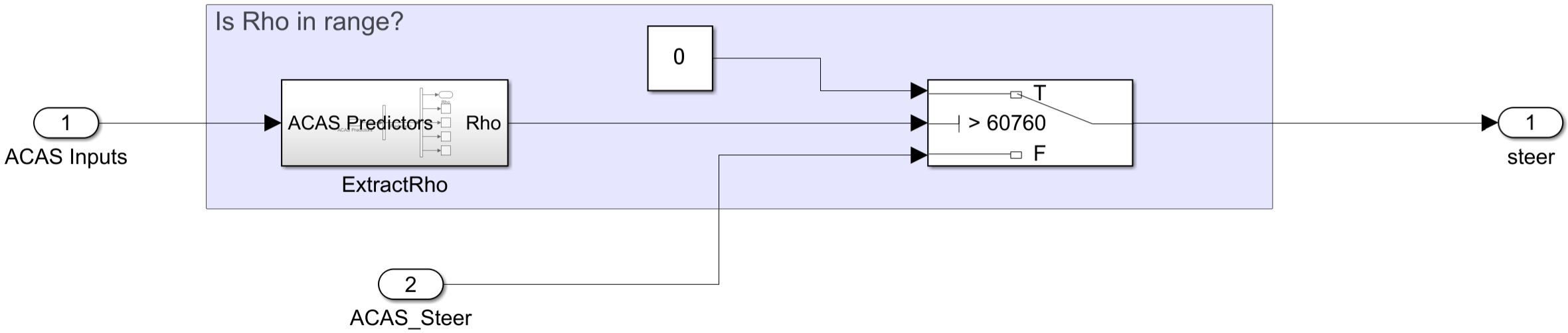
The CheckWithinODD subsystem monitors whether the inputs to the ACAS Xu neural networks are within the ODD and rejects predictions made outside of the ODD. Because the velocities of the ownship and intruder are constant, only the separation between the two aircraft is needed to determine whether the configuration is within the ODD of the ACAS Xu neural networks.
Load ACAS Xu Neural Networks
Load and save the networks. The example prepares the networks as shown in Explore ACAS Xu Neural Networks.
acasXuNetworkFolder = fullfile(matlab.project.rootProject().RootFolder,".");
zipFile = matlab.internal.examples.downloadSupportFile("nnet","data/acas-xu-neural-network-dataset.zip");
filepath = fileparts(zipFile);
unzip(zipFile,acasXuNetworkFolder);
matFolder = fullfile(matlab.project.rootProject().RootFolder,"acas-xu-neural-network-dataset","networks-mat");
helpers.convertACASXuFromONNXAndSave(matFolder);
Importing ONNX files and converting to MAT format...
.........    ..........    ..........    ..........    ......
Import and conversion complete.
Simulate ACAS Xu Simulink Model
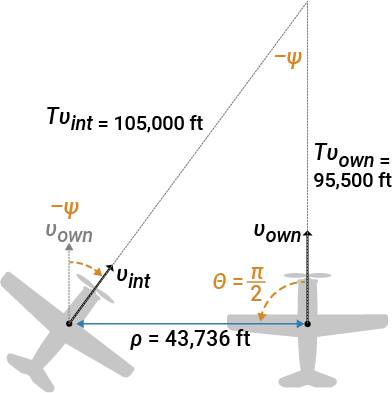
Different configurations of the ownship and intruder require different maneuvers to avoid collision. For example, Left Abeam means that the intruder ship will collide with the ownship from the left if both aircraft stay on their current course. To avoid collision, the ownship must turn right.
Load all of the ACAS Xu neural networks to the MATLAB® base workspace by using the loadAllACASXuNetworks function, which is defined at the bottom of this example.
loadAllACASXuNetworks
The model is configured to simulate the Left Abeam scenario. The simulation runs for 200 s of model time and uses the default model settings in Simulink, except for the solver. In realistic scenarios, the aircraft gets steering advice updates at regular intervals. To reflect this, use a discrete fixed-step solver, with a fixed time step of 200 ms.
Simulate the model.
simObj = sim("ACAS_Scenario.slx");Visualize the interaction between the two aircraft by using the replaySimScenario function, which is defined at the bottom of this example.
replaySimScenario(simObj);
To simulate different scenarios, in Simulink, open the Model Explorer and navigate to Simulink Root > ACAS_Scenario > External Data > ACAS_Scenario > Design Data. Replace these parameters:
ownshipWpts— Set of waypoints for the ownship, specified as a n-by-3 matrix of positions in meters. The ownship navigates between these waypoints, unless it receives steering advisory to avoid collision.intruderWpts— Set of waypoints for the intruder ship, specified as a n-by-3 matrix of positions in meters. The intruder ship navigates between these waypointsownshipAirSpd— Airspeed of ownship, specified in m/s.intruderAirSpd— Airspeed of intruder ship, specified in m/s.
You can also replace the parameters programmatically using the Simulink.data.assigninGlobal (Simulink) function, for example:
ownshipWptsNew = [linspace(-100000,100000,11);zeros(2,11)]' / 3.28084; % convert from feet to meters
intruderWptsNew = -ownshipWptsNew; % traverse waypoints in reverse re
ownshipAirSpdNew = 1000 / 3.28084; % convert from ft/s to m/s
intruderAirSpdNew = ownshipAirSpdNew;
Simulink.data.assigninGlobal('ACAS_Scenario','ownshipWpts',ownshipWptsNew)
Simulink.data.assigninGlobal('ACAS_Scenario','intruderWpts',intruderWptsNew)
Simulink.data.assigninGlobal('ACAS_Scenario','ownshipAirSpd',ownshipAirSpdNew)
Simulink.data.assigninGlobal('ACAS_Scenario','intruderAirSpd',intruderAirSpdNew)
Simulate the model and replay the scenario.
simObj = sim("ACAS_Scenario.slx")
replaySimScenario(simObj)
Supporting Functions
loadAllACASXuNetworks
The loadAllACASXuNetworks function loads all 45 ACAS Xu neural networks into the workspace.
function loadAllACASXuNetworks
for previousAdvisory = 1:5
    for timeBeforeLossOfVerticalSeparation = 1:9
        net = helpers.loadACASNetwork(previousAdvisory, timeBeforeLossOfVerticalSeparation);
        varname = sprintf('net%d_%d', previousAdvisory, timeBeforeLossOfVerticalSeparation);
        assignin('base',varname,net);
    end
end
end
replaySimScenario
The replaySimScenario function creates an animation visualizing the interaction between the two aircraft.
function replaySimScenario(simObj)
% Extract timetable from simulation object.
data = extractTimetable(simObj.logsout);
data = fillmissing(data,"previous");

% Adjust video frames every second.
data = retime(data,"secondly");

% Retrieve waypoints from scenario.
ownshipPath  = Simulink.data.getVariableFromGlobal("ACAS_Scenario","ownshipWpts");
intruderPath = Simulink.data.getVariableFromGlobal("ACAS_Scenario","intruderWpts");

% Create replay scene.
helpers.replayScenario(data,ownshipPath,intruderPath);
end
References
[1] Manzanas Lopez, Diego, et al. “Evaluation of Neural Network Verification Methods for Air-to-Air Collision Avoidance.” Journal of Air Transportation, vol. 31, no. 1, Jan. 2023, pp. 1–17. DOI.org (Crossref), https://doi.org/10.2514/1.D0255.
See Also
Topics
- Tuning Waypoint Following Controller for Fixed-Wing UAV (UAV Toolbox)

