MIDI Controls
R2026bOutput values from controls on MIDI control surface
MIDI Controls Block block

To add a block to a model, double-click the canvas and start typing the block name. Then, select the block from the list.
Libraries:
Audio Toolbox /
Sources
Description
The MIDI Controls block outputs values from controls on a MIDI control surface in real time. Use the MIDI Controls block to interact with your audio processing model.
The MIDI Controls block combines the functionality of the general MIDI functions in
MATLAB®: midicontrols, midiread, midisync. Use the MATLAB
midiid command to discover MIDI device
names or MIDI device control numbers.
Examples
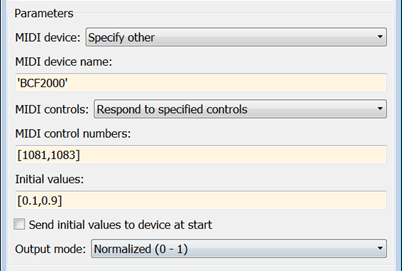
Output Values from MIDI Control Surface
The example shows how to set the MIDI Controls block parameters to output control values from your MIDI device.
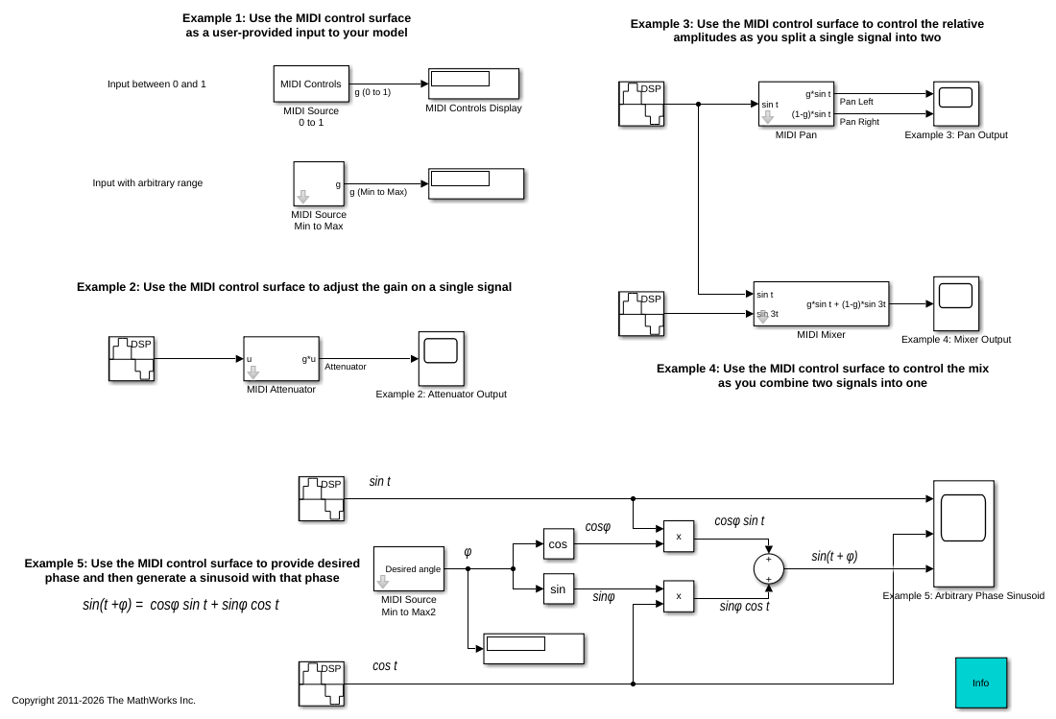
Using a MIDI Control Surface to Interact with a Simulink Model
Use a MIDI control surface as a physical user interface to a Simulink® model, allowing you to use knobs, sliders and buttons to interact with that model. It can be used in Simulink as well as with generated code running on a workstation.
Ports
Output
Parameters
Block Characteristics
Data Types |
|
Direct Feedthrough |
|
Multidimensional Signals |
|
Variable-Size Signals |
|
Zero-Crossing Detection |
|
Programmatic Use: Add Block
To add the block programmatically, use the add_block function with one of these library block paths as the source.
"audiosources/MIDI Controls"
Example: add_block("audiosources/MIDI Controls","myModel/myBlock",MakeNameUnique="on")
Tips
The MIDI Controls block is not supported for rapid accelerator mode.
Extended Capabilities
Version History
Introduced in R2016a
See Also
parameterTuner | Audio Test Bench | midiid | midicontrols | midiread | midisync

