acousticRoomResponse
R2026bDescription
Add-On Required: This feature requires the Room Acoustics Simulation add-on.
Examples
Specify the dimensions of a simple shoebox room. The first dimension is the length along the x-axis, the second dimension is the width along the y-axis, and the third dimension is the height along the z-axis.
roomDimensions = [5, 4, 6];
Specify the cartesian coordinates of the receiver and source within the room.
rx = [2, 3.5, 2];
tx = [2, 1.5, 2];
Synthesize the impulse response.
ir = acousticRoomResponse(roomDimensions,tx,rx);
Plot the impulse response.
fs = 16e3;
t = (0:numel(ir)-1)/fs;
plot(t,ir)
xlabel("Time (s)")
Read in a triangulation object from an STL file using stlread. Define the coordinates of the transmitter and two receivers. Use the viewScene helper function to visualize the room with the transmitter represented as a blue point and the receivers as red points.
room = stlread("office.stl");
tx = [2, 1.5, 2];
rx = [2, 3.5, 2; 4, 2, 1];
viewScene(room,tx,rx)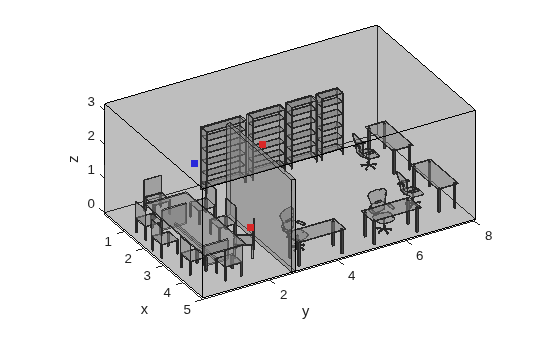
Use acousticRoomResponse to synthesize the impulse response for both receivers. Set the ImageSourceOrder to 2, because the default of 3 is too high for this complex scene.
ir = acousticRoomResponse(room,tx,rx,ImageSourceOrder=2);
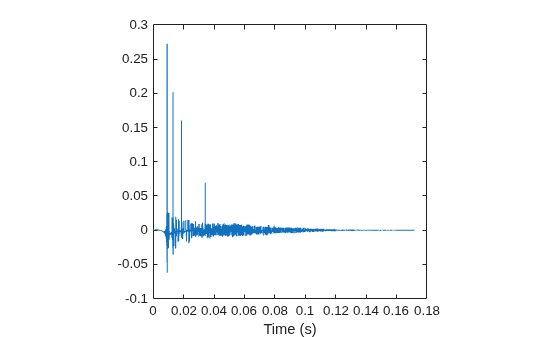
Filter an audio signal using the first impulse response. Plot the impulse response and listen to the filtered audio. The impulse response for this microphone has no direct line-of-sight to the transmitter, and the sound must reflect around the wall.
[x,fs] = audioread("MaleVolumeUp-16-mono-6secs.ogg");
y1 = filter(ir(1,:),1,x);
sound(y1,fs)

t = (0:length(ir)-1)/fs;
plot(t,ir(1,:))
xlabel("Time (s)")
Filter the same signal using the impulse response from the other microphone and listen to the difference. Plot the impulse response. The microphone associated with this impulse response has a direct line-of-sight to the transmitter.
y2 = filter(ir(2,:),1,x);
sound(y2,fs)

plot(t,ir(2,:))
xlabel("Time (s)")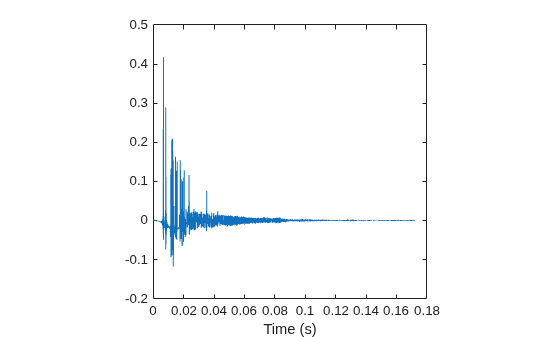
Supporting Function
function viewScene(room,tx,rx)
% Helper function to visualize scene with source and receiver locations.
trisurf(room,FaceAlpha=0.3,FaceColor=[.5 .5 .5],EdgeColor="none");
view(60, 30);
hold on; axis equal; grid off;
xlabel("x"); ylabel("y"); zlabel("z");
% Plot edges
fe = featureEdges(room,pi/20);
numEdges = size(fe, 1);
pts = room.Points;
a = pts(fe(:,1),:);
b = pts(fe(:,2),:);
fePts = cat(1, reshape(a,1,numEdges,3),reshape(b, 1, numEdges, 3), ...
    nan(1,numEdges,3));
fePts = reshape(fePts,[],3);
plot3(fePts(:,1),fePts(:,2),fePts(:,3),"k",LineWidth=.5);
scatter3(tx(1),tx(2),tx(3),"sb","filled");
scatter3(rx(:,1),rx(:,2),rx(:,3),"sr","filled");
hold off
end
Define the dimensions of a shoebox room and the coordinates of the transmitter and receiver. Use acousticRoomResponse to synthesize the impulse response with custom absorption and scattering coefficients for the walls of the room. Plot the synthesized response.
roomDimensions = [6, 5, 2.5];
tx = [3, 3, 1.8];
rx = [5, 4, 1.7];

ir = acousticRoomResponse(roomDimensions,tx,rx,MaterialAbsorption=.5,MaterialScattering=0.07);
fs = 16e3;
t = (0:numel(ir)-1)/fs;
plot(t,ir)
xlabel("Time (s)")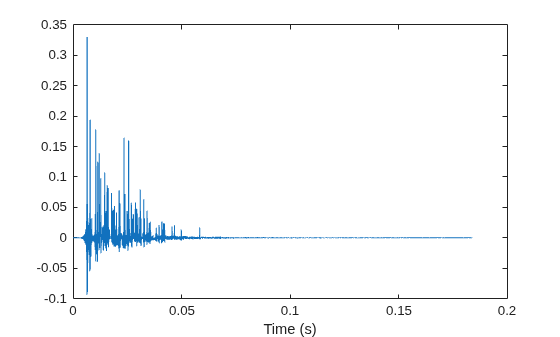
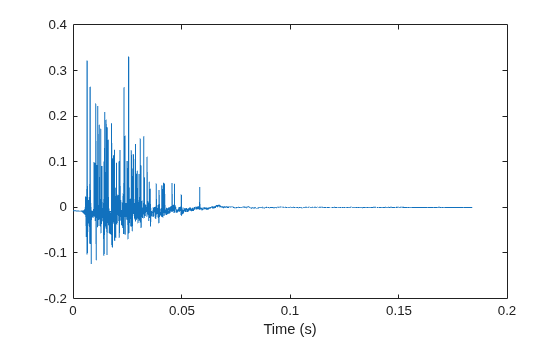
Call acousticRoomResponse with the absorption and scattering coefficients set to column vectors to specify the characteristic for each of the surfaces, which are the floor, front, back, left, right, and ceiling of the shoebox room. Plot the resulting impulse response.
ir = acousticRoomResponse(roomDimensions,tx,rx,...
                          MaterialAbsorption=[.05, .06, .05, .07, .08, .1].',...
                          MaterialScattering=[.7, .6, .7, .6, .7, .6].');
plot(t,ir)
xlabel("Time (s)")
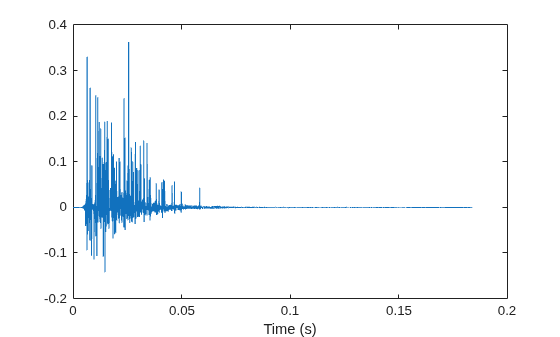
Call acousticRoomResponse with the absorption and scattering coefficients set to row vectors to specify the characteristic for each of the frequencies specified by BandCenterFrequencies. Plot the resulting impulse response. You can also specify the coefficients as matrices to define the characteristic for each combination of surface and frequency band.
ir = acousticRoomResponse(roomDimensions,tx,rx,...
                          MaterialAbsorption=[.015, .015, .02, .02, .03, .03, .04, .05, .05],...
                          MaterialScattering=[.2, .2, .3, .5, .6, .6, .7, .7, .7],...
                          BandCenterFrequencies=[31.125, 62.5, 125, 250, 500, 1000, 2000, 4000, 8000]);
plot(t,ir)
xlabel("Time (s)")
Specify the dimensions of a simple shoebox room. The first dimension is the length along the x-axis, the second dimension is the width along the y-axis, and the third dimension is the height along the z-axis.
roomDimensions = [5.5 4.5 4.2];
Specify the Cartesian coordinates of the source and receiver within the room.
tx = [2.25 2.2 4.1];
rx = [2.2 2 4.15];
Specify the material absorption coefficients of the room surfaces as a column vector, where each element corresponds to one surface. The coefficients are specified in this order: floor (), front (), back (), left (), right (), and ceiling (). Set all surfaces except the ceiling as completely absorbing. Set the ceiling as a reflecting surface.
absorptionCoeffs = [1 1 1 1 1 1e-3]';
Synthesize the impulse response of the room using the image-source method. Set the image-source maximum order to 1. Because you specified the absorption coefficients as a column vector, the same coefficients are used for all frequency bands.
ir = acousticRoomResponse(roomDimensions, tx, rx, ...
    Algorithm="image-source", ...
    ImageSourceOrder=1, ...
    MaterialAbsorption=absorptionCoeffs);
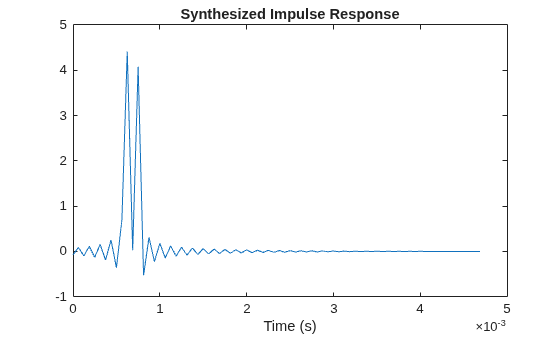
Plot the impulse response. The two peaks correspond to line-of-sight and reflection from the ceiling. The peaks are close because the source and receiver are near the ceiling.
fs = 16e3;
t = (0:numel(ir)-1)/fs;
plot(t,ir)
xlabel("Time (s)")
title("Synthesized Impulse Response")
Material properties of room surfaces can be specified using strings. Synthesize the impulse response of a room with the following properties:
A wood floor with high material scattering
A front wall covered in cotton drapes with low material scattering
A left wall with large panes of heavy glass and high material scattering
Right and back walls with plywood paneling and medium material scattering
A ceiling made of dry plaster tiles with low material scattering
materials = ["WoodFloor",...% floor
            "CottonDrapes78",...% front
            "PlywoodPanel",...% back
            "LargeGlassPane",...% left
            "PlywoodPanel",...% right
            "DryPlasterTiles"]; % ceiling
scattering = ["high","low","medium","high","medium","low"];
Specify room dimensions, receiver and transmitter positions, and synthesize the impulse response.
roomDimensions = [5, 4, 6];
rx = [2, 3.5, 2];
tx = [2, 1.5, 2];
ir = acousticRoomResponse(roomDimensions,tx,rx,...
    MaterialAbsorption=materials,MaterialScattering=scattering);
Plot the impulse response.
fs = 16e3;
t = (0:numel(ir)-1)/fs;
plot(t,ir)
xlabel("Time (s)")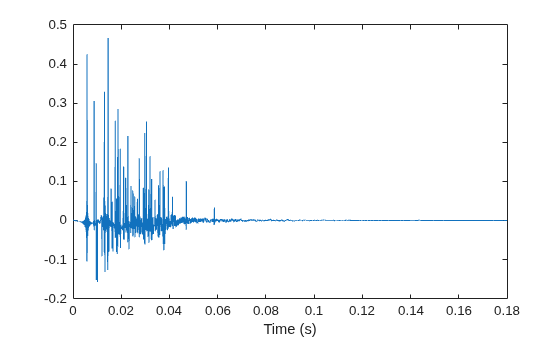
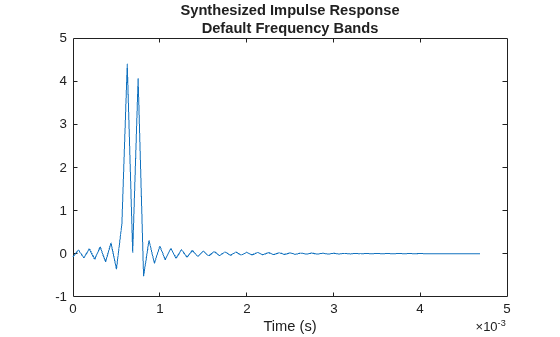
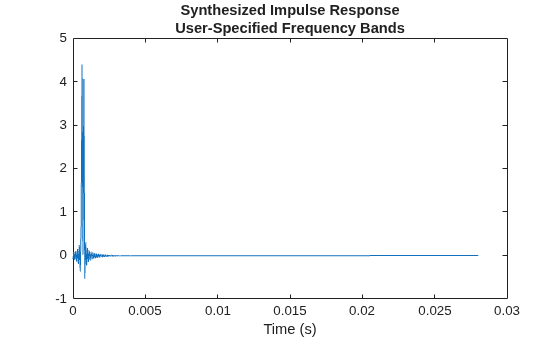
This example shows how to synthesize the impulse response of a triangulation object where all surfaces except the ceiling are completely absorbing. First, you synthesize the impulse response using the default frequency bands. Then, using the same triangulation object, you synthesize using user-specified frequency bands.
Create triangulation Object
Create a triangulation object representing a room.
roomDimensions = [5.5 4.5 4.2];
X = roomDimensions(1);
Y = roomDimensions(2);
Z = roomDimensions(3);
pts = [0 0 0;
    0 Y 0;
    X 0 0;
    X Y 0;
    0 0 Z;
    0 Y Z;
    X 0 Z;
    X Y Z];
dt = delaunayTriangulation(pts(:,1), pts(:,2), pts(:,3));
[conn, verts] = freeBoundary(dt);
scene = triangulation(conn, verts);
Specify the Cartesian coordinates of the source and receiver within the room.
tx = [2.25 2.2 4.1];
rx = [2.2 2 4.15];
Using Default Frequency Bands
Obtain the number of triangles (surfaces) in the triangulation object. Specify the material absorption coefficients as a column vector. Set all the surfaces, including those on the ceiling, as completely absorbing.
numTriangles = size(scene.ConnectivityList,1);
absorptionCoeffs = ones(numTriangles,1);
disp("Number of triangles: "+num2str(numTriangles))
Number of triangles: 12
In order to set the ceiling as reflecting, you must first find all the triangles that are formed only by points on the ceiling.
Find all the points that are on the ceiling.
points = 1:numTriangles;
ceilingPoints = points(scene.Points(:,3)==4.2);
Find all the triangles formed only by points on the ceiling. For every such triangle, set its material absorption coefficient to 1e-3. Determine the number of triangles on the ceiling.
CL = scene.ConnectivityList;
for ind=1:size(CL,1)
    p = CL(ind,:);
    if all(ismember(p,ceilingPoints))
        absorptionCoeffs(ind,:) = 1e-3;
    end
end

disp("Number of triangles on ceiling: "+num2str(sum(absorptionCoeffs~=1)))
Number of triangles on ceiling: 2
Synthesize the impulse response of the object using the image-source method. Set the image-source maximum order to 1. Because you specified the absorption coefficients as a column vector, the same coefficients are used for all frequency bands.
ir = acousticRoomResponse(scene, tx, rx, ...
    Algorithm="image-source", ...
    ImageSourceOrder=1, ...
    MaterialAbsorption=absorptionCoeffs);
Plot the impulse response. The two peaks correspond to line-of-sight and reflection from the ceiling. The peaks are close because the source and receiver are near the ceiling.
fs = 16e3;
t = (0:numel(ir)-1)/fs;
plot(t,ir)
xlabel("Time (s)")
title({"Synthesized Impulse Response", ...
    "Default Frequency Bands"})
Using Specified Frequency Bands
Specify the center frequencies of the bandpass filters in hertz.
freq = [31.125, 62.5, 125, 250, 500, 1000, 2000, 4000, 8000];
For the triangulation object, specify the material absorption coefficients as an -by- matrix, where is the number of triangles and is the number of center frequencies. Set all the surfaces, including those on the ceiling, as completely absorbing.
lfreq = numel(freq);
absorptionCoeffs = ones(numTriangles,lfreq);
Find all the triangles formed only by points on the ceiling. For every such triangle, set its material absorption coefficient to 1e-3.
CL = scene.ConnectivityList;
for ind=1:size(CL,1)
    p = CL(ind,:);
    if all(ismember(p,ceilingPoints))
        absorptionCoeffs(ind,:) = 1e-3;
    end
end
Synthesize the impulse response of the object using the specified frequency bands.
ir = acousticRoomResponse(scene, tx, rx, ...
    Algorithm="image-source", ...
    ImageSourceOrder=1, ...
    MaterialAbsorption=absorptionCoeffs, ...
    BandCenterFrequencies=freq);
Plot the impulse response.
fs = 16e3;
t = (0:numel(ir)-1)/fs;
plot(t,ir)
xlabel("Time (s)")
title({"Synthesized Impulse Response", ...
    "User-Specified Frequency Bands"})
In this example, you calculate reverberation time (RT-60) of a room using both the Sabine equation and a more physically accurate room modeling approach. In the first section, you use the Sabine equation to estimate RT-60 from room dimensions and absorption coefficients. Then you simulate the room impulse response (RIR) using physical modeling to obtain a more realistic RT-60. In the second section, you invert the Sabine equation to find absorption coefficients required to achieve a desired RT-60 in each frequency band. Finally, you compare the Sabine-predicted RT-60 values to physical modeling.
Sabine Equation
The Sabine equation is a classic analytical formula to estimate the reverberation time of an enclosed space based on its geometry and average surface absorption. The Sabine equation was published by Wallace Clement Sabine in 1900 after extensive experiments in the Fogg Lecture Hall at Harvard University. Sabine discovered that the reverberation time is proportional to the room's volume and inversely proportional to the total effective absorption:
where:
is the reverberation time in seconds.
is the speed of sound in meters per second.
is the room volume in cubic meters.
is the total absorption of room in metric sabins.
The Sabine equation is still in use today and is a valuable tool for its simplicity. However, it has several limitations, such as:
Assumes the sound field is perfectly diffuse--meaning a uniform distribution of sound energy throughout the room
Assumes absorption is evenly distributed on all surfaces
Is less accurate in small and irregular rooms
Does not account for air absorption, scattering, or diffraction effects
Can be inaccurate when the mean absorption coefficients are greater than 0.25
For the purposes of this example, the physical room and simulation are contrived to simulate many of the suppositions of the Sabine equation.
Room Modeling for RT-60 Estimation
Define room dimensions in meters. Choose dimensions that are not integer multiples of each other to avoid modal degeneracies in the physical simulation.
roomdims = [9.5,7.1,3.1]; % length, width, heightSpecify absorption coefficients for six frequency bands: 125, 250, 500, 1000, 2000, and 4000 Hz. Use the same absorption coefficients on each surface of the room to follow Sabine's assumption of a diffuse acoustic field. The values are moderate and representative of mostly absorptive surfaces that one could find in a theater.
alpha = [0.2045,0.2100,0.1900,0.2097,0.2495,0.2835];
Use the Sabine equation to estimate the RT-60 for each frequency band.
t60_sabine = predictRT60(roomdims, ...
BandCenterFrequencies=[125,250,500,1000,2000,4000], ...
MaterialAbsorption=alpha)
t60_sabine = 1×6 table
      125        250        500       1000       2000       4000
    _______    _______    _______    _______    _______    _______

    0.69268    0.67454    0.74555    0.67551    0.56775    0.49966
Isolate the RT-60 values for later comparison.
t60_sabine = table2array(t60_sabine);
Next, use a physical modeling approach to simulate the room's impulse response and estimate the RT-60 from the simulated data.
Define a sampling frequency for the simulation.
fs = 24e3;
Define source and receiver positions for the simulation. The height, 1.55 m, is roughly ear level and a common choice. To reduce the dominance of early reflections and to avoid strong room modes, the positions are away from the walls and corners.
sourceloc = [2.1,2.3,1.55];
receiverloc = [7.0,4.9,1.55];
Use high scattering coefficients to simulate a diffuse acoustic field. Use the same six frequency-dependent scattering coefficients for all surfaces.
scatteringCoeffs = [0.8,0.5,0.5,0.5,0.5,0.5];
To simulate the impulse response using a hybrid image-source and ray-tracing algorithm, use acousticRoomResponse. Use the default parameters of the stochastic ray tracing algorithm (MaxNumRayReflections=10 and NumStochasticRays=1280) to model the reverberant tail. Increase the image-source order for a more accurate model of the sound reflections.
ir = acousticRoomResponse(roomdims,sourceloc,receiverloc, ...
    BandCenterFrequencies=[125,250,500,1000,2000,4000], ...
    AirAbsorption=0, ...
    MaterialAbsorption=alpha, ...
    MaterialScattering=scatteringCoeffs, ...
    Algorithm="hybrid", ...
    MaxNumRayReflections=10, ...
    NumStochasticRays=1280, ...
    ImageSourceOrder=45);
To simulate a realistic measurement, add a noise floor to the impulse response. The supporting function iAddNoiseFloor does this.
noiseFloor = -80; % dB
rir = iAddNoiseFloor(ir,fs,noiseFloor);
Estimate the RT-60 from the simulated room impulse response using T30. RT-60 is the time it takes to the energy of an impulse response to decrease 60 dB from its peak. However, actually achieving a 60 dB dynamic range in a measurement is unlikely due to noise floors in most real measurements. Generally, a 20 dB range or 30 dB range (T20 and T30, respectively) is measured and the slope is extrapolated to 60 dB.
t60 = rt60(rir,fs,FilterOrder=64);
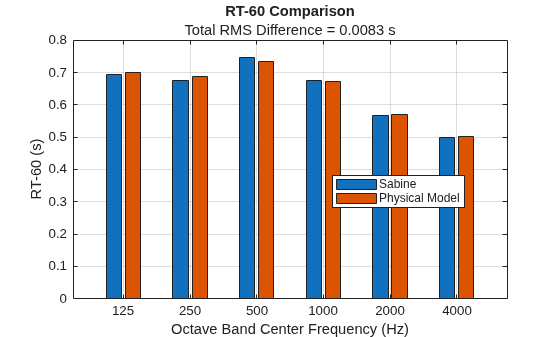
t60_physicalmodel = t60.T30'
t60_physicalmodel = 1×6

    0.7005    0.6877    0.7331    0.6720    0.5700    0.5028
Compare the analytical (Sabine) and simulated (physical model) RT-60s by calculating their root mean square (RMS) difference. Display the RT-60 values and RMS difference.
rms_error = rms(t60_physicalmodel - t60_sabine);

figure
bar(["125","250","500","1000","2000","4000"],[t60_sabine(:),t60_physicalmodel(:)],"grouped");
xlabel("Octave Band Center Frequency (Hz)");
ylabel("RT-60 (s)");
legend("Sabine","Physical Model",Location="best");
title("RT-60 Comparison","Total RMS Difference = " + round(rms_error,4) + " s");
grid on
Invert the Sabine Equation: Find Absorption Coefficients from Target RT-60
Assume you want to design the room to achieve specific target RT-60 values in each frequency band.
t60_target = [1,0.8,0.85,0.8,0.7,0.7];
Invert the Sabine equation to solve for the average absorption coefficient needed for each band. The supporting function iInverseRT60model does this.
alpha_target = iInverseRT60model(roomdims,t60_target)
alpha_target = 1×6

    0.1416    0.1770    0.1666    0.1770    0.2023    0.2023
Verify the resulting RT-60 values match the target values using the Sabine equation with the newly computed absorption coefficients.
t60_target_sabine = iRT60model(roomdims,alpha_target)
t60_target_sabine = 1×6

    1.0000    0.8000    0.8500    0.8000    0.7000    0.7000
Simulate the room again with these new absorption coefficients. Again, add a noise floor to simulate a realistic measurement.
ir = acousticRoomResponse(roomdims,sourceloc,receiverloc, ...
    BandCenterFrequencies=[125,250,500,1000,2000,4000], ...
    AirAbsorption=0, ...
    MaterialAbsorption=alpha_target, ...
    MaterialScattering=[0.8,0.5,0.5,0.5,0.5,0.5], ...
    Algorithm="hybrid", ...
    MaxNumRayReflections=10, ...
    NumStochasticRays=100, ...
    ImageSourceOrder=45);

noiseFloor = -80;
rir = iAddNoiseFloor(ir,fs,noiseFloor);
Estimate RT-60 from the simulated response.
t60 = rt60(rir,fs,FilterOrder=64);
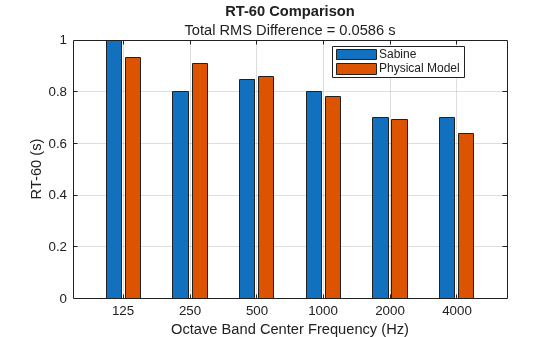
t60_target_physicalmodel = t60.T30'
t60_target_physicalmodel = 1×6

    0.9325    0.9101    0.8583    0.7825    0.6921    0.6406
Compute the RMS error between the Sabine-predicted and simulated RT-60s and display the results.
rms_error = rms(t60_target_physicalmodel - t60_target_sabine);

figure
bar(["125","250","500","1000","2000","4000"],[t60_target_sabine(:),t60_target_physicalmodel(:)],"grouped");
xlabel("Octave Band Center Frequency (Hz)");
ylabel("RT-60 (s)");
legend("Sabine","Physical Model",Location="best");
title("RT-60 Comparison","Total RMS Difference = " + round(rms_error,4) + " s");
grid on
Supporting Functions
Add Noise Floor
function ir = iAddNoiseFloor(ir,fs,noiseFloor)
% Adds a pink noise floor to the impulse response to simulate measurement noise.

% Extend IR for ISO 3382 compliance (minimum 1.6 s duration)
flength = ceil(2*fs);

% Zero-pad IR to minimum length
if numel(ir) < flength
    ir = resize(ir(:),flength);
else
    ir = ir(:);
end

% Generate pink noise and normalize rms.
rng default
noise = pinknoise(numel(ir),1);
noise = noise./rms(noise);

% Scale pink noise to desired rms.
noise_rms = max(abs(ir(:))) * 10^(noiseFloor/20);
noise = noise*noise_rms;

ir = ir + noise;
end
RT-60 Model (Sabine)
function t60 = iRT60model(roomdims,alpha,options)
% Calculates RT-60 using the Sabine equation for a shoe-box room.
arguments
    roomdims
    alpha
    options.SoundSpeed (1,1) = 343 % (m/s)
end

Lx = roomdims(1); % Length
Ly = roomdims(2); % Width
Lz = roomdims(3); % Height

% Surface areas
Sxy = Lx*Ly;
Syx = Sxy;
Sxz = Lx*Lz;
Szx = Sxz;
Syz = Ly*Lz;
Szy = Syz;

S = [Sxy;Syx;Sxz;Szx;Syz;Szy];

% Total Volume
V = prod(roomdims);

% Compute the frequency-dependent effective absorbing area of the room surfaces.
A = sum(S.*alpha,1);

% Apply Sabine formula
t60 = (55.25/options.SoundSpeed)*V./A;
end
Inverse RT-60 Model (Sabine)
function alpha = iInverseRT60model(roomdims,t60,options)
% Inverts the Sabine equation to estimate the average absorption coefficient
% required to achieve a target RT-60 in each frequency band.
arguments
    roomdims
    t60
    options.SoundSpeed (1,1) = 343 % (m/s)
end

Lx = roomdims(1); % Length
Ly = roomdims(2); % Width
Lz = roomdims(3); % Height

% Surface areas
Sxy = Lx*Ly;
Syx = Sxy;
Sxz = Lx*Lz;
Szx = Sxz;
Syz = Ly*Lz;
Szy = Syz;

S = [Sxy;Syx;Sxz;Szx;Syz;Szy];

% Total Volume
V = prod(roomdims);

% Total surface area
Stot = sum(S);

% Invert Sabine formula:
alpha = (55.25/options.SoundSpeed).*V./ (Stot.*t60);
end
Input Arguments
Name-Value Arguments
Output Arguments
References
[1] Allen, Jont B., and David A. Berkley. “Image Method for Efficiently Simulating Small-Room Acoustics.” The Journal of the Acoustical Society of America 65, no. 4 (April 1, 1979): 943–50. https://doi.org/10.1121/1.382599.
[2] Peterson, Patrick M. “Simulating the Response of Multiple Microphones to a Single Acoustic Source in a Reverberant Room.” The Journal of the Acoustical Society of America 80, no. 5 (November 1, 1986): 1527–29. https://doi.org/10.1121/1.394357.
[3] Schröder, Dirk. “Physically Based Real-Time Auralization of Interactive Virtual Environments.” PhD Thesis, RWTH Aachen University, 2011.
Version History
Introduced in R2025aSee Also
acousticMaterialCatalog | predictRT60 | triangulation | stlread | delaunayTriangulation

