Access MATLAB Functions and Workspace Data in C Charts
In charts that use C as the action language, you can call built-in MATLAB® functions and access MATLAB workspace variables by using either the ml namespace operator
or the ml function.
ml Namespace Operator
To reference MATLAB variables and functions in charts that use C as the action language, use the
ml namespace operator uses standard dot notation (.)
.
For example, the statement a = ml.x assigns the value of the
MATLAB workspace variable x to the Stateflow® data a.
For functions, use this syntax:
[return_val1,return_val2,...] = ml.function_name(arg1,arg2,...)
For example, the statement [a, b, c] =
ml. passes the return values from the
MATLAB function function(x, y)function to the Stateflow data a, b, and
c.
Include parentheses when calling functions, even if the function does not require arguments. Without parentheses, Stateflow interprets the name as a workspace variable, which generates a run-time error if the variable does not exist.
Examples
In these examples, x, y, and
z are workspace variables and d1 and
d2 are Stateflow data:
a = ml.sin(ml.x)The MATLAB function
sinevaluates the sine of the MATLAB variablex. The chart assigns that value to the Stateflow data variablea. Sincexis a workspace variable, you must use the namespace operatormlto access it.a = ml.sin(d1)The MATLAB function
sinevaluates the sine of the Stateflow datad1. The chart assigns that value to the Stateflow data variablea. Sinced1is Stateflow data, you can access it directly.ml.x = d1*d2/ml.yThe chart assigns the result of the expression to the MATLAB variable
x. Ifxdoes not exist prior to simulation, it is automatically created in the MATLAB workspace.ml.v[5][6][7] = ml.f(ml.x[1][3],ml.y[3])The workspace variables
xandyare arrays.x[1][3]is the(1,3)element of the two-dimensional array variablex.y[3]is the third element of the one-dimensional array variabley.The chart returns the value of the call to
fand assigns it to element(5,6,7)of the workspace arrayv. Ifvdoes not exist prior to simulation, it is automatically created in the MATLAB workspace.
ml Function
To use the ml function to access MATLAB variables and functions, use the syntax:
ml(evalString,arg1,arg2,...);
evalString
A MATLAB command, or a set of commands, each separated by a semicolon
Format specifiers, such as
%g,%f, or%d, that substitute the other input arguments intoevalString
The format specifiers are the same as those in the C functions printf
and sprintf. The format specifiers must either match the data types of
the arguments arg1,
arg2,...
Using the ml function is equivalent to using the MATLAB eval
function. For example, this syntax:
ml.eval(ml.sprintf(evalString,arg1,arg2,...))
The format specifiers must either match the data types of the arguments or the arguments must be of types that can be promoted to the type represented by the format specifier.
Stateflow charts assume the ml namespace operator and
ml function return scalar values. For more information, see How Charts Infer the Return Size for ml Expressions.
Examples
In these examples, x is a MATLAB workspace variable, and d1 and d2 are
Stateflow data:
a = ml("sin(x)")The
mlfunction calls the MATLAB functionsinto evaluate the sine ofxin the MATLAB workspace. The chart the assigns the result to the Stateflow data objecta. Becausexis a workspace variable, andsin(x)is in the MATLAB workspace, you enter it directly as the string"sin(x)".sfmat_44 = ml("rand(4)")The function returns a square 4-by-4 matrix of random numbers between 0 and 1 is assigns it to the Stateflow data object
sf_mat44. You must define this data object as a 4-by-4 array before simulation. Otherwise, a size mismatch error occurs during run-time.a = ml("sin(%f)",d1)The MATLAB function
sinevaluates the sine ofd1in the MATLAB workspace and assigns the result to Stateflow data objecta. Becaused1is Stateflow data, in the string argument"sin(%f)"using the format expression%f. Ifd1= 1.5, the expression issin(1.5).a = ml("f(%g,x,%f)",d1,d2)In this example, the expression is the
evalStringd1andd2are inserted into the expression"by using the format specifiersf(%g,x,%f)"%gand%f, respectively.
Using ml Namespace Operators and ml Functions in Expressions
You can mix ml namespace operator and ml function
expressions along with Stateflow data in larger expressions. For example, this code squares the
sine and cosine of an angle in workspace variable
X and adds them:
a = ml.power(ml.sin(ml.X),2) + ml("power(cos(X),2)")The first operand uses the ml namespace operator to call the
sin function. Its argument is ml.X, since
X is in the MATLAB workspace. The second operand uses the ml function. Because
X is in the workspace, it appears in the
evalStringX. The squaring of each operand is performed with the MATLAB
power function, which takes two arguments: the value to square, and the
power value, 2.
Expressions using the ml namespace operator and the
ml function can be used as arguments for ml
namespace operator and ml function expressions. The following example
nests ml expressions at three different levels:
a = ml.power(ml.sin(ml.X + ml("cos(Y)")),2)In composing your ml expressions, follow the levels of precedence set
out in Binary Operations. Use parentheses around power
expressions with the ^ operator when you use them in conjunction with
other arithmetic operators.
Choosing Between ml Namespace and ml Functions
In most cases, the notation of the ml namespace operator is more
straightforward. However, the ml function has these advantages:
Use the
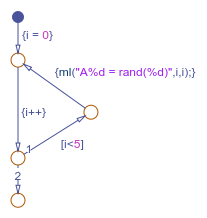
mlfunction to dynamically construct workspace variables.For example, this chart creates four new MATLAB matrices:
The
for-loop creates four new matrix variables in the MATLAB workspace. The default transition initializes the Stateflow counterito 0, while the transition segment between the top two junctions increments it by 1. Ifiis less than 5, the transition segment to the top junction evaluates themlfunction callml("A%d = rand(%d)",i,i)for the current value ofi. Wheniis greater than or equal to 5, the transition segment between the bottom two junctions occurs and execution stops.The transition executes the following MATLAB commands, which create a workspace scalar (
A1) and three matrices (A2,A3,A4):A1 = rand(1) A2 = rand(2) A3 = rand(3) A4 = rand(4)
Use the
mlfunction with full MATLAB notation.You cannot use full MATLAB notation with the
mlnamespace operator, as the following example shows:ml.A = ml.magic(4); B = ml("A + A'");This example sets the workspace variable
Ato a magic 4-by-4 matrix using themlnamespace operator. Stateflow dataBis then set to the addition ofAand its transpose matrix,A', which produces a symmetric matrix. Because themlnamespace operator cannot evaluate the expressionA', themlfunction is used instead. However, you can call the MATLAB functiontransposewith themlnamespace operator in the following equivalent expression:ml.A = ml.magic(4); B = ml.A + ml.transpose(ml.A)
As another example, you cannot use arguments with cell arrays or subscript expressions involving colons with the
mlnamespace operator. However, these can be included in anmlfunction call.
ml Data Type
Stateflow data of type ml is typed internally with the MATLAB type mxArray for C charts. You can assign (store) any type
of data available in the Stateflow hierarchy to a data of type ml. These types include any
data type defined in the Stateflow hierarchy or returned from the MATLAB workspace with the ml namespace operator or
ml function.
Rules for Using ml Data Type
These rules apply to Stateflow data of type ml:
You can initialize
mldata from the MATLAB workspace just like other data in the Stateflow hierarchy.Any numerical scalar or array of
mldata in the Stateflow hierarchy can participate in any kind of unary operation and any kind of binary operation with any other data in the hierarchy.If
mldata participates in any numerical operation with other data, the size of themldata must be inferred from the context in which it is used, just as return data from themlnamespace operator andmlfunction are. For more information, see How Charts Infer the Return Size for ml Expressions.You cannot define
mldata with the scope Constant.This option is disabled in the Data properties dialog box and in the Model Explorer for Stateflow data of type
ml.You can use
mldata to build a simulation target but not to build an embeddable code generation target.If data of type
mlcontains an array, you can access the elements of the array via indexing with these rules:You can index only arrays with numerical elements.
You can index numerical arrays only by their dimension.
In other words, you can access only one-dimensional arrays by a single index value. You cannot access a multidimensional array with a single index value.
The first index value for each dimension of an array is 1, and not 0, as in C language arrays.
In the examples that follow,
mldatais a Stateflow data of typeml,ws_num_arrayis a 2-by-2 MATLAB workspace array with numerical values, andws_str_arrayis a 2-by-2 MATLAB workspace array with character vector values.mldata = ml.ws_num_array; /* OK */ n21 = mldata[2][1]; /* OK for numerical data of type ml */ n21 = mldata[3]; /* NOT OK for 2-by-2 array data */ mldata = ml.ws_str_array; /* OK */ s21 = mldata[2][1]; /* NOT OK for character vector data of type ml*/
mldata cannot have a scope outside a C chart; that is, you cannot define the scope ofmldata as Input from Simulink or Output to Simulink.
Place Holder for Workspace Data
Both the ml namespace operator and the ml
function can access data directly in the MATLAB workspace and return it to a C chart. However, maintaining data in the
MATLAB workspace can present Stateflow users with conflicts with other data already resident in the workspace.
Consequently, with the ml data type, you can maintain
ml data in a chart and use it for MATLAB computations in C charts.
As an example, in the following statements, mldata1 and
mldata2 are Stateflow data of type ml:
mldata1 = ml.rand(3);
mldata2 = ml.transpose(mldata1);
In the first line of this example, mldata1 receives the return
value of the MATLAB function rand, which, in this case, returns a 3-by-3
array of random numbers. Note that mldata1 is not specified as an array
or sized in any way. It can receive any MATLAB workspace data or the return of any MATLAB function because it is defined as a Stateflow data of type ml.
In the second line of the example, mldata2, also of Stateflow data type ml, receives the transpose matrix of the matrix
in mldata1. It is assigned the return value of the MATLAB function transpose in which mldata1 is
the argument.
Note the differences in notation if the preceding example were to use MATLAB workspace data (wsdata1 and wsdata2)
instead of Stateflow
ml data to hold the generated matrices:
ml.wsdata1 = ml.rand(3);
ml.wsdata2 = ml.transpose(ml.wsdata1);
In this case, each workspace data must be accessed through the ml
namespace operator.
How Charts Infer the Return Size for ml Expressions
In C charts, Stateflow expressions using the ml namespace operator and the
ml function evaluate in the MATLAB workspace at run time. The actual size of the data returned from the following
expression types is known only at run time:
MATLAB workspace data or functions using the
mlnamespace operator or themlfunction callFor example, the size of the return values from the expressions
ml.,varml., orfunc()ml(, whereevalString,arg1,arg2,...)varfuncStateflow data of type
mlGraphical functions that return Stateflow data of type
ml
When these expressions appear in actions, Stateflow code generation creates temporary data to hold intermediate returns for evaluation of the full expression of which they are a part. Because the size of these return values is unknown until run time, Stateflow software must employ context rules to infer the sizes for creation of the temporary data.
During run time, if the actual returned value from one of these commands differs from
the inferred size of the temporary variable that stores it, a size mismatch error appears.
To prevent run-time errors, use the following guidelines to write actions with MATLAB commands or ml data:
| Guideline | Example | |
|---|---|---|
Return sizes of MATLAB commands or data in an expression must match return sizes of peer expressions. | In the expression | |
Expressions that return a scalar never produce an error. You can combine matrices and scalars in larger expressions because MATLAB commands use scalar expansion. | In the expression The same rule
applies to subtraction ( | |
MATLAB commands or Stateflow data of type | Arguments The expression for each function argument is a
larger expression for which the return size of MATLAB commands or Stateflow data of type | In the expression |
Array indices The expression for an array index is an independent level of expression that must be scalar in size. | In the expression | |
The return size for an indexed array element access must be a scalar. | The expression | |
MATLAB command or data elements used in an expression for the input
argument of a MATLAB function called through the | In the function call | |
MATLAB command or data elements used for the input argument for a graphical function in an expression are resolved for size by the function prototype. | If the graphical function
| |
| In the expression | |
In an
assignment, the size of the right-hand expression must match the size of the
left-hand expression, with one exception. If the left-hand expression is a single
MATLAB variable, such as | In the expression | |
In an assignment, Stateflow column vectors on the left-hand side are compatible with MATLAB row or column vectors of the same size on the right-hand side. A matrix you define with a row dimension of 1 is considered a row vector. A matrix you define with one dimension or with a column dimension of 1 is considered a column vector. | In the expression | |
If you cannot resolve the return size of MATLAB command or data elements in a larger expression by any of the preceding rules, they are assumed to return scalar values. | In the expression | |
The
preceding rules for resolving the size of member MATLAB commands or Stateflow data of type Note Member MATLAB commands or data of type | The expression | |
Special cases exist, in which no size checking occurs to resolve the size of MATLAB command or data expressions that are part of larger expressions. Use of the following expressions does not require enforcement of size checking at run-time:
ml.varml.func()ml(evalString,arg1,arg2,...)Stateflow data of type
mlGraphical function returning a Stateflow data of type
ml
In these cases, assignment of a return to the left-hand side of an assignment statement or a function argument occurs without checking for a size mismatch between the two:
An assignment in which the left-hand side is a MATLAB workspace variable
For example, in the expression
ml.x = ml.y,ml.yis a MATLAB workspace variable of any size and type (structure, cell array, character vector, and so on).An assignment in which the left-hand side is a data of type
mlFor example, in the expression
m_x = ml.,func()m_xis a Stateflow data of typeml.Input arguments of a MATLAB function
For example, in the expression
ml.,func(m_x, ml.x,gfunc())m_xis a Stateflow data of typeml,ml.xis a MATLAB workspace variable of any size and type, andgfunc()ml. Although size checking does not occur for the input type, if the passed-in data is not of the expected type, an error results from the function callml..func()Arguments for a graphical function that are specified as Stateflow data of type
mlin its prototype statementNote
If you replace the inputs in the preceding cases with non-MATLAB numeric Stateflow data, conversion to an
mltype occurs.

