Controllable tight subplot

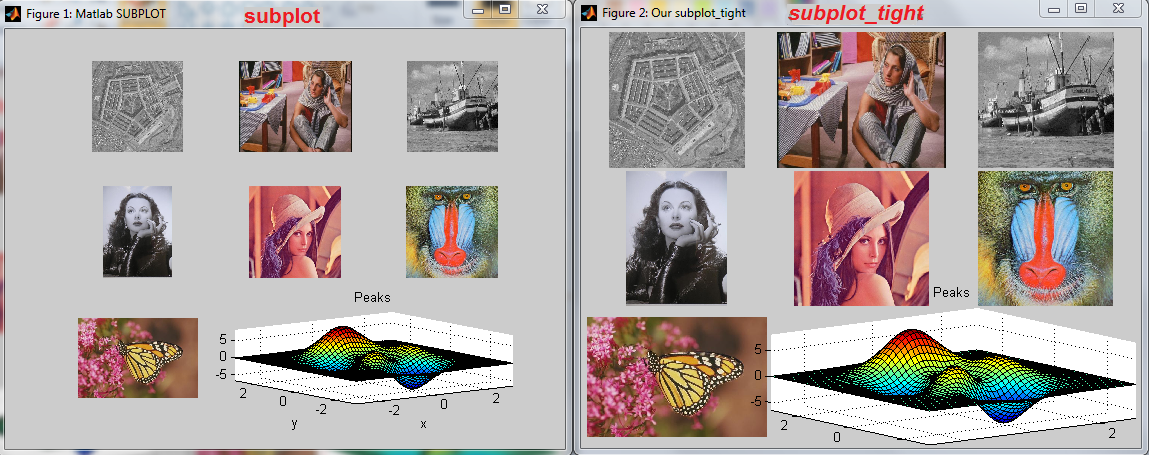
Subplot wrapper, allowing better figure utilization, by tighter axes.

You are now following this Submission

Allows fully utilizing the figure surface by defining margins, by wrapping the existing subplot function. Unfortunately the original subplots function spends lavishly the figure area , without allowing the user to control it in a convenient manner. In addition to subplot functionality (fully supported) the user can define margins, which result in larger axis presented in the figure. Default margins are 1% of figure area.
Thanks goes to a colleague- Adi N., who both urged me to write this function down, and assisted in writing it.
Hope you will find this one useful.
Update:
Some subplot functionality s now supported. However, I must mention this looks quiet buggy to me. Check this out:
figure;
subplot(1,2,1);
plot(rand(1,20));
subplot(1,2,1,'Position',[0.1,0.1,0.3,0.3]); % 'Position' is ignored!!!

Cite As

Nikolay S. (2026). Controllable tight subplot (https://uk.mathworks.com/matlabcentral/fileexchange/30884-controllable-tight-subplot), MATLAB Central File Exchange. Retrieved .

General Information

MATLAB Release Compatibility

  • Compatible with any release

Platform Compatibility

  • Windows
  • macOS
  • Linux
Version Published Release Notes Action
1.3.0.0

Updated demo code, using Varoujan good advice.

1.2.0.0

A bit shorter implementation, now supporting functionality Allan has requested.

1.1.0.0

.png replaced by .jpg's, to reduce file size, screen-shot modified.

1.0.0.0