
You are now following this Submission
- You will see updates in your followed content feed
- You may receive emails, depending on your communication preferences
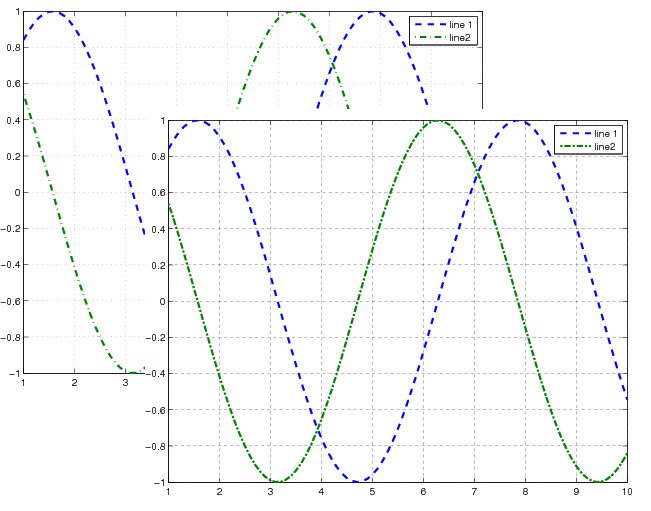
FIXPSLINESTYLE: Fix line styles in exported post script files
FIXPSLINESTYLE(FILENAME) fixes the line styles in the postscript file FILENAME. The file will be over-written. This takes a .PS or .EPS file and fixes the dotted and dashed line styles to be a little bit more esthetically pleasing. It fixes the four default line styles (line, dotted, dashed, dashdot).
FIXPSLINESTYLE(FILENAME, NEWFILENAME) creates a new file NEWFILENAME.
This is meant to be used with postscript files created by MATLAB (print, export).
Example:
x = 1:.1:10;
y1 = sin(x);
y2 = cos(x);
h = plot(x, y1, '--', x, y2, '-.');
set(h, 'LineWidth', 2);
grid on;
legend('line 1', 'line2');
print -depsc test.eps
fixPSlinestyle('test.eps','fixed_test.eps');
Cite As
Jiro Doke (2026). FIXPSLINESTYLE (https://uk.mathworks.com/matlabcentral/fileexchange/17928-fixpslinestyle), MATLAB Central File Exchange. Retrieved .
Acknowledgements
Inspired: fix_lines, EPS Utility Toolbox, PlotPub - Publication Quality Graphs in MATLAB
General Information
- Version 1.2.0.1 (2.17 KB)
MATLAB Release Compatibility
- Compatible with any release
Platform Compatibility
- Windows
- macOS
- Linux
