
Disk Usage

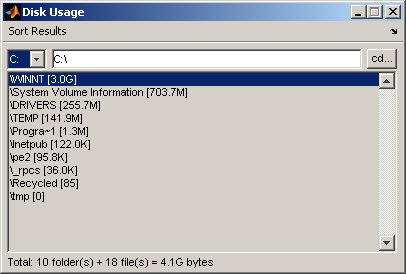
Lightweight GUI sums up how your disk space is used.

You are now following this Submission

What do you do when your hard drive gets full?
Add another disk?
Get a new computer?
Sometimes you just need to delete some old files to make room for new ones. However, it can be tedious and time consuming to examine folders (and NFS directories) one at a time. This utility makes that task easier.

Simply navigate the GUI to a top level drive letter or folder of interest. The tool lists all subfolders and sums up the number of bytes in each one. It also summarizes the total number of folders, files and bytes beneath the top level folder.

Notes:

1. The larger the drive, the longer it takes to summarize its usage.

2. With MATLAB Compiler, you can create a standalone executable program. That way, you can run Disk Usage in the background without interfering with your current MATLAB session. You can also freely distribute the standalone tool to others if you wish.

Cite As

Robert Bemis (2026). Disk Usage (https://uk.mathworks.com/matlabcentral/fileexchange/11743-disk-usage), MATLAB Central File Exchange. Retrieved .

Acknowledgements

Inspired: Manchester, Disk usage

Categories

Find more on Environment and Settings in Help Center and MATLAB Answers

General Information

MATLAB Release Compatibility

  • Compatible with any release

Platform Compatibility

  • Windows
  • macOS
  • Linux
Version Published Release Notes Action
1.1.0.1

Updated license

1.1.0.0

copyright

1.0.0.0

Fixed typos in Description.