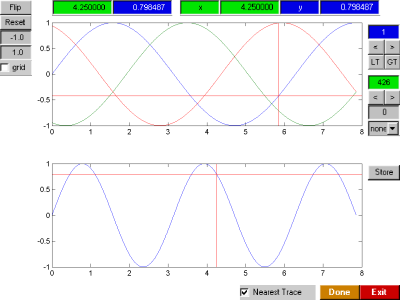
plot crosshairs

A gui interface for reading (x,y) values from line plot(s).

You are now following this Submission

A set of mouse driven crosshairs is placed on the current axes, and displays the current (x,y) values of the line plot. There is an option to provide data specific values or interpolated values. The resolution of the data specific values depends on both the data resolution and the GUI interface (mainly mouse movement resolution). To overcome this limitation, there are next & previous buttons that move the x dimension of the crosshairs one point at a time. Interpolated values provide a more continuous function, however they too depend on the GUI interface resolution. There are currently no options for extrapolation. Further help is given in tool tips of the GUI.

For multiple traces, plots with the same length(xdata) are tracked. Each mouse click returns Xpoint,Ypoint values and selecting 'done' will remove the GUI and restore the mouse buttons to previous values. Selecting 'exit' will remove the GUI and close the figure.

The function now works across multiple plot figures (01/2002).

Useage: x = [1:10]; y(1,:) = sin(x); y(2,:) = cos(x);
figure; plot(x,y); crosshair

Note: crosshair always updates the Xpoint,Ypoint in the base workspace. Here is an example of how to get return values within a script/function after pressing the exit button of crosshair:
function [X,Y] = crosshair_returnXY
x = [1:10]; y(1,:) = sin(x); y(2,:) = cos(x);
figure; plot(x,y); crosshair;
uiwait
X = evalin('base','Xpoint');
Y = evalin('base','Ypoint');
return
Copy this text to a function .m file and then call it from the base workspace with [X,Y] = crosshair_returnXY

Cite As

Darren Weber (2026). plot crosshairs (https://uk.mathworks.com/matlabcentral/fileexchange/1038-plot-crosshairs), MATLAB Central File Exchange. Retrieved .

Acknowledgements

Inspired: Antenna Design Wizards, dtmcursor

General Information

MATLAB Release Compatibility

  • Compatible with any release

Platform Compatibility

  • Windows
  • macOS
  • Linux
Version Published Release Notes Action
1.0.0.0

Additional version to handle subplots of a figure, crosshair_subplots.m