Main Content

Write Torque & Thrust

Writes normalized torque and thrust commands to the ArduPilot mixer

Since R2025b

Add-On Required: This feature requires the UAV Toolbox Support Package for ArduPilot® Autopilots add-on.

Libraries:
UAV Toolbox Support Package for ArduPilot Autopilots / Controller Interface Blocks

Description

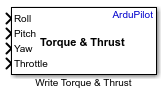
The Write Torque & Thrust block writes the normalized torque (roll, pitch, yaw) and thrust (throttle) commands to the ArduPilot Mixer.

  • The roll, pitch, and yaw commands should be normalized within the range of [-1,1]

  • The throttle command should be normalized within the range of [0,1]

You can specify a custom mixer matrix in this block for custom airframe configurations.

You can configure a custom mixer matrix for different airframe types by specifying the roll, pitch, yaw, and throttle factors for each motor. The minimum number of motors required is 4, and you can add up to a maximum of 12 motors.

Ports

Input

expand all

Outputs the roll command for the vehicle. This value directs the vehicle to rotate about its longitudinal x- axis in the body frame. Positive values correspond to a right-wing-down (clockwise when viewed from behind) motion, while negative values correspond to a left-wing-down (counterclockwise) motion. The input range is typically normalized to [-1, 1], where the value is mapped to the allowable roll angle range of the vehicle.

Data Types: single

Outputs the pitch command for the vehicle. This value directs the vehicle to rotate about its lateral y- axis in the body frame. Positive values result in nose-up motion, while negative values result in nose-down motion. The input range is typically normalized to [-1, 1], where the value is mapped to the allowable pitch angle range of the vehicle.

Data Types: single

Outputs the yaw command for the vehicle, representing the desired torque about the z- axis of the body frame. The specified inputs are normalized to the range [-1,1] in the vehicle body FRD (Forward-Right-Down) frame.

Data Types: single

Outputs the throttle command for the vehicle. The throttle command outputs the collective thrust generated by all motors, directly controlling the vehicle's altitude or vertical speed. Higher values increase the total thrust and cause the vehicle to ascend, while lower values decrease thrust and cause descent. The input range is normalized to [0, 1], where 0 corresponds to minimum thrust (motors off or idle) and 1 corresponds to maximum allowable thrust for the vehicle..

Dependencies

To enable this port, select Throttle input parameter.

Data Types: single

Parameters

expand all

Select this parameter to enable the use of throttle as an input parameter for controlling the overall power delivered to all motors. When enabled, the throttle input will directly affect the lift generated by the system, allowing for altitude control. This setting is essential for operation, as it regulates the speed of all motors.

Select this parameter to manually define a custom mixer matrix for your airframe. This allows you to specify the individual roll, pitch, yaw, and throttle contributions for each motor, enabling support for custom multirotor configurations. When enabled, you can enter or modify the mixer matrix values to match your specific frame layout and motor arrangement.

Provide a name for the custom mixer frame.

Dependencies

To enable this port, select Configure custom mixer matrix parameter.

The Mixer matrix interface allows you to configure the individual contributions of each motor to the vehicle’s roll, pitch, yaw, and throttle commands. Each row in the matrix corresponds to a motor, and the columns specify the factors for roll, pitch, yaw, and throttle.

You can configure a custom mixer matrix for different airframe types by specifying the roll, pitch, yaw, and throttle factors for each motor. The minimum number of motors required is 4, and you can add up to a maximum of 12 motors.

Here is a sample mixer matrix table with default values for a quadcopter.

Mixer Matrix

Motor numberRoll factorPitch factorYaw factorThrottle factor
Motor 1-1011
Motor 21011
Motor 301-11
Motor 40-1-11
  • Add motor: Click Add motor to add a new motor entry to the matrix.

  • Delete motor: Select a motor and click Delete motor to remove it from the matrix.

  • Edit values: You can directly modify the roll, pitch, yaw, and throttle factors for each motor to customize the behavior of your frame.

Dependencies

To enable this port, select Configure custom mixer matrix parameter.

Version History

Introduced in R2025b